• We’re currently investigating an issue related to the forum theme and styling that is impacting page layout and visual formatting. The problem has been identified, and we are actively working on a resolution. There is no impact to user data or functionality, this is strictly a front-end display issue. We’ll post an update once the fix has been deployed. Thanks for your patience while we get this sorted.

Question *STABLE* NVMe - USB Adapter?

Page 49 - Seeking answers? Join the AnandTech community: where nearly half-a-million members share solutions and discuss the latest tech.

cyberjedi

Junior Member
I'm looking to buy a *RELIABLE* NVME-USB external adapter, that doesn't disconnect randomly, can keep up the close to 1GB/s speed.
So far all adapter's reviews contain frighteningly high % of reports of malfunction, random disconnects, sub-par speeds, falling to even under USB 2.0 speeds, etc.
There are 3 main chipsets in the market: JMicron JMS583, Asmedia ASM2362, and Realtek RTL9210 (no product has surfaced with the latter yet, so no REAL reviews, experiences yet UPDATE: it is on the market already).
Also ASUS has a new product, ROG Strix Arion, but there isn't enough feedback about it yet, and I mean real life feedback not just being able to run a few benchmarks, but real stress test to see if the device (adapter) can keep it up, without disconnecting or slowing down hard.
I would really appreciate any feedback from those who have GOOD experiences during stress-tests, like tons of random 4k writes with a stable speed, cloning 100's of GB-s at a stable high speed close to 1GB/s.
I know SSD's very well, so please stick to the point and don't start to educate me on how their speed falls after some writes, etc. I'm aware and this is NOT the point.
You can help if you can point me to a STABLE and RELIABLE NVMe-USB-C adapter that WORKS as expected.
Thank you in advance!
 
Last edited:
The part about "Always using the latest firmware version" - is it updateable?
how does one update it?

I bought this nvme: https://www.amazon.com/dp/B0BXSYK91G (iDsonix M.2 NVMe PCIe SSD Enclosure )
idVendor 0x0bda Realtek Semiconductor Corp.
idProduct 0x9210 RTL9210 M.2 NVME Adapter
bcdDevice 20.01
iManufacturer 1 Realtek
iProduct 2 RTL9210B-CG
iSerial 3 012345679039

and running into weird issues where it goes to read-only mode after awhile.
Tried 2 different computers.
Have you also tried using a different drive in the enclosure?

Also might be worth checking with a different cable. I've seen cables cause some pretty weird symptoms, and lots of enclosures come with pretty flakey cables.
 
Have you also tried using a different drive in the enclosure?

Also might be worth checking with a different cable. I've seen cables cause some pretty weird symptoms, and lots of enclosures come with pretty flakey cables.

havent. brand new drive. brand new enclosure.
I just ordered another enclosure - will test.
 
https://www.amazon.com/dp/B0CFXS4KNC - orico nvme+ssd - DO NOT BUY
https://www.amazon.com/dp/B0BXSYK91G - iDsonix M.2 NVMe - DO NOT BUY

^ above enclosures didnt work for me in linux. both showed up as RTL9210B-CG and ended failing after about 2 minutes of rsync.

then got this orico 40Gbps usb4 enclosure for 40$ from aliexpress: https://www.aliexpress.us/item/3256806583353849.html - it worked without any f-ing problems with the same exact nvme drive. Chip comes up as ASM246X in fedora 41 linux

fwiw - I dunno if it was those enclosures fault or linux UAS (blacklisting UAS and forcing usb-storage for those nvme also worked - but who's got time for that).
 
Last edited:
Hello! This is my first post here.
I was wondering if anyone found a reliable M.2 NVME enclosure that works for Linux? And especially with TRIM support? (And of course S.M.A.R.T is a nice bonus)

I've looked at IB-1817M-C31, which was linked from Arch Wiki. However there appears to be a lot of complaints with it.
Looking elsewhere for enclosures with chipset of JMS583 seem to indicate not all enclosure with such chipset supports TRIM, and also there appears to be a lot of complaints on reliability which is essential given it's going to be my boot drive.
One blog (https://tisyang.github.io/post/2023-05-25-linux-usb-storage-safe-shutdown/) seem to indicate RTL9210B is supported, yet I'm not sure if that's true for all enclosures with that chipset.

Can anyone recommend some enclosures they confirmed work on Linux and have TRIM?
Thanks!

(Sorry for my English)
 
Last edited:
Why would some enclosures not work on Linux? That seems odd since if the enclosure chipset has proper USB support, it should work the same everywhere, including also on MacOS and Linux.
 
Ah, It appears like I misread one of the forum post and interpret it as that some enclosures wouldn't work even with same chipset... Sorry about that...
So in theory, most enclosures that states TRIM support should work on Linux one way or another with a little fiddling?
 
bought a Lexar E350 which should be RTL9210B (nvme+sata) on aliexpress for $10.50, check the coins section

looks like the E300 is RTL9210 (non B, only nvme, no SATA) and the E6 is JMS583

we'll see if I'm right in a few weeks
 
https://www.amazon.com/dp/B0CFXS4KNC - orico nvme+ssd - DO NOT BUY
https://www.amazon.com/dp/B0BXSYK91G - iDsonix M.2 NVMe - DO NOT BUY

^ above enclosures didnt work for me in linux. both showed up as RTL9210B-CG and ended failing after about 2 minutes of rsync.

then got this orico 40Gbps usb4 enclosure for 40$ from aliexpress: https://www.aliexpress.us/item/3256806583353849.html - it worked without any f-ing problems with the same exact nvme drive. Chip comes up as ASM246X in fedora 41 linux

fwiw - I dunno if it was those enclosures fault or linux UAS (blacklisting UAS and forcing usb-storage for those nvme also worked - but who's got time for that).
PS, Orico and iDsonix are actually the same, both are under "Orico Group"
They have quite a few brands

 
Greetings from Germany to the members of a thread where knowledge is created.

Just a quick question: I'd like to buy a USB-C NVME drive for my girlfriend, with a focus on energy efficiency and backward compatibility.

Her device is an M1 Pro.

I think it's still too early for USB4 due to the high temperatures.

Would a combo of a
KIOXIA EXCERIA PLUS G3 SSD 2TB
and a UGreen 20Gbps (RTL9220) be solid? Yes, I know the M1 only has 10Gbps.
Actually, I also like the type of case that comes with an adapter from USB-C to USB-A in the cable : /

alternative maybe the SK Beetle X31
 
bought a Lexar E350 which should be RTL9210B (nvme+sata) on aliexpress for $10.50, check the coins section

looks like the E300 is RTL9210 (non B, only nvme, no SATA) and the E6 is JMS583

we'll see if I'm right in a few weeks
I was thinking about buying a Lexar E300 with the RTL9210. How has your experience been with linux so far? Any disconnects or otherwise erratic behavior?
 
Is there a tldr of what I should be buying here.
I bought a 9210 based one from amazon not knowing that there are so many issues and its absolutely terrible.

What should I be buying that actually is reliable?

Thanks
 
Any. Problems can be due to lack of power, cable, heating or incompatibility of equipment, etc.
This is not all and only on RTL9210. There are no issues.
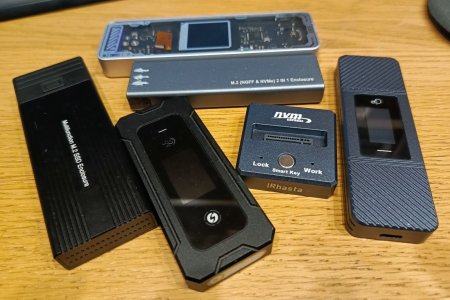
IMG_20250809_000553_862-e2.jpg
 
Any. Problems can be due to lack of power, cable, heating or incompatibility of equipment, etc.
This is not all and only on RTL9210. There are no issues.
View attachment 128458
I've had several RTL9210 for a few years now. They work just fine. With any type of enclosure, the first thing to check is the cable, even if it's brand new. A significant number are bad, right out of the box.

By far, cable problems have been the most common failure with the dozen or two enclosures I have here.
 
Latest RTL9210(B) fw (1.34.29.011325) fixed random disconnect on high r/w loads on my orico m2pv-c3 box

Many thanks, I flashed the latest FW to my orico RTL9210 enclosure and it seems to have fixed this disconnection issue.

Is there a way to specify the sleep timeout in minutes in the configuration file?
I'm asking because it appears like my enclosure is not going to sleep after 10minutes anymore.
 
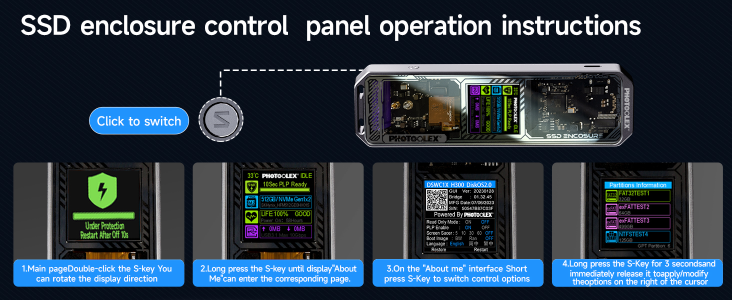
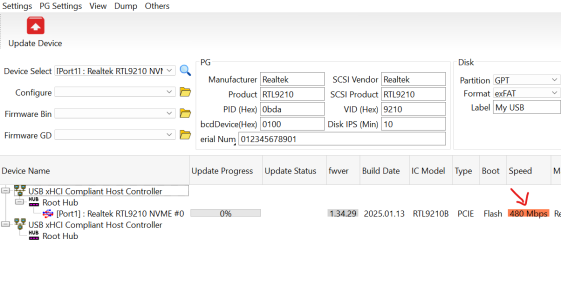
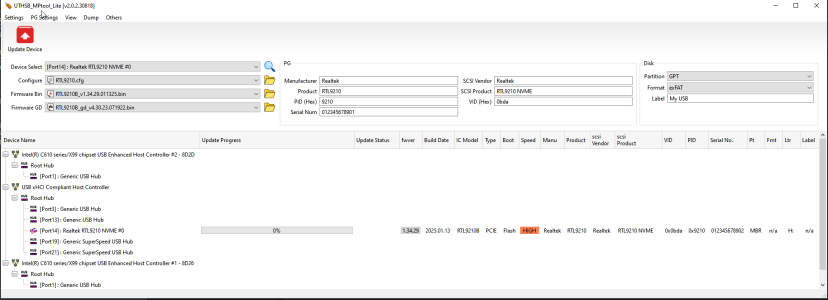
I have a question.. Has anyone else noticed that the NVME enclosures that are RTL9210B gets detected as usb 2.0 speed only on a thunderbolt 5.0 port. I checked using the firmware tool also? I also would like to know how the display enclosures are able to display all the disk information.. How does the info for disk health, disk copy speed etc gets available for a display driver?
 

Attachments

  • Image_2025-08-13_173331_692.png
    Image_2025-08-13_173331_692.png
    862.8 KB · Views: 12
  • Screenshot 2025-08-13 173419.png
    Screenshot 2025-08-13 173419.png
    53.2 KB · Views: 8
10 min
DISK_IPS_THRES = 0x0a
Awesome, thank you! And if I wanted 5 minutes, would that be 'DISK_IPS_THRES = 0x05'?
Please note that the config currently says ';DISK_IPS_THRES = 10'

On the chipset of this Orico enclosure, it physically says RTL9210 (non-B):

I'm confused whether the firmware .bin (with a B) is compatible with my chipset, and also why does it get detected as RTL9210B if the chipset has RTL9210 printed on it (non B).
 

Attachments

  • 2025-08-13 14_07_23-E__Downloads_40d1b2d8Realtek_RTL9210B_1.34.39(station-drivers.com)_Windows.png
    2025-08-13 14_07_23-E__Downloads_40d1b2d8Realtek_RTL9210B_1.34.39(station-drivers.com)_Windows.png
    56.7 KB · Views: 12
Last edited:
And if I wanted 5 minutes, would that be 'DISK_IPS_THRES = 0x05'?
Please note that the config currently says ';DISK_IPS_THRES = 10'
Yes. Or DISK_IPS_THRES = 5.
0x means hexadecimal value. 0x0a equivalent 10.
I'm confused whether the firmware .bin (with a B) is compatible with my chipset, and also why does it get detected as RTL9210B if the chipset has RTL9210 printed on it (non B).
I don't see any problems.
 
Tried several cables and both the ports. Other thunderbolt 3.0 laptops appears to work fine and seem to recognize this as 10 Gbps. I Cannot seem to figure out what could cause this. I have 10+ enclosures of RTL.. It intermittently recognizes as 10 Gbps once in a while. For instance.. I have a JM583 device that seems to detect fine as 10Gbps. Also.. A 20 Gbps 9220DP recognizes as 20 Gbps.
 
I tried a laptop with Thunderbolt 4 also - It works fine at 10 Gbps also. I tried another laptop with thunderbolt 3 - It works at 10 Gbps as well. This is a MSI vector with Thunderbolt 5 (2 ports) - It weirdly detects some of my RTL9210B at 10 Gbps and some at 480Mbps. I will keep troubleshooting. If any of you have a different Thunderbolt 5 laptop and if you have issues.. I wanted to first report the issue. I tried several versions as well and that does not change.
 
Back
Top