• We’re currently investigating an issue related to the forum theme and styling that is impacting page layout and visual formatting. The problem has been identified, and we are actively working on a resolution. There is no impact to user data or functionality, this is strictly a front-end display issue. We’ll post an update once the fix has been deployed. Thanks for your patience while we get this sorted.

Discussion Zen 5 Builders thread

Page 33 - Seeking answers? Join the AnandTech community: where nearly half-a-million members share solutions and discuss the latest tech.
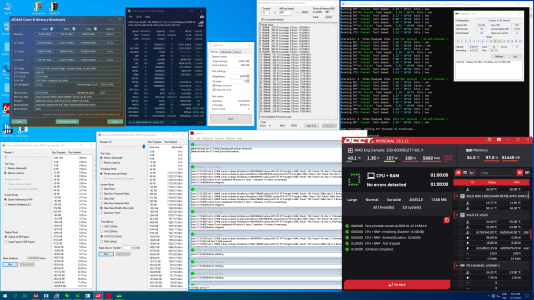
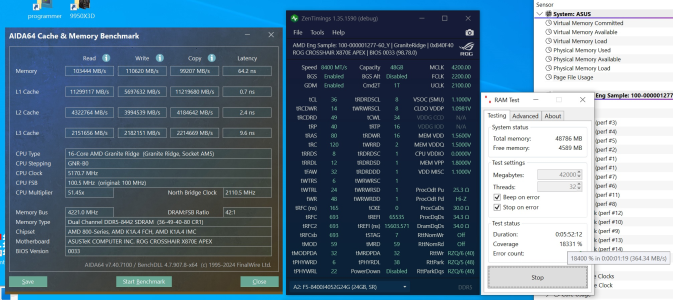
My 8400 a-die profile have reached its final form in the meantime 💪
Cpu cant run higher memoryspeed with a-die GDM disable, and memory cant run tigher timings, so i'm pretty much "done" on this combo.
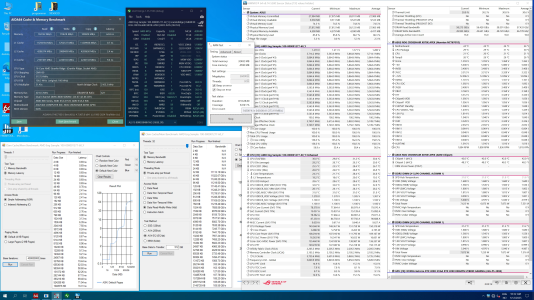
Decided to complete all stability tests in a single boot to show that i dont cherry pick settings for spesific benchmarks 🤝

Manged to average 373mb/s over a 10 hour karhu run
1737121461649.png

Following completed:
  • 10 hours karhu @ 373 mb/s
  • ~350% runmemtestpro @ 36.5k mb/s
  • 1 hour y-cruncher all tests enabled
  • 1 hour OCCT large AVX512
  • 1 hour Prime95 large FFT's AVX512
  • Quick Testmem5 1usumus cfg to end it off
1737121486342.png
 
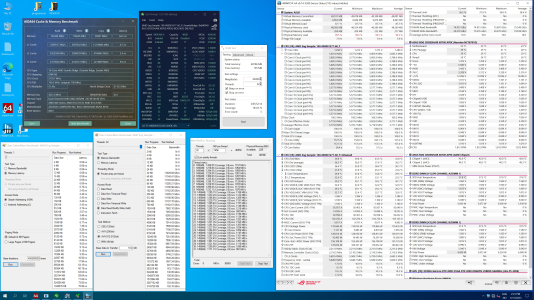
Have also had a few days to play with my 2x24GB m-die 🙂

Shouldn't come as a surprise for anyone i hope, but a-die fully maxed out is alittle faster than maxed m-die, but infact the difference was alittle less than what i originally expected.

End result was around ~373mb/s for A-die and ~364mb/s for M-die in karhu, while latency was also a tiny bit worse for M-die. (same cpu that caps out at 8400MT/s used for both kits) The main performance-difference comes down to the inability to run GDM disable with m-die at high memory-speeds

If the small performance increase is worth 50% less memory is up to you to decide i guess 🤔

Onwards to some screenshots (y)

Managed 364mb/s average over 6 hours in karhu
1737121571837.png

Afterwards i also ran some ~9 hours runmemtestpro while i went to work
1737121587619.png

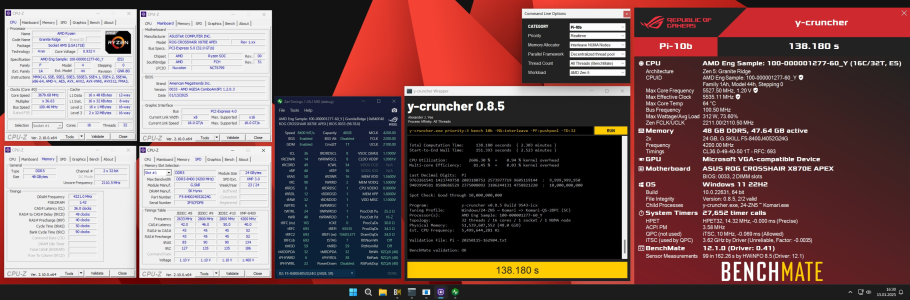
Also updated Y-cruncher 10B for hwbot before i went back to daily sticks
1737121601005.png
 
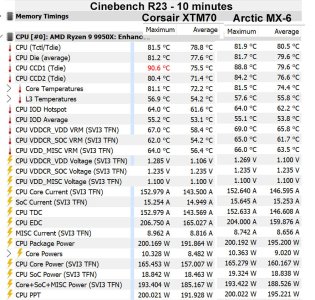
So I took Igor's advice and tried the XTM70 thermal paste. Here's how the test went.
Set TDP at 200W. Should have set it higher but I'm not doing it again!
MX-6 was applied as pea size in the middle of the spreader. When I took it apart the paste was pretty much perfect.
For the XTM70 I followed the Corsair instructions making the grid on the AIO plate.
10 minutes of CB R23.
Scores were the same within statistical variation due to same 200W limit. 40,010 for MX-6, 40,165 for XTM70.

I'm curious as to how people here would interpret these results?
 

Attachments

  • Cinebench R23 - XTM70 vs MX-6.jpg
    Cinebench R23 - XTM70 vs MX-6.jpg
    333.1 KB · Views: 17
So I took Igor's advice and tried the XTM70 thermal paste. Here's how the test went.
Set TDP at 200W. Should have set it higher but I'm not doing it again!
MX-6 was applied as pea size in the middle of the spreader. When I took it apart the paste was pretty much perfect.
For the XTM70 I followed the Corsair instructions making the grid on the AIO plate.
10 minutes of CB R23.
Scores were the same within statistical variation due to same 200W limit. 40,010 for MX-6, 40,165 for XTM70.

I'm curious as to how people here would interpret these results?
I would say that in general, thermal paste is overrated. What I mean by that is any paste from a recognized authority (Corsair, thermalright, etc...) are all the same. I am sure there are exceptions.
 
So I took Igor's advice and tried the XTM70 thermal paste. Here's how the test went.
Set TDP at 200W. Should have set it higher but I'm not doing it again!
MX-6 was applied as pea size in the middle of the spreader. When I took it apart the paste was pretty much perfect.
For the XTM70 I followed the Corsair instructions making the grid on the AIO plate.
10 minutes of CB R23.
Scores were the same within statistical variation due to same 200W limit. 40,010 for MX-6, 40,165 for XTM70.

I'm curious as to how people here would interpret these results?
I would say Kryosheet, unless you want liquid metal. I am running a 7900xtx sapphire, and never hit the temps others report. Highest I've seen is 80C mem junction.

I am going to use it on my 9800x3d.

EDIT: Large custom loop.
 
Once you get to "good enough" I haven't noticed a substantial difference from TIM. I happened to get a very good deal on a bunch of TG Hydronaut, so my default high performance paste is Hydronaut but I have MX4, MX5, Noctua, Scythe, and Thermalright TIMs for more temporary setups/testing and have not noticed any significant difference. Maybe maximally a 10MHz boost clock difference? Which is usually within margin of error... Though I have noticed a few tend to pull chips out of sockets if I don't heat up the system before removing a heatsink, LOL

I recently brought my Radeon VII back online for the Folding@Home race this month and put it under a Bitspower GPU block I imported from Japan - using Hydronaut as the TIM for the GPU/HBM area and included Bitspower 1mm thermal pads for VRMs and surface mount components the beast stays pretty tamed at hotspot temps under 75C max.
 
I think try that again with the new paste?
You were right Igor. Compared to the MX-6 at 175W, with the XTM70 I'm able to run 185W at around the same or lower temps. Seems like the higher the thermal load the more of a difference between the paste brands. CPU(TctlTdie) average MX-6 175W is 85.3C vs XTM70 at 200W at 85.0C. Same temp but dissipating an additional 10W. I'm set to 200W TDP as opposed to 175W with the MX-6 but the render is only pulling 182W average, where before it was pulling 172W average. Now I'm fully utilizing the stock 200W cap on the CPU. Average clock 110MHz faster.

This CPU game is one of inches sometimes.

I'll take it. Thanks for the recommendation!


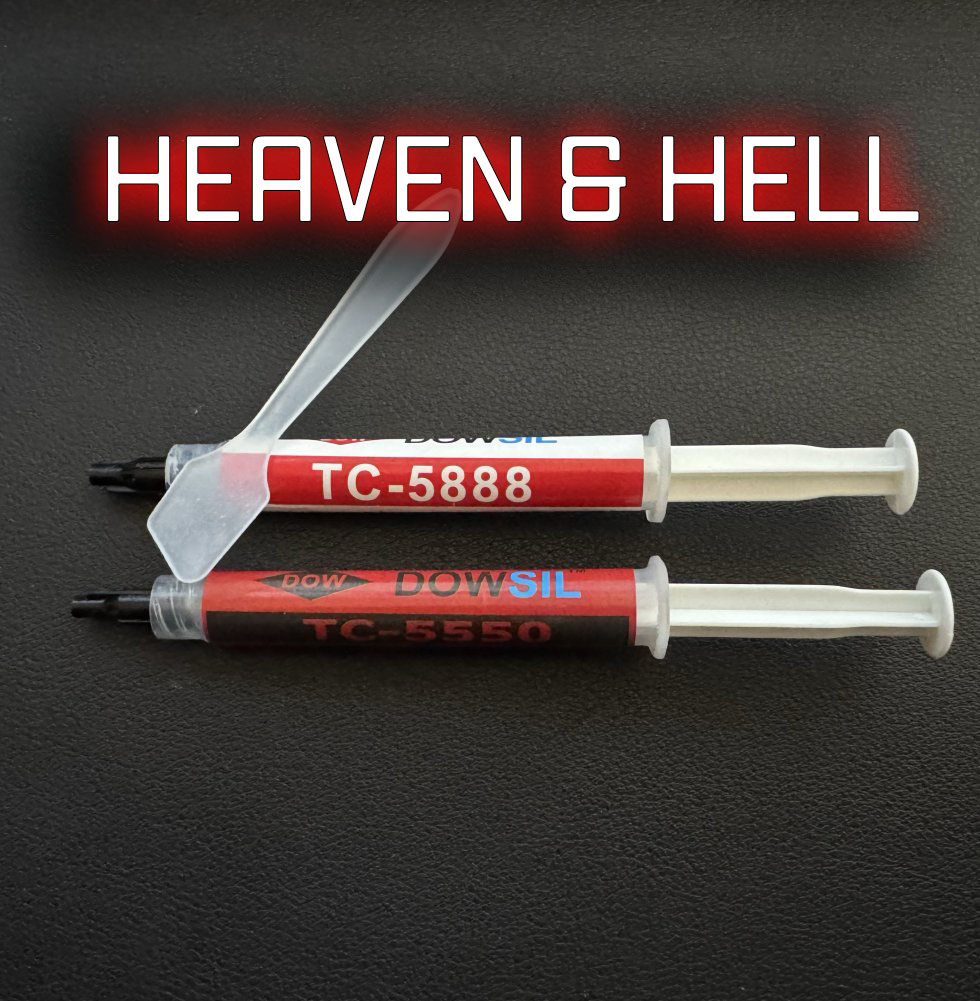
That Dowsil one is even better (may net you additional 100 MHz?) but seems to only be available from Aliexpress: https://www.aliexpress.com/item/1005006200653459.html

Price seems very reasonable for 50g of that stuff.

TG-04 and TFX may be better but they need to be heated up before application. Complete no-no, at least for me.


That Dowsil one is even better (may net you additional 100 MHz?) but seems to only be available from Aliexpress: https://www.aliexpress.com/item/1005006200653459.html

Price seems very reasonable for 50g of that stuff.

TG-04 and TFX may be better but they need to be heated up before application. Complete no-no, at least for me.
As always there are risks involved when buying online 😁

 
I would say that in general, thermal paste is overrated. What I mean by that is any paste from a recognized authority (Corsair, thermalright, etc...) are all the same. I am sure there are exceptions.
I agree. It's definitely "fooling around at the edges" kind of stuff.
It's hard to even tell if a degree or two is statistical variation during testing or due to application differences.
But I would rate the XTM70 as definitely as good and "probably" a little more effective than the MX-6 if I were comparing the two.
Yeah, I know, not a strong recommendation, especially for the price!
 
I agree. It's definitely "fooling around at the edges" kind of stuff.
It's hard to even tell if a degree or two is statistical variation during testing or due to application differences.
But I would rate the XTM70 as definitely as good and "probably" a little more effective than the MX-6 if I were comparing the two.
Yeah, I know, not a strong recommendation, especially for the price!

Have you tried using PTM7950 based thermal pads? Apparently they get better with age (through multiple heating/cooling cycles) and also don't ever have to be replaced unlike traditional thermal paste.

1737330033551.png
 
Have you tried using PTM7950 based thermal pads? Apparently they get better with age (through multiple heating/cooling cycles) and also don't ever have to be replaced unlike traditional thermal paste.

View attachment 115248
PCM based TIM can't be meaningfully used on an IHS application. While the core/chip might achieve high temps, the skin temp of the IHS rarely ever reaches temperatures that allow it to fully melt and flow. I and a few others have tried it with awful results. I even unplugged fans to heatsoak and force it to melt (several times actually, I did 10+ heat cycles this way) but performance was not great. As soon as I gave up and repasted with normal paste, temps were better.

It's really only useful in direct die applications. If it doesn't melt in routine use, it doesn't perform well.
 
PCM based TIM can't be meaningfully used on an IHS application. While the core/chip might achieve high temps, the skin temp of the IHS rarely ever reaches temperatures that allow it to fully melt and flow. I and a few others have tried it with awful results. I even unplugged fans to heatsoak and force it to melt (several times actually, I did 10+ heat cycles this way) but performance was not great. As soon as I gave up and repasted with normal paste, temps were better.

It's really only useful in direct die applications. If it doesn't melt in routine use, it doesn't perform well.
Laptop makers seem to disagree...
 
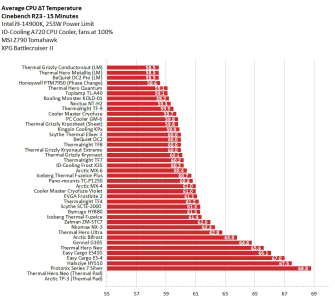
If you want to use a graphical representation to visually show differences between some values, then you must start from zero on the relevant axis.

Otherwise, the visual representation is very extremely misleading.

Not to mention that comparing temperature values is problematic.
 
Last edited:
If you want to use a graphical representation to visually show differences between some values, then you must start from zero on the relevant axis.

Otherwise, the visual representation is very extremely misleading.

Not to mention that comparing temperature values is problematic.

Yup. It's going to be twice as cold tomorrow. What does that mean? Unless using Kelvin, nothing.
 
If you want to use a graphical representation to visually show differences between some values, then you must start from zero on the relevant axis.

Otherwise, the visual representation is very extremely misleading.

Not to mention that comparing temperature values is problematic.
Good point "0" is about 6 miles to the left on that chart.
 
It helps if you got the correct setup to use the extra headroom

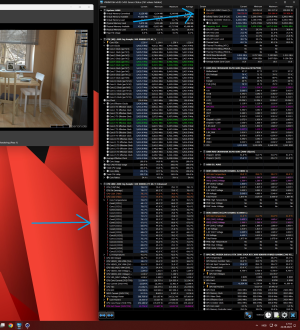
Temp-spread while running Cinebench R23 MT PBO daily tune
(GPU showing idle temp)

View attachment 115305
Keeping those die temps<80C while dissipating 300W is impressive.
If you have the time can you let me know what your cooling setup is and how hard it was to delid?
 
Back
Top