
AdamK47
Lifer
That is an option on my X670E with the 4X slot at the bottom of the board. Thought about it a while ago.Or you could use this: https://www.startech.com/en-eu/hdd/pex4sff8639u3
Was just curious about the SlimSAS on the newer board.

That is an option on my X670E with the 4X slot at the bottom of the board. Thought about it a while ago.Or you could use this: https://www.startech.com/en-eu/hdd/pex4sff8639u3
An idea:Was just curious about the SlimSAS on the newer board.
I don't want something that has to be used in the 2nd full length slot. That would cut the primary to 8x.An idea:
Get this: https://www.eproductsolutions.com/pcie-x8-gen4-with-redriver-to-slimsas-4i-sff-8654-dual-port-aic
Then get this: https://www.newegg.com/asrock-low-profile-slimsas-to-u-3-cable/p/N82E16816775083
Attach to the SlimSAS connector on the PCIe card and to the U3 port, attach some cheap U3 SSD. If it works, it will mean that the SlimSAS to U3 cable should work with the SlimSAS port on the mobo too.
But yes, quite a bit of money just to experiment and learn.

I played with it a bit about a year ago. Not on mismatched DIMMs. Tried to get 6400 stable on two 32GB modules. It didn't make an appreciable difference and only resulted in me having to clear/reset BIOS settings.Has anyone with ASUS board fiddle with memory impedance values? ProcODT, DriveStrength, etc. I cannot seem to change those values, at least not in the way I am doing. Are there rules that I need to follow, e.g. certain values need to be paired, x value cannot excced y, etc.?
Trying to make odd memory combination work. I recently upgraded to 2x48GB from 4x16GB, and wonder if I can make 4 mismatched sticks work together. (2x48GB + 2x16GB)
What speed do the Auto settings give you when you populate all the slots? Note down the values the Auto mode arrives at and then start experimenting, decreasing timings or increasing voltages and speeds until you reach stability. It's a painful process so be ready to tear your hair out.I recently upgraded to 2x48GB from 4x16GB, and wonder if I can make 4 mismatched sticks work together. (2x48GB + 2x16GB)

Things might be different with your board or with modern AGESA but last year when I upgraded from a 2x16GB SR kit to a 2x32GB DR kit, I made an attempt to run 2x48GB (16+32) per channel.Trying to make odd memory combination work. I recently upgraded to 2x48GB from 4x16GB, and wonder if I can make 4 mismatched sticks work together. (2x48GB + 2x16GB)
How long did you wait? Maybe the training time increases a lot with mismatched DIMMs?No matter what I tried the system would never POST at all under any circumstances.
Do you really need the extra 32GB of memory? Could just dial back speed and primary timings.
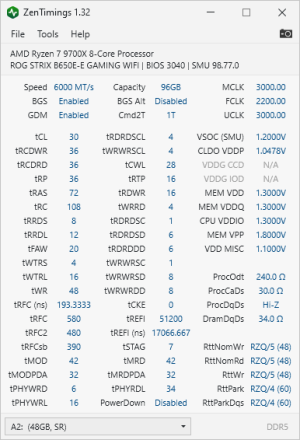
Try mismatched DIMMs in the same channel, i.e. 48GB paired with 16GB on the preferred slots channel. If that boots, populate the other channel.I had been running 4x16GB (2x16GB Samsung and 2x16GB Hynix DIMMs) for the past year without an issue, which made me think why not.
Preaching to the choir here. I gave it plenty of time. I'd one of the guys that gives this advice out - Turn it on and walk out of the room, come back later.How long did you wait? Maybe the training time increases a lot with mismatched DIMMs?
I would try myself but I hate that the heatsink is above the DIMM slots and I don't want to remove it unless I absolutely have to.
Did you happen to try on your own what I suggested in post #260?Preaching to the choir here.
That is not something I have not tried yet. I will do that over the weekend. Thx for the pointerTry mismatched DIMMs in the same channel, i.e. 48GB paired with 16GB on the preferred slots channel. If that boots, populate the other channel.
Had not tried. Hilariously I ended up buying (again) the exact same kit I sold to you for my test bench when I set it up so I do have dimms I could try with if I get some motivation.Did you happen to try on your own what I suggested in post #260?
Nitpicking over 25 MHz? 😀What is annoying though is that its max boost is 5725 MHz compared to 7700X's 5750 MHz. AMD really knows how to curb end user enthusiasm.
Gear Down Mode is it's own thing. But memory power down and memory context restore you should enable /disable toghether.The below settings gave me a 4 hour headache; OS installers will not load if all 3 are disabled.
The screen does not change to the below until going into the page, and only setting MCE to disabled (all settings are on Auto by default), then saving and restarting 😒
Basically, if I touch Gear Down Mode, I cannot install Windows or load a Linux Live ISO.
I took out the dedicated video card and started using the integrated GPU because it would do a weird video card type crash and then say no signal and restart the system, but then it happened on the iGPU also... Ugh
View attachment 105815
power down and memory context restore disabled together isn an issue with zen 5 (at least in my system), fortunately 🙂Gear Down Mode is it's own thing. But memory power down and memory context restore you should enable /disable toghether.

That seems high. Mine is around 2% idle usage. What process is using the most?BTW my 9700X has a rather high idle temperature at around 50C. It is about 10C hotter than 7700X it replaced.
I hated it at first, but for whatever reason it also runs like 10C cooler under load using similar workload (say, ~75C instead of ~85C) so I do not mind it now. I rarely see it go over 80C under heavy load (1T/MT) This has to be a TSMC process thing?
What is annoying though is that its max boost is 5725 MHz compared to 7700X's 5750 MHz. AMD really knows how to curb end user enthusiasm.
Edit: Actually it is not exactly an idle state. My PC idle state is more like 5~10% usage
I just got it to post reliably (at stock/auto JEDEC 3600, the 2x2R default) with a trident z5 neo 6000C30 2x32gb kit and a 6000C30 2x16GB kit. Expo won't work in this config at all.How long did you wait? Maybe the training time increases a lot with mismatched DIMMs?
I would try myself but I hate that the heatsink is above the DIMM slots and I don't want to remove it unless I absolutely have to.
Realistically if you want to run 1:1 6400 will be the limit for any of those due to UCLK limits.Since we have few overclockers here, I was wondering, what speeds are realistic for following capacities 2x24GB, 2x32GB,2x48GB? I am more interested in max stable frequency, with more relaxed timings as gaming workloads are a secondary concern.
I would actually want to achieve the highest read bandwidth, so I guess with 2 CCD SKUs, the 2:1 mode won't be a problem. But it seems anything denser than 2x24 is out of the question to for 7000+ speeds?Realistically if you want to run 1:1 6400 will be the limit for any of those due to UCLK limits.
You could run the 2x24GB at a much higher speed in 2:1 mode but you probably won't see any meaningful benefit over 6400 1:1
G.Skill announced 2x48GB 6400C30 kits a few months ago that I've been waiting to see, but they haven't materialized yet.
I wouldn't expect great success running dual rank (32 or 48GB) dimms over 7200, and I would expect performance to be worse than 6400 1:1.I would actually want to achieve the highest read bandwidth, so I guess with 2 CCD SKUs, the 2:1 mode won't be a problem. But it seems anything denser than 2x24 is out of the question to for 7000+ speeds?


