• We’re currently investigating an issue related to the forum theme and styling that is impacting page layout and visual formatting. The problem has been identified, and we are actively working on a resolution. There is no impact to user data or functionality, this is strictly a front-end display issue. We’ll post an update once the fix has been deployed. Thanks for your patience while we get this sorted.

Ryzen: Strictly technical

Page 62 - Seeking answers? Join the AnandTech community: where nearly half-a-million members share solutions and discuss the latest tech.
Status
Not open for further replies.
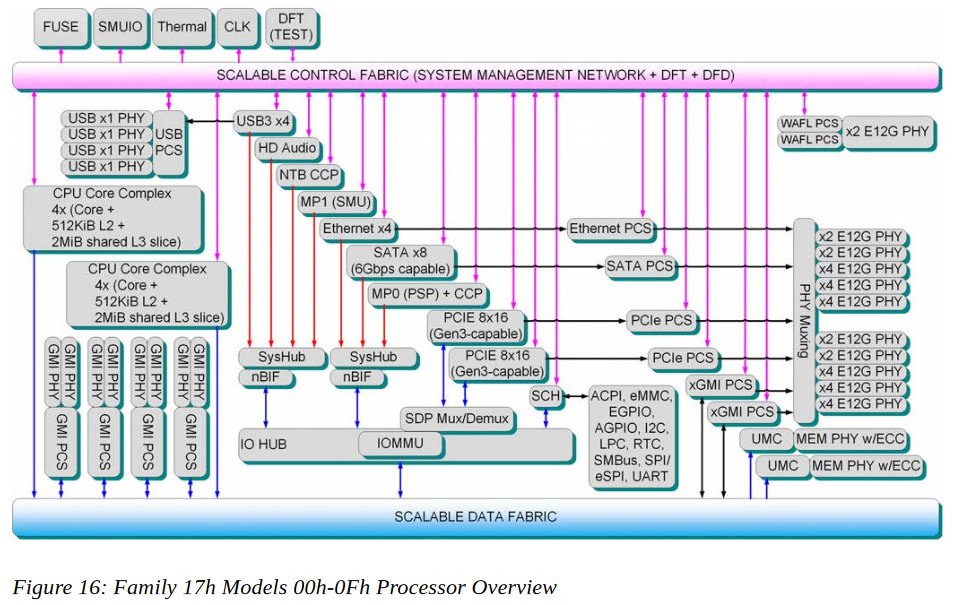
More goodies:
C98C2fuWAAAqkQo.jpg


Source:
"Processor Programming Reference (PPR) for AMD Family 17h Model 01h, Revision B1 Processors"
http://support.amd.com/TechDocs/54945_PPR_Family_17h_Models_00h-0Fh.pdf

That physical muxing looks pretty crazy...... disappointed not to see a SOC level crypto accelerator in their.......


edit: if im reading it right, looks like you can get upto 80gb/s ethernet per 32 core proc.......
 
Last edited:
I've been thinking about the tangential reference to how the ring bus on Broadwell-E can incur a performance penalty on CPUs with very large L3s, like the E5 2699v4(22C,55MB L3), and digging a bit deeper, I found that there is a minor penalty to the memory bandwidth with increasing core count:
pic2.jpg


So there seems to be an ideal core count in order to maximize peak memory bandwidth. I could not find an immediate reference that tests the cache performance but a glance at this presentation makes me think that this is an issue in HPC. Specifically, as the presentation shows that latency has either remained stagnant or become slightly worse over the generations, I'm curious to see how AMD tackles this issue with Naples.
 
Specifically, as the presentation shows that latency has either remained stagnant or become slightly worse over the generations, I'm curious to see how AMD tackles this issue with Naples.
AMD seems to be a lot more comfortable with NUMA than Intel; they've been using it since K8 (the original Opteron 2xx and 8xx models), and the Zeppelin die seems to be designed to exploit NUMA for modular scaling beyond the basic 8-core design. While NUMA does require a bit more finesse from software running on it, latency to the "local" IMC should be as good as on a single-socket (or single-die) machine, with the penalty only being to non-local memory accesses, which have to go through extra links and hubs.

Naturally, it remains to be seen how well practice matches theory.
 
I'm having a very frustrating experience with virtualization and Ryzen. I detail it here:

https://community.amd.com/thread/215064

TLDR:

Virtualized Windows XP on a Ryzen system I just built can't run 16-bit programs... and, interestingly, neither can virtualized Windows 3.11.

I will be testing Linux as a host OS tomorrow and I have already ordered a different motherboard just to explore as many possibilities at once as possible. Time is my enemy, I have a week to resolve this before all of the Ryzen parts are returned as being a woefully defective platform.

If anyone here could do some testing along these lines that would be VERY awesome.
 
Did you take a look at AGESA 1.0.0.4A updated bios?
There are some improvements, among them is better memory support for 4 sticks and faster boot times. One cam wonder what else have been changed.
Also, inability to run 16bit software may be dependent as much on host as it is on virtualization software. Worth checking 🙂
 
I'm having a very frustrating experience with virtualization and Ryzen. I detail it here:

https://community.amd.com/thread/215064

TLDR:

Virtualized Windows XP on a Ryzen system I just built can't run 16-bit programs... and, interestingly, neither can virtualized Windows 3.11.

I will be testing Linux as a host OS tomorrow and I have already ordered a different motherboard just to explore as many possibilities at once as possible. Time is my enemy, I have a week to resolve this before all of the Ryzen parts are returned as being a woefully defective platform.

If anyone here could do some testing along these lines that would be VERY awesome.

I use VirtualBox.How is it for Ryzen?
 
Did you take a look at AGESA 1.0.0.4A updated bios?
There are some improvements, among them is better memory support for 4 sticks and faster boot times. One cam wonder what else have been changed.
Also, inability to run 16bit software may be dependent as much on host as it is on virtualization software. Worth checking 🙂

Yes, tried latest BIOS w/ AGESA 1004a and older BIOS. The same Windows 7 x64 install was able to run the same virtual machine with the same VMWare Player installation prior to the Ryzen upgrade. The same VM works perfectly on a different machine.

I use VirtualBox.How is it for Ryzen?

It's fast, but I couldn't install any Windows version after 3.11... and I'd have a black screen inside the VM for installing XP - same as with VMWare Player (any version).

It simply seems like it has to be hardware related. Someone with Ryzen (I'm not at home, so I can't test with my two Ryzen rigs at home until next week... go figure) who could simply try installing XP in a VM would be a great help.

...

Haven't actually tried a Linux guest - will do that tomorrow first. It's possible virtualization is somehow damaged across the board. I know it works on my system (I rely heavily on virtual machines for Haiku and Linux - never actually ran my virtualized XP, I don't think).
 
Did previous working version run on another AMD platform? Perhaps there's an issue with AMD-V in general with 16bit apps under virtualization in your environment that isn't particular to Ryzen but the AMD-V itself?
 
I'm having a very frustrating experience with virtualization and Ryzen. I detail it here:

https://community.amd.com/thread/215064

TLDR:

Virtualized Windows XP on a Ryzen system I just built can't run 16-bit programs... and, interestingly, neither can virtualized Windows 3.11.

I will be testing Linux as a host OS tomorrow and I have already ordered a different motherboard just to explore as many possibilities at once as possible. Time is my enemy, I have a week to resolve this before all of the Ryzen parts are returned as being a woefully defective platform.

If anyone here could do some testing along these lines that would be VERY awesome.

16 bit on linux? dosbox?

I haven't tried the virtualization as work has been very demanding lately... If someone could give virtualbox or qemu a shot (I don't do video card passthru which i heard isn't good on Ryzen anyway) that'd be great.
 
It simply seems like it has to be hardware related. Someone with Ryzen (I'm not at home, so I can't test with my two Ryzen rigs at home until next week... go figure) who could simply try installing XP in a VM would be a great help.

I have several VMs created back in 2012 on a Bulldozer. Transferred a 32bit XM VM onto the 1800X and ran up the old 16 bit "Chips Challenge" exe and it ran up fine.
I'm using KVM on Linux. I've been hammering a Windows 8.1 64bit VM running CCTV software for a week or so. Again, originally installed on Bulldozer and copied across. Aside from using about half the CPU for the same amount of work it's all good. I don't pass through PCI though.
 
I pity the fool who had to run 16bits apps 🙂, do they run natively?

They don't run natively, they are complex medical data management programs which would cost about $400k to replace - they're here to stay. I've also worked in Fortune 500 companies which do the same thing to keep old software running so they don't get hit by new licensing expenses and don't have to create their own way to get the data out of the old programs.
 
Y...Someone with Ryzen (I'm not at home, so I can't test with my two Ryzen rigs at home until next week... go figure) who could simply try installing XP in a VM would be a great help...
I haven't tried going through the install process, but I have a VirtualBox VM with XP installed already that I have for compatibility with old stuff, and it sometimes ends up at a black screen when booting. The rest of the time it works fine.
 
I haven't tried going through the install process, but I have a VirtualBox VM with XP installed already that I have for compatibility with old stuff, and it sometimes ends up at a black screen when booting. The rest of the time it works fine.

Can you try running some 16-bit Windows software? Linux installed perfectly fine in VMWare Player, now I'm going to try to use it as a host.

UPDATE:

Okay, this is just plain confusing:

Host: Windows 10
Guest: Linux Mint 18.1
Sub-Guest Windows XP
16-bit apps working on XP guest running on Linux Mint 18.1 guest running on Windows 10 host.


Host: Windows 10
Guest: Windows XP (same VM as above)
16-bit apps don't work

Crazy strange...
 
Last edited:
Can you try running some 16-bit Windows software? Linux installed perfectly fine in VMWare Player, now I'm going to try to use it as a host...
I don't have any 16bit apps still, so I tried running some old DOS games, and they all just quit immediately, no error message or anything. I tried toggling AMD-V, to no avail. I think they used to work on my old FX machine, but I can't really remember. Host is Win10.

I tested a second XP VM that I have, and noted that it always booted successfully, with no black screen. One difference between the two VMs is that the one that black-screens has "Enable I/O APIC" ticked. I tried ticking it on the working VM, and it started randomly black-screening too, so that seems to be the cause of that problem.
 
Can you try running some 16-bit Windows software? Linux installed perfectly fine in VMWare Player, now I'm going to try to use it as a host.

UPDATE:

Okay, this is just plain confusing:

Host: Windows 10
Guest: Linux Mint 18.1
Sub-Guest Windows XP
16-bit apps working on XP guest running on Linux Mint 18.1 guest running on Windows 10 host.


Host: Windows 10
Guest: Windows XP (same VM as above)
16-bit apps don't work

Crazy strange...

I had similar problems like this, how I usually solve is by creating a new Machine and reinstalling the guest and the application inside it. Although not 16-Bit Applications, but some of our engineering Software don't work if we just copy the VM and run the applications directly.

I still run Windows XP with at least 8 Applications, simply because
- our product Lifespan stretch for at least a decade.
- The Supplier went defunct, so no support
- Supplier still exists but their Application is EOL, and they don't have the skills to maintain it anymore
- License Contract says Windows XP 😀
- many more

In fact we baseline the System Image on which we develop our Product, because you never know.

I can relate to your situation very closely.
 
Last edited:
I don't have any 16bit apps still, so I tried running some old DOS games, and they all just quit immediately, no error message or anything. I tried toggling AMD-V, to no avail. I think they used to work on my old FX machine, but I can't really remember. Host is Win10.

I tested a second XP VM that I have, and noted that it always booted successfully, with no black screen. One difference between the two VMs is that the one that black-screens has "Enable I/O APIC" ticked. I tried ticking it on the working VM, and it started randomly black-screening too, so that seems to be the cause of that problem.

What motherboard do you have? That's exactly the symptom I have with 16-bit apps: they do absolutely nothing (though, form time to time, ntvdm will run one core up 100%).
 
Until ZenOpteron release we'll have to iron out problems in virtualization environments through a lot of guesswork as all of this will be supported/documented then.

Mr. Evil guess seems legit, could you replicate it on your 16bit programs?
 
Until ZenOpteron release we'll have to iron out problems in virtualization environments through a lot of guesswork as all of this will be supported/documented then.

Mr. Evil guess seems legit, could you replicate it on your 16bit programs?

Do you mean I/O APIC? Yes, tried that. Tried every setting I could find (including spoofing an Intel Pentium 4).

Thankfully, I have Windows XP running 16-bit properly with a Linux Mint host running as a guest on Windows 10 with the necessary performance, sound, and disk access - with all of my data pipes functioning... so it's not a loss (phew), it's just a matter of a little hidden Linux in the background (since the machine is nearly always just suspended).

Will swap motherboards anyway as the Asus board is a real disappointment with artificial restrictions and faulty fan controls... then I will test at home next week.

Not solved, but an acceptable workaround... better than using Bochs, which was my last resort before using a KVM switch and a dedicated machine for XP.
 
Will swap motherboards anyway as the Asus board is a real disappointment with artificial restrictions and faulty fan controls... then I will test at home next week.

I'm too mildly disappointed with the options x370-PRIME UEFI is giving me, but this rig is just for playing, so I just overclocked+downvolted and feel fine enough to not go through giving it back to Amazon for a swap :>
 
I'm too mildly disappointed with the options x370-PRIME UEFI is giving me, but this rig is just for playing, so I just overclocked+downvolted and feel fine enough to not go through giving it back to Amazon for a swap :>

$160 for a motherboard and no custom P-states and broken fan control is simply unacceptable when my wife's $100 ASRock board has the same features and perfect fan control.
 
$160 for a motherboard and no custom P-states and broken fan control is simply unacceptable when my wife's $100 ASRock board has the same features and perfect fan control.

To top it off their last BIOS update seriously broke memory compatibility. I went from being able to run 2933 to now not being able to post above 2133. I'm seriously considering buying a new motherboard that has better RAM support.
 
Status
Not open for further replies.
Back
Top