I finally did it...Windows 10 free upgrade on the last day!

Page 7 - Seeking answers? Join the AnandTech community: where nearly half-a-million members share solutions and discuss the latest tech.

Kaido

Elite Member & Kitchen Overlord
Feb 14, 2004
52,370
7,631
136
I would seriously consider it if they stop being greedy and let us have it for $999 with 16GB RAM and 512GB SSD.

HP has a 17.3" laptop with an i3 that beats out an i5, has a 1TB SSD, and 16 gigs of RAM for under $600 on Amazon:


I got my wife an M1 Macbook a couple years ago, which closed out the Hackintosh chapter of my life. The M1 laptop is RIDICULOUSLY fast, light, and has great battery life. I mean, you can still build a Hackintosh (for now). Like, a 10-core i9 CPU is under $300 on Amazon:


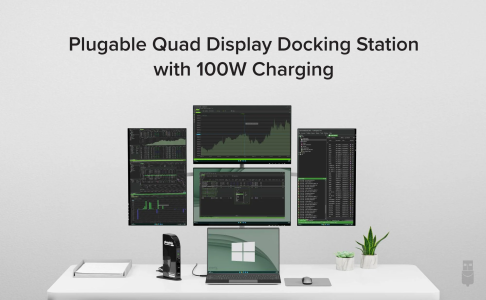
It all depends on what you want to do. I enjoyed my OSX run for a long time, but Apple neglected stuff like Final Cut Pro while they were focused on iOS development, so I went back to Windows for Adobe Premiere & haven't looked back! Plus a lot of people simply use laptops these days. There are various docking stations available, such as this 4-monitor Pluggable dock, which charges the laptop & connects everything through a single USB-C cable:


I try to get most of my clients on the HP Z2 platform for mini computers & laptops. Especially for DCC pro's (CAD, CGI, etc.), if you have the bucks, you can get crazy stuff like this laptop with a 24-core CPU, 64GB RAM, 2TB NVMe SSD, and 16GB RTX 5000:


Computers are pretty great these days!!

1696799216710.png
 
Jul 27, 2020
28,174
19,218
146
I have the base M1 MBA that is seeing zero use. Got it for the French 42 coding bootcamp but dropped out coz it was interfering with my job performance. I'll hopefully sell the M1 MBA for not much loss and wait for a deal on the M2 MBP 16/512GB to avoid the thought of burning out the SSD with my excessive use and turn it into landfill fodder.
 

tcsenter

Lifer
Sep 7, 2001
18,954
577
126
Remember those who predicted that not receiving a real product key for this 'digital entitlement license' may be a risk in the future if MS decides not to honor them anymore? It appears MS may even be pulling the rug or purging previously activated systems that have not been used (i.e. phoned home) in a while from the activation databases.

I have mobo and CPU combo (from OEM system that came with W7 Pro OA activation), onto which I know for certain I applied the W7 to W10 upgrade back in 2017/1018, activated using 'digital entitlement' license. I used it as a test PC for about a week before mothballing it, reused the SSD for other things but did not create any backup/image.

Tried installing W10 on it, but no activation after 10 hours. I believe my aversion to using MS or Windows Live accounts and linking my devices has come back to bite me. If I had linked this mb 'device' to my account, I probably would still have use of W10 on it.
 
Last edited:

Shmee

Memory & Storage, Graphics Cards Mod Elite Member
Super Moderator
Sep 13, 2008
8,313
3,177
146
Remember those who predicted that not receiving a real product key for this 'digital entitlement license' may be a risk in the future if MS decides not to honor them anymore? It appears MS may even be pulling the rug or purging previously activated systems that have not been used (i.e. phoned home) in a while from the activation databases.

I have mobo and CPU combo (from OEM system that came with W7 Pro OA activation), onto which I know for certain I applied the W7 to W10 upgrade back in 2017/1018, activated using 'digital entitlement' license. I used it as a test PC for about a week before mothballing it, reused the SSD for other things but did not create any backup/image.

Tried installing W10 on it, but no activation after 10 hours. I believe my aversion to using MS or Windows Live accounts and linking my devices has come back to bite me. If I had linked this mb 'device' to my account, I probably would still have use of W10 on it.
Wow that is nuts. Hopefully you can find a way to activate, may have to try phone or cmd activation or something. I myself don't use an MS account generally, so this is concerning.

As for Apple, they make some decent CPUs for sure, but those are no good to me if they only come in overpriced pre-built systems that aren't modular and cannot be upgraded, don't have a high end GPU, and in general are very finicky about OS choice and are hard to repair. As much as I am not a fan of MS, I need Windows for games for the time being. Otherwise I would only run Linux.
 

Kaido

Elite Member & Kitchen Overlord
Feb 14, 2004
52,370
7,631
136
Remember those who predicted that not receiving a real product key for this 'digital entitlement license' may be a risk in the future if MS decides not to honor them anymore? It appears MS may even be pulling the rug or purging previously activated systems that have not been used (i.e. phoned home) in a while from the activation databases.

I have mobo and CPU combo (from OEM system that came with W7 Pro OA activation), onto which I know for certain I applied the W7 to W10 upgrade back in 2017/1018, activated using 'digital entitlement' license. I used it as a test PC for about a week before mothballing it, reused the SSD for other things but did not create any backup/image.

Tried installing W10 on it, but no activation after 10 hours. I believe my aversion to using MS or Windows Live accounts and linking my devices has come back to bite me. If I had linked this mb 'device' to my account, I probably would still have use of W10 on it.

Interesting! They obviously keep a "handprint" database (composite UUID's of your system hardware or whatever) because when I've used the free upgrade & have done fresh installs, it has always pulled the digital license down again, so it "knows" the system even on a fresh install with no key inserted during or after installation, and only activates that digital entitlement after connecting online & verifying the equipment ID set on the Microsoft servers.

Perhaps they have an aging mechanism for systems that haven't pinged in awhile. Using a new SSD on that system would probably trigger it to re-arm since it has a new UUID on a core piece of hardware, so if it purged an aged-out previously-activated digital entitlement, it may have blocked it because it wasn't in their "active" database. Hmm...

For older systems, lately I've either been using Rufus (removes the TPM & Secure boot limitations) or on really old systems, Tiny11, both of which activate with Windows 11 Pro keys legitimately. I'd imagine Microsoft wouldn't straight-up cut out support for those out, but instead may deprecate allowing them to run Windows updates at some point in the future. iirc Tiny11 has some built-in issues for running updates. On the flip side, basic modern computers are so cheap these days, especially if you don't mind used...you can get a pretty basic renewed compact business machine with an i5, 8GB RAM, and an SSD for like $99 on Amazon:


I've also been experimenting with off-brand laptops with surprisingly good results! I wouldn't necessarily rely on them for business use, but for grandma who just needs a basic 15.6" laptop for like $299 for going on Facebook with, they ain't bad! I still strongly advocate for Chromebooks for security purposes whenever possible, but sometimes people need to run specific Windows programs. I try to convert people over to Google Docs or even Office 365 online, as well as Turbotax online & whatnot to get away from their old CD's & software downloads. Plus Walmart bought the Gateway brand & sells surprisingly decent laptops for cheap too!


Kaido

Elite Member & Kitchen Overlord
Feb 14, 2004
52,370
7,631
136
Remember those who predicted that not receiving a real product key for this 'digital entitlement license' may be a risk in the future if MS decides not to honor them anymore? It appears MS may even be pulling the rug or purging previously activated systems that have not been used (i.e. phoned home) in a while from the activation databases.

I have mobo and CPU combo (from OEM system that came with W7 Pro OA activation), onto which I know for certain I applied the W7 to W10 upgrade back in 2017/1018, activated using 'digital entitlement' license. I used it as a test PC for about a week before mothballing it, reused the SSD for other things but did not create any backup/image.

Tried installing W10 on it, but no activation after 10 hours. I believe my aversion to using MS or Windows Live accounts and linking my devices has come back to bite me. If I had linked this mb 'device' to my account, I probably would still have use of W10 on it.

Hmm interesting:


Before you begin

Make sure Windows 11 is activated


You’ll need to link your Microsoft account to your digital license before you reinstall Windows
In Windows 11, you must link your Microsoft account to the Windows 11 digital license on your PC before you can reactivate Windows. For more info, see "Associate your Windows license with your Microsoft account" in Reactivating Windows after a hardware change.

I'm guessing this only applies to Windows 11 Home licenses because I don't have any customers who do this & I've been able to reactivate Windows 11 just fine on a fresh reinstall with no key inputted after connecting to the Internet just fine.
 
  • Like
Reactions: tcsenter
Dec 10, 2005
29,674
15,260
136
Remember those who predicted that not receiving a real product key for this 'digital entitlement license' may be a risk in the future if MS decides not to honor them anymore? It appears MS may even be pulling the rug or purging previously activated systems that have not been used (i.e. phoned home) in a while from the activation databases.

I have mobo and CPU combo (from OEM system that came with W7 Pro OA activation), onto which I know for certain I applied the W7 to W10 upgrade back in 2017/1018, activated using 'digital entitlement' license. I used it as a test PC for about a week before mothballing it, reused the SSD for other things but did not create any backup/image.

Tried installing W10 on it, but no activation after 10 hours. I believe my aversion to using MS or Windows Live accounts and linking my devices has come back to bite me. If I had linked this mb 'device' to my account, I probably would still have use of W10 on it.
I've just been doing the link with a MS account on my latest assemblies. In 2 systems, part of it was because it's a retail license, so easier to keep track of it should I move or misplaced the original box. Then there is also the annoyance things of not having it linked. And lastly, I got myself an office subscription, so needed to be signed in anyway to use my OneDrive 1 TB allocation.

Of course, I also adjusted all the privacy settings and opted out of a bunch of things.
 

tcsenter

Lifer
Sep 7, 2001
18,954
577
126
Perhaps they have an aging mechanism for systems that haven't pinged in awhile. Using a new SSD on that system would probably trigger it to re-arm since it has a new UUID on a core piece of hardware, so if it purged an aged-out previously-activated digital entitlement, it may have blocked it because it wasn't in their "active" database. Hmm...

I suspect that is exactly what they have done. And it might not even be an aged activation as my case that hasn't connected to MS activation servers (some periodic phone home check) in a long time. It may be they just purged all prior digital entitlement licenses that are not linked to an MS account. So that if you attempt to install Windows again, or reinstall, you're not in the activation system at all anymore and will need a product key. And no proof to show of ever having been activated previously.

I have two more surplus PCs to test this theory: HP EliteDesk 800 G1 SFF that I acquired in the spring this year. They were sold as 'No OS, RAM, or disk drive'. I had both running with Windows 10 activated via digital entitlement in June, to test upon receipt. But after thorough testing to confirm everything is working, similarly pulled the SSD and have repurposed it, no system backup/image (assuming that I would just be able to install Windows again).
 
Last edited:
  • Like
Reactions: VirtualLarry

tcsenter

Lifer
Sep 7, 2001
18,954
577
126
But first order of business, my main PC (older 4690K on ASRock H97 MB) is upgraded Windows 7 -> W10 freebie so I'm going to get it added as a device under my Microsoft Windows Live account, while I still can!
 
  • Like
Reactions: Kaido

tcsenter

Lifer
Sep 7, 2001
18,954
577
126
I have two more surplus PCs to test this theory: HP EliteDesk 800 G1 SFF that I acquired in the spring this year. They were sold as 'No OS, RAM, or disk drive'. I had both running with Windows 10 activated via digital entitlement in June, to test upon receipt. But after thorough testing to confirm everything is working, similarly pulled the SSD and have repurposed it, no system backup/image (assuming that I would just be able to install Windows again).

Well I lucked out here. Though I did pull the SSD used to test the 800G1 units, I had not yet repurposed it or reformatted, was still in my small stack of SSDs ready to be reused. Only question was now, which of the two units did the drive LAST come out of? I couldn't remember so I imaged the SSD to file in case my first pick was wrong. Windows 10 loaded and was still activated on #1. Interestingly, I restored that image to a 2nd SSD and installed it in #2, it loaded and remained activated as well!

Both systems were identical enough same BIOS version, CPU, and graphics, only exception being one had 16GB vs. 8GB RAM, and the different SSD drive make and models (same capacity though).

Per the post by Kaido citing the Microsoft article on activation, in order to get Windows to report the needed "Windows is activated with a digital license linked to your Microsoft account" in order to preserve activation after a reinstall of Windows, it is NOT sufficient to add a Microsoft account to the PC to be used for things like email. e.g. as displayed in Settings -> Accounts -> Email & Accounts. When a Microsoft account is added here, the PC will be shown as one of your devices in your online Microsoft Account (profile), but will NOT be reported as 'linked to' in the Activation section of Windows Settings.

You have to go the full monty and enable signing into Windows with your Microsoft account as well. i.e. NO local account. Will be testing some other scenarios this weekend.

 
Last edited:

Kaido

Elite Member & Kitchen Overlord
Feb 14, 2004
52,370
7,631
136
Well I lucked out here. Though I did pull the SSD used to test the 800G1 units, I had not yet repurposed it or reformatted, was still in my small stack of SSDs ready to be reused. Only question was now, which of the two units did the drive LAST come out of? I couldn't remember so I imaged the SSD to file in case my first pick was wrong. Windows 10 loaded and was still activated on #1. Interestingly, I restored that image to a 2nd SSD and installed it in #2, it loaded and remained activated as well!

Both systems were identical enough same BIOS version, CPU, and graphics, only exception being one had 16GB vs. 8GB RAM, and the different SSD drive make and models (same capacity though).

Per the post by Kaido citing the Microsoft article on activation, in order to get Windows to report the needed "Windows is activated with a digital license linked to your Microsoft account" in order to preserve activation after a reinstall of Windows, it is NOT sufficient to add a Microsoft account to the PC to be used for things like email. e.g. as displayed in Settings -> Accounts -> Email & Accounts. When a Microsoft account is added here, it will be shown as one of your devices in the online Microsoft Account (profile), but will NOT be reported as 'linked to' in the Activation section of Windows Settings.

You have to go the full monty and enable signing into the PC with your Microsoft account as well. i.e. NO local account. Will be testing some other scenarios this weekend.


Whoohoo, fortune has smiled upon you!

I wonder what the activation limit is, i.e. if I make a generic Microsoft account, register computers, then sign out. Or if you sign in to activate, then do a system reset & a fresh install, if it would activate. I tend to do a few older computers on the side on a weekly basis, I'll have to play with this concept...
 
  • Like
Reactions: tcsenter

tcsenter

Lifer
Sep 7, 2001
18,954
577
126
FWIW I am only testing the upgraded PC scenario, from W7 or W8 to W10. If you have an OEM PC that shipped with W10 and contains the OEM Digital Product Key in BIOS, or purchased a license, you should always be able to reinstall W10 on that device either way.
 
Last edited:

tcsenter

Lifer
Sep 7, 2001
18,954
577
126
Whoohoo, fortune has smiled upon you! I wonder what the activation limit is, i.e. if I make a generic Microsoft account, register computers, then sign out. Or if you sign in to activate, then do a system reset & a fresh install, if it would activate. I tend to do a few older computers on the side on a weekly basis, I'll have to play with this concept...

I think another potential solution is to make a backup disk image of the entire activated installation, just in case.
 
  • Like
Reactions: igor_kavinski

mikeymikec

Lifer
May 19, 2011
21,576
16,831
136
My parents' old laptop has a Win81 Pro retail licence which has never been used for a Win10 upgrade. When I've got a moment, I'll try to do a win10 upgrade on it to see whether the recent claim about 'virgin licences' is accurate.
 

tcsenter

Lifer
Sep 7, 2001
18,954
577
126
My parents' old laptop has a Win81 Pro retail licence which has never been used for a Win10 upgrade. When I've got a moment, I'll try to do a win10 upgrade on it to see whether the recent claim about 'virgin licences' is accurate.

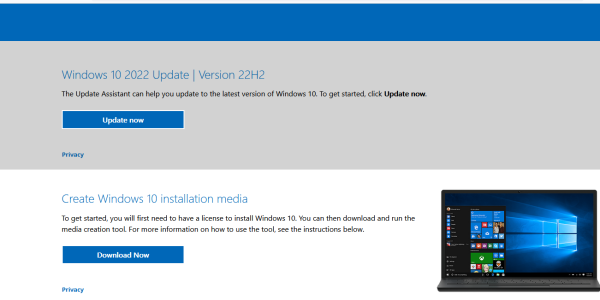
On Microsoft's download page for Windows 10, there are two options presented to select from; the Media Creation Tool and the other is 'Update Now':

Untitled.png


When you click Update Now it downloads a file named Windows10Upgrade9252.exe

Which is really quite similar in name and file SIZE to the older 'upgrade assistant' download that was offered back in the 'free upgrade' days. In file properties Details it is remarked as Windows Installation Assistant, same as the old one. The file was digitally signed in September 2022. I haven't tried it but worth a shot.
 
  • Like
Reactions: igor_kavinski

tcsenter

Lifer
Sep 7, 2001
18,954
577
126
Well looks like it the reports are true. I've even tried with an older version of that windows10upgrade.exe download from 2016 that installed build 1607. The W7 free upgrade path really is eighty-sixed, even for OA/OEM activated installs of Windows 7.

Have moved through denial, anger, bargaining, depression and finally arriving at acceptance
 
  • Wow
Reactions: Kaido

Kaido

Elite Member & Kitchen Overlord
Feb 14, 2004
52,370
7,631
136
Well looks like it the reports are true. I've even tried with an older version of that windows10upgrade.exe download from 2016 that installed build 1607. The W7 free upgrade path really is eighty-sixed, even for OA/OEM activated installs of Windows 7.

Have moved through denial, anger, bargaining, depression and finally arriving at acceptance

I guess the options for a fresh install of Win11 now are: (all require a valid license for activation)

1. Have a system with compliant hardware & go to Windows 11
2. Use Rufus to bypass the hardware requirements & go to Windows 11 using the official ISO burned to a USB stick
3. Use Tiny11 (download or DIY) to bypass the hardware requirements & go to Windows 11 on older hardware

afaik Win10 keys should work for each of these options, but I'll have to test. I typically do a few side jobs a week for family, friends, and coworkers with various older systems (a lot of pro-bono upgrades for people's fixed-income grandma's & whatnot), so it's a bummer that the 7/8/8.1 free upgrade path is gone. Maybe an option with Win10 keys to activate 11.

Alternatively, you can upgrade from Win10 to Win11 23H2 on unsupported computers using this method, pretty easy: (would be curious to do a reinstall & see if it crashes without a TPM 2.0, haha!)


tcsenter

Lifer
Sep 7, 2001
18,954
577
126
I purchased four W10 keys from a 'discounter' reseller that has good reviews and offers guarantee, to cover older PCs that I might want to run W10.

Hopefully these petition efforts calling for Microsoft to extend W10 support a year or two beyond 2025 might gather enough steam to convince MS into postponing the arbitrary and contrived decision to 'obsolete' an estimated 1 billion systems perfectly able to run all the security features of Windows 10 and keep them from the landfills.
 
  • Like
Reactions: igor_kavinski

balloonshark

Diamond Member
Jun 5, 2008
7,309
3,734
136
I purchased a Windows 10 PRO Professional License - RETAIL DIGITAL Instant product key. It is an "Activation Key" meant to activate currently installed, or fresh installs of Windows 10 Pro. It's not an "upgrade" key.

I want that key or activation to install Windows 11 either via the Windows 10 key (if possible) or via upgrade from 10 pro to 11 pro. Do I need to go through the motions of installing and activating Windows 10 first and then perform a clean Windows 11 install and hopefully the key gets automagically picked up during 11's install? Or can I just clean install 11 Pro via usb stick and use the Windows 10 Pro key to activate 11 pro?

Edit: If I need to install Windows 10, do I need to log into a MS account so the key is bound to my account or can it just be bound to the hardware? I really don't want to go online during the installs except for license activation.

Can we still bypass the MS account log-in for Windows 10 and 11 installs?
 
Last edited:

balloonshark

Diamond Member
Jun 5, 2008
7,309
3,734
136
I purchased a Windows 10 PRO Professional License - RETAIL DIGITAL Instant product key. It is an "Activation Key" meant to activate currently installed, or fresh installs of Windows 10 Pro. It's not an "upgrade" key.

I want that key or activation to install Windows 11 either via the Windows 10 key (if possible) or via upgrade from 10 pro to 11 pro. Do I need to go through the motions of installing and activating Windows 10 first and then perform a clean Windows 11 install and hopefully the key gets automagically picked up during 11's install? Or can I just clean install 11 Pro via usb stick and use the Windows 10 Pro key to activate 11 pro?

Edit: If I need to install Windows 10, do I need to log into a MS account so the key is bound to my account or can it just be bound to the hardware? I really don't want to go online during the installs except for license activation.

Can we still bypass the MS account log-in for Windows 10 and 11 installs?
Just a follow up. I was able to install a rufus tweaked Windows 11 pro and the install looked really clean. I also bypassed the need for a MS account which was excellent. The Windows 10 pro retail key I used did activate the new Windows 11 pro install.