Question Handbrake 1.3.3 - Benchmark your System - New benchmark criteria

Page 7 - Seeking answers? Join the AnandTech community: where nearly half-a-million members share solutions and discuss the latest tech.

Hulk

Diamond Member
Oct 9, 1999
4,467
2,416
136
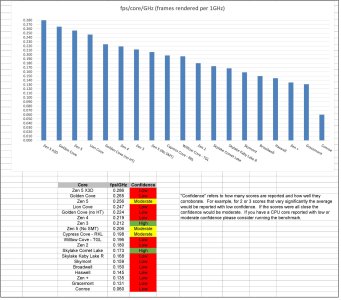
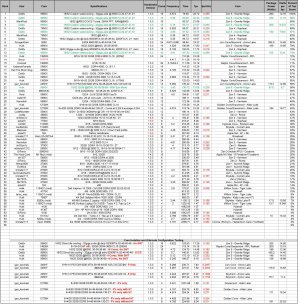
Back in 2018 ElFenix posted the original Handbrake Benchmark Thread. I thought it was cool so I started updating the thread with a results table. With his permission I'm posting an update to that thread. If you want to participate we're going to tighten up the testing methodology (see below) so the results provide data better for analysis.

I'll update the second post of this thread periodically with results.

The test file:
sdifox said:
et voila. we can all host the file and round robin it :p

LG New York HDR UHD 4K Demo.zip

drive.google.com
drive.google.com


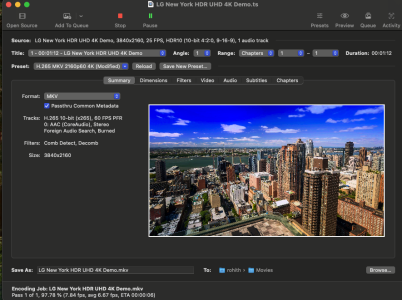
1. Use the following version of Handbrake with the built-in h.265 mkv 2160p60 preset
HandBrake-1.3.3-x86_64-Win_GUI.exe
Don't forget to turn on logging in Handbrake so you can retrieve your time. Tools>Preferences>Advanced>Logging
Once this current version is replaced you'll be able to access this version from the following link.
HandBrake: Nightly Builds
Nightly builds of HandBrake
handbrake.fr

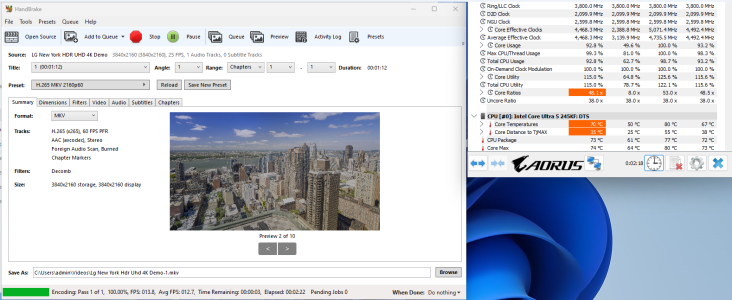
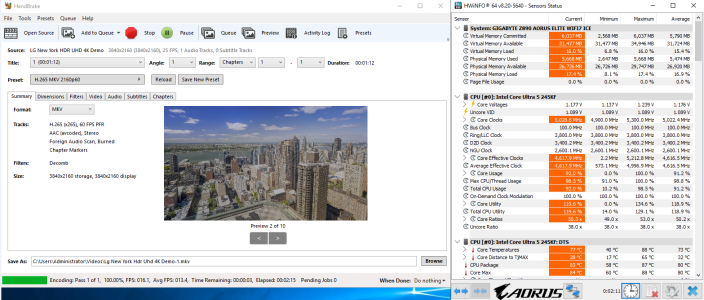
2. Report average effective clockspeed using HWinfo - https://www.hwinfo.com/
I'm sure there are better ways to do this using the logging feature but here's how I did it. I downloaded the portable version, which runs from the exe file.

Run the exe and select "sensors only." You only need this window open.
Minimize the sensors window so you can have it and Handbrake visible at the same time. Select the "average effective clockspeed" line so you can spot it easily. It will highlight.
Note the icon for "reset min/max/average values and timer" in the bottom right area of the window, it's the clock icon.

Start the handbrake but don't start/reset the timer until handbrake is actually encoding video. Record the average effective clockspeed right before handbrake finishes the encode. It should settle in pretty quickly after the encode starts and not change during the encode.

More info on "effective" vs "instant" clock: https://www.hwinfo.com/forum/threads/effective-clock-vs-instant-discrete-clock.5958/

3. Report "Total CPU Usage" (also from HWinfo)

4. Report your encoding time, CPU Model, and RAM specs (amount, speed, latency)

1665102318265.png
 
Last edited:
  • Like
Reactions: Kaluan and ElFenix

Det0x

Golden Member
Sep 11, 2014
1,263
3,998
136
What memory are you running ? I have 7200 running 1:1 but I can't run this now. cl 34 I think.
New gskill 8000 EXPO royal
 

Markfw

Moderator Emeritus, Elite Member
May 16, 2002
26,129
15,274
136
New gskill 8000 EXPO royal
What I have is EXP only, but it was on the preselect, and aftermarket tests say 1:1, so I am happy. Taichi motherboard.
 

Hitman928

Diamond Member
Apr 15, 2012
6,123
10,527
136
Seems like there are hardly any improvment for Zen5 in handbreak
Is this benchmark bandwidth limited ?
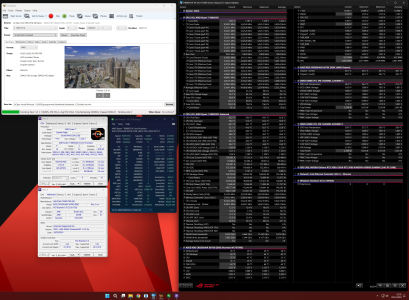
  • Direct die cooled 9950x on large custom watercooling @ 5600mhz
  • 32gigs a-die @ daily 8200MT/s 32-46-40-48
  • 2200mhz FCLK
encoded 1806 frames in 79.83s (22.62 fps), 11820.04 kb/s, Avg QP:29.09
View attachment 108004

HandBrake 1.3.3 (2020061300)
OS: Microsoft Windows NT 10.0.22631.0
CPU: AMD Eng Sample: 100-000001277-60_Y
Ram: 32390 MB,
GPU Information:
NVIDIA GeForce RTX 3090 - 32.0.15.6109
Screen: 3840x2160
Temp Dir: C:\Users\Administrator\AppData\Local\Temp\
Install Dir: I:\Clean install Windows 11\5950x\programmer\Handbreak\Handbreak 1.33\HandBrake
Data Dir: C:\Users\Administrator\AppData\Roaming\HandBrake

-------------------------------------------


# Starting Encode ...

[11:23:10] base preset: H.265 MKV 2160p60
[23:23:10] hb_init: starting libhb thread
[23:23:10] Starting work at: Sat Sep 21 23:23:10 2024
[23:23:10] 1 job(s) to process
[23:23:10] json job:
{
"Audio": {
"AudioList": [
{
"Bitrate": 160,
"DRC": 0.0,
"Encoder": "av_aac",
"Gain": 0.0,
"Mixdown": 4,
"NormalizeMixLevel": false,
"Samplerate": 0,
"Track": 0,
"DitherMethod": 0
}
],
"CopyMask": [
"copy:aac",
"copy:ac3",
"copy:dtshd",
"copy:dts",
"copy:eac3",
"copy:flac",
"copy:mp3",
"copy:truehd"
],
"FallbackEncoder": "ac3"
},
"Destination": {
"ChapterList": [
{
"Name": "Chapter 1"
}
],
"ChapterMarkers": true,
"AlignAVStart": false,
"File": "I:\\Clean install Windows 11\\5950x\\programmer\\Handbreak\\video her\\video her.mkv",
"Mp4Options": {
"IpodAtom": false,
"Mp4Optimize": false
},
"Mux": "av_mkv"
},
"Filters": {
"FilterList": [
{
"ID": 4,
"Settings": {
"mode": "7"
}
},
{
"ID": 3,
"Settings": {
"block-height": "16",
"block-thresh": "40",
"block-width": "16",
"filter-mode": "2",
"mode": "3",
"motion-thresh": "1",
"spatial-metric": "2",
"spatial-thresh": "1"
}
},
{
"ID": 12,
"Settings": {
"crop-bottom": "0",
"crop-left": "0",
"crop-right": "0",
"crop-top": "0",
"height": "2160",
"width": "3840"
}
},
{
"ID": 6,
"Settings": {
"mode": "2",
"rate": "27000000/450000"
}
}
]
},
"PAR": {
"Num": 1,
"Den": 1
},
"Metadata": {},
"SequenceID": 0,
"Source": {
"Angle": 1,
"Range": {
"Type": "chapter",
"Start": 1,
"End": 1
},
"Title": 1,
"Path": "I:\\Clean install Windows 11\\5950x\\programmer\\Handbreak\\Handbreak 1.33\\LG New York HDR UHD 4K Demo.ts"
},
"Subtitle": {
"Search": {
"Burn": true,
"Default": false,
"Enable": true,
"Forced": true
},
"SubtitleList": []
},
"Video": {
"Encoder": "x265",
"Level": "auto",
"TwoPass": false,
"Turbo": false,
"ColorMatrixCode": 0,
"Options": "strong-intra-smoothing=0:rect=0:aq-mode=1",
"Preset": "slow",
"Profile": "main",
"Quality": 24.0,
"QSV": {
"Decode": false,
"AsyncDepth": 0
}
}
}
[23:23:10] CPU: AMD Eng Sample: 100-000001277-60_Y
[23:23:10] - logical processor count: 32
[23:23:10] Intel Quick Sync Video support: no
[23:23:10] hb_scan: path=I:\Clean install Windows 11\5950x\programmer\Handbreak\Handbreak 1.33\LG New York HDR UHD 4K Demo.ts, title_index=1
udfread ERROR: ECMA 167 Volume Recognition failed
src/libbluray/disc/disc.c:323: failed opening UDF image I:\Clean install Windows 11\5950x\programmer\Handbreak\Handbreak 1.33\LG New York HDR UHD 4K Demo.ts
src/libbluray/disc/disc.c:424: error opening file BDMV\index.bdmv
src/libbluray/disc/disc.c:424: error opening file BDMV\BACKUP\index.bdmv
src/libbluray/bluray.c:2585: nav_get_title_list(I:\Clean install Windows 11\5950x\programmer\Handbreak\Handbreak 1.33\LG New York HDR UHD 4K Demo.ts\) failed
[23:23:10] bd: not a bd - trying as a stream/file instead
libdvdnav: Using dvdnav version 6.0.1
libdvdread: Encrypted DVD support unavailable.
libdvdread:DVDOpenFileUDF:UDFFindFile /VIDEO_TS/VIDEO_TS.IFO failed
libdvdread:DVDOpenFileUDF:UDFFindFile /VIDEO_TS/VIDEO_TS.BUP failed
libdvdread: Can't open file VIDEO_TS.IFO.
libdvdnav: vm: failed to read VIDEO_TS.IFO
[23:23:10] dvd: not a dvd - trying as a stream/file instead
[23:23:10] file is MPEG Transport Stream with 188 byte packets offset 0 bytes
[23:23:10] hb_ts_stream_find_pids - end of file
Input #0, mpegts, from 'I:\Clean install Windows 11\5950x\programmer\Handbreak\Handbreak 1.33\LG New York HDR UHD 4K Demo.ts':
Duration: 00:01:12.15, start: 0.999989, bitrate: 52098 kb/s
Program 1
Stream #0:0[0x101]: Video: hevc (Main 10) ([36][0][0][0] / 0x0024), yuv420p10le(tv, bt2020nc/bt2020/smpte2084), 3840x2160 [SAR 1:1 DAR 16:9], 25 fps, 25 tbr, 90k tbn, 25 tbc
Stream #0:1[0x102](und): Audio: aac (LC) ([15][0][0][0] / 0x000F), 48000 Hz, stereo, fltp, 192 kb/s
[23:23:10] scan: decoding previews for title 1
[23:23:10] file is MPEG Transport Stream with 188 byte packets offset 0 bytes
[23:23:10] hb_ts_stream_find_pids - end of file
[23:23:11] scan: audio 0x1: aac, rate=48000Hz, bitrate=192000 Unknown (AAC LC) (2.0 ch) (192 kbps)
[23:23:12] scan: 10 previews, 3840x2160, 25.000 fps, autocrop = 0/0/0/0, aspect 16:9, PAR 1:1
[23:23:12] scan: supported video decoders: avcodec qsv
[23:23:12] libhb: scan thread found 1 valid title(s)
[23:23:12] Skipping subtitle scan. No suitable subtitle tracks.
[23:23:12] Starting Task: Encoding Pass
[23:23:12] Skipping crop/scale filter
[23:23:12] work: only 1 chapter, disabling chapter markers
[23:23:12] job configuration:
[23:23:12] * source
[23:23:12] + I:\Clean install Windows 11\5950x\programmer\Handbreak\Handbreak 1.33\LG New York HDR UHD 4K Demo.ts
[23:23:12] + title 1, chapter(s) 1 to 1
[23:23:12] + container: mpegts
[23:23:12] + data rate: 52098 kbps
[23:23:12] * destination
[23:23:12] + I:\Clean install Windows 11\5950x\programmer\Handbreak\video her\video her.mkv
[23:23:12] + container: Matroska (libavformat)
[23:23:12] * video track
[23:23:12] + decoder: hevc
[23:23:12] + filters
[23:23:12] + Comb Detect (mode=3:spatial-metric=2:motion-thresh=1:spatial-thresh=1:filter-mode=2:block-thresh=40:block-width=16:block-height=16)
[23:23:12] + Decomb (mode=39)
[23:23:12] + Framerate Shaper (mode=2:rate=27000000/450000)
[23:23:12] + frame rate: 25.000 fps -> peak rate limited to 60.000 fps
[23:23:12] + Output geometry
[23:23:12] + storage dimensions: 3840 x 2160
[23:23:12] + pixel aspect ratio: 1 : 1
[23:23:12] + display dimensions: 3840 x 2160
[23:23:12] + encoder: H.265 (libx265)
[23:23:12] + preset: slow
[23:23:12] + options: strong-intra-smoothing=0:rect=0:aq-mode=1
[23:23:12] + profile: main
[23:23:12] + level: auto
[23:23:12] + quality: 24.00 (RF)
[23:23:12] + color profile: 9-16-9
[23:23:12] * audio track 1
[23:23:12] + decoder: Unknown (AAC LC) (2.0 ch) (192 kbps) (track 1, id 0x1)
[23:23:12] + bitrate: 192 kbps, samplerate: 48000 Hz
[23:23:12] + mixdown: Stereo
[23:23:12] + dither: none
[23:23:12] + encoder: AAC (libavcodec)
[23:23:12] + bitrate: 160 kbps, samplerate: 48000 Hz
[23:23:12] file is MPEG Transport Stream with 188 byte packets offset 0 bytes
[23:23:13] hb_ts_stream_find_pids - end of file
[23:23:13] sync: expecting 1803 video frames
x265 [info]: HEVC encoder version 3.2.1+1-b5c86a64bbbe
x265 [info]: build info [Windows][GCC 9.2.0][64 bit] 8bit+10bit+12bit
x265 [info]: using cpu capabilities: MMX2 SSE2Fast LZCNT SSSE3 SSE4.2 AVX FMA3 BMI2 AVX2
x265 [info]: Main profile, Level-5 (Main tier)
x265 [info]: Thread pool created using 32 threads
x265 [info]: Slices : 1
x265 [info]: frame threads / pool features : 6 / wpp(34 rows)
x265 [info]: Coding QT: max CU size, min CU size : 64 / 8
x265 [info]: Residual QT: max TU size, max depth : 32 / 1 inter / 1 intra
x265 [info]: ME / range / subpel / merge : star / 57 / 3 / 3
x265 [info]: Keyframe min / max / scenecut / bias: 25 / 250 / 40 / 5.00
x265 [info]: Lookahead / bframes / badapt : 25 / 4 / 2
x265 [info]: b-pyramid / weightp / weightb : 1 / 1 / 0
x265 [info]: References / ref-limit cu / depth : 4 / on / on
x265 [info]: AQ: mode / str / qg-size / cu-tree : 1 / 1.0 / 32 / 1
x265 [info]: Rate Control / qCompress : CRF-24.0 / 0.60
x265 [info]: tools: limit-modes rd=4 psy-rd=2.00 rdoq=2 psy-rdoq=1.00 rskip
x265 [info]: tools: signhide tmvp lslices=4 deblock sao
[23:23:13] sync: first pts video is 0
[23:23:13] sync: "Chapter 1" (1) at frame 1 time 0
[23:23:13] sync: first pts audio 0x1 is 0
[23:24:28] reader: done. 1 scr changes
[23:24:32] work: average encoding speed for job is 22.995642 fps
[23:24:32] comb detect: heavy 1091 | light 277 | uncombed 438 | total 1806
[23:24:32] decomb: deinterlaced 1091 | blended 277 | unfiltered 438 | total 1806
[23:24:32] vfr: 1806 frames output, 0 dropped and 0 duped for CFR/PFR
[23:24:32] vfr: lost time: 0 (0 frames)
[23:24:32] vfr: gained time: 0 (0 frames) (0 not accounted for)
[23:24:32] aac-decoder done: 3384 frames, 0 decoder errors
[23:24:32] hevc-decoder done: 1806 frames, 0 decoder errors
[23:24:32] sync: got 1806 frames, 1803 expected
[23:24:32] sync: framerate min 25.000 fps, max 25.000 fps, avg 25.000 fps
x265 [info]: frame I: 20, Avg QP:22.74 kb/s: 84168.04
x265 [info]: frame P: 426, Avg QP:24.64 kb/s: 29918.47
x265 [info]: frame B: 1360, Avg QP:30.58 kb/s: 5087.03
x265 [info]: Weighted P-Frames: Y:15.7% UV:11.0%
x265 [info]: consecutive B-frames: 9.6% 1.8% 7.6% 35.9% 45.1%
encoded 1806 frames in 79.83s (22.62 fps), 11820.04 kb/s, Avg QP:29.09
[23:24:32] mux: track 0, 1806 frames, 106742176 bytes, 11814.30 kbps, fifo 512
[23:24:32] mux: track 1, 3385 frames, 1365514 bytes, 151.14 kbps, fifo 1024
[23:24:32] Finished work at: Sat Sep 21 23:24:32 2024
[23:24:32] libhb: work result = 0

# Encode Completed ...

That’s about 15% higher than your fps in the table on page one. Did you have a higher score than that with the 7950x?
 

Det0x

Golden Member
Sep 11, 2014
1,263
3,998
136
That’s about 15% higher than your fps in the table on page one. Did you have a higher score than that with the 7950x?
Was just hoping for more*, but since limited by the same 2200mhz FCLK bandwidth limitation i guess 12% is okai
22.62/20.21 = ~12%

* in other render benchmarks Zen5 is a beast compared to Zen4
 

jdubs03

Senior member
Oct 1, 2013
804
411
136
I’m honestly surprised the 9950X efficiency/clock speed is pretty much the same as the 7950X. Would’ve thought there’d be some advance there.
 

Hitman928

Diamond Member
Apr 15, 2012
6,123
10,527
136
Was just hoping for more*, but since limited by the same 2200mhz FCLK bandwidth limitation i guess 12% is okai
22.62/20.21 = ~12%

* in other render benchmarks Zen5 is a beast compared to Zen4

@Hulk , looks like @Det0x 's 7950x table entry needs to be updated as well.

Handbrake is an encoder benchmark, not render benchmark, but ~12% is consistent with the average IPC uplift. Different encoder formats may show different results.
 

poke01

Platinum Member
Mar 8, 2022
2,094
2,628
106
Handbrake is an encoder benchmark, not render benchmark, but ~12% is consistent with the average IPC uplift. Different encoder formats may show different results.
If that’s the case I’ll test M4’s h.265 encoder when the Mac’s come out, it’s encoder is nearly 2x faster than M3.
 

Hulk

Diamond Member
Oct 9, 1999
4,467
2,416
136
@Hulk , looks like @Det0x 's 7950x table entry needs to be updated as well.

Handbrake is an encoder benchmark, not render benchmark, but ~12% is consistent with the average IPC uplift. Different encoder formats may show different results.
What needs to be edited regarding his 7950x data? I'll fix it.
 

Det0x

Golden Member
Sep 11, 2014
1,263
3,998
136
What needs to be edited regarding his 7950x data? I'll fix it.
This is a newer 7950X entry with 2:1 memory @ 8000MT/s compared to the older 1:1 run you have in the table
its a much closer apple to apple comparison vs the 9950X
 

MarkPost

Senior member
Mar 1, 2017
312
583
136
AVX512 is disabled by default in x265 encoding. You need to add this in Video tab ---> Advanced options:

Code:
:asm=avx512

In HandBrake 1.3.3 it doesnt improve x265 encoding speed (9950X)

But I have tried with the latest version, 1.8.2, and if AVX512 is enabled, it improves encoding speed by about 10%
 
  • Like
Reactions: MS_AT