Getting Bored with 2600k - Need New Whipping Boy

Page 2 - Seeking answers? Join the AnandTech community: where nearly half-a-million members share solutions and discuss the latest tech.

BallaTheFeared

Diamond Member
Nov 15, 2010
8,115
0
71
Bioshock low is 24% meaning Haswell is 24% faster clock for clock. I didn't double check the others, but unless my math is wrong they're probably wrong too.

 

Arkaign

Lifer
Oct 27, 2006
20,736
1,379
126
Bioshock low is 24% meaning Haswell is 24% faster clock for clock. I didn't double check the others, but unless my math is wrong they're probably wrong too.


That's not really a complete way of considering averages.

App A = 24% gain
App B = 12% gain
App C = 8% gain

What would you take as an average from that?

And how can you take 24% as correct from HOCP while saying their other tests are invalid? That literally makes no sense. Not every app responds the same to the same architecture.
 

BallaTheFeared

Diamond Member
Nov 15, 2010
8,115
0
71
That's why I said between, and these are canned benchmarks. With settings that don't properly represent actual cpu load.


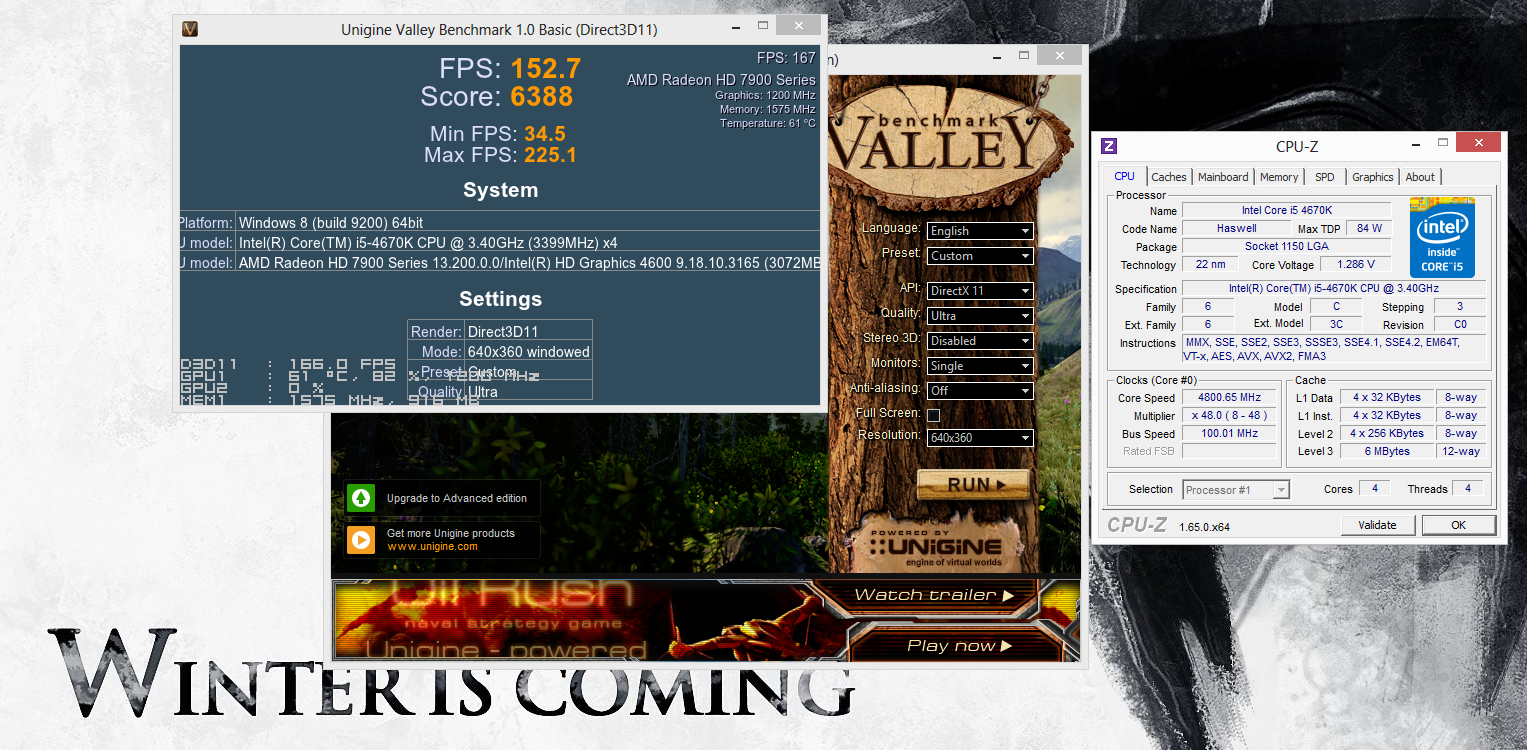
Elfear you have Valley right?

I'm still using ULPS so my clocks reflect that. You can hit 1200/1575 on your first card right?

Should be pretty easy to reproduce this:

9454617037_6cbe999a6f_o.png
 

Arkaign

Lifer
Oct 27, 2006
20,736
1,379
126
Regardless of total CPU load, they do show gaming improvements. For estimating real-world gaming performance they are better than synthetics which actually do load the CPU fairly well.

Look at Sandra 2013 tests of ALU, memory bandwidth, HyperPi, wPrime, etc.

With the CPUs going as hard as they can to complete those particular tasks, gains were not great.

With encoding, gains are tremendously better by comparison.

The point is that buying a Haswell will not gain you 24% gaming improvement (even with the Titan they used in the HOCP test). It will gain you anywhere between 2%-25%+ depending on app. Gaming seems to fall in the 5-10% range at settings typically used by most (1080p w/decent details). Even looking at settings which take the GPU out of the calculation as much as possible, gains aren't anywhere close to 24% on average.

Someone testing with Unigine Valley as a synthetic and expecting their actual games to show those same gains will be disappointed.

That said, I do hope that AVX2 finds a foothold in development before Haswell gets too old. I now have two 4770Ks that I'm debating selling, but I may keep one.
 

BallaTheFeared

Diamond Member
Nov 15, 2010
8,115
0
71
What cpu do you have? I'd be happy to bench it against mine to see where the truth lies.

Feel free to add your valley Ultra quality no AA 640x360 results, assuming you have a gpu capable of bottlenecking the processor.
 

Arkaign

Lifer
Oct 27, 2006
20,736
1,379
126
Valley is hugely better with Haswell.

We play all of our games at 640x360 :)

It's just as meaningless as if I asked you for an ALU bench, or prime, or Fritz. We all know where the gains are and where they're not, we're not idiots.

http://www.anandtech.com/show/6985/choosing-a-gaming-cpu-at-1440p-adding-in-haswell-/5

Three 7970s, 1440p Max Settings, Haswell actually the tiniest bit behind Ivy in Metro.

Anyone playing games at 1080p, even with a Titan, won't see any major gaming gains. They will see encoding gains and some big bonuses to AVX2 stuff.

Anyone playing games at 640p, well.

I'm not sure why you are a bit touchy about someone saying Haswell is not actually much faster than Sandy/Ivy in gaming, especially when you compare common OC to OC.

What resolution do you run your 7950CF at while gaming?

At any reasonable resolution, you're going to hit the GPU wall anyway unless your CPU is terrible. Even a Lynnfield OC will max out a typical single-GPU. Even in synthetics this is true for the most part. Case in point :

1080p.png


Try your config with the 1080p Extreme HD.
 

BallaTheFeared

Diamond Member
Nov 15, 2010
8,115
0
71
We're discussing cpu performance John Tauwhare, specifically not GPU, he has 3 7970s at 1080p trying to make 120 FPS.

That's why it's a cpu discussion. That's why your liking this to x87 benchmarks makes no sense, not the bench I suggested.


Let's keep this to AMD gpus since they require more cpu it seems, but for your information...

9095373540_3996693dcd_o.png


So either 770 SLI @ 1267/2010 is only 7% faster than 7950 CF at 1215/1750 or something else is at play, limiting the performance of just two GPUs at 1080p.

Elfear got 127.3 FPS in the same test with 3 7970s

Or with two 102.0 FPS 1310-1350/1650

That's two faster cards with 100MHz clock speed advantage offering less than a 5% increase in performance. Granted my 7950s have a bit more bandwidth but at 1080p it's unlikely that offset any performance advantage the higher core clocked 7970s had.

Arguably the 7970 should be at least 12% faster per card, or rougly 20% faster in CF, but it's less than 5%, and the scaling from 2 to 3 is roughly 25% from the 3rd card.

I bet if we ask him to show his MSI monitoring all 3 cards are below 99% because of a cpu bottleneck, that's pure performance gain unlockable by a faster CPU, such as Haswell.


780 SLI + 4770K

ampp46.jpg


680 3 way + 2700k

t8kec7.jpg


We aren't talking about 60 FPS, we're talking about 120+ with the GPU power to push it, that's why it's a cpu discussion.
 
Last edited:

Arkaign

Lifer
Oct 27, 2006
20,736
1,379
126
Aha, so Unigine which responds well to Haswell is the only relevant benchmark :) I see!

What about the Anandtech test of three 7970s with Metro at 1440p? I could be obtuse and say that's the only bench that matters :p

Unigine is not a game. It's a synthetic.

Is Haswell faster in Fritz? Another synthetic? No? How is that possible?

For someone buying a new build, 4770K is a great option. For someone with a SB or IB i7 already, $$ is just plain better spent on GPU if they game.
 

BallaTheFeared

Diamond Member
Nov 15, 2010
8,115
0
71
Valley? Does it? I haven't seen any benches to show that's the case, the other one is Heaven.

You could be, but in light of the OP, 120Hz @ 1080p it seems a bit I don't know, misplaced?

Built in benchmarks aren't games, they're synthetics.

Why would this matter? However to answer your question, yes, yes it is.

9457751436_5338967f5e_o.png


Listen, the OP has 3 7970s at 1080p trying to run 120Hz and has a processor he can sell that will get him as much if not more in return than what a i5-4670k costs.

That's the discussion, try to stick within it.
 
Last edited:

Elfear

Diamond Member
May 30, 2004
7,169
829
126
Looks like Haswell won't improve multi-GPU gaming at 1600p too much except for CPU-intense games like Civ 5 but it should show decent gains at 1080p.

Thanks for the links gents.

Balla - I'll try and get some Valley/Heaven benchmarks to see what kind of difference Haswell makes. Maybe if I drop clocks to 1150/1575 it should be pretty close to your 7950s at 1200/1575.
 

Arkaign

Lifer
Oct 27, 2006
20,736
1,379
126
Looks like Haswell won't improve multi-GPU gaming at 1600p too much except for CPU-intense games like Civ 5 but it should show decent gains at 1080p.

Thanks for the links gents.

Balla - I'll try and get some Valley/Heaven benchmarks to see what kind of difference Haswell makes. Maybe if I drop clocks to 1150/1575 it should be pretty close to your 7950s at 1200/1575.

I think playing with a Haswell is fun, if not sometimes frustrating. I've built about a dozen of them now, and as they are not something I wanted to keep for personal use, I've not let one go out above 4.2Ghz even under water. Cheap corsair water, but still. With Ivy and Haswell, you have two lotteries : the silicon lottery (of which Balla won the golden ticket, lol), and the TIM/IHS lottery, which can be manually fixed at the loss of warranty (I personally don't care, but would never de-lid a customer unit unless they directed me to explicitly).

http://www.bit-tech.net/news/hardware/2013/06/06/haswell-heat/

Regardless of anyone's personal feelings toward Haswell, the facts are that ~10% faster clock for clock in 1080p gaming is sort of lost if your clock speed is ~10% slower. IOW, a mixed bag.

At 4.2Ghz, the Haswell's heat/energy efficiency, combined with better platform features makes it an easy recommendation around here for most new builds. If someone says they're doing encoding, photoshop, premiere, etc, on a regular basis : Haswell. About the only time I don't recommend it is if they already have an average to above-average SB/IB OC system in place. In that case, it's just a waste of money, and may even degrade performance in some apps. Eg : if you have an Ivy happily buzzing along at 4.7, or a SB happily kicking at 5.0, a Haswell at 4.2 won't bridge that gap outside of rare circumstances.

Looking at AT, HOCP, Toms, and all the other benches out there, it really comes down to :

4.2 Haswell is ~ 4.5 Ivy ~ 4.8 SB. Those are all very average safe typical max OCs with average CPUs. If you get a golden sample out of any of them, it will beat the average OC. 4.4 Haswell is more typical high-end OC with great cooling, along with 4.7 Ivy and 5.0 SB, which basically ends up a wash as well.

Beware people telling you that Haswell is the second coming of Jesus, and that a single benchmark is indicative of the entire experience. At the same time, beware people telling you that because Haswell does poor in benchmarks A, B, and C, that it's not superior overall clock-for-clock.

In the end the truth is that it's a case-by-case basis, and you have to examine what you have, what you want, and what you're willing to go through / spend to get it.
 

BonzaiDuck

Lifer
Jun 30, 2004
16,889
2,205
126
So I was all set to get Haswell when it came out but after seeing the poor overclocking results (compared to SB) I decided to hold off until something compelling came along. Well that time may be at least a year off (Haswell-E maybe) so I started thinking I should get something cheap to drop in my current board.

Right now I have a 2600k that does 4.8Ghz@1.48V HT off. I don't think it's P95 stable but it is game stable. What I'd like to do is buy a golden 2500k or 3570k to drop in. I'm thinking a 2500k@5.3Ghz or a 3570k@5.0Ghz would give a decent performance boost for little out of pocket cost especially if I can sell my 2600k for $150-170.

Thoughts? Good locations to locate a golden chip?

Interesting. How long have you had that 2600K puppy running? And did you get it to work with EIST? Are you using Offset-mode in your over-clock? Is 4.8Ghz the "Turbo" speed?

I think I could probably push my own rig to 4.8, but I stopped at 4.6 because I think any momentary voltage spike would still be under 1.4V.

Can't remember if it was IDontCare or one of our other resident gurus, but there was a speculation -- an educated guess -- that the SB CPU could handle more voltage than 1.40V. The "safety-obsessed" among us tried to keep the "visible" voltage at 1.35V. Ultimately, for me, the loaded voltage might be below that, but the "unloaded-Turbo" value is probably closer to 1.37V.

And like someone else here said -- a 200Mhz difference at those speeds won't seem to matter much.

That's why I haven't jumped on either the Ivy-Bridge or Haswell bandwagon yet . . .
 

BallaTheFeared

Diamond Member
Nov 15, 2010
8,115
0
71
Looks like Haswell won't improve multi-GPU gaming at 1600p too much except for CPU-intense games like Civ 5 but it should show decent gains at 1080p.

Thanks for the links gents.

Balla - I'll try and get some Valley/Heaven benchmarks to see what kind of difference Haswell makes. Maybe if I drop clocks to 1150/1575 it should be pretty close to your 7950s at 1200/1575.

Or as he is saying, it could be worse, or only as good, but at least you get PCIe 3.0 and other advances as well as a more efficient system.

I think it's there, I wouldn't go back to my water cooled 5GHz+ sandy systems over this Haswell that does 5GHz on a mid range $50 air cooler.

Every benchmark I run it's faster than what I had before, that's all I know ;)
 

Slomo4shO

Senior member
Nov 17, 2008
586
0
71
I don't see much gain either. That's why I thought a cheap upgrade to a golden 2500k or 3570k would be provide more CPU power and be something new to tinker with.

Wait around until November and see what is offered by Intels Retail Edge program. If they offer a 4770K or an Ivy-E, you will be able to pick one up on Ebay at a substantially discounted price. I killed my 4770K while delidding it so I am also waiting to find good deal before I dip into Haswell again. Word of advise: don't attempt delicate tasks when you are sleep deprived o_O
 

skipsneeky2

Diamond Member
May 21, 2011
5,035
1
71
My i5 2500 non k is pretty boring,even if it was overclockable i am sure it would be boring and ivy and haswell lack a improvement big enough to upgrade,amazingly broadwell may be the upgrade for me and by then this chip will be over 3 years old.

Purely for gaming with a single gpu at 1200p,this chip is gonna have some major staying power for a while and god only knows broadwell could be another hairline upgrade....almost love to hate the the staying power lol.
 

Elfear

Diamond Member
May 30, 2004
7,169
829
126
Interesting. How long have you had that 2600K puppy running? And did you get it to work with EIST? Are you using Offset-mode in your over-clock? Is 4.8Ghz the "Turbo" speed?

I've had the 2600k for over two years now. Initially I overclocked the chip in the bios and had it working well with EIST but when I started Bitcoin mining I dropped it back to stock and then oced in Windows for gaming sessions.

4.8Ghz is the Turbo speed.

I think I could probably push my own rig to 4.8, but I stopped at 4.6 because I think any momentary voltage spike would still be under 1.4V.

Can't remember if it was IDontCare or one of our other resident gurus, but there was a speculation -- an educated guess -- that the SB CPU could handle more voltage than 1.40V. The "safety-obsessed" among us tried to keep the "visible" voltage at 1.35V. Ultimately, for me, the loaded voltage might be below that, but the "unloaded-Turbo" value is probably closer to 1.37V.

And like someone else here said -- a 200Mhz difference at those speeds won't seem to matter much.

That's why I haven't jumped on either the Ivy-Bridge or Haswell bandwagon yet . . .
I'm a pretty reserved as well when it comes to voltage. I only went over 1.4V for benchmarking or gaming which was about .1% of the chip's time in my hands. Though it seems lots of people have had good luck running 1.4V+ 24/7 with EIST enabled.

Or as he is saying, it could be worse, or only as good, but at least you get PCIe 3.0 and other advances as well as a more efficient system.

I think it's there, I wouldn't go back to my water cooled 5GHz+ sandy systems over this Haswell that does 5GHz on a mid range $50 air cooler.

Every benchmark I run it's faster than what I had before, that's all I know ;)

You guys convinced me that the small price to upgrade is worth it for Haswell. I may get a mediocre chip but at least it will be something new to mess with and have some newer features.

I'm thinking the Asus Z87-A or Asrock Extreme 6 is the best board for the price. Thoughts?

Wait around until November and see what is offered by Intels Retail Edge program. If they offer a 4770K or an Ivy-E, you will be able to pick one up on Ebay at a substantially discounted price. I killed my 4770K while delidding it so I am also waiting to find good deal before I dip into Haswell again. Word of advise: don't attempt delicate tasks when you are sleep deprived o_O

I live close to a Microcenter so the price to upgrade right now will be fairly small.

I'm debating whether I want to try delidding myself or a pay a guy on Ebay to do it for $25. Normally I'd just do it myself but it's ~$15-20 for the Liquid Ultra itself which the guy will include for the price. I don't know if I'd have much use for a syringe full after the one application.
 

Face2Face

Diamond Member
Jun 6, 2001
4,100
215
106
The vice method is super easy if you have one. I would say buy a tube of CLU, you may be using it on future CPU's? I have a tube sitting in my closet, I was going to delid mine and OC my chip to at 5.0-5.1Ghz. I don't feel it will be worth it until a have a multi-gpu setup.
 

Elfear

Diamond Member
May 30, 2004
7,169
829
126
The vice method is super easy if you have one. I would say buy a tube of CLU, you may be using it on future CPU's? I have a tube sitting in my closet, I was going to delid mine and OC my chip to at 5.0-5.1Ghz. I don't feel it will be worth it until a have a multi-gpu setup.

I do have a vice and getting your hands dirty is always fun. Just not sure what I'd do with the extra CLU since I don't swap CPUs that often and I'm not sure how long the stuff lasts.
 

Face2Face

Diamond Member
Jun 6, 2001
4,100
215
106
I do have a vice and getting your hands dirty is always fun. Just not sure what I'd do with the extra CLU since I don't swap CPUs that often and I'm not sure how long the stuff lasts.

From everything I have heard it should last the life of the chip, assuming you do not remove the IHS once installed. I was thinking about putting a small bead of silicone around the chip' edges to keep the IHS on for good when you remove it from the socket.
 
Last edited:

BallaTheFeared

Diamond Member
Nov 15, 2010
8,115
0
71
Excellent, another subject for the Haswell silicon lottery... Muahahaha!

I use the cheaper Liquid Pro? Whatever is cheaper and contains more substance, that's what this cheap guy used.

I used it on my cpu, and both my GPUs. Good stuff imo. I had the girls pick up some water color paint brushes and 97% Iso for me when I ordered it. I literally painted it on. You could use it on your GPUs :)

I didn't delid my cpu, I had it on the edge. Razor started to go in but I chickened out, looking at what others were getting I wasn't prepared to lose the chip. I can bench it at 5GHz with my air cooler, which isn't even a big high end one I can't imagine as a gamer I'd gain much.

As far as boards go, ASUS has to be considered, they put a lot of effort into our section and I appreciate how much time AJ spends getting information out to us. Gigabyte seems to have redeemed themselves after what I thought was garbage P67 lineup (I had a UD4 and was jaded by it before it died about two months after I got it).

I wouldn't buy into POWER PHASE RAR RAR RAR, Haswell as I said uses a fraction of the power SB used, it's not even really a factor but OC settings might be and auto functions are important. I wasn't able to get these 1600MHz sticks of ram over 1866 on my SB system and less than 1750 on my P55D, but it auto configed itself all the way up to 2400 for me with Haswell before I tightened up the timings.

MSI GD65, I own it. I like it. It's auto overclock is pretty garbage, the UEFI isn't perfect but it's simple and easy to use. Layout is good, on-board audio is above average for the price bracket, it's PCIe 3.0 across the board. The Asus Z87-A for instance is x8x8 PCIe 3.0 x4 PCIe 2.0, GD65 is Gen 3(at x16/x4/x4 or x8/x8/x4). Fan controls are simple, it has a fan profile arch like MSI AB but from what I can tell you can only set two points so it's pretty limiting for something looking to tweak PWN heavily.
 
Last edited:

Face2Face

Diamond Member
Jun 6, 2001
4,100
215
106
Not to get to far off topic-

Hey Balla, would you recommend using CLU on a GPU? I mean, did you see much of a reduction in temps vs. the stock paste? I have MX-4 on mine and it seems like after a month of use the temps steadily go up to 60-61c while gaming. As before 55C was the highest.
 

Slomo4shO

Senior member
Nov 17, 2008
586
0
71
The vice method is super easy if you have one. I would say buy a tube of CLU, you may be using it on future CPU's? I have a tube sitting in my closet, I was going to delid mine and OC my chip to at 5.0-5.1Ghz. I don't feel it will be worth it until a have a multi-gpu setup.

The Vice method is what I used as well. Worked great for my 3770K but I was reckless and let the block slip when delidding my 4770K :whiste:

I do have a vice and getting your hands dirty is always fun. Just not sure what I'd do with the extra CLU since I don't swap CPUs that often and I'm not sure how long the stuff lasts.
You can always use whatever thermal paste you have available to you. AS5 and MX-2/4 are within a couple of degrees of CLU.

Also, the Extreme6 or the GD65 Gaming are both great options. I currently favor the Extreme6 since I own one and it has been ~$20 cheaper than the GD65 (currently $15 more at Microcenter). Asus Maximum VI Hero and Gigabyte UD5H are also on sale at Microcenter for $210 ($20 more than the GD65). However the best buy at Microcenter would be the Gigabyte UD4H for $115 if you can find it in your area.


Whatever is cheaper and contains more substance, that's what this cheap guy used.
Agreed. I pickup MX-2 or 4 whenever it is available free after rebate. Can't beat free... Although a few times I did make money off the transaction :)
 
Last edited:

BallaTheFeared

Diamond Member
Nov 15, 2010
8,115
0
71
Not to get to far off topic-

Hey Balla, would you recommend using CLU on a GPU? I mean, did you see much of a reduction in temps vs. the stock paste? I have MX-4 on mine and it seems like after a month of use the temps steadily go up to 60-61c while gaming. As before 55C was the highest.

It's direct die contact, yes it works great :)