• We’re currently investigating an issue related to the forum theme and styling that is impacting page layout and visual formatting. The problem has been identified, and we are actively working on a resolution. There is no impact to user data or functionality, this is strictly a front-end display issue. We’ll post an update once the fix has been deployed. Thanks for your patience while we get this sorted.

AMD RYZEN Builders Thread

Page 110 - Seeking answers? Join the AnandTech community: where nearly half-a-million members share solutions and discuss the latest tech.
Thanks for the Info IEC. I'm sticking with the release 1002 for my Asus C6H. My MSI X370 XPOWER Titanium is back with MSI on a RMA. I'll see what it does when it is returned. I really like this C6H so the MSI will probably be sold.
 
Flashed to latest beta BIOS on my Gaming 3. It still hates my G.Skill FlareX 3200 8GB sticks and refuses to boot at speeds > 2400. One or two other things I have left to try out before I give up (Taichi coming in a few days anyways 😉).

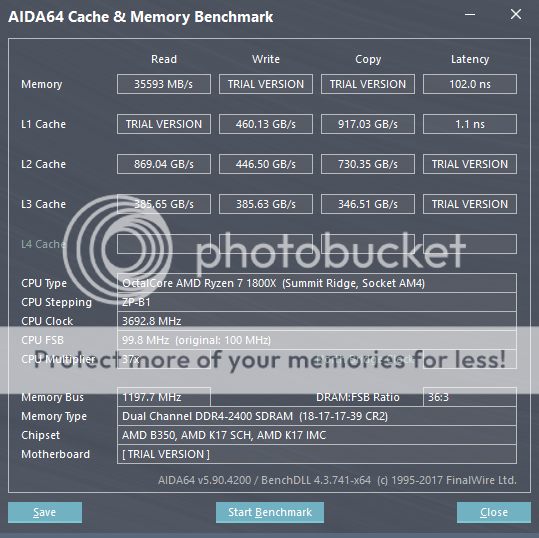
At least now properly works with XMP settings on my G.Skill single rank 8GB DDR4-2400 sticks. Check out the latency reduction from AGESA 1.0.0.4 + running at proper timings...

F5 BIOS result (102ns):
AIDA64%202400%20CL18_zpsstfkgy5g.png


F6g BIOS result (88ns):
AIDA64%202400%20CL15%20XMP_zps9v9gjqxq.png
 
Thanks for the Info IEC. I'm sticking with the release 1002 for my Asus C6H. My MSI X370 XPOWER Titanium is back with MSI on a RMA. I'll see what it does when it is returned. I really like this C6H so the MSI will probably be sold.

I did that with my TItanium, ended up selling it for $280. It's a nice board and I had no issues with it, but it's definitely overpriced (you can tell by how many features they advertise are just fluff). $200 or even $250 would have been a fair MSRP, given its competition.

The Crosshair VI Hero's has a ton of features, but it's killer feature is the AM3 bracket mount support. All motherboard manufacturers should have done that. Really happy with my C6H assuming (knock on wood) ASUS doesn't put out any brick-y BIOS'. 1001 and now 1002 have been working fine for me.
 
Last edited:
Darn no BIOS update for the lil Gigabyte mATX board yet! Can't wait to see latencies drop for me too.

Do you guys think the lower latencies will help with gaming on Ryzen?
 
Darn no BIOS update for the lil Gigabyte mATX board yet! Can't wait to see latencies drop for me too.

Do you guys think the lower latencies will help with gaming on Ryzen?
I think low 70s will be possible in the future with 3400 MT/s.
My 1700X is showing 82-83 ns on with Tridentz 3200 right now. with the 6 ns BIOS + higher frequencies low 70s ns should be achievable.
But I think Ryzen benefit more from increased RAM speed than reduced latency.
I saw a couple of videos on YouTube with 3400 running, albeit with some tweaking.
There are many videos related to fps gains due to increased RAM speed.

This video is one of many. However I dont game myself. Last game I played was Uncharted 4 on PS4. Before that Witcher 3. I have Rise of Tomb Raider on my PS4 but I watched too many videos on Youtube that I dont wanna play anymore since I know how the game will turn out to be.


EDIT: sorry I saw the question about specifically about the latencies and most likely it is wont help much. none of my applications I am developing benefit from reduced latency. 😀😀
 
Last edited:
I was already achieving 75ns with DDR4-3200 CL14 on AGESA 1.0.0.3 (on the $79 MSI B350M Gaming Pro) so it should be ~68-69ns once I get my hands on the next MSI BIOS update incorporating 1.0.0.4.
 
One thing I forgot to mention about the Gigabyte Gaming 3 board and failed memory settings - it will turn on --> train memory --> turn off and do this cycle four times, then finally boot on the 5th cycle. If it goes longer than that you need to power off and reset CMOS. It's a little disconcerting at first until you get used to it.
 
So you have your SSD's plugged into Sata port 0 and 1? Are those Asata 0 and 1 or the stardard Sata 0 and 1? I also dont have any M.2 drives to test out just standard Sata SSD's and a DVDr Drive.Also where in the world did you get Bios F6D? I am only seeing F5 on Gigabytes main site. I noticed that F5b got pulled and is no longer available.

BIOS F6G is out for the AB350-GAMING-3

http://forum.gigabyte.us/thread/886/am4-beta-bios-thread

On the MOBO, the CPU SATA ports are marked as "ASATA0, and ASATA1" - the CHIPSET ports are marked as "SATA0,SATA1,SATA2,SATA3)". I have my three SSD's and one BluRaySATA writer plugged into the chipset ports (SATA0,SATA1,SATA2,SATA3). I'm not using the ASATA0, and ASATA1 ports - additionally, got it disabled on the BIOS as well.

If one ends up using an M2 NVME drive that's PCIeX4 - then the ASATA0, and ASATA1 can't be used, my opinion is that if you have up to 4 SATA drives, then might as well use the SATA0,1,2,3 ports then disable the ASATA ports on the BIOS. There's no speed difference between the two sets of ports.
 
The $100 off at Mircocenter is for the 1700X not the 1700, The 1700 with cooler only has $50 off. Still a pretty good deal. Personally, I am just going to wait and see where the cards fall with all of this. My current machine is an i5-6600K with a Z170 board. If MC drops the price of the i7-7700k, I think I will drop one of those CPUs in and call it a day. If not, I will have to really think about selling what I have to go to AMD again. AMD has not been a primary rig build for almost 10 years now. The last one was a the venable Barton XP 2500 OCed to 3200 spec with an ATI X850XT Pro AGP card. That system still ran as a secondary rig for almost another 2 o 3 years before part out. I digress.
 
So im meeting some resistance from my CPU @4ghz.

Ive tried Upping voltage to 1.35v in bios with level 2 LLC(reported as 1.38-1.4 by cpuZ), and the SOC voltage to 1v, and that gets it stable enough to game and benchmark but crashes after 10-20 min of prime95 in place Large FFT's(passes hour of prime95 blend no crashes). It also ups total system power consumption up another 20w over 3.9Ghz, and temps a few degrees C.

I think if i throw more voltage at it i can probably get it to 4 - 4.1 but it seems like this is just not worth it over 3.9Ghz. Its a pretty steep wall @4ghz with these I think thats my chips sweet spot, it likes it at 3.9Ghz.

Im probably going to leave it at 3.9Ghz for now, and focus on getting my ram as fast as possible once my new ram shows up, which will hopefully be 3600Mhz samsung B dies, should be a week or two and ill have em in my hands to see if i got lucky in the dd4 lottery lol.


Ill wait for a few more bios's over next months and then after i get my new ram dialed in ill give it another go on the CPU, but for now, 3.9Ghz it is.
 
Interesting observation concerning the pdf vendors memory support list document dated 29th March 2017 for the Asus B350 Plus Motherboard. The document now states that the motherboard has official support for a number of 3600 - 4133mhz memory kits, although the supported speed are currently 2133 - 2400mhz. Although a few 3000, and 3200mhz rated Kits from Corsair and Team are running closer to their optimal speeds with DOCP (XMP) settings at 1.35 - 1.40v in the Bios (Version 0513 23/3/2017). So at least the manufacturer Asus is attempting to clarify and update the memory supported list on a regular basis.

From a personal point of view I've found Bios 0513 provided the ability to tighten and improve the timings on my Crucial Ballistix Sport 2400mhz from 16-16-16-39 1.2v to 14-14-14-36 1.25v without crashing. So a modest overclock.
 
Dumb question but how do I find AIDA 64 memory and cache benchmark thing? I can only find the aida 64 extreme trial or whatever.
 
Last edited:
Back
Top