
DrMrLordX
Lifer
@lightmanek
Is CPU-z showing 1.4v, or is that just the value you've got plugged in to Ryzen Master/the UEFI?
Is CPU-z showing 1.4v, or is that just the value you've got plugged in to Ryzen Master/the UEFI?


It's set volts, real under load is more like 1.387v@lightmanek
Is CPU-z showing 1.4v, or is that just the value you've got plugged in to Ryzen Master/the UEFI?
The highest I will go is 1.344v. 1.387v isn't that much higher, but you still might want to back that down a little. Really 1.325v during heavy loads is as high as people should normally get.

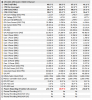
How bad are these power reporting deviation numbers?
View attachment 25528
That's after being at full load; clocks at stock and a little undervolting. For you personally, would that be enough to warrant a different motherboard, or am I misreading it? The minimum is always 88.9% after fully loading the CPU.
Thanks for your advice but think you are confusing 24/7 with my suicide runs for fun. 🙂
Oh okay. Carry on then!
@JoeRambo
I found that even voltage offsets messed up that value. So yeah it has to be bone stock. It also helps to use an external power meter or (even better) voltmeter to gain some perspective on what kind of power is really in use.

| Windows 10 | |
| AMD TRX40 | Yes |
| AMD X570 | Yes |
| AMD B550 | Yes |
| AMD X399 | Yes |
| AMD X470 | Yes |
| AMD B450 | Yes |
| AMD X370 | Yes |
| AMD B350 | Yes |
| AMD A320 | Yes |
| Windows 10 | |
| 1st/2nd/3rd Gen AMD Ryzen™ Threadripper™ Processors | Yes |
| 3rd Gen AMD Ryzen™ Desktop Processors | Yes |
| AMD Ryzen™ Desktop Processors with Radeon™ Graphics | Yes |
| AMD Ryzen™ Mobile Processors with Radeon™ Graphics | Yes |
| 1st/2nd Gen AMD Ryzen™ Desktop Processors | Yes |
| 2nd Gen AMD Ryzen™ Desktop Processors | Yes |
| 7th Gen AMD A-Series Processor | Yes |
| Driver Name | Previous Version | New Version | Change Details |
| AMD Ryzen Power Plan | 5.0.0.0 | 6.0.0.3 | AMD Ryzen 4000 G-Series Desktop Processor Support Added |
| AMD PCI Device Driver | 1.0.0.80 | No Change | |
| AMD I2C Driver | 1.2.0.102 | No Change | |
| AMD UART Driver | 1.2.0.106 | 1.2.0.112 | Added DFx support. BSOD 133 fixed |
| AMD GPIO2 Driver | 2.2.0.126 | 2.2.0.130 | New program support added |
| PT GPIO Driver | 2.0.1.0 | No Change | |
| AMD PSP Driver | 4.13.0.0 | No Change | |
| AMD IOV Driver | 1.2.0.48 | 1.2.0.49 | Device support list updated |
| AMD SMBUS Driver | 5.12.0.38 | No Change | |
| AMD AS4 ACPI Driver | 1.2.0.46 | No Change | |
| AMD SFH I2C Driver | 1.0.0.86 | No Change | |
| AMD USB Filter Driver | 2.1.11.304 | No Change | |
| AMD SFH Driver | 1.0.0.303 | 1.0.0.308 | BSOD and Controller Yellow Bang fixed for few Notebook SKU’s |
| AMD CIR Driver | 3.2.4.135 | No Change | |
| AMD MicroPEP Driver | 1.0.26.0 | 1.0.27.0 | New program support added |


 www.asus.com

Anyone know what changed in the latest AMD micro code. I see:
Update AM4 AGESA combo V2 PI 1.0.8.0
Ryzen 4000(Vermeer) support added.
I already have this bios downloaded for my board but won't be installing it until tomorrow.
Other than what is listed in the changelog I hasn't really found anything else on the internet about it. I tend to search multiple forums for issues whenever they drop a new bios version before loading them.
If you use Ryzen Master you'll need to uninstall it and reinstall it after every uEFI update.
i've never had to do this for previous bios updates whaat is the reason for this?

How odd. Especially with Zen3 coming out in a few months. Though I suppose software optimizations for Zen2 should carry over pretty well to Zen3.
Isn't that the Dram Calculator guy? It does say that it's his global project and nothing about being AMD's.


