• We’re currently investigating an issue related to the forum theme and styling that is impacting page layout and visual formatting. The problem has been identified, and we are actively working on a resolution. There is no impact to user data or functionality, this is strictly a front-end display issue. We’ll post an update once the fix has been deployed. Thanks for your patience while we get this sorted.

Discussion Zen 5 Builders thread

Page 17 - Seeking answers? Join the AnandTech community: where nearly half-a-million members share solutions and discuss the latest tech.
My aspirations are a little higher than 6000C28. I got a 6600C32 2x48GB M-die kit with hopes of getting 6400 going, 6600 if I get a lucky sample IMC. I'm sure if I was settling for 6000 it would be a piece of cake, I've run 6200C28 tuned on a 2x32 kit and 6400C30 tuned on a 2x16GB kit previously.
Mine are a 6400C32 2x48GB kit. But my 7800X3D didn't want to go higher than 6200 and it wasn't worth it to me to have to go up on vSOC from the 1.1Vish needed for 6000C28. I haven't tried more recently but will probably do so once I get my 9800X3D and flash to the latest AGESA. I know it should be able to do at least 6100 C28...
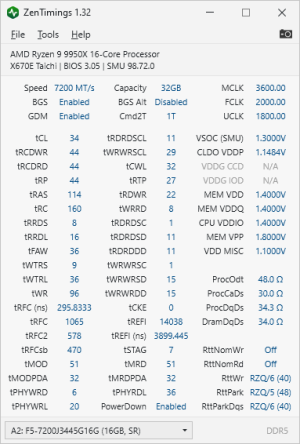
I can't get the settings easily, but I got 7200 memory, and used XMP defaults, and it says its running 1:1. I put a picture somewhere in this thread I think. Have to go now.
I sincerely doubt 7200 is running 1:1. 1:1 != 1T
 
Mine are a 6400C32 2x48GB kit. But my 7800X3D didn't want to go higher than 6200 and it wasn't worth it to me to have to go up on vSOC from the 1.1Vish needed for 6000C28. I haven't tried more recently but will probably do so once I get my 9800X3D and flash to the latest AGESA. I know it should be able to do at least 6100 C28...

I sincerely doubt 7200 is running 1:1. 1:1 != 1T
did you see my screenshot linked in the last post ? What there says 1:2 ? That says Cmd2T is 1T

1731116778051.png
 
Mine are a 6400C32 2x48GB kit. But my 7800X3D didn't want to go higher than 6200 and it wasn't worth it to me to have to go up on vSOC from the 1.1Vish needed for 6000C28. I haven't tried more recently but will probably do so once I get my 9800X3D and flash to the latest AGESA. I know it should be able to do at least 6100 C28...
My 7950X3D won't run 2x2R dimms over 6200 either. Just judging from people's luck with Zen 5, there's a pretty good chance 6400 will be doable, with 6600 being the golden sample stretch goal.
 
Sorry Mark, you just confirmed you are running 1:2.

Even the best golden samples require tuning to hit 6600 at 1:1 UCLK to MCLK and most can't even hit that speed 1:1 - you were claiming something that is just impossible by claiming 7200 1:1.
You see why. It said 1T in that screen. I did not look at the UCLK.

At least I provided what I THOUGHT was proof. That I proved myself wrong. 🙂
 
My aspirations are a little higher than 6000C28. I got a 6600C32 2x48GB M-die kit with hopes of getting 6400 going, 6600 if I get a lucky sample IMC. I'm sure if I was settling for 6000 it would be a piece of cake, I've run 6200C28 tuned on a 2x32 kit and 6400C30 tuned on a 2x16GB kit previously.
Tried 6400 with my 9800X3D. It's the same story as with my prior 7950X3D and 7950X. It will boot into Windows and run benchmarks but will fall flat on its face the first minute of running stress tests. I know the memory can do it since it's a 2x32GB 6400 rated kit. Trying even the loosest of timings doesn't help.

A tightened up CL28 6120 seems to be the sweet spot for me. I'm currently running asynchronous. 104MHz x 54 (max multiplier with PBO +200MHz) for CPU and 102MHz x 60 for memory and everything else. FCLK is set to 2133MHz in BIOS for 2175MHz total FCLK.

My memory is dual rank which makes it harder.
 
Last edited:
You see why. It said 1T in that screen. I did not look at the UCLK.

At least I provided what I THOUGHT was proof. That I proved myself wrong. 🙂
Generally, the only instance where a 1:2 memory divider performs better than a 6000+ 1:1 divider is when you can get the memory to 8000+. And only if that 8000+ memory is running with decent timings. Otherwise, 1:1 6000+ is going to outperform it. 7200 1:2 will easily be outperformed by any 6000+ 1:1 setting. Probably even outperformed by a 1:1 5600 memory setting.
 
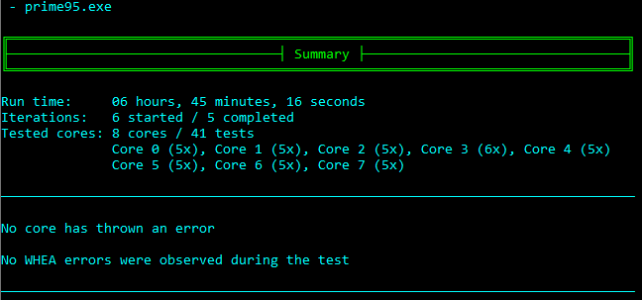
Ran nearly 7 hours of CoreCycler with the 104MHz base and +200MHz PBO. Prime95 SSE large FFT single thread 10 minutes per core.

1731122275454.png

The thread load on the tested core showed the clock being around 5450MHz. It boosted back up to 5642MHz between runs. Tempted to try higher speeds but I think I'll do some gaming tonight to truly test it. Will most likely run CoreCycler with y-chruncher overnight.
 
What version chipset drivers are you all using? Amds website the version says 6.10.17.152. On Asus website the version says 6.10.22.027. (for my x870e Strix)
 
Question for everyone. Do you rigorously only purchase QVL memory or do you have other metrics along with the manufacturer QVL recommendation that factors into your memory purchasing decision?
Motherboard makers don't have time to qualify every single kit. I go for quality brands like G.Skill, Teamgroup and Kingston. Crucial isn't that great anymore. Corsair I don't trust after one of their expensive DDR3 kits gave me hell of trouble. Avoid kits with Samsung chips, even from the three quality brands I mentioned. Anyway, that's just what I have learned on my own. Others may have different experiences. I'm sure that someone like Det0x may have much better advice to offer.
 
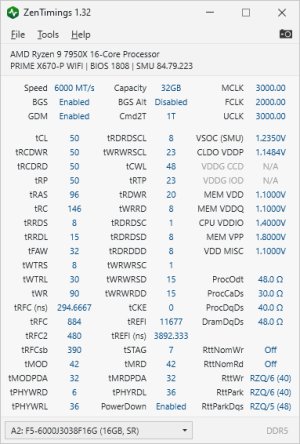
ZenTimings screenshot please 🙂
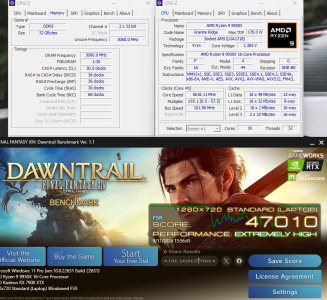
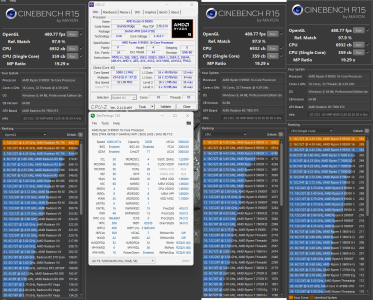
Not to just post timings, my R15 scores are best ever thanks to new memory 😀
CineR15 CPU-Z   PBO 222W 102FCLK -20CO1 -30CO2 A-Die 6120 tweaked.png

As expected, best gain is in OpenGL test, but there are consistent gains in ST and MT tests as well.
Not shown here, but CB R24 gained about 60 points and now I'm scoring 2480 MT at these clocks.
 
Late to the party with doing a basic matx build...any reason to wait for the B 850 series at this point?
 
While on B650 first M.2 slot might be PCIe.5.0 (instead of PCIe 4.0), on B850 it must be PCIe 5.0. The other specifications are the same.

Because of the higher number (850>650), this could make B650 boards slightly cheaper (this is my speculation; not guaranteed to happen).

So you might want to wait for B850 boards in order to get a cheaper B650 board.

Or for the potential motherboard design improvements (like a new revision of a certain motherboard) at similar prices.
 
While on B650 first M.2 slot might be PCIe.5.0 (instead of PCIe 4.0), on B850 it must be PCIe 5.0. The other specifications are the same.

Because of the higher number (850>650), this could make B650 boards slightly cheaper (this is my speculation; not guaranteed to happen).

So you might want to wait for B850 boards in order to get a cheaper B650 board.

Or for the potential motherboard design improvements (like a new revision of a certain motherboard) at similar prices.
X870 = B650E > B850 > B650
With USB4 mandatory for X870.
 
I picked up a 9800x3D from Microcenter on Friday. They said they've sold a ton of them, though they still seem to have plenty in stock. I've read that people are trying to scalp them for $1,500, which is just nuts. It's going to replace a 7800x3D in my main system and I'm going to use that to build a new PC in the basement.

I get the impression it may be a while before we see a new gaming champion. I really hope Zen 6 has a good memory controller.
 
Back
Top