• We’re currently investigating an issue related to the forum theme and styling that is impacting page layout and visual formatting. The problem has been identified, and we are actively working on a resolution. There is no impact to user data or functionality, this is strictly a front-end display issue. We’ll post an update once the fix has been deployed. Thanks for your patience while we get this sorted.

Discussion Zen 5 Builders thread

Page 5 - Seeking answers? Join the AnandTech community: where nearly half-a-million members share solutions and discuss the latest tech.
4060 8GB and RX 7600 since those would "force" the gamers to stick to 1080p.
Then the results would be flat as you would run in GPU bottleneck so weaker CPUs would have relatively more time to do their work, and faster ones would sit there idling waiting for gpu to finish?

Might be reviewers could do separate "Benchmark this PC config" to show realistic HW pairings, or remove gaming workloads from CPU reviewes all together. But using GPU bottlenecked runs for CPU comparisons doesn't seem very informative.
 
Then the results would be flat as you would run in GPU bottleneck so weaker CPUs would have relatively more time to do their work, and faster ones would sit there idling waiting for gpu to finish?

Might be reviewers could do separate "Benchmark this PC config" to show realistic HW pairings, or remove gaming workloads from CPU reviewes all together. But using GPU bottlenecked runs for CPU comparisons doesn't seem very informative.

Hardware Unboxed has done them, many channels do them

 
I'd like to know the relevance of game results using a $1000 graphics card at 1080p low.

I'm not dismissing the results, but they have very little value being completely unrealistic configuration. Maybe proving that this improvement in lows happens on an actual configuration someone in real life would use would have more value.
Also higher settings can cause heavier cpu load. 1080p low settings doesn't really make sense to me. At that point high end cards are barely doing anything so results can be unpredictable.
 
I don't think we're arguing that 1080p is a pointless resolution to benchmark. Only that benchmarking 1080P low on a $1000 graphics card is unrealistic and has little value.

So how do you suggest the reviewers do it then? What GPU should they all use?
Ideally they'd use graphics settings an end user is likely to use for the hardware they are testing. It's not about which graphics card they've chosen to use as much as it is using settings no one with that CPU + GPU would be using.
 
Also higher settings can cause heavier cpu load. 1080p low settings doesn't really make sense to me. At that point high end cards are barely doing anything so results can be unpredictable.
Gaming performance is all about GPU and Monitor size.

If you have 30in+ monitor, you really want 1440p or the pixels are on the large side.

If you have smaller 1080p is fine.

4090 with a 27in, 1080p monitor is stupid for the average Joe - also the biggest gap between processors, keep going down on GPU and you might have a zen3 be the same as a zen5 or RPL (am I right AMD PR?)

At 1440p+ any midrange or over CPU from this side of 2020 will be fine, even with a 4090. Any GPU lesser than a 4090 and I doubt you can tell a 7800x3d or 14900k from a 5600X ( well the 14900k might crash...)

Just change your CPU every 3-4 generations and or 2-3 GPUs and you will be fine for gaming.
 
Ideally they'd use graphics settings an end user is likely to use for the hardware they are testing. It's not about which graphics card they've chosen to use as much as it is using settings no one with that CPU + GPU would be using.
And that's exactly why they do it the way they do. They pick a configuration and stick with it so you can see the difference in CPU performance. If you choose lower settings and a lower tier GPU for a 9600X, then based on this I should choose higher settings and a higher tier GPU for the 7800x3d. But then I can't compare the two.
 
The system is ready, waiting on a 9950x
heatsink on the left. video cards is asus 4090
Just like me with my gaming rig, the 9700X can't come soon enough!

On another note; just wanted to mention that in HWiNFO there is a field called Presentmon.exe that measures the data for waiting times between cpu & gpu, when I had my lapped 7600X under air cooling in there with custom PBO setting & playing at 3440x1440 Ultra settings in Starfield with no mods (creation engine 2) anywhere between 7ms & 11ms were average waiting times for both cpu & gpu - this is with adrenalin 26.6.1 drivers.
 
1080p is where most gamers are. Did you forget that the 3rd world citizens are the majority of gamers? Why Geforce 3060/4060 is the most owned videocard by gamers?
 
Last edited:
Qhd high refresh rate is only possible with the 7900xt($800) price and 7900 xtx($1400) can do. Minimal pay in my country: $300.
I do plan on testing with the 5500XT 8GB, 480 8GB, and 480 4GB; I had a 1660Ti but I gave that to my brother as a Christmas gift last year 🙂

I know they won't hit the 240Hz panel limit, but, that is one less "bottleneck" for people to nitpick.
 
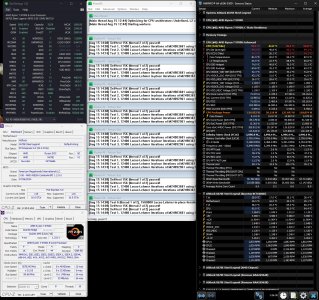
Ok, here we go, first stress test run with the traditional prime 95, latest version blend test. A good way for gaming stability to be established imo & test my cpu mounting efforts. 🙂
All auto bios settings except PBO enabled, FLCK - 2000 & EXPO profile enabled for my ram.
Kind of surprised at the average power draw cause' AVX512 disabled (useless for gaming atm) 118w average as opposed to the publicised 88w max TDP. Perhaps Asrock have implemented agesa 1.2.0.0 in a custom way for Zen 5?
CPU mounted with Thermal Grizzlies thermal guard & Kryonaut extreme TIM, system enclosed in Antec P8 case.
1.15Hrs_PBO_EXPO_Blend - Copy.jpg
 
Ok, here we go, first stress test run with the traditional prime 95, latest version blend test. A good way for gaming stability to be established imo & test my cpu mounting efforts. 🙂
All auto bios settings except PBO enabled, FLCK - 2000 & EXPO profile enabled for my ram.
Kind of surprised at the average power draw cause' AVX512 disabled (useless for gaming atm) 118w average as opposed to the publicised 88w max TDP. Perhaps Asrock have implemented agesa 1.2.0.0 in a custom way for Zen 5?
CPU mounted with Thermal Grizzlies thermal guard & Kryonaut extreme TIM, system enclosed in Antec P8 case.
View attachment 105355

You're stress testing a CPU? What are you doing? People don't do that anymore.

They generally put in overclock settings they saw in a YouTube video or some website and never test. When they get reboots, blue screens, or application crashes they blame either Windows or drivers.
 
You're stress testing a CPU? What are you doing? People don't do that anymore.

They generally put in overclock settings they saw in a YouTube video or some website and never test. When they get reboots, blue screens, or application crashes they blame either Windows or drivers.
Oh, how terrible of me, I'm such a bad guy.... 😵
Just plug n' play eh? understand sir! 😎
 
Ok, here we go, first stress test run with the traditional prime 95, latest version blend test. A good way for gaming stability to be established imo & test my cpu mounting efforts. 🙂
All auto bios settings except PBO enabled, FLCK - 2000 & EXPO profile enabled for my ram.
Kind of surprised at the average power draw cause' AVX512 disabled (useless for gaming atm) 118w average as opposed to the publicised 88w max TDP. Perhaps Asrock have implemented agesa 1.2.0.0 in a custom way for Zen 5?
CPU mounted with Thermal Grizzlies thermal guard & Kryonaut extreme TIM, system enclosed in Antec P8 case.
View attachment 105355

88W PPT is without PBO enabled.
 
Back
Top