• We’re currently investigating an issue related to the forum theme and styling that is impacting page layout and visual formatting. The problem has been identified, and we are actively working on a resolution. There is no impact to user data or functionality, this is strictly a front-end display issue. We’ll post an update once the fix has been deployed. Thanks for your patience while we get this sorted.

Question Zen 4 builders thread

Page 82 - Seeking answers? Join the AnandTech community: where nearly half-a-million members share solutions and discuss the latest tech.
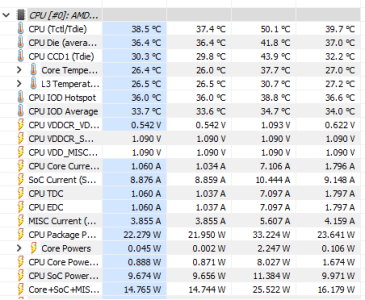
But what is your PPT at idle?

22W at "idle". Keep in mind this is with HWiNFO64 itself using anywhere from 0.3%-0.6% of CPU time per task manager so true idle likely a smidge lower.

1682211976665.png

CPU - auto voltage, no PBO, no change to PPT
vSOC 1.1V (1.090V sensor read)
MC voltage: 1.35V (I might try to optimize this next)
vDIMM 1.35V

Secondary monitor on iGPU.
 
Since there's no appreciable difference for gaming between 5600 CL28 and 6000 CL30 I wonder if I could get away with lower volts for everything including 1.00V for SOC and 1.25V MC/IOD with 5600 CL28...
 
Since there's no appreciable difference for gaming between 5600 CL28 and 6000 CL30 I wonder if I could get away with lower volts for everything including 1.00V for SOC and 1.25V MC/IOD with 5600 CL28...
What have you been using to validate stability with lower vsoc?
 
The boot time seems to be 14-15s
What is in your setup (BIOS version included)? I don't see them in your sig ...


The last AMD that I've used was Opteron 180. The last I've seen was Phenom (II X6?). The cloud naturally offers EPYCs, but that is less tangible. Still not sure what to order next, but within AM5 selection is likely.
 
Last edited:
What is in your setup (BIOS version included)? I don't see them in your sig ...


The last AMD that I've used was Opteron 180. The last I've seen was Phenom (II X6?). The cloud naturally offers EPYCs, but that is less tangible. Still not sure what to order next, but within AM5 selection is likely.
ASRock X670E RS pro bios v 1.18
 
I have the 7950x3d but i need motherboard and ram for motherboard i have see the asrock x670e taichi msi x670e ace and x670e master and for the ram i don’t know klevv tforce Delta or tcreate!!!!
 
22W at "idle". Keep in mind this is with HWiNFO64 itself using anywhere from 0.3%-0.6% of CPU time per task manager so true idle likely a smidge lower.

View attachment 79838

CPU - auto voltage, no PBO, no change to PPT
vSOC 1.1V (1.090V sensor read)
MC voltage: 1.35V (I might try to optimize this next)
vDIMM 1.35V

Secondary monitor on iGPU.
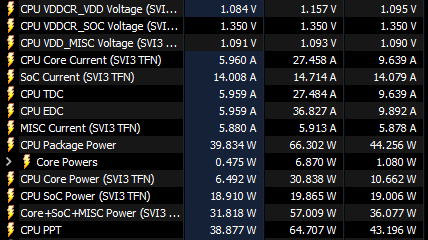
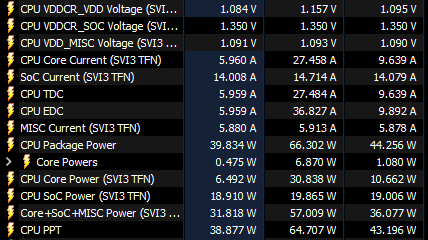
Yeah I'm not even close to that on mine. Granted I have PBO enabled, CO -30, manual PPT set to 100W. But idle should be idle, right? Guess not. My SOC voltage at "idle" is 1.350. Unfortunately I have not found a place in the MSI BIOS to change it.

Idle Power.png
 
Which software do you use for fan control?
I'm using L-connect since I have the Lian Li fans. It controls RGB as well. There is a free software that gets a lot of praise since it allows you to use both CPU and GPU temp (separately or by using the max of either one) to set fan speed.

 
It looks like Newegg is now offering the Jedi Survivor code with the 7800X3D. I would have waited for this if I knew, as I wanted to pick up this game anyway, but returning mine and buying a new one is too much of a hassle now.
 
It looks like Newegg is now offering the Jedi Survivor code with the 7800X3D. I would have waited for this if I knew, as I wanted to pick up this game anyway, but returning mine and buying a new one is too much of a hassle now.
Just buy a new one and return it under the original order. You don't even have to uninstall anything.
 
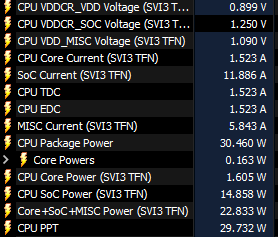
OK, I found the setting for SOC. I set it to override and manually set it. Lowest I seem to be able to go is 1.25V I can do 1.20V with XMP enabled only, but if I chance anything else it doesn't want to post. I need to play around some more and see if I can get it lower and also make sure it is stable. Idle power dropped from ~39W down to ~30W. Idle temps are about the same which is interesting, thought for sure they would drop a little.

Idle Power.png


New idle power.png
 
Just buy a new one and return it under the original order. You don't even have to uninstall anything.
Actually I just went to the chat on the Microcenter site and asked them about this. I gave them the ref number from the receipt and they sent me the code by email right away. Great service from them.

You need an AMD account to use the code and have to download an AMD app to verify you own the CPU. I think it's an EA platform key and only becomes available when the game releases. A bit of a hassle, but well worth it for a game I wanted anyway.
 
Last edited:
Actually I just went to the chat on the Microcenter site and asked them about this. I gave them the ref number from the receipt and they sent me the code by email right away. Great service from them.

You need an AMD account to use the code and have to download an AMD app to verify you own the CPU. I think it's an EA platform key and only becomes available when the game releases. A bit of a hassle, but well worth it for a game I wanted anyway.

you just saved me 70 bucks, thanks

microcenter rules
 
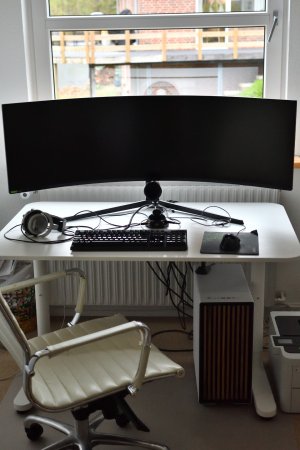
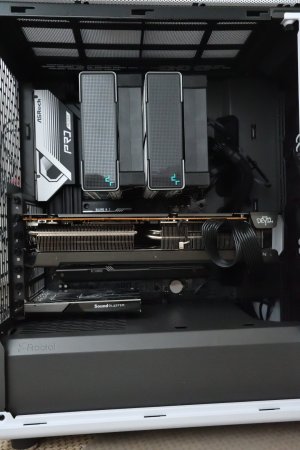
what is a d t cooler? Very nice setup. I am not sure how I feel about there being no curtains with a view of your neighbour's balcony. what is that net under the desk?
 
I've never heard of deep cool. are they new? or an old brand that's come back again? I've bought the same few brands forever. very out of the loop with heatsinks.
 
I've never heard of deep cool. are they new? or an old brand that's come back again? I've bought the same few brands forever. very out of the loop with heatsinks.
No idea on history. I just searched one day, found this, and its been working great !
 
Back
Top