It only shows how much AMD lacks in R&D and why they quit making high end gpus.Hexus review here:
http://hexus.net/tech/reviews/graphics/95359-sapphire-radeon-rx-460-nitro-4gb/?page=5
Seems to trade blows with the GTX950.


Who bought/is buying a Radeon RX 470 or RX 460?
Page 5 - Seeking answers? Join the AnandTech community: where nearly half-a-million members share solutions and discuss the latest tech.
You are using an out of date browser. It may not display this or other websites correctly.
You should upgrade or use an alternative browser.
You should upgrade or use an alternative browser.

WilliamM2
Diamond Member
- Jun 14, 2012
- 3,029
- 896
- 136
Did anyone notice that almost all the 460's listed on Newegg require a 6 pin connector? And here I was hoping for a fanless version, since it's supposed to be a low power card...
At this point the 950 w/o connector looks like a better low power choice, but I hate the nvidia control panel color setting.
At this point the 950 w/o connector looks like a better low power choice, but I hate the nvidia control panel color setting.
Launch day is a terrible time to introduce fanless cards in my opinion. Almost all reviews are primarily focused on performance more than anything else. A fanless, referenced clocked, strict TDP limit RX 460 is going to get slaughtered in performance and performance/$ by the factory overclocked RX 460 (and older) cards.Did anyone notice that almost all the 460's listed on Newegg require a 6 pin connector? And here I was hoping for a fanless version, since it's supposed to be a low power card...
At this point the 950 w/o connector looks like a better low power choice, but I hate the nvidia control panel color setting.
WilliamM2
Diamond Member
- Jun 14, 2012
- 3,029
- 896
- 136
Launch day is a terrible time to introduce fanless cards in my opinion. Almost all reviews are primarily focused on performance more than anything else. A fanless, referenced clocked, strict TDP limit RX 460 is going to get slaughtered in performance and performance/$ by the factory overclocked RX 460 (and older) cards.
Didn't expect a fanless version right on release day. But I did expect to see most of them NOT requiring a 6 pin power connector.
I figured most factory overclocked RX 460 cards would have 6-pin connectors ever since Lisa Su held up a reference RX 460 which included the space and contacts necessary to attach a 6-pin connector (see top right of card).Didn't expect a fanless version right on release day. But I did expect to see most of them NOT requiring a 6 pin power connector.


WilliamM2
Diamond Member
- Jun 14, 2012
- 3,029
- 896
- 136
To anyone else choosing between the RX460 and the GTX950, Newegg made up my mind this morning.
Asus GTX 950 Mini with no power connector for $94.19 after promo code and rebate.
http://www.newegg.com/Product/Product.aspx?Item=9SIA2F84972500
Most the reviews I am reading show the 950 being fairly even with the RX 460 OC versions that DO require a 6 pin connector.
Asus GTX 950 Mini with no power connector for $94.19 after promo code and rebate.
http://www.newegg.com/Product/Product.aspx?Item=9SIA2F84972500
Most the reviews I am reading show the 950 being fairly even with the RX 460 OC versions that DO require a 6 pin connector.
Last edited:
Got my Sapphire Radeon RX 470 Platinum OC card yesterday. It is as close to a theoretical reference RX 470 as you can get. Power consumption is very close to AMD's official 120W TDP and the cooler is just a shiny version of the RX 480 stock cooler. Boost clock is 1216 MHz, barely more than AMD's official RX 470 boost clock of 1206 MHz.
Looking at the results below it is easy to see why AMD didn't launch a reference RX 470. The poor efficiency of Polaris 10 compared to Pascal cripples RX 470 performance at the advertised TDP of 120W. When the GPU is under full gaming load in the 3DMark Fire Strike Stress test, the average GPU frequency was only 1008 MHz. The temperature was also rather high, topping out around 82C. The test was taken using stock WattMan settings, using an enclosed case, at an ambient temp was 76F/24.4C. Test system CPU is an i3-6100. 3DMark Fire Strike graphics score is 10,588.
Most RX 470 buyers will probably want to look at higher performing RX 470 alternatives with better cooling and higher power consumption. At $171 this card was still a good buy compared to what most GTX 960 and Radeon 380/380X cards were selling for a couple months ago.
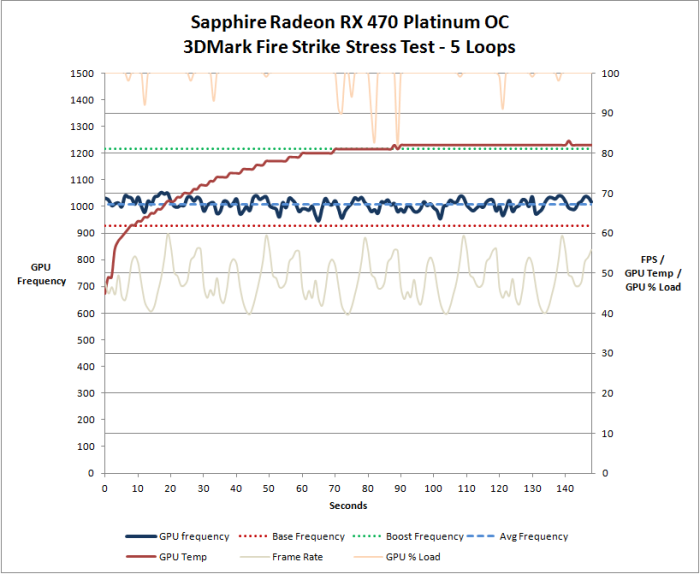
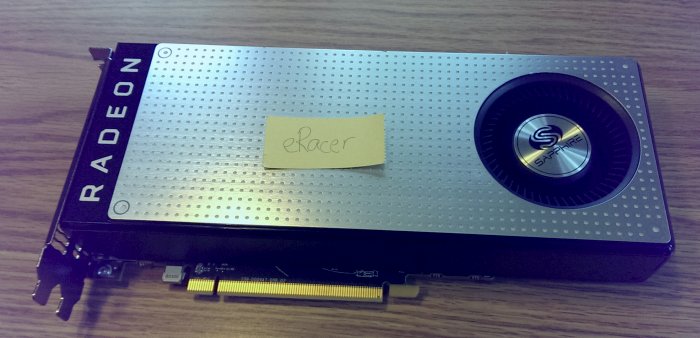
Looking at the results below it is easy to see why AMD didn't launch a reference RX 470. The poor efficiency of Polaris 10 compared to Pascal cripples RX 470 performance at the advertised TDP of 120W. When the GPU is under full gaming load in the 3DMark Fire Strike Stress test, the average GPU frequency was only 1008 MHz. The temperature was also rather high, topping out around 82C. The test was taken using stock WattMan settings, using an enclosed case, at an ambient temp was 76F/24.4C. Test system CPU is an i3-6100. 3DMark Fire Strike graphics score is 10,588.
Most RX 470 buyers will probably want to look at higher performing RX 470 alternatives with better cooling and higher power consumption. At $171 this card was still a good buy compared to what most GTX 960 and Radeon 380/380X cards were selling for a couple months ago.
Looks to be power limited. If it was temperature limited the GPU frequency should have decreased toward the end of the test. Doesn't look like there is much headroom on the temps, though, if the power limit was removed. I'll try run a few benchmarks over the next couple days with some custom WattMan settings.is that power or temp limited? I mean if you set the fan to a high RPM does it still behave like that (the clock)?
Last edited:
RX 460 over GTX 950
1. Smaller size than GTX 950
2. <75W TDP
3. $99
4. Pair with cheap ($100-120) FreeSync monitor for much better gaming experience than GTX 950
5. DP 1.3/1.4
6. Better DX-12/Vulkan perf
Cheap 1080p FreeSync monitors
http://pcpartpicker.com/products/monitor/#A=2&r=192001080&X=0,21888
Wow... I didn't realize there were Freesync displays out there as cheap as $120... that's not even a premium over basic bob monitors at all.
Cheap AMD card plus very cheap Freesync (not more than $30-40 premium) really does change the low end market. nVidia needs to support Adaptive Sync asap because that's a game changer at that price point
Looks to be power limited. If it was temperature limited the GPU frequency should have decreased toward the end of the test. Doesn't look like there is much headroom on the temps, though, if the power limit was removed. I'll try run a few benchmarks over the next couple days with some custom WattMan settings.
makes sense, they are just trying hard to hit the 120W tdp with this card
my only experience with AMD reference blowers was the 5850 and that card came with some pretty low default RPM settings, if you are not to bothered by the noise to much you can probably make a custom fan profile and get way lower temps, giving you the room to up the power limit, that's what I probably would do with it, but I always game with a headphone...
Unfortunately the stock cooler can't keep the temps under control when the power limit is raised. Below is a test comparing stock settings, power limit at +25 (auto fan upper limit at 2800 RPM), and power limit +25 with manual fan upper limit of 4000 RPM.if you are not to bothered by the noise to much you can probably make a custom fan profile and get way lower temps, giving you the room to up the power limit, that's what I probably would do with it, but I always game with a headphone...
Simply raising the power limit to +25 increased the average GPU frequency 99 MHz (1008 MHz stock vs. 1107 MHz overclocked). GPU temperature topped out at 89C and was probably temperature limited toward the end of the test as the GPU frequency fell a bit toward the end. Increasing the fan to 4000 RPM only helped improve average GPU frequency 12 MHz (1107 MHz at stock RPM vs. 1119 MHz at 4000 RPM). At 4000 RPM the fan noise was rather annoying with the computer near my feet, and would have been more annoying had it been sitting at head level on the desk. The stock cooler just isn't very good. With a better cooler this card should run near its advertised boost clock at reasonable temperatures and volume.
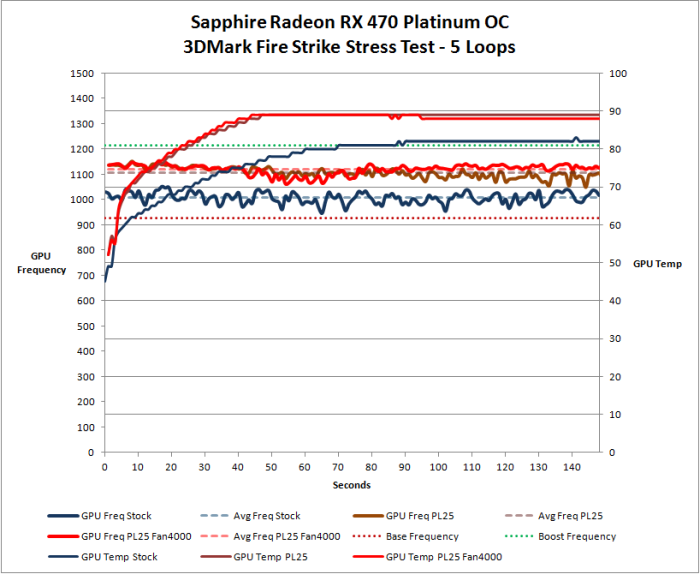
Stock = blue lines
Power Limit +25 = brownish lines
Power Limit +25 and 4000 RPM fan = red lines
GPU frequency = thick solid lines
GPU temp = thin solid lines
Finalnight
Golden Member
- Mar 5, 2003
- 1,891
- 1
- 76

FalconHorse
Member
- Jul 22, 2011
- 168
- 0
- 76
I've had my MSI Gaming X 470 for a few days now, but I don't have any intensive games to test it with. 
Wow... I didn't realize there were Freesync displays out there as cheap as $120... that's not even a premium over basic bob monitors at all.
Cheap AMD card plus very cheap Freesync (not more than $30-40 premium) really does change the low end market. nVidia needs to support Adaptive Sync asap because that's a game changer at that price point
Yup. Given the cheapness of Freesync, AMD cards are a great deal at $250 price point and lower. There are a wide variety of Freesync out there from 1920x1080 TN panels up to 3840x2160 IPS panels. If someone were building a budget to mid-range gaming computer right now, I'd only recommend an AMD card and a 1080 Freesync monitor within the buyer's budget. Quibbling over a 480 being $10-30 over MSRP is silly when I can get a Freesync monitor for $150-300 less than Gsync.
I picked up a LG 27UD88 - 3840x2160 resolution - for a measly $600. The monitor is fantastic - great color accuracy, tiny bezel, USB 3 & C connectivity - the Freesync is a nice (almost) free bonus. Yes, 4k monitors have narrow ranges (40-60Hz, though I hacked mine to 32-60Hz), but, like i said, the Freesync is a nice bonus. And it's about $300 cheaper than a Gsync monitor would be.
I got the SAPPHIRE NITRO+ Radeon RX 470 100407NT+8GOCL yesterday and have been optimizing the performance with Wattman. I went from a Firestrike / Time Spy score of 10,020 / 3,795 to 10,293 / 3,842. I also had an MSI RX 480 briefly that I ran some benchmarks on before I used it in another build. It's score were 10,285 / 3,955.

RussianSensation
Elite Member
- Sep 5, 2003
- 19,458
- 765
- 126
Yup. Given the cheapness of Freesync, AMD cards are a great deal at $250 price point and lower. There are a wide variety of Freesync out there from 1920x1080 TN panels up to 3840x2160 IPS panels. If someone were building a budget to mid-range gaming computer right now, I'd only recommend an AMD card and a 1080 Freesync monitor within the buyer's budget. Quibbling over a 480 being $10-30 over MSRP is silly when I can get a Freesync monitor for $150-300 less than Gsync.
I picked up a LG 27UD88 - 3840x2160 resolution - for a measly $600. The monitor is fantastic - great color accuracy, tiny bezel, USB 3 & C connectivity - the Freesync is a nice (almost) free bonus. Yes, 4k monitors have narrow ranges (40-60Hz, though I hacked mine to 32-60Hz), but, like i said, the Freesync is a nice bonus. And it's about $300 cheaper than a Gsync monitor would be.
And check this BOMB out:
QNIX UHD3216R REAL 4K 32 inch 3840X2160 AMD FreeSync IPS Technology LED Monitor, 1 Year Warranty
= $420
NV literally has nothing to compete with a 32" IPS FreeSync monitor for $420 USD and will not for a long time. We are at most 2 years (1 generation) away from a $400-450 GPU matching or beating the Titan XP which means 4K 60Hz is within reach.

Arachnotronic
Lifer
- Mar 10, 2006
- 11,715
- 2,012
- 126
And check this BOMB out:
QNIX UHD3216R REAL 4K 32 inch 3840X2160 AMD FreeSync IPS Technology LED Monitor, 1 Year Warranty
= $420

NV literally has nothing to compete with a 32" IPS FreeSync monitor for $420 USD and will not for a long time. We are at most 2 years (1 generation) away from a $400-450 GPU matching or beating the Titan XP which means 4K 60Hz is within reach.
5ms GtG response time is OK but not great; any input lag measurements?
I know you like to extol the virtues of FreeSync vs Gsync from a cost perspective, but you seem to leave out the fact that the Gsync based monitors tend to be much nicer in gamer specific ways.
Take for example the FreeSync MG279Q vs the more expensive GSync PG279Q. Both IPS, both 144hz native panels (although PG can go to 165hz).
At $599 vs $799 seems like that Gsync tax is huge right? Yeah, until you look at reviews that test the nitty gritty of both like this one: http://www.tftcentral.co.uk/reviews/asus_rog_swift_pg279q.htm
Total display lag is slightly but measurably lower on the Gsync version than the FreeSync version. Response time averages just 5ms with max of 6.5ms on the Gsync version while the FreeSync version averages 6.5ms with spikes to 15ms.
Anyway, bottom line is that the display manufacturers know that Gsync is perceived as a more premium solution targeted at people who are willing to spend more. So the Gsync panels are more expensive but they tend to be higher quality in ways beyond just the inherent differences of Gsync vs FreeSync.
If you want the best quality solution, you go Gsync. If you want to save a couple of bucks but give up quality, go FreeSync. Sadly AMD is doing a poor job supporting those who buy into FreeSync by being >6 months late to the game with a high end FinFet GPU.

poofyhairguy
Lifer
- Nov 20, 2005
- 14,612
- 318
- 126
Sadly AMD is doing a poor job supporting those who buy into FreeSync by being >6 months late to the game with a high end FinFet GPU.
Not if all they want is a cheap monitor (which means 1080p).
Arachnotronic
Lifer
- Mar 10, 2006
- 11,715
- 2,012
- 126
Not if all they want is a cheap monitor (which means 1080p).
True, if you are on a budget and want the goodness of variable refresh, AMD/FreeSync is a good option.
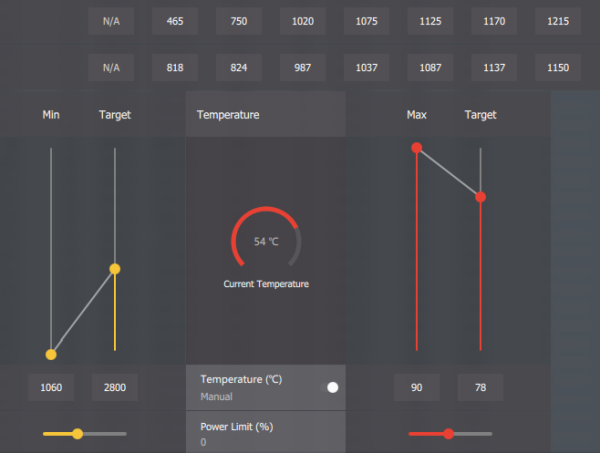
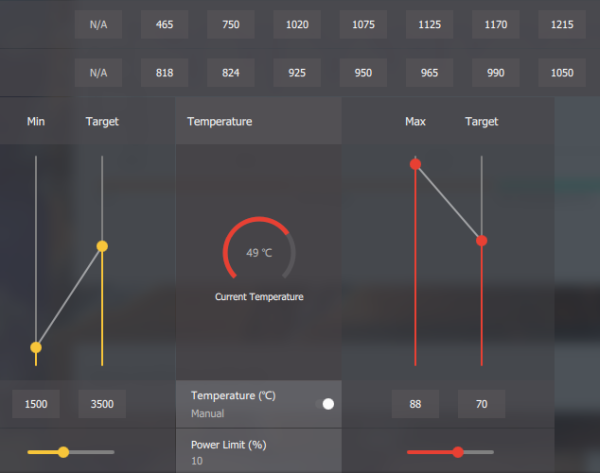
Worked on undervolting / overclocking the Sapphire Radeon RX 470 Platinum OC tonight. Best results I could achieve in the 3DMark Fire Strike Stress Test are below. Undervolting helped boost frequency by keeping power consumption and temperatures in check. Power limit of +10 seemed to work best when undervolting. Higher power limits would cause the card to become temperature limited within a few minutes and cause the frequency to decrease slightly as a result.
I chose 3500 RPM as the OC fan speed as noise is still tolerable for me at this level, but too annoying at higher RPMs.
Average stock frequency: 1004 MHz
Average OC frequency: 1162 MHz (15.7% increase)
Average stock FPS: 47.9
Average OC FPS: 54.7 (14.1% increase)
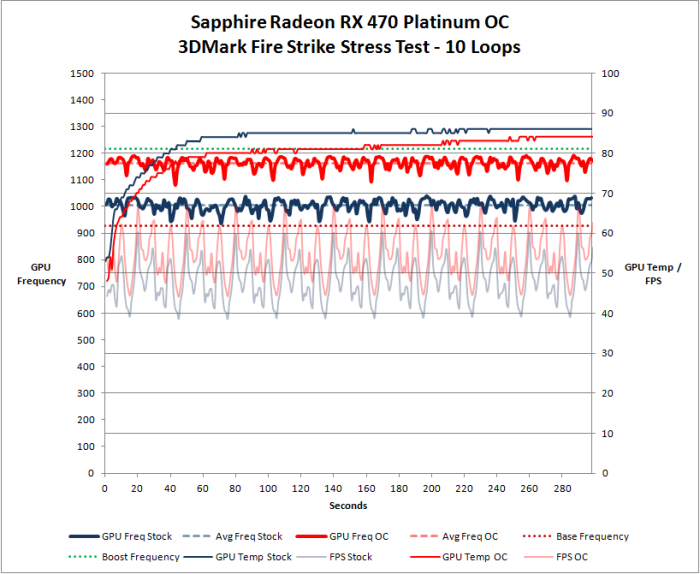
Stock WattMan settings:
OC WattMan settings:
I chose 3500 RPM as the OC fan speed as noise is still tolerable for me at this level, but too annoying at higher RPMs.
Average stock frequency: 1004 MHz
Average OC frequency: 1162 MHz (15.7% increase)
Average stock FPS: 47.9
Average OC FPS: 54.7 (14.1% increase)
Stock WattMan settings:
OC WattMan settings:
poofyhairguy
Lifer
- Nov 20, 2005
- 14,612
- 318
- 126
The whole game of PC games is simple right now. If you want high end and can pay for it Nvidia+gsync. If you want low-end but cheap go AMD+freesync.
But there are always respectable reasons for exceptions, like those who care a lot about power consumption or a guy like me who will use a GPU more for Madvr than games. Speaking of which my 480 is much better than the 970 was at the task. I kinda want a 470 just for another HTPC because I bet it can do 4K upscaling as easy as the 480.
But there are always respectable reasons for exceptions, like those who care a lot about power consumption or a guy like me who will use a GPU more for Madvr than games. Speaking of which my 480 is much better than the 970 was at the task. I kinda want a 470 just for another HTPC because I bet it can do 4K upscaling as easy as the 480.

TRENDING THREADS
-
 Discussion Zen 5 Speculation (EPYC Turin and Strix Point/Granite Ridge - Ryzen 9000)
- Started by DisEnchantment
- Replies: 25K
-
Discussion Intel Meteor, Arrow, Lunar & Panther Lakes + WCL Discussion Threads
- Started by Tigerick
- Replies: 24K
-
 Discussion Intel current and future Lakes & Rapids thread
- Started by TheF34RChannel
- Replies: 23K
-

-


AnandTech is part of Future plc, an international media group and leading digital publisher. Visit our corporate site.
© Future Publishing Limited Quay House, The Ambury, Bath BA1 1UA. All rights reserved. England and Wales company registration number 2008885.
 Facebook
 Twitter