plonialmoni
Junior Member
Also, one more thing... Could VRMs get too hot with this? Will a ASRock gaming professional i7 be good enough in that department?
Sent from my VS986 using Tapatalk
Sent from my VS986 using Tapatalk

Hi, I guess I'm a latecomer to this thread, I have an ASRock x99 motherboard. Is all I need to do is flash one of the modded BIOSes for it to get an E5 2690 v3 at max turbo on all cores, or are there more steps I'm missing? I have adequate cooling (240mm water) by the way.
Hi, I guess I'm a latecomer to this thread, I have an ASRock x99 motherboard. Is all I need to do is flash one of the modded BIOSes for it to get an E5 2690 v3 at max turbo on all cores, or are there more steps I'm missing? I have adequate cooling (240mm water) by the way.
If you have load line calibration in your bios it should help stabilize your cpu


@MOF so many different variables for throttling one just has to do what one can. The biggest problem I personally see is with AVX2, this seems to operate via a VID table, that is it seems to try and keep core VID below a certain value and what ratio one gets is tied to that.
Here's an example running just one thread with affinity set, just a simply loop, no AVX2. Turbo in yellow.
CPU runs at it's max 30x ratio
Now see what happens when we run just one AVX2 opcode once every 50 milliseconds on one thread of each core.
Power control gets ready for AVX2 by slamming down the ratio to 25x and from what I am led to believe leaves it there for 1 millisecond after the last AVX2 instruction before returning to the top ratio, 30x in this case. The irony in this case is that it doesn't even run the AVX2 as 256bit but needs a warm up period. Some info on Agner Fog's blog, for instance http://www.agner.org/optimize/blog/read.php?i=387. Limit reasons shows EDP logged, with the event being logged in yellow.
Now if we run the same opcode once every millisecond
Ratio is now dropping to 25x and we can see EDP continually active (red) and only using 37W of power, no current or power throttling..
I will prepare some custom bioses in the Next days. Let me know which board exactly and which efi.


Here: https://yadi.sk/d/ZGu0BU3X3LXubCDoes anyone have a copy of the v3x2_vcc.efi by @randir that does not undervolt? The original link is long dead, but the -50mV version works great for me, alas not fully stable.
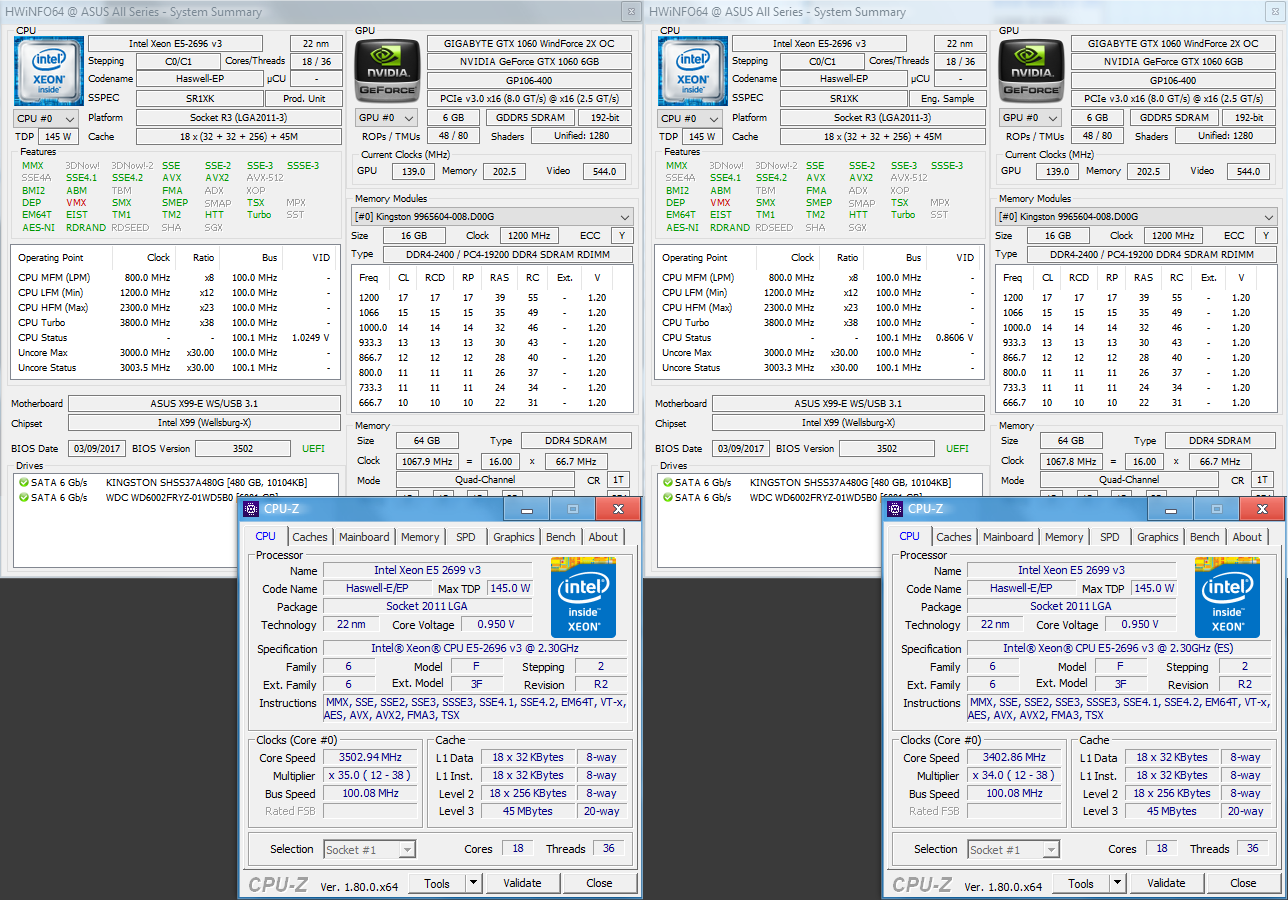

So I should use the QGN7 as CPU0, that is to install it into the right hand side socket? Is that correct?You're supposed to use the newer CPU as the bootstrap processor, but that rule is enforced by the UEFI. I believe mixing QS C0 and QS C1 Haswell-EP cpus would work, but definitely not the B-step ES2s with the QS's.
So I should use the QGN7 as CPU0, that is to install it into the right hand side socket? Is that correct?
Awesome I'm excited, fixed lol
- Thanks to dufus and C_payne share their sourse code,if they don't share the sourse code,we will not have E5V3 tubor boost,thanks agian!
- I had made most MOD BIOS for in need.
- MOD BIOS TOOLS AND FFS FILES:http://pan.baidu.com/s/1qY0THJQ;
- ASrock X99 mainboard wiht FFS MOD BIOS:http://pan.baidu.com/s/1nvG8Zfr ;
- MSI X99 mainboard wiht FFS MOD BIOS:http://pan.baidu.com/s/1jHHeOvG;
- EVGA X99 mainboard wiht FFS MOD BIOS:http://pan.baidu.com/s/1slJOHDr;
- ASUS X99 mainboard removed Microcode MOD BIOS:http://pan.baidu.com/s/1kVFrs15;
- GIGABYTE X99 mainboard removed Microcode MOD BIOS:http://pan.baidu.com/s/1hsGJrSS;
- GIGABYTE X99 mainboard wiht FFS MOD BIOS:http://pan.baidu.com/s/1i5OOHbn
- GIGABYTE NEED EFIFLASH MOD TOOL to flash the MOD BIOS:http://pan.baidu.com/s/1dEUMqDN
I do not know how you did, but this time, bios for asrock oc formula, it works charming, greeting
- Thanks to dufus and C_payne share their sourse code,if they don't share the sourse code,we will not have E5V3 tubor boost,thanks again!
- I had made most MOD BIOS for in need.
- MOD BIOS TOOLS AND FFS FILES:http://pan.baidu.com/s/1qY0THJQ;
- ASrock X99 mainboard wiht FFS MOD BIOS:http://pan.baidu.com/s/1nvG8Zfr ;
- MSI X99 mainboard wiht FFS MOD BIOS:http://pan.baidu.com/s/1jHHeOvG;
- EVGA X99 mainboard wiht FFS MOD BIOS:http://pan.baidu.com/s/1slJOHDr;
- ASUS X99 mainboard removed Microcode MOD BIOS:http://pan.baidu.com/s/1kVFrs15;
- GIGABYTE X99 mainboard removed Microcode MOD BIOS:http://pan.baidu.com/s/1hsGJrSS;
- GIGABYTE X99 mainboard wiht FFS MOD BIOS:http://pan.baidu.com/s/1i5OOHbn
- GIGABYTE NEED EFIFLASH MOD TOOL to flash the MOD BIOS:http://pan.baidu.com/s/1dEUMqDN
- Thanks to dufus and C_payne share their sourse code,if they don't share the sourse code,we will not have E5V3 tubor boost,thanks again!
- I had made most MOD BIOS for in need.
- MOD BIOS TOOLS AND FFS FILES:http://pan.baidu.com/s/1qY0THJQ;
- ASrock X99 mainboard wiht FFS MOD BIOS:http://pan.baidu.com/s/1nvG8Zfr ;
- MSI X99 mainboard wiht FFS MOD BIOS:http://pan.baidu.com/s/1jHHeOvG;
- EVGA X99 mainboard wiht FFS MOD BIOS:http://pan.baidu.com/s/1slJOHDr;
- ASUS X99 mainboard removed Microcode MOD BIOS:http://pan.baidu.com/s/1kVFrs15;
- GIGABYTE X99 mainboard removed Microcode MOD BIOS:http://pan.baidu.com/s/1hsGJrSS;
- GIGABYTE X99 mainboard wiht FFS MOD BIOS:http://pan.baidu.com/s/1i5OOHbn
- GIGABYTE NEED EFIFLASH MOD TOOL to flash the MOD BIOS:http://pan.baidu.com/s/1dEUMqDN
mmtool and uefitool are both needing.Use hex edit and uefi tool to replace the original bios microcode with the mod microcode.And use mmtool to add the ffs to the DexCore and save,than use the UBU to recheck the bios.Can you provide some instruction on how to use the tool? are you using mmtool or uefitool? Where should I insert a ffs file to? And, I should work on the BIOS file that has mcode removed, correct? Thanks!
I will wtite a teaching and upload,because I can't upload the pictures on Anandtech.I do not know how you did, but this time, bios for asrock oc formula, it works charming, greeting
..............................................................................................
I'm coming back after 2 hours of continuous use with Handbrake and I mean it's slipping and going round this time, its perfect, like original bios