• We’re currently investigating an issue related to the forum theme and styling that is impacting page layout and visual formatting. The problem has been identified, and we are actively working on a resolution. There is no impact to user data or functionality, this is strictly a front-end display issue. We’ll post an update once the fix has been deployed. Thanks for your patience while we get this sorted.

Swiftkey 3 Out

Page 2 - Seeking answers? Join the AnandTech community: where nearly half-a-million members share solutions and discuss the latest tech.
Installed it.

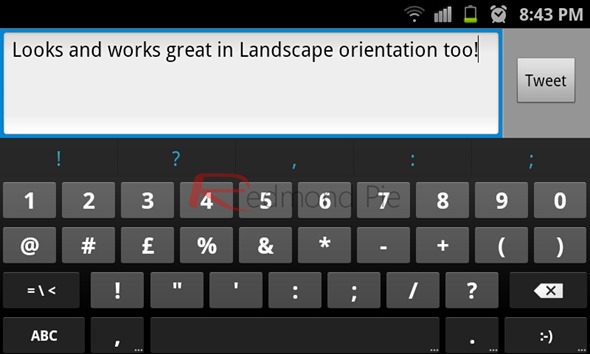
Okay, Swiftkey's stupid number layout on the keyboard is what I hated. It's stupid and unconventional. I don't really care if they have science showing its better or whatever. There's a STANDARD keyboard layout and that is what people expect. If they want to introduce a new style, that's fine, but allow people to switch to a normal number layout. And for those of you saying press and hold in the normal qwerty screen, that defeats the purpose of rapid typing no?
 
Installed it.

Okay, Swiftkey's stupid number layout on the keyboard is what I hated. It's stupid and unconventional. I don't really care if they have science showing its better or whatever. There's a STANDARD keyboard layout and that is what people expect. If they want to introduce a new style, that's fine, but allow people to switch to a normal number layout. And for those of you saying press and hold in the normal qwerty screen, that defeats the purpose of rapid typing no?

Thing is I expect the number layout to be like the swiftkey layout, in short its just what you are you are used to.

Dont like it? Dont use it, its not an issue to argue over. Theres lots of choice out there.
 
but the fastest typing has been done on an iPhone.

The best keyboard is one that taps well. That is SmartKeyboad Pro.

Who cares about the prediction of Swiftkey. If you're fast enough in typing, you won't care as its much faster for you to just keep punching keys.

How you figure? With Swiftkey for a lot of longer words I type 2-3 of the letters and bang spacebar to autofill the rest. There's no way it's faster to type 8 letters over 2 or 3 + 1 press of the space bar. I can get away with 2 for many of the words I frequently use in text messages. And for a good 40% I'll get a string of predictions that only require me to press the space bar. Also the auto add space between word feature in version 3 is pretty bad ass.

the iPhone's by far the best stock keyboard, I can hit about 80wpm using one. Hell I'd even take it over any replacement Android one outside of Swiftkey, and I've tried every single one that's on the market. But I'm sometimes at around 120wpm with swiftkey.
 
Last edited:
Installed it.

Okay, Swiftkey's stupid number layout on the keyboard is what I hated. It's stupid and unconventional. I don't really care if they have science showing its better or whatever. There's a STANDARD keyboard layout and that is what people expect. If they want to introduce a new style, that's fine, but allow people to switch to a normal number layout. And for those of you saying press and hold in the normal qwerty screen, that defeats the purpose of rapid typing no?

Numpad style is much much faster than across the row style. Stop smoking whatwever you're smoking. Its extremely conventional and has been a standard for years.
 
Numpad style is much much faster than across the row style. Stop smoking whatwever you're smoking. Its extremely conventional and has been a standard for years.

I'm picturing him with a data entry job where he's using the home row number keys.

Who needs 10 key? 😀
 
Am I the only one that hates this new version? The suggestions and auto-changes are horrible. I just typed "cant" and instead of changing it to "can't" like it used to, it corrected it to "can." Same thing with a number of other contractions.

Previous version worked so much better. Also, I'm unable to remove some words (at random seemingly) from its dictionary.
They borked something in the release because the VIP beta has no problems with contractions, but now I'm finding that typing "im" gets you "im" and not the "I'm" it always did before. I tried to log into my VIP Forum, but borked my password and am locked out for the moment.

I'm sure they're getting lit up HARD over it. When the initial beta omitted the comma key, the ability to set long-press duration and one other thing that slips my mind and it was as if a kitten was being killed with every button press and they put that back in. It's a major PITA, but I'm sure they'll fix it. I just can't believe they suddenly forgot that this was something it did before.

I LOVE SwiftKey and have used it since the very first version (if you buy any version, you get lifetime upgrades - SwiftKey became SwiftKey X and now SwiftKey 3) and I advise all my Android-buying friends to get it. This is annoying that they made a goof here.

And BTW, the iPhone doesn't set a record in anything but being hype and sucking money off of morons.
 
Numpad style is much much faster than across the row style. Stop smoking whatwever you're smoking. Its extremely conventional and has been a standard for years.
SC20111121-204342.jpg

UIKeyboardTypeNumbersAndPunctuation.png


windows-phone-7-numeric-keyboard-layout%5B7%5D.png

hp-touchpad-keyboard.jpg


So conventional its the standard style of webOS, Android, iOS, Windows Phone.

Look, when you type on a phone you're using your thumbs. Similarly when you type on a computer keyboard, you typically have your hands in roughly home position. The numbers up top are more accessible. When you use the numpad, that's typically when you have a lot of data entry/numbers to put in. However to type that I was born on June 25, I can bet you most people will reach up and hit 25 on the number row.

In mobile phone typing, a lot of people are switching over and typing a few numbers. It's been a standard in the mobile industry to use top row number. What's worse is Swiftkey makes it all on the left side, so you're only using your left thumb.
 
...

So conventional its the standard style of webOS, Android, iOS, Windows Phone.

Look, when you type on a phone you're using your thumbs. Similarly when you type on a computer keyboard, you typically have your hands in roughly home position. The numbers up top are more accessible. When you use the numpad, that's typically when you have a lot of data entry/numbers to put in. However to type that I was born on June 25, I can bet you most people will reach up and hit 25 on the number row.

In mobile phone typing, a lot of people are switching over and typing a few numbers. It's been a standard in the mobile industry to use top row number. What's worse is Swiftkey makes it all on the left side, so you're only using your left thumb.

But still many people can type faster and prefer the swiftkey style.

Whats your point here? That theres only one type of keyboard everyone should use?
 
But still many people can type faster and prefer the swiftkey style.

Whats your point here? That theres only one type of keyboard everyone should use?
No. Did you not read what I said? It's fine if they want to introduce that new form of numbers out there, but there should be an option to toggle it on or off. Just like Swiftkey you can rely on prediction or you can be a fast typer and rely on autocorrect. In swype you can swype or tap. There's a conventional way of typing that practically every smartphone user is used to.

Is it really that it's faster or have you just gotten used to the layout that it's no longer an issue?

It's not just numbers. It's symbols and the layout of those are affected severely too. the standard way is to lay them out in a row kinda like iOS, Android stock keyboards do.
 
Last edited:
Oh man, you really do not know when to let go and will bitch about things that simply don't matter when you use the damn phone for more than 20 seconds at a time and your brain figures it out.

I have NEVER liked the row across the top standard. It's retarded. Hell, Qwerty as a keyboard arrangement is already extremely inefficient for typing. Just because YOU don't like it means jack shit. Switftkey is what it is advertised, a way to efficiently type as fast as possible. Putting numbers in a pad style is much faster because of the fact they're closer together requiring less hand movement.

And for convention, stop being stupid. Just because the stock keyboards across platforms use a row style doens't mean that the numpad isn't a convention. Of course it is, its the reason the word "numpad" even exists in the first place. There are multiple standards, and numpad is one of them.

So why not, just switch over to another keyboard instead of bitching. This isn't some massive feature that was taken out or anything. it's a matter of numpad preference and yet you are having some sort of shitstorm about it. Just because YOU don't like a more efficient style of typing doesn't mean the rest of us have to conform to your hideously inefficient preferences.
 
No. Did you not read what I said? It's fine if they want to introduce that new form of numbers out there, but there should be an option to toggle it on or off.

You can, just use a different keyboard if you dont like it.

Just like Swiftkey you can rely on prediction or you can be a fast typer and rely on autocorrect. In swype you can swype or tap. There's a conventional way of typing that practically every smartphone user is used to.

No there isnt, if there was we wouldnt be having this discussion.

Is it really that it's faster or have you just gotten used to the layout that it's no longer an issue?

Isnt that what you have done with the preference for the numbers on the top row?
 
Am I the only one that hates this new version? The suggestions and auto-changes are horrible. I just typed "cant" and instead of changing it to "can't" like it used to, it corrected it to "can." Same thing with a number of other contractions.

Previous version worked so much better. Also, I'm unable to remove some words (at random seemingly) from its dictionary.

Edit: Geez, "we'd" isn't even a presented option for typing "wed." Seriously, Swiftkey? Seriously?
Something's wrong with your install. I bought X a while ago so just upgraded to 3 to check it out- not seeing any of the issues you mention. cant becomes can't, first suggestion for wed is we'd.

Also the thing with periods always after space (wherever I saw that mentioned): You can change that under advanced to autocomplete or prediction. My email addresses auto-complete after typing the first three characters.

I don't get the complaint with the numbers keys not being straight across on a secondary screen. (Other than, yeah, just something to bitch about.) If you want straight across numbers just long press. That is NOT any more inconvenient than having to drop into a secondary number screen just to insert the odd number here and there. That's one thing I can't stand about using any mobile keyboard without long-press keys.

Anyway, I like switching back and fourth between several keyboards- just adding this one to the rotation. Lately I've been using Thumb Keyboard or Perfect Keyboard, sometimes Multilingual keyboard depending on which device I'm on and what mood strikes me. I've stopped giving two poos which one is supposedly 'better' than all the rest- I can type fast with just about any of them.
 
Something's wrong with your install. I bought X a while ago so just upgraded to 3 to check it out- not seeing any of the issues you mention. cant becomes can't, first suggestion for wed is we'd.

...

Yeah just checked, mines working as you described as well.
 
Anyway to change the punctuation key to what it was like before with just the ? and long press !

I hate the new one having to hold and swipe for ?
 
Anyway to change the punctuation key to what it was like before with just the ? and long press !

I hate the new one having to hold and swipe for ?

Yeah this one is throwing me for a loop today. How am I supposed to get to the question mark? swipe to the right?


Edit: Oh okay I figured it out. Hold and shift it left and right as appropriate. I actually kind of like this then.
 
Yeah this one is throwing me for a loop today. How am I supposed to get to the question mark? swipe to the right?


Edit: Oh okay I figured it out. Hold and shift it left and right as appropriate. I actually kind of like this then.


😕 Just touch the . and slide your finger to the ?

Edit: Beaten by your edit.
 
😕 Just touch the . and slide your finger to the ?

Edit: Beaten by your edit.

Yeah I was chatting back and forth this afternoon when I found this so I didn't bother to really try to figure out then. Now at home reading this thread reminded me of the problem so of course I posted first and then try stuff 🙂
 
Yeah I was chatting back and forth this afternoon when I found this so I didn't bother to really try to figure out then. Now at home reading this thread reminded me of the problem so of course I posted first and then try stuff 🙂

Thats what the forum is for. :biggrin:
 
I find myself actually wishing that pressing space multiple times would insert multiple predictions in a row. I use the predictions fairly frequently but if you press space twice in a row it inserts a period. If you turn off Quick Period functionality it just inserts more spaces instead.
 
If you're having a problem with contractions like I was, try updating your language packs like this:

1. Open SwiftKey 3 from the apps menu.

2. Select Languages and Layouts.

3. Press the Menu button and select Update languages.

4. Press the Update button by your language pack and after the update, things should be much better.

Got this from the SwiftKey VIP forum and it appears to have solved my problem.
 
If you're having a problem with contractions like I was, try updating your language packs like this:

1. Open SwiftKey 3 from the apps menu.

2. Select Languages and Layouts.

3. Press the Menu button and select Update languages.

4. Press the Update button by your language pack and after the update, things should be much better.

Got this from the SwiftKey VIP forum and it appears to have solved my problem.

Thanks. That solved my contraction problem. And the update added several new languages including Korean. I was never huge fan of SwiftKey but it's growing on me.
 
If you're having a problem with contractions like I was, try updating your language packs like this:

1. Open SwiftKey 3 from the apps menu.

2. Select Languages and Layouts.

3. Press the Menu button and select Update languages.

4. Press the Update button by your language pack and after the update, things should be much better.

Got this from the SwiftKey VIP forum and it appears to have solved my problem.

It seems they updated and fixed this problem today.
 
Back
Top