• We’re currently investigating an issue related to the forum theme and styling that is impacting page layout and visual formatting. The problem has been identified, and we are actively working on a resolution. There is no impact to user data or functionality, this is strictly a front-end display issue. We’ll post an update once the fix has been deployed. Thanks for your patience while we get this sorted.

Question SK hynix Platinum P41 2TB SSD Write speed dropped by half

Page 5 - Seeking answers? Join the AnandTech community: where nearly half-a-million members share solutions and discuss the latest tech.
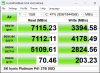
Only about 4TB written to the SSD so far, when I first got it, the performance was:
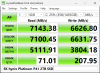
SK hynix Platinum P41 2TB SSD.png

Now, the write has dropped by about half:
CrystalDiskMark_20230212154139.png

the only difference which I think was different is I was on Windows 11 21H1 when I benchmarked it the first time and now I am on the latest 22H2. The read speeds are the same. What gives?

PS: I even tried using the Samsung NVMe modded drive but that didn't change the write speeds.
Antivirus is disabled while taking the test

Laptop specs are in my signature
 
Is Solidigm/SKH even staying in the consumer market anymore? There are like four consumer options and three server/enterprise on Newegg. That's a vanishingly small product line for a major flash/NAND manufacturer that acquired Intel's entire SSD business?
 
Isn't Sk Hynix in Korea? I don't expect Korea to celebrate Thanksgiving 😉

Going through the process myself. Just opened the initial ticket this morning, included the amz proof of purchase with the ticket.

I suppose it's fair to ask for front/back pics of product as the rear label contains the serial number. Paying for return shipping... eh.. It is what it is. USPS parcel ground with signature should be ~$8. It automatically includes $100 insurance from usps.

@StoppedDeadInMyTracks Once you get a response, post the address they want it sent back to please. https://www.skhynix.com/company/UI-FR-CP06/#americaTitFirst shows several US addresses. My guess its going to san jose.

To retain customer loyalty, they should offer a return label. Has anyone been able to get one? At this point I will never buy another hynix (or solidgm) product.
 
Isn't Sk Hynix in Korea? I don't expect Korea to celebrate Thanksgiving 😉

Going through the process myself. Just opened the initial ticket this morning, included the amz proof of purchase with the ticket.

I suppose it's fair to ask for front/back pics of product as the rear label contains the serial number. Paying for return shipping... eh.. It is what it is. USPS parcel ground with signature should be ~$8. It automatically includes $100 insurance from usps.

@StoppedDeadInMyTracks Once you get a response, post the address they want it sent back to please. https://www.skhynix.com/company/UI-FR-CP06/#americaTitFirst shows several US addresses. My guess its going to san jose.

To retain customer loyalty, they should offer a return label. Has anyone been able to get one? At this point I will never buy another hynix (or solidgm) product.
I'm in Canada, so I doubt it will be the same.
 
btw I think the perf regression/corrosion is incremental, my drive had way worse scores than others posted here

and I guess it progressively got so slow where it just kept crashing 🤣 so cooked
 
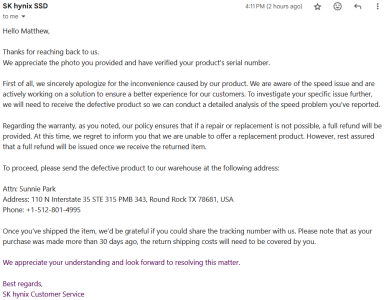
^^Thanks for posting the response. I googled the address..


This is scary. So it's going to a retail mail forwarder (thus the PMB 343 in the address). I would follow up "when is the refund received once the item is delivered to the address provided?"
 
Also, I thought you guys would like to know that after cloning my OS and sanitizing the drive, the write speeds returned to normal. This isn't simply a matter of the drive slowing down due to storage though. I have another SK Platinum P41 in another slot on my motherboard that is 80% full and doesn't exhibit the slowdown issue, which is strange to me. Can anyone confirm that they have had the write speed defect happen on a drive that isn't being used as a boot drive?
 
Also, I thought you guys would like to know that after cloning my OS and sanitizing the drive, the write speeds returned to normal. This isn't simply a matter of the drive slowing down due to storage though. I have another SK Platinum P41 in another slot on my motherboard that is 80% full and doesn't exhibit the slowdown issue, which is strange to me. Can anyone confirm that they have had the write speed defect happen on a drive that isn't being used as a boot drive?
As I understand it, the problem occurs once the pSLC cache is full. Iirc its capacity is approx 320GB (https://www.techpowerup.com/ssd-specs/sk-hynix-platinum-p41-2-tb.d587). That is, after 320GB written to the drive, you should start to see slow downs. Installing OS and programs does not use up 320GB.
 
As I understand it, the problem occurs once the pSLC cache is full. Iirc its capacity is approx 320GB (https://www.techpowerup.com/ssd-specs/sk-hynix-platinum-p41-2-tb.d587). That is, after 320GB written to the drive, you should start to see slow downs. Installing OS and programs does not use up 320GB.

very helpful to know directly. it's funny how it's a significant defect basically "openly" documented, but it passes on reviews etc without much issue.

but how is my cooked drive explained? described here https://forums.anandtech.com/thread...e-speed-dropped-by-half.2610542/post-41346076

maybe because only 200gb out of 2TB free, ~90% full when it started happening?
 
View attachment 112458


They got back to me. I'll update again once I have received my refund.

what's their email address?

the pSLC explanation above makes a lot of sense, so it's unlikely they will fix anything, it's literally by design...

"aware of speed issue and actively working on a solution" is a classic corporate nothingburger template meaning "we absolutely don't care but we have to say something and hopefully it will be forgotten"
 
I've read this (and similar) threads. For those that have this issue, I am unclear, does a trim flush the pSLC cache, or only secure erase does? If trim does then that could be a viable work around, no?
 
win 11 definitely does automatic trim on ssd, it's baked in the OS

manual trim was a thing 15 years ago when the first fast 80gb intel SSDs were released

which by the way loaded everything up truly instantaneously in mere core2duo systems... I'm not seeing this happening anymore even with top end ssd and zen 4 machines... what the hell happened along the way?
 
Digging a bit deeper into the address above. I thought it was a freight forwarder at first, now I think it's just a private mailbox as that's what that business provides.

I have a strange feeling about sending a product back to a private mail box (pmb) in a retail business in a strip mall. Reaching out to amazon, given it's been a year, they can't provide any recourse should the seller fail to actually issue the refund.

That phone number listed above also comes back to a tmobile cell number that goes directly to voicemail with no proper greeting.

Thoughts?
 
Took a chance and sent it back. Refund posted to original payment (inc tax) 2 days after delivery. Good riddance. No more hynix/solidgm drives for me.

They had 2 years to put a fw fix out and still haven't.
They don't have any firmware updates for it for anything. All manufacturers post at least 1 or 2 updates overtime!

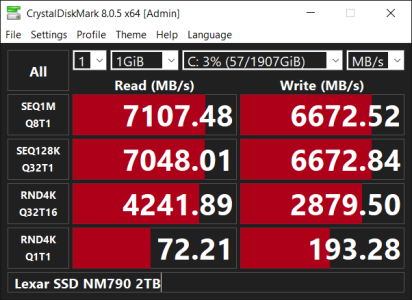
Here is a great new not so expensive but great performance SSD that I am thinking of when I need a new SSD:

Lexar NM790 SSDLexar NM790 2TB SSD.png
 
I'm quite late, but for me defragmenting the drive fixed the issue, I just built this pc this week, installed about 300gb of games on my 2TB SkHinyx SSD and started running some benchmarks. When I got to the SSD I was shocked getting only 2500MB/s, after a defragmentation later it went up to 6500MB/s, my read speed was the same (about 7300MB/s)
 
I'm quite late, but for me defragmenting the drive fixed the issue, I just built this pc this week, installed about 300gb of games on my 2TB SkHinyx SSD and started running some benchmarks. When I got to the SSD I was shocked getting only 2500MB/s, after a defragmentation later it went up to 6500MB/s, my read speed was the same (about 7300MB/s)
No.


Who remembers running Norton Speed Disk to defrag FAT16 volumes back in the day? 🙂
 
Back
Top