Seriously consider moving to Linux

Page 5 - Seeking answers? Join the AnandTech community: where nearly half-a-million members share solutions and discuss the latest tech.

Indus

Lifer
May 11, 2002
16,601
11,410
136
You had the backup on the system operational drive? :oops:

I always keep several full verified backups on separate unattached hard drives.

Perfect storm.. old 1tb hdd that had backups died recently and it's my wife's comp.

LMDE actually seems snappier.. my wife was saying her videos seemed like they were stuttering a bit and we couldn't figure it out.. which was the reason I tried pushing the update.

Sorta hilarious wonky update somehow fixes the problem by causing problems.

I always wanted her on LMDE so her system and my systems would be the same but she didn't want any changes.. oh well. :)
 
  • Like
Reactions: pcgeek11

pcgeek11

Lifer
Jun 12, 2005
22,392
5,004
136
Well yesterday I decided to try and upgrade my laptop from Mint 21.3 to 22.2.

Cleaned up the system, made sure it had all updates for Mint version 21.3. Updated and cleared the cache.Installed the Mint Upgrade Tool and let it roll...
Issues I had to deal with:
Remove some third party repositories.
Uninstall Open Audible Application.
Turn off the VPN.
Resolve some dependencies.

The upgrade to Mint 22.0 went with no issues noted in the end.

Upgraded that to Mint 22.2 and all is well. Noticed it seems faster than Mint 21.3....
 

Red Squirrel

No Lifer
May 24, 2003
71,073
13,982
126
www.anyf.ca
I'm not that familiar with Windows since I'm on Linux now but if you keep getting nagged for windows 11 upgrade and you're on 10, what happens if you say yes but it's not compatible? Will it brick the whole system or will it just say it can't upgrade and then stop nagging you?
 
Jul 27, 2020
28,173
19,208
146
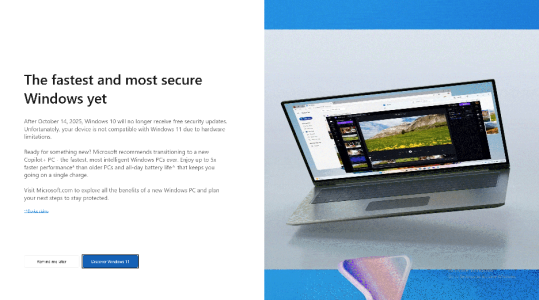
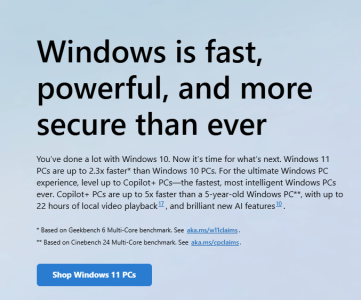
Probably say not compatible and still nag you. On my i7-4770 work PC, it told me to go to Microsoft Store for some "amazing" Win11 compatible Copilot+ machines.
 

mikeymikec

Lifer
May 19, 2011
21,406
16,615
136
I'm not that familiar with Windows since I'm on Linux now but if you keep getting nagged for windows 11 upgrade and you're on 10, what happens if you say yes but it's not compatible? Will it brick the whole system or will it just say it can't upgrade and then stop nagging you?

If it's officially not compatible then you don't get the upgrade offer in the first place.
 
  • Like
Reactions: WilliamM2
Jul 27, 2020
28,173
19,208
146
I'm not that familiar with Windows since I'm on Linux now but if you keep getting nagged for windows 11 upgrade and you're on 10, what happens if you say yes but it's not compatible? Will it brick the whole system or will it just say it can't upgrade and then stop nagging you?

Yes, I have done this. The steps that worked for me:
  1. Change EditionID to EnterpriseS
  2. Install LTSC from ISO with option for 'keep files and folders'
  3. Let windows update get current
  4. Manually install IoT key using slmgr /ipk xxxxx-xxxxx-xxxxx-xxxxx-xxxxx and slmgr /ato
  5. After reboot, edition now shows Windows 10 IoT Enterprise LTSC

You or someone else absolutely repulsed by the idea of Win11 may wanna try doing that.

Getting a Win11 LTSC 2024 key is also another option. It is basically debloated version of Windows that gets only security updates.
 
Jul 27, 2020
28,173
19,208
146
@Zepp Is there a Linux distro that installs into exFAT or NTFS partition and also uses the default Windows boot loader instead of installing its own? That would be so convenient for testing.
 

lxskllr

No Lifer
Nov 30, 2004
60,684
11,052
126
@Zepp Is there a Linux distro that installs into exFAT or NTFS partition and also uses the default Windows boot loader instead of installing its own? That would be so convenient for testing.
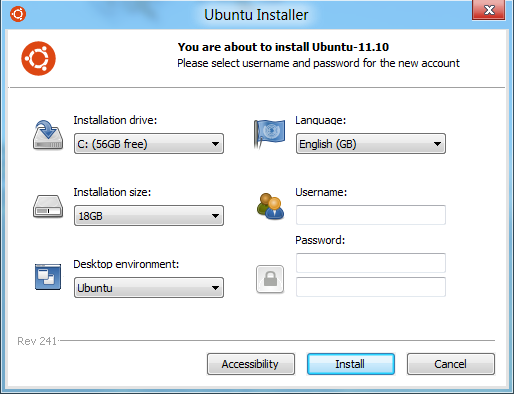
There used to be something like that. I forget what it was called, but it's been long abandoned. It was a kind of fake dual boot where ms was the base layer, and linux(ubuntu only?) ran on top. Could be (un)installed without any risk to the windows system. It took a performance hit, and wasn't 100% like a bare metal install, but it worked pretty well, and it was easy. From memory, it wasn't anymore difficult than installing a windows program.
 
  • Like
Reactions: igor_kavinski

mikeymikec

Lifer
May 19, 2011
21,406
16,615
136
@Zepp Is there a Linux distro that installs into exFAT or NTFS partition and also uses the default Windows boot loader instead of installing its own? That would be so convenient for testing.

The first time I flirted with Linux ended up being a triple boot arrangement with Windows 2000 handling boot management. To give me a boot option into Linux, I had to dd the Linux bootsector into a file and store on the rood of Win2k's C drive, then point boot.ini at that file. Windows has the BCD boot system these days, but it wouldn't surprise me if the routine has changed much.

It looks easier these days:

Instead of trying to NTFS the Linux filesystem, why not have a spare drive / USB stick with a file system both OS's can handle. It seems a lot less messy.
 
  • Like
Reactions: igor_kavinski

Red Squirrel

No Lifer
May 24, 2003
71,073
13,982
126
www.anyf.ca
If it's officially not compatible then you don't get the upgrade offer in the first place.

Turns out that might not be the case, my uncle keeps getting nagged and he wanted me to be around to do it in case something goes wrong so he came to my house the other day with his laptop since he was in town. Problem is I was not sure how to trigger the popup nag to actually show up so I was poking around the settings to see if there's an option to upgrade to 11, but then I saw a message saying it's not compatible. So I told him to just keep clicking no. Deep down I'm curious what happens if he clicks yes though... :p

I know there's ways around the TPM but it's not something I want to mess with for other people's machines in case MS ever pushes something that breaks that fix so told him to just stick with 10. I just hope MS doesn't do something to completely break win10 machines on purpose once it's past the due date.
 

mikeymikec

Lifer
May 19, 2011
21,406
16,615
136
Turns out that might not be the case, my uncle keeps getting nagged and he wanted me to be around to do it in case something goes wrong so he came to my house the other day with his laptop since he was in town. Problem is I was not sure how to trigger the popup nag to actually show up so I was poking around the settings to see if there's an option to upgrade to 11, but then I saw a message saying it's not compatible. So I told him to just keep clicking no. Deep down I'm curious what happens if he clicks yes though... :p

I know there's ways around the TPM but it's not something I want to mess with for other people's machines in case MS ever pushes something that breaks that fix so told him to just stick with 10. I just hope MS doesn't do something to completely break win10 machines on purpose once it's past the due date.

I personally have never seen a "not officially compatible" Win10 setup ever offer Win11 (out of hundreds of PCs in the last few years). I suppose it's theoretically possible (say with a funky TPM that passes the initial check but when asked to actually do something then strange things occur).

If you want to check if a PC is compatible then Win10 boxes usually end up with an app auto-installed by MS called 'PC Health Check', then when you start that there's a 'check now' button IIRC, that will tell you if it's compatible or not and will tell you if it's not then why it isn't.

If you want to see if a PC is offering Win11 as an auto update and there isn't the standard Windows Update two-arrows-chasing-each-other icon by the clock in the corner of the taskbar with a blue dot on it, then go into Settings > Windows Update and it will offer it there. One caveat here: When I've upgraded a bunch of "not compatible" AM4 CPUs to "officially compatible" CPUs, the prompt in Settings > Windows Update doesn't automatically appear, but has always appeared within a few days of making changes like swapping out a CPU / altering TPM settings to be "officially compatible". I assume therefore that the option to upgrade to Win11 runs on its own polling system which is unrelated to Windows updating / system restarts.
 
  • Like
Reactions: igor_kavinski
Jul 27, 2020
28,173
19,208
146
  • Like
Reactions: Zepp and pcgeek11

WelshBloke

Lifer
Jan 12, 2005
33,405
11,555
136
I've done it FOR YOU!

Nothing happens. It just shows a fancy screen saying PC is not compatible and then a link to Microsoft page showing off some expensive CoPilot+ laptops for you to waste your money on.
Yeah, that's what my wife gets. Lucky MS are doing a free year of security updates for Win10 right now so that's put the problem off for a year!
Wife is stuck using MS office and some translation software for work so she has to use Windows. It seems mad to trash her PC just to buy another that's going to function no faster for her but change all the things she's used to!
 
Jul 27, 2020
28,173
19,208
146
I'd rather keep everything legit on her machine, I don't need MS suddenly deactivating her install when she's halfway through a 20,000 word translation!
Another option: Use PCMover to backup MS Office and translation software. Buy Win11 cheap key. Install Linux on PC. Install VMware on Linux. Install Win11 inside VM. Restore PCMover backup to Win11 VM. Profit. The overhead is minimal. Less than 5% in most cases. Only heavy I/O sucks in VMs.
 
  • Like
Reactions: Zepp

Red Squirrel

No Lifer
May 24, 2003
71,073
13,982
126
www.anyf.ca

WelshBloke

Lifer
Jan 12, 2005
33,405
11,555
136
Another option: Use PCMover to backup MS Office and translation software. Buy Win11 cheap key. Install Linux on PC. Install VMware on Linux. Install Win11 inside VM. Restore PCMover backup to Win11 VM. Profit. The overhead is minimal. Less than 5% in most cases. Only heavy I/O sucks in VMs.
It is weird that you can run Win11 in a VM on a machine that won't run Win11 now I think about it!
 
  • Haha
Reactions: igor_kavinski

manly

Lifer
Jan 25, 2000
13,509
4,199
136
There used to be something like that. I forget what it was called, but it's been long abandoned. It was a kind of fake dual boot where ms was the base layer, and linux(ubuntu only?) ran on top. Could be (un)installed without any risk to the windows system. It took a performance hit, and wasn't 100% like a bare metal install, but it worked pretty well, and it was easy. From memory, it wasn't anymore difficult than installing a windows program.
I also forgot what it's called, so I had to look it up. It's not as old as I thought, existing from 2008 to 2013.