• We’re currently investigating an issue related to the forum theme and styling that is impacting page layout and visual formatting. The problem has been identified, and we are actively working on a resolution. There is no impact to user data or functionality, this is strictly a front-end display issue. We’ll post an update once the fix has been deployed. Thanks for your patience while we get this sorted.

Question PSU RMA?

Page 3 - Seeking answers? Join the AnandTech community: where nearly half-a-million members share solutions and discuss the latest tech.
What rubber pads? Do you mean the thermal pads on the heatsink of the motherboard? If so, yes use them, do not remove them. You do need to remove any plastic film that may be on them.

argb, the 5V one. Again, from the manual.


View attachment 107419
Rubber pads very small square shape not thetmal pads . Manual says if nvme ssd is double sided dont use and if single sided use it. I am confused i have samsung 980 1tb 2280 m
Gotcha. Some NVME drives have chips on both sides. It looks like yours does not, so leave the rubber pad.

View attachment 107422
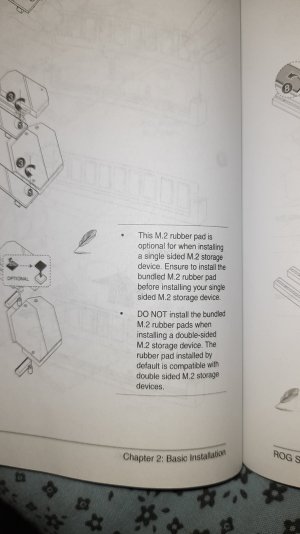
Leave? It says if single sided we need to install .
 

Attachments

  • 20240912_225351.jpg
    20240912_225351.jpg
    283.4 KB · Views: 10
In my first M.2 build I forgot to install the pads and I could see the drive flexing a bit beneath the heatsink that the board came with. As you say, probably not the end of the world but it probably inhibited cooling a bit.
Will it just stick or what? Where exactly do i place it i have 2280
 
40 also do i have to argb and rgb extention cable?
I know very little about RGB, sorry. Re temps - one more check I'd make is to trawl the BIOS and make sure that there's no processor overclocking going on. I don't know the foibles of that particular processor, but a quick google suggests that your load temps are higher than expected. Hopefully someone here knows that processor well enough to advise what to expect.
 
Can you help with overclocking i9 10900k on asus z490f strix
If you're already having trouble with your processor hitting 100C then overclocking is the last thing that I would be thinking about in your place.

In general I would advise against overclocking processors from recent years because they're being pushed to their limits far more than processors from several years ago or more were (assuming you want a system that will work reliably in the medium to long term).
 
If you're already having trouble with your processor hitting 100C then overclocking is the last thing that I would be thinking about in your place.

In general I would advise against overclocking processors from recent years because they're being pushed to their limits far more than processors from several years ago or more were (assuming you want a system that will work reliably in the medium to long term).
Not now cpu is maxing out at 71 in intel cpu test
 
What changed? Your "4 hours" post suggests you re-assembled the whole thing.
When i indtalled cpu in new board i replaced noctua nth2 thermal paste after using isopropyl may be helped with lower temp now. Now maxing at 71 in intel processor diagnostic test . Have not tested occt yet
 
When i indtalled cpu in new board i replaced noctua nth2 thermal paste after using isopropyl may be helped with lower temp now. Now maxing at 71 in intel processor diagnostic test . Have not tested occt yet

Especially after my experience with an intermittently faulty graphics card a few years ago, I would give it a month on stock settings to make sure everything is working 100% reliably before I considered trying to OC it. Otherwise you might end up chasing a gremlin that is only exacerbated by the OC, and there's no solid ground for you to retreat to.
 
Especially after my experience with an intermittently faulty graphics card a few years ago, I would give it a month on stock settings to make sure everything is working 100% reliably before I considered trying to OC it. Otherwise you might end up chasing a gremlin that is only exacerbated by the OC, and there's no solid ground for you to retreat to.
my intel iv225 ethernet on asus strix z490f is having issues of disconnections frewquently saying invalid ip suddenlly. what to do? how do i install this type of drriver i mean there is no proper setup file .exe
 
You could boot from a Linux live CD/USB, browse for the web a bit with it and see whether you get any disconnections?

Did you get a new board or are you still using the one that looks like the cpu power connector partially incinerated?
 
Back
Top