• We’re currently investigating an issue related to the forum theme and styling that is impacting page layout and visual formatting. The problem has been identified, and we are actively working on a resolution. There is no impact to user data or functionality, this is strictly a front-end display issue. We’ll post an update once the fix has been deployed. Thanks for your patience while we get this sorted.

PrimeGrid Challenge Series 2026

Page 5 - Seeking answers? Join the AnandTech community: where nearly half-a-million members share solutions and discuss the latest tech.
It just seems that these machines could be doing more than they are currently. I had no idea it would involve so much attention. Also did not know of different versions. Should I be using something else?
I think if you downgrade to any of the 7.x versions it should fix that issue with it not respecting thread counts. I don't think it changes it until it downloads new tasks though.
 
I think if you downgrade to any of the 7.x versions it should fix that issue with it not respecting thread counts. I don't think it changes it until it downloads new tasks though.

Probably best to wait then...I would lose any progress in the process.
 
I think there's actually a bug in BOINC 8.2.8 where it doesn't respect the thread count setting on BOINC projects.
Does anybody know if this bug would it also cause it to ignore local app_config.xml settings?

(I still have v7 everywhere myself.)

Edit,
It's also not the end of the world if you don't get them running 100% optimally in this challenge. I mean we all want our hardware to perform the best it can but it will still complete tasks and earn points even if it's not 100% optimal or 100% the most points it could be.
Seeing that Rollo has got Ryzens, some single-CCX, most dual-CCX, I am wondering if the throughput loss of running 1 task at a time on the dual-CCX hosts (instead of 2 tasks at a time, forced to 1 task scheduled on 1 CCX) is really that important... Can't find out myself for certain, because I don't have Ryzens, only lower clocked server CPUs (2600v4, 7002, 9004).

Edit 2,
If you're using Windows, Process Lasso is by far the easiest way to set the task pinning which keeps the task running on a single CCX. It's free for 30 days (I think 30)
The few lines of powershell commands to which I linked earlier are free for... let me check... found it: ∞ days. ;-)
 
Last edited:
Does anybody know if this bug would it also cause it to ignore local app_config.xml settings?

(I still have v7 everywhere myself.)


I'm not sure on this. I want to know also, all the issues I've seen of it no one has tried using an app config.

The few lines of powershell commands to which I linked earlier are free for... let me check... found it: ∞ days. ;-)

You put a lot of faith in Microsoft's ability to not screw something up.
 
I have one machine due to upload in about 4 hours. I'll install a V-7 then to see what happens.

8.0.x is still good IIRC. I think most people went to 8.0.4 or 8.0.2. it's just 8.2.x that's the problem and I think 8.1.x as well.
 
There is another thing you can try, within the 8.2.x BOINC which you presently have, and without having to wait for tasks to finish:

Create a text file with the name app_config.xml (important: *not* app_config.xml.txt) in the folder
C:\ProgramData\BOINC\projects\www.primegrid.com

This file needs to have the following content:
XML:
<app_config>
    <app_version>
        <app_name>llrSOB</app_name>
        <plan_class>mt</plan_class>
        <cmdline>--nthreads 8</cmdline>
        <avg_ncpus>8</avg_ncpus>
    </app_version>
</app_config>

Then, in boincmgr's advanced view, Options -> Computing preferences, change
"Use at most [ xxx ] % of the CPUs and at most [ yyy ] % of CPU time"
to
"Use at most [ 50 ] % of the CPUs and at most [ 100 ] % of CPU time"
in *both* the "When computer is in use" and "When computer is not in use" section and click [Save].

Then, shut down BOINC. And restart BOINC. (Your PrimeGrid tasks will save their state on BOINC shutdown and continue running at that state after BOINC restart.)

However, one of the team mates who is running Windows too needs to tell you how to check whether the PrimeGrid tasks do indeed have 8 computing threads after restart. (The boincmgr tasks list isn't showing how many threads the program actually uses; it only shows what the BOINC client has been told via either BOINC server side settings or via our app_config.xml how many threads the task is supposed to use.) I guess the Windows Taskmanager can show this. But I don't have a Windows computer around me at this very moment to be sure.

 
Picks are kind of slim on the BOINC site... https://boinc.berkeley.edu/download_all.php Any other sources? I downloaded 7.14 for the time being.


This should be a good version to use: https://boinc.berkeley.edu/dl/boinc_8.0.4_windows_x86_64.exe

However, one of the team mates who is running Windows too needs to tell you how to check whether the PrimeGrid tasks do indeed have 8 computing threads after restart. (The boincmgr tasks list isn't showing how many threads the program actually uses; it only shows what the BOINC client has been told via either BOINC server side settings or via our app_config.xml how many threads the task is supposed to use.) I guess the Windows Taskmanager can show this. But I don't have a Windows computer around me at this very moment to be sure.

Yes you can check the windows task manager to see if it's using 8 threads (cores) per each task. What I am not sure, however, is if BOINC thinks the task is using 32 threads, will it allow more than one to run even though it's only using 8? I dont use Windows that often for crunching and my main windows box is down right now with a leaky water loop. Waiting on a new fitting to get it back up and going again.

Or perhaps pschoefer shows up and demands royalties. :-)
(AFAIK he was the first to post the powershell commands which find tasks and set their CPU affinity mask.)

He seems like a nice guy. Pretty sure he can be trusted way more than Microsoft.
 
Yes you can check the windows task manager to see if it's using 8 threads (cores) per each task. What I am not sure, however, is if BOINC thinks the task is using 32 threads, will it allow more than one to run even though it's only using 8?
In the xml which I posted,
<cmdline>--nthreads 8</cmdline> is passed to the application which should then run with 8 threads, whereas
<avg_ncpus>8</avg_ncpus> says to the client that it shall treat these tasks as if they were 8-threaded and consider this in its job scheduling decisions.

In other words, as soon as you put that <avg_ncpus>8</avg_ncpus> line in there, the BOINC client will assume that this is an 8-threaded task, regardless whether or not the former line with the --nthreads parameter had the desired effect in the application. (The BOINC client does not monitor actual processor usage of threads; it takes for granted what it was told — by default through app_config properties which it received from the BOINC server, or by the override which we put into the local app_config.xml.)

Edit, unless the v8.2 is buggy in this regard too.
 
Oh I understand what you mean now. Windows task manager will be able to tell you if the tasks are using 8 threads or not. You'll just have to do some math maybe. Unlike Linux where when a task is using 100% of a core/thread and it shows 100 (well usually 99) windows treats its a bit different. So 10 cores fully utilized will show 100% on the overall page, but each task will appear to be using only 10% of the CPU. So each cores "100%" is 10% of it. Used 10/100 as its an easy number to work with.

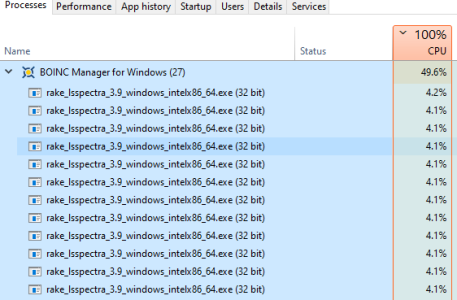
Here is task manager showing some Rakesearch tasks I am doing. I'm running 24 of these on a 3900X. Under the BOINC Manager tab its got 12 tasks that total ~50-% of the CPU being used. With another 12 tasks sitting outside of that tab utilizing the other ~50% of the CPU.

1773263311569.png

So depending on how many threads the computer has and how many it should be running vs actually running, basic math will be able to get you the answer.
 
Just tried version 8.0.4 on one machine and there is no change. I'll wait until this challenge is over to mess around with it in more detail to keep from screwing it all to pieces lol. Lots of things to try in this thread for sure. 👍
 
What do you mean no change? You have described a lot of issues, so what hasnt changed?

Are the new tasks you downloaded not following the thread count you set in the preferences on the PG web site? This is important that it's new tasks you've downloaded. Any tasks already downloaded will not be changed after the fact. Unless you use the app_config.xml that Stef provided.

Are you still only getting 1 task per host? If yes, is that one task still utilizing 100% of the threads on the host? As per above, is this because new tasks you've downloaded are trying to utilize all the threads or are they pre-existing tasks that were already utilizing all the threads?

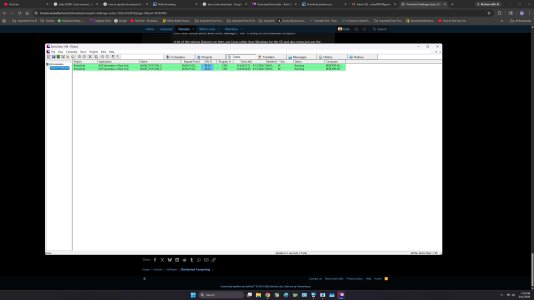
You need to use BOINCTasks or the advanced view in the BOINC Manager (Im pretty sure the advanced view shows this, I dont ever use it and can't remember anymore) to see how many threads the task is trying to use. In that BT screenshot you posted earlier today it showed the tasks using 32 threads which means only 1 task will run on a 16 core, 32 thread host.
 
What do you mean no change? You have described a lot of issues, so what hasnt changed?

Are the new tasks you downloaded not following the thread count you set in the preferences on the PG web site? This is important that it's new tasks you've downloaded. Any tasks already downloaded will not be changed after the fact. Unless you use the app_config.xml that Stef provided.

Are you still only getting 1 task per host? If yes, is that one task still utilizing 100% of the threads on the host? As per above, is this because new tasks you've downloaded are trying to utilize all the threads or are they pre-existing tasks that were already utilizing all the threads?

You need to use BOINCTasks or the advanced view in the BOINC Manager (Im pretty sure the advanced view shows this, I dont ever use it and can't remember anymore) to see how many threads the task is trying to use. In that BT screenshot you posted earlier today it showed the tasks using 32 threads which means only 1 task will run on a 16 core, 32 thread host.

It means it is still only allowing one task and is still 32 threads.
 
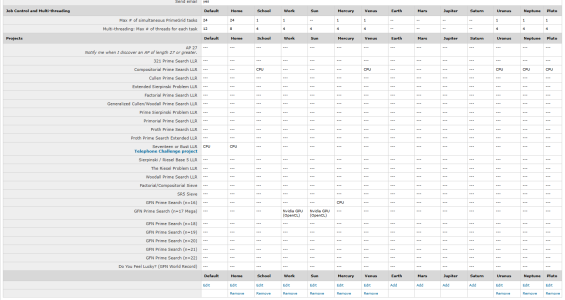
Can you take a screenshot of all your venue settings? Towards the top of the page you'll see (switch view) link, click that so it shows all the venues in a single table separated by columns. It'll look like this.

1773269623179.png
 
Day 4.5 stats:

Rank___Credits____Username
4______17523348___cellarnoise2
6______13875792___crashtech
11_____10684635___ChelseaOilman
14_____9657334____w a h
16_____8659074____Icecold
38_____3202765____Orange Kid
43_____3013298____mmonnin
44_____2908281____Rollo
55_____1893462____johnnevermind
87_____1150664____waffleironhead
127____589903___10esseeTony
139____442164_____Ken_g6
157____304609_____[TA]Skillz

Rank__Credits____Team
1_____72160781___TeAm AnandTech
2_____67751399___Czech National Team
3_____48191940___BOINC@AUSTRALIA
4_____42242210___SETI.Germany
 
I'm getting somewhere...it was the downloaded tasks that was holding everything up. They have been deleted/aborted and I'm making some progress now.

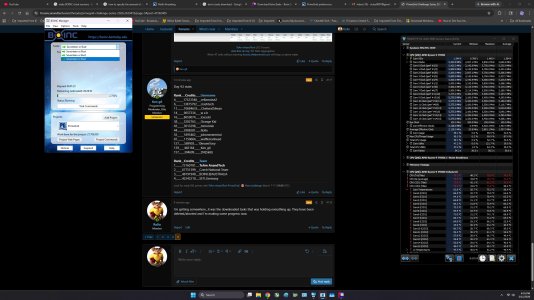
Not exactly right, but a step in the correct direction lol. I now have 3 Tasks ongoing...

semi success.jpg
 
Last edited:
I'm getting somewhere...it was the downloaded tasks that was holding everything up. They have been deleted/aborted and I'm making some progress now.

Not exactly right, but a step in the correct direction lol. I now have 3 Tasks ongoing...

View attachment 139788
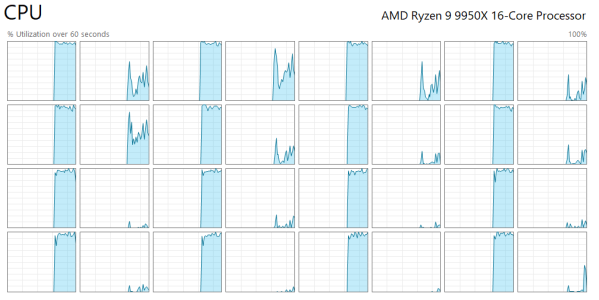
On an AMD Desktop 16 core (32 thread) computer like the AMD 7950x and 9950x, your Windows Task Manager screen under the Performance CPU tab should look something like this if you have your system set up well - notice mostly half the "threads" are being used and it seems to skip every other one. This is using pinned 8 threaded PrimeGrid SoB tasks. Boinc is set to use 50% of the available threads of the 32 threaded CPU.

Also in "Boinc Manager" you can go under the "View" menu item and choose "Advanced View" and you get to see a lot more details about what Boinc Manager / "BM" is doing on an individual computer.

A lot of the serious Boincers on here, use Linux rather than Windows for the OS and also many just use the Command Line Interface (CLI) to control the "Boinc Client". The Boinc Client is what really runs the Boinc projects / tasks.. The Boinc Manager is a seperate program that has the ability to modify what the Boinc Client performs, like the Command Line Interface, just with text commands.

There are a few Boinc Client control programs available. "Boinc Tasks" being another program that can control Boinc Clients over several puters on a network.
 
Last edited:
On an AMD Desktop 16 core system, your Windows Task Manager screen under the Performance CPU tab should look like this if you have your system set up well. This is using pinned 8 threaded PrimeGrid SoB tasks. Boinc is set to use 50% of the available threads of the 32 threaded CPU.

Also in "Boinc Manager" you can go under the "View" menu item and choose "Advanced View" and you get to see a lot more details about what Boinc Manager / "BM" is doing on an individual computer.

A lot of the serious Boincers on here, use Linux rather than Windows for the OS and also many just use the Command Line Interface (CLI) to control the "Boinc Client". The Boinc Client is what really runs the Boinc projects / tasks.. The Boinc Manager is a seperate program that has the ability to modify what the Boinc Client performs, like the Command Line Interface, just with text commands.

There are a few Boinc Client control programs available. "Boinc Tasks" being another program that can control Boinc Clients over several puters on a network.

Well crap.. I posted the image in a separate post, but you'll figure it out 🙂
1773274542169.png
 
Doubled the tasks, but also the completion time. Probably not progress after all.

View attachment 139795
Well, make sure your only using 1/2 your threads on 16 core / 32 thread puters and that they are on only every other thread! And also, the task times take awhile to get to the true time and they are just averages with every "whatever" the client thinks is time to average out the task times... It can take like a day on these crazy long tasks!!!

The "Task time estimates" without any reported / completed tasks are not great at all of estimated completion time!
 
One of my 9950x set to 150W TDP, is taking on average around 13.2 hours to complete 2 tasks at a time.

That depends on a bunch of other factors, but whatever!

Probably the most important thing on a fairly recent AMD 16 Core / 32 thread CPU (5950x and newer) is to get PG to run 8 threaded tasks and only run 2 tasks at a time, and have each "task" running or "pinned" to each CCD on an AMD CPU. Other CPUs it depends on the number of threads / cores and also the task to likely L3 cache ratio?

Probably other factors, like RAM speed come into play also and RAM channels, but it gets crazy with variables!
 
One of my 9950x set to 150W TDP, is taking on average around 13.2 hours to complete 2 tasks at a time.

That depends on a bunch of other factors, but whatever!

Probably the most important thing on a fairly recent AMD 16 Core / 32 thread CPU (5950x and newer) is to get PG to run 8 threaded tasks and only run 2 tasks at a time, and have each "task" running or "pinned" to each CCD on an AMD CPU. Other CPUs it depends on the number of threads / cores and also the task to likely L3 cache ratio?

Probably other factors, like RAM speed come into play also and RAM channels, but it gets crazy with variables!

Can't get my 9950X to accept any changes no matter what I have tried...still running one task on 16 cores. The 9900X's are acting the same as well.
 
Last edited:
Back
Top