• We’re currently investigating an issue related to the forum theme and styling that is impacting page layout and visual formatting. The problem has been identified, and we are actively working on a resolution. There is no impact to user data or functionality, this is strictly a front-end display issue. We’ll post an update once the fix has been deployed. Thanks for your patience while we get this sorted.

Discussion Performance Efficiency Score using HandBrakeCLI

Page 2 - Seeking answers? Join the AnandTech community: where nearly half-a-million members share solutions and discuss the latest tech.
If we could get the same data for average frequency of P and E cores we'd have it all during the run we'd have it all with no chance for human error!
Unfortunately, that's something more up Boris's alley. There might be a way to expose that information through openhwmonitor library but I have no idea how.
 
It would still remain interesting to know for sure 😀
If you are feeling bored, you just need to modify the script "scripts/mingw-w64-build" to use the latest Clang and then compile HandbrakeCLI.exe for us on one of your Linux machines 😛

Build instructions: https://handbrake.fr/docs/en/latest/developer/build-windows.html

you just need to modify the script "scripts/mingw-w64-build" to use the latest Clang
I know, that sounds like something a boss would say, with absolutely no idea of the effort involved 😀
 
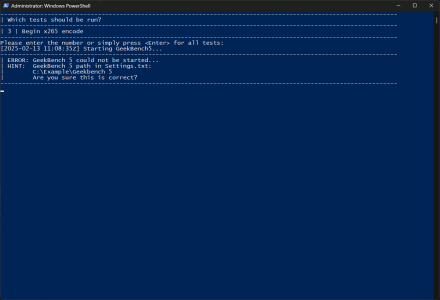
The easy way doesn't mention the Geekbench 5 prerequisite. When I go to download 5, I am taken to the download page for 6. Found the old version here: https://www.geekbench.com/legacy/
My easy way is not for running Geekbench. Only for HandBrakeCLI. That's why I'm showing only the Begin Encode option.

Didn't remove the other options from the Powershell script because I don't want to deal with things not working due to removing the wrong block of code. So while you can enter some number other than 3, it's not supported in my mangled PES 😀

The original PES thread is this: https://forums.anandtech.com/thread...-efficiency-of-x86-cpu-architectures.2597905/
 
My easy way is not for running Geekbench. Only for HandBrakeCLI. That's why I'm showing only the Begin Encode option.

Didn't remove the other options from the Powershell script because I don't want to deal with things not working due to removing the wrong block of code. So while you can enter some number other than 3, it's not supported in my mangled PES 😀

The original PES thread is this: https://forums.anandtech.com/thread...-efficiency-of-x86-cpu-architectures.2597905/
It seems to require Geekbench to run if I enter the number 3. Or maybe not, I was just hitting enter and though that meant 3?
 
In munching mode at the moment but I was able to update the openhwmon DLL.

Only took downloading like 20+ gigs of VStudio, googling to find Arrow Lake CPU ID, updating the CPU.cs file, mimicking what Boris had done for the Raptor Lake entry and Build.
 
Meteor Lake and Panther Lake support added to the DLL.

@511 , would you like to give the benchmark a go, with High Performance power profile, HT on and off? It's really easy and quick to run (download/instructions in the first post of this thread). And you could try the Jellyfish encode too if you want to contribute more.

@Schmide , interested in contributing the score for your Ryzen laptop?
 
Meteor Lake and Panther Lake support added to the DLL.

@511 , would you like to give the benchmark a go, with High Performance power profile, HT on and off? It's really easy and quick to run (download/instructions in the first post of this thread). And you could try the Jellyfish encode too if you want to contribute more.

@Schmide , interested in contributing the score for your Ryzen laptop?
Sure I am away for few days but I would love to do it once I get back
 
Possibly, I am using 25.2.0.3 which is probably latest as I just installed it. I thought maybe a divide by zero or something, but that is just spitballing.
 
Back
Top