

New tweaks for ASUS/BENQ/Samsung 120 Hz! (Zero LCD motion blur; looks like CRT)
Page 7 - Seeking answers? Join the AnandTech community: where nearly half-a-million members share solutions and discuss the latest tech.
You are using an out of date browser. It may not display this or other websites correctly.
You should upgrade or use an alternative browser.
You should upgrade or use an alternative browser.
bystander36
Diamond Member
- Apr 1, 2013
- 5,154
- 132
- 106
btw, what if we don't have 120fps @ 120hz? my GTX 670 certainly can't play most games @ 120fps.what if we're gaming @ 60-100fps @ 120hz? Is it still beneficial or pointless? thanks!
Since this system pulses the backlight on every refresh, and motion only occurs on refreshes (when the screen updates the image), it should help you at any FPS rate. It just won't be as optimal as having max FPS.
BTW, ToastyX just sent me some new instructions that may make it easier to enable LightBoost, without INF files, without REG files, and without an emitter. These haven't been fully tested on all models, but has fewer steps than my Hack method of my LightBoost HOWTO.
Used this method on my benq 2411t that I received today.
Perfect.
I can definitely tell the difference between lightboost at 10% and any other setting.
bystander36
Diamond Member
- Apr 1, 2013
- 5,154
- 132
- 106
Just be aware that having Stereoscopic 3D drivers loaded does incur a FPS penalty, even if not used.
She runs fine on my system (ASUS P2B) with an Abit Slotket !!!. Mine runs stably at 880 at 1.8 V, but not 100% stable at 896. However, I can run Photoshop for short periods even at 1.8 V/920 MHz. I can't use 1.85 on my motherboard but that's too high for my tastes anyway for anything other than testing. Oh, by the way, at 1.9 V she runs DOS at 960 MHz and posts at 992 MHz. In general I dislike Abit because their motherboard quality is suspect, but I'm happy with Abit Slotket !!!.
Eug
533A@840 1.7 V.
Thanks, but for many of us thats not possible as getting 120fps in games requires SLI even with top tier cards. So 60-100 fps on avg will still see smoother blur free gameplay, yes?
P.S. For better color on ASUS VG278H:
1. Decrease Contrast to 65 or 75. This darkens a bit but the colors become much more saturated.
2. Recalibrate the colors using Lagom LCD patterns:
Lagom Contrast
Or if you're willing to spend extra money, for best colors at desktop, you may want to spend $150 on a Spyder4 or i1 Pro colorimeter. That's a special USB sensor you buy, and suction-cup to your screen, plug into your computer, and press a button in software to automatically calibrate the colors. Some games will override the color calibration though; but this can help to an extent.
Well I'm kinda short on money these days.
My goal is to leave lightboost on all the time.
With that in mind, would you happen to have some color calibration settings for the benQ 2411t ?
What I'm worried about is the screen locks every color setting while in lightboost mode.
Is it possible to calibrate the colors a bit better than factory settings in normal mode then keep those settings in LB mode ?
Edit: Found this post: http://hardforum.com/showthread.php?p=1039701454
My monitor looks better under the second set.
About AMA is it possible to change its behaviour with lightboost on ?
Last edited:


BTRY B 529th FA BN
Lifer
- Nov 26, 2005
- 15,194
- 403
- 126
I don't know how to keep the settings from going into 3D. It use to work on my previous OS install but since then I can't keep it in 2D. I always have to CTRL + C it.. the method described on how to do it doesn't work..


videogames101
Diamond Member
- Aug 24, 2005
- 6,783
- 27
- 91
LCD's will never touch CRT's as long as their black levels continue to be atrocious.
yeah, i only run plasma for my monitors
BTRY B 529th FA BN
Lifer
- Nov 26, 2005
- 15,194
- 403
- 126

Whitestar127
Senior member
- Dec 2, 2011
- 397
- 24
- 81
Hi Mark,
At Blurbusters I read this in the comments on the LightBoost Howto page:
"If that fails, the good news is that later this year, there will be a much easier way to enable LightBoost (without enabling 3D stereoscopic)."
Can you elaborate on this?
At Blurbusters I read this in the comments on the LightBoost Howto page:
"If that fails, the good news is that later this year, there will be a much easier way to enable LightBoost (without enabling 3D stereoscopic)."
Can you elaborate on this?
Whitestar127
Senior member
- Dec 2, 2011
- 397
- 24
- 81
Mark, I feel like I owe you a lot of money right now.
Thank you, thank you, thank you!
My Benq XL2411T feels like a CRT now!!! Incredibly smooth!
I have found an (almost) ideal solution to switching between LightBoost on and off. The problem I had was Skyrim. Skyrim cannot be run in 100 or 120hz because of all the physics bugs that start to manifest as soon as the fps increases to somewhere between 90 and 100, at least above 85. So I have to run it at 85hz.
So what I did was I followed ToastyX's procedure to activate LB. Then I added an extra resolution in CRU, namely 1920x1080 @ 85hz. So when I change resolution now to 85hz, LB is turned off and I can play Skyrim. When I change to 100hz or 120hz LB is activated again and I can play the other games.
The only downside to this is that I have to re-calibrate the colors every time I switch back to LB mode. If anyone knows how to save those settings please let me know. For now I'm just going to make an AutoIt macro that sets the colors automatically.
I use the following settings when in LB mode:
B = Brightness
C = Contrast
G = Gamma
Red:
B = +32%
C = +40%
G = +0.90
Green:
B = +45%
C = +60%
G = +0.90
Blue:
B = +30%
C = +45%
G = +0.90%
Digital vibrance = +50%
Hue = +0
On monitor:
NVIDIA 3D Lightboost = Lowest setting
Contrast = 65
For anyone who doesn't know: On the Benq XL2411T OSD there is a really simple way of knowing if LB is activated. Have a look at the image below.

Thank you, thank you, thank you!
My Benq XL2411T feels like a CRT now!!! Incredibly smooth!
I have found an (almost) ideal solution to switching between LightBoost on and off. The problem I had was Skyrim. Skyrim cannot be run in 100 or 120hz because of all the physics bugs that start to manifest as soon as the fps increases to somewhere between 90 and 100, at least above 85. So I have to run it at 85hz.
So what I did was I followed ToastyX's procedure to activate LB. Then I added an extra resolution in CRU, namely 1920x1080 @ 85hz. So when I change resolution now to 85hz, LB is turned off and I can play Skyrim. When I change to 100hz or 120hz LB is activated again and I can play the other games.
The only downside to this is that I have to re-calibrate the colors every time I switch back to LB mode. If anyone knows how to save those settings please let me know. For now I'm just going to make an AutoIt macro that sets the colors automatically.
I use the following settings when in LB mode:
B = Brightness
C = Contrast
G = Gamma
Red:
B = +32%
C = +40%
G = +0.90
Green:
B = +45%
C = +60%
G = +0.90
Blue:
B = +30%
C = +45%
G = +0.90%
Digital vibrance = +50%
Hue = +0
On monitor:
NVIDIA 3D Lightboost = Lowest setting
Contrast = 65
For anyone who doesn't know: On the Benq XL2411T OSD there is a really simple way of knowing if LB is activated. Have a look at the image below.


- Dec 13, 2012
- 273
- 1
- 71
120fps benefits anything with adequately fast motion. It even benefits Chrome web browser scrolling (using Chromium Smooth Scroller extension, and mouse wheel). Or IE10's smoothscroll feature using up/down arrow keys.Do games like Skyrim also benefit from running above 60fps? I thought it was only for fps games?
The problem is the Skyrim engine was designed for 60Hz, and does not do a good job of 120Hz. So Skyrim is a particularly troublesome game to get running smoothly.
- Dec 13, 2012
- 273
- 1
- 71
You are welcome!Mark, I feel like I owe you a lot of money right now.
Thank you, thank you, thank you!
My Benq XL2411T feels like a CRT now!!! Incredibly smooth!
- Dec 13, 2012
- 273
- 1
- 71
There's some new content since this thread was posted. Some good links include LCD Motion Artifacts 101 as well as 60Hz versus 120Hz versus LightBoost.
 Standard 60 Hz LCD
 Standard 120 Hz LCD : 50% less motion blur
 120 Hz LightBoost : ~90% less motion blur
(These are real photographs. See this page for how these were captured.)
(These are real photographs. See this page for how these were captured.)
Looks great so tempted to buy a 120hz and try this just unsure about dropping from 1440p to 1080p on my gaming screen.
I am surprised the monitor companies haven't picked up on this yet and somehow build this feature into their screens. Is there any downside to it? maybe reduction in life of the monitor due to having the lightboost on all the time or something?
I am surprised the monitor companies haven't picked up on this yet and somehow build this feature into their screens. Is there any downside to it? maybe reduction in life of the monitor due to having the lightboost on all the time or something?
- Dec 13, 2012
- 273
- 1
- 71
The main disadvantage of LightBoost is color quality and some loss of brightness. LightBoost can produce somewhat degraded color, but with some careful adjustment (via nVidia Control Panel, since some monitor settings are locked), you can get 80% of the picture quality back. TFT Central's article shows that they were able to get almost the same contrast ratio with LightBoost as with non-LightBoost. cpkeeper can also force games to use the calibration too, since games override it.I am surprised the monitor companies haven't picked up on this yet and somehow build this feature into their screens. Is there any downside to it? maybe reduction in life of the monitor due to having the lightboost on all the time or something?
Brightness loss isn't a big problem for my eyes because these monitors are already WAY too bright (350cd/m2) so loss of brightness during LightBoost (it's not as bright as Brightness=100%, more closer to Brightness=50%) is not a big problem.
Flicker-sensitive people may not like LightBoost (especially if you hated CRT). But for FPS players who didn't mind a high-refresh rate CRT, it's a less evil flicker than PWM. I get less eyestrain with LightBoost than with PWM. The one-pulse-per-refresh produces a pleasing zero motion blur effect. TFT Central's article explains this too, as does LCD Motion Artifacts 101; if you are used to a high-end 120Hz CRT, then you won't mind 120Hz LightBoost.
No wear and tear. LightBoost is an intentional feature built into a monitor, but was force-bundled with 3D Vision. The new tweaks simply unbundles LightBoost from 3D glasses. Letting you get LightBoost benefit for 2D, without buying a 3D Vision kit. (nVidia certainly isn't complaining: It has caused a lot of Titan sales!)
If you want good out-of-box LightBoost color, get the ASUS VG278H since there's no purple tint like some VG248QE's have. Also, XL2420T and VG278HE (the 'HE', not 'H') have an increased checkerboard pixel pattern artifact during fast motion during lightboost, which is not noticeable to everyone, but bothered a few (e.g. hazmatm compared VG278H and VG278HE on overclock.net and preferred the VG278H). The manufacturers need to re-enable LightBoost picture adjustments.
And if you end up hate LightBoost, you can always turn off LightBoost. The monitors still do a great job of 120Hz and 144Hz. So not a waste of money. See testimonials and media coverage.
Last edited:
Whitestar127
Senior member
- Dec 2, 2011
- 397
- 24
- 81
Looks great so tempted to buy a 120hz and try this just unsure about dropping from 1440p to 1080p on my gaming screen.
I am surprised the monitor companies haven't picked up on this yet and somehow build this feature into their screens. Is there any downside to it? maybe reduction in life of the monitor due to having the lightboost on all the time or something?
You won't regret it! I'm playing Half-Life 2, Battlefield 3, Just Cause 2 and Trackmania 2 with 100fps @ 100hz and I can't for the life of me see the difference in smoothness/blur between my Benq and my old CRT. I was totally blown away!
Just be advised that you need to retain 100fps and that can be a challenge in some games. You may have to lower settings a bit in some of them.
- Dec 13, 2012
- 273
- 1
- 71
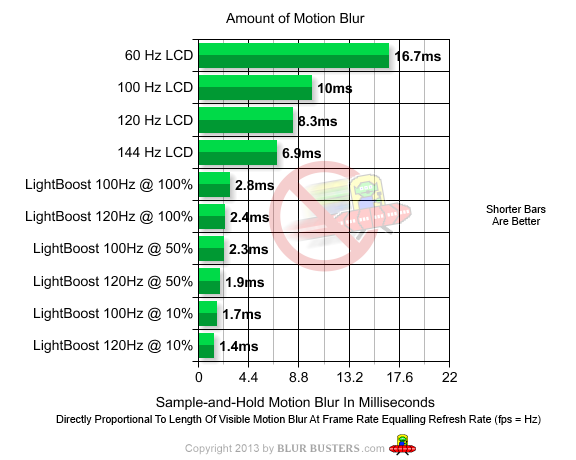
There is now a new graph on the 60Hz vs 120Hz vs LightBoost page, that directly compares the base-case-scenario motion blur for each mode:
TRENDING THREADS
-
 Discussion Zen 5 Speculation (EPYC Turin and Strix Point/Granite Ridge - Ryzen 9000)
- Started by DisEnchantment
- Replies: 25K
-
Discussion Intel Meteor, Arrow, Lunar & Panther Lakes + WCL Discussion Threads
- Started by Tigerick
- Replies: 23K
-
 Discussion Intel current and future Lakes & Rapids thread
- Started by TheF34RChannel
- Replies: 23K
-

-


AnandTech is part of Future plc, an international media group and leading digital publisher. Visit our corporate site.
© Future Publishing Limited Quay House, The Ambury, Bath BA1 1UA. All rights reserved. England and Wales company registration number 2008885.
 Facebook
 Twitter