Discussion Intel Meteor, Arrow, Lunar & Panther Lakes + WCL Discussion Threads

Page 226 - Seeking answers? Join the AnandTech community: where nearly half-a-million members share solutions and discuss the latest tech.

Tigerick

Senior member
Apr 1, 2022
942
857
106
Wildcat Lake (WCL) Specs

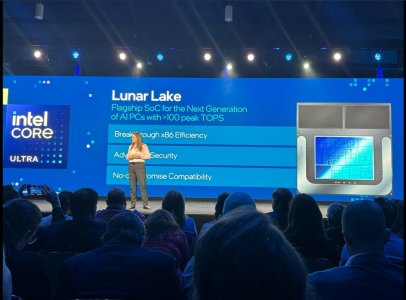
Intel Wildcat Lake (WCL) is upcoming mobile SoC replacing Raptor Lake-U. WCL consists of 2 tiles: compute tile and PCD tile. It is true single die consists of CPU, GPU and NPU that is fabbed by 18-A process. Last time I checked, PCD tile is fabbed by TSMC N6 process. They are connected through UCIe, not D2D; a first from Intel. Expecting launching in Q1 2026.
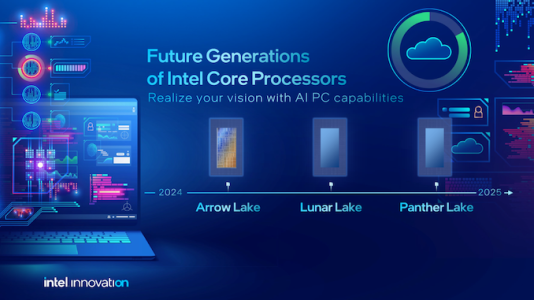
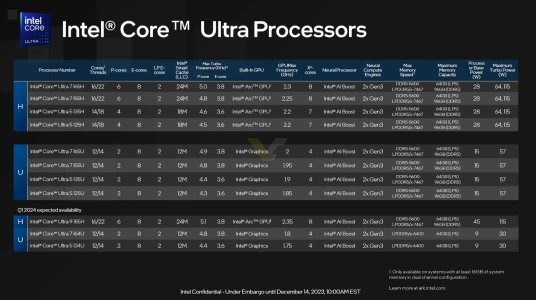
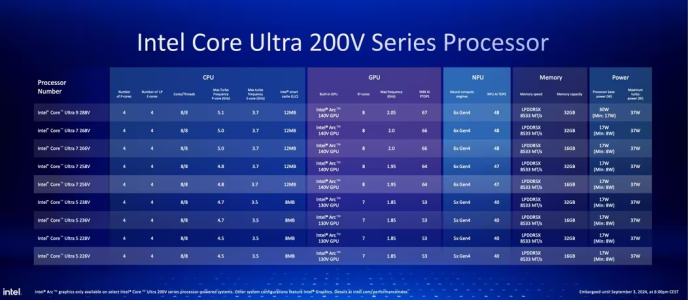
Intel Raptor Lake UIntel Wildcat Lake 15W?Intel Lunar LakeIntel Panther Lake 4+0+4
Launch DateQ1-2024Q2-2026Q3-2024Q1-2026
ModelIntel 150UIntel Core 7Core Ultra 7 268VCore Ultra 7 365
Dies2223
NodeIntel 7 + ?Intel 18-A + TSMC N6TSMC N3B + N6Intel 18-A + Intel 3 + TSMC N6
CPU2 P-core + 8 E-cores2 P-core + 4 LP E-cores4 P-core + 4 LP E-cores4 P-core + 4 LP E-cores
Threads12688
Max Clock5.4 GHz?5 GHz4.8 GHz
L3 Cache12 MB12 MB12 MB
TDP15 - 55 W15 W ?17 - 37 W25 - 55 W
Memory128-bit LPDDR5-520064-bit LPDDR5128-bit LPDDR5x-8533128-bit LPDDR5x-7467
Size96 GB32 GB128 GB
Bandwidth136 GB/s
GPUIntel GraphicsIntel GraphicsArc 140VIntel Graphics
RTNoNoYESYES
EU / Xe96 EU2 Xe8 Xe4 Xe
Max Clock1.3 GHz?2 GHz2.5 GHz
NPUGNA 3.018 TOPS48 TOPS49 TOPS


PPT1.jpg
PPT2.jpg
PPT3.jpg


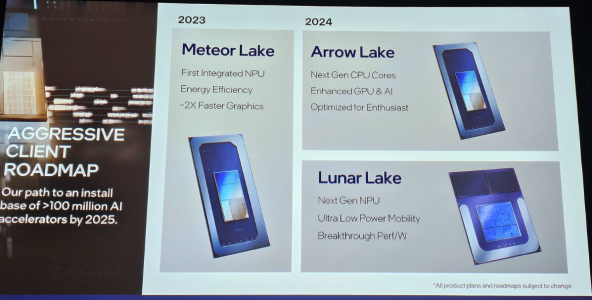
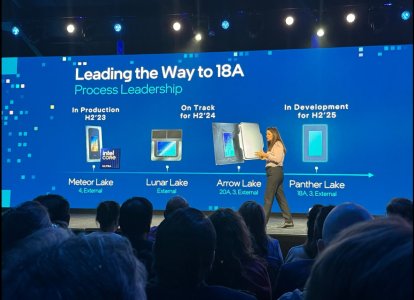
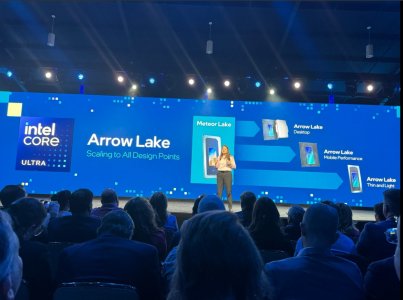
As Hot Chips 34 starting this week, Intel will unveil technical information of upcoming Meteor Lake (MTL) and Arrow Lake (ARL), new generation platform after Raptor Lake. Both MTL and ARL represent new direction which Intel will move to multiple chiplets and combine as one SoC platform.

MTL also represents new compute tile that based on Intel 4 process which is based on EUV lithography, a first from Intel. Intel expects to ship MTL mobile SoC in 2023.

ARL will come after MTL so Intel should be shipping it in 2024, that is what Intel roadmap is telling us. ARL compute tile will be manufactured by Intel 20A process, a first from Intel to use GAA transistors called RibbonFET.


LNL-MX.png
 

Attachments

  • PantherLake.png
    PantherLake.png
    283.5 KB · Views: 24,044
  • LNL.png
    LNL.png
    881.8 KB · Views: 25,531
  • INTEL-CORE-100-ULTRA-METEOR-LAKE-OFFCIAL-SLIDE-2.jpg
    INTEL-CORE-100-ULTRA-METEOR-LAKE-OFFCIAL-SLIDE-2.jpg
    181.4 KB · Views: 72,440
  • Clockspeed.png
    Clockspeed.png
    611.8 KB · Views: 72,327
Last edited:

Hitman928

Diamond Member
Apr 15, 2012
6,755
12,501
136
Regarding the display, OLED should use less power in theory. If it isn’t then companies are likely cheaping out. Good Adaptive Sync OLED displays should be capable of at least 1-120hz refresh.

No, OLEDs use more power. The only time you may save power is when the screen is largely very dark due to there being no backlight and so the vast majority of pixels are off whereas with other types of screen, the backlight will still be on (this changes with LED array panels with local dimming to whatever extent they can do local dimming). For normal usage though, OLEDs use significantly more power than other modern displays.
 

moinmoin

Diamond Member
Jun 1, 2017
5,248
8,463
136
We need a similar solution for GPUs as well and a way to let Windows see “the happy path” to power savings.

What we really need is Windows to be optimized for such a setup. Many of the Windows processes could be run on these cores without compromising performance. Even if the CPU tile is active this could save some power.
In the last couple years Microsoft has repeatedly shown that it doesn't really care how well Windows' scheduler works. This works to the detriment of any true LP core that could work to save power as with a scheduler not cooperating you get the worst of all worlds, slow cores visibly affecting application performance as the scheduler ends up (ab)using the LP cores for normal processes anyway, and for better power saving the wrong non-optimized applications ends up being moved to the LP cores defeating the whole setup. So I don't have hope that this improves with Microsoft's help, and thus the approach is doomed.
 
  • Like
Reactions: Thibsie

dullard

Elite Member
May 21, 2001
26,196
4,869
126
But it works just fine.
Modern workloads are just perf-hungry and thus anything with a QoS priority gets moved onto the bigs.
I realize it was a joke, but at least use the proper terms.

Thread Affinity: software states which type of core to run on (big, little, etc). Windows doesn't get to choose if a thread affinity is stated by software. This is the correct long-term solution as the software makers should know best.

Thread Priority: software states how high up on the list the thread should be when there are too few resources to run all threads at the same time.

QoS priority is for networking.
 
  • Like
Reactions: Thibsie

moinmoin

Diamond Member
Jun 1, 2017
5,248
8,463
136
But it works just fine.
Modern workloads are just perf-hungry and thus anything with a QoS priority gets moved onto the bigs.
Yeah, Microsoft doesn't even bother to take responsibility for the Windows ecosystem anymore. It's little more than a PR vehicle to push secondary services. For LP cores the simplest approach would be to lock them away from normal processes and only allow dedicated optimized ones that won't ever spill over to full E- or P-cores. But no, let's the usual mess keep festering, after all it works just fine.

And people keep wondering what competitive advantage Apple could possibly have.

This is the correct long-term solution as the software makers should know best.
I disagree. Especially the last couple of years with its many different odd setups, MTL LPe cores being only one of them, showed that no software can really be prepared in advance for such without knowing them. It's the job of the scheduler to make everything work well in the end even if software is badly prepared or even not at all.
 
  • Like
Reactions: Tlh97 and Thibsie

maddie

Diamond Member
Jul 18, 2010
5,204
5,614
136
Yeah, Microsoft doesn't even bother to take responsibility for the Windows ecosystem anymore. It's little more than a PR vehicle to push secondary services. For LP cores the simplest approach would be to lock them away from normal processes and only allow dedicated optimized ones that won't ever spill over to full E- or P-cores. But no, let's the usual mess keep festering, after all it works just fine.

And people keep wondering what competitive advantage Apple could possibly have.


I disagree. Especially the last couple of years with its many different odd setups, MTL LPe cores being only one of them, showed that no software can really be prepared in advance for such without knowing them. It's the job of the scheduler to make everything work well in the end even if software is badly prepared or even not at all.
Just a thought, could the AI engines help with this, learning over time?
 

dullard

Elite Member
May 21, 2001
26,196
4,869
126
I disagree. Especially the last couple of years with its many different odd setups, MTL LPe cores being only one of them, showed that no software can really be prepared in advance for such without knowing them. It's the job of the scheduler to make everything work well in the end even if software is badly prepared or even not at all.
You are correct in the fact that no software can predict future CPUs. However, you are missing the point.

Take a virus scan application for example. When someone opens up a virus scanner and says to scan a drive now, that should be on performance cores--whatever form the performance cores take now or in the future. No user wants to wait an eon after they put in a drive and ask for it to be scanned. They most likely want it scanned now and scanned fast.

But, when the virus scanner just runs in the background all day long scanning misc. items, that should be on efficient cores and not on the performance cores. Yes, in the future newer efficient cores can and will come along that the software does not know about. The scheduler will have to determine if it goes on the E or LPe cores. But, the software has already done the main task of avoiding the P cores so the user's other software can run at full speed unaffected (excluding the few software programs specifically coded to use all cores of course). A later software revision can come along and specify LPe cores only (if the developer so chooses).
 

DavidC1

Platinum Member
Dec 29, 2023
2,187
3,340
106
Idle minimum power (display set to minimum brightness, all wireless off, and power plan in Windows set to Energy Saving) = 7.1 W
7.1W idle power? Have you been living under a rock? If you were an average joe that only knows how to turn on/off computers, I'd understand but you are posting in AT forums.


AC power: Idle minimum, 8.6W
Reader/Idle battery life: 653 mins, 54WHr. Or 4.96W

My Kaby-Y Yoga 11S uses less than 4W with the screen on while playing Youtube video. 8.6W isn't just bad, it's a disaster. 4.96W is a disaster. It should be under 3W screen-on idle. Dell XPS Icelake idled at 2.5W!

NBC's AC idle power results are near totally irrelevant for measuring battery power. In their excuse, you can only measure power properly if you open up the laptop and probe it, but that's difficult.

Instead for laptops you have a more relevant figure that is much easier and convenient to test, called battery life. Your wireless router at home is on 24/7 and people couldn't care less about that power, so 2-3W is irrelevant for AC, thus manufacturers don't care either.

However, under battery you do.

Unfortunately Meteorlake hasn't convinced me thoroughly that it caught up to AMD in perf/watt and battery life.

(Reminder: perf/watt and battery life is NOT the same. You could have wonderful perf/watt and terrible battery life and vice versa)

The seemingly endless miracle BIOS patches have ended up in handful of test systems and it just stopped. Oh well, wait for Lunarlake I guess.

I liked Intel too and is more confident about the future but let's get our facts straight first, eh?

@mikk You did not address that using N2 for Novalake is bad, especially if they have 18A for Pantherlake. There really is little reason.
 
Last edited:

Khato

Golden Member
Jul 15, 2001
1,382
491
136
You've convinced me, I agree now with your way of thinking about this. That's why, after searching near and far, I found the best possible CPU, the 7840u in a Lenovo laptop. It offers over 13 hours of browsing battery life on only a 57 Whr battery. Honorable mention would be the HP laptop with a 7840u. It actually is even more efficient but the battery life isn't as long due to a lower capacity battery so it gets knocked down a peg. You're going to need glasses because this one shines so bright! No need to check how they are configured, clearly when Lenovo or HP get a hold of a CPU they know how to do it right and Zen4 can really shine ahead of any competition!


And RPL-U can offer a minute shy of 14 hours of web browsing battery life on the same 57Whr battery - https://www.notebookcheck.net/Lenov...ing-expensive-business-flagship.728359.0.html

It's a great example of how meticulous implementation of the remainder of the laptop can yield greater gains in light workload battery life than superior CPU efficiency.
 

DavidC1

Platinum Member
Dec 29, 2023
2,187
3,340
106
And RPL-U can offer a minute shy of 14 hours of web browsing battery life on the same 57Whr battery - https://www.notebookcheck.net/Lenov...ing-expensive-business-flagship.728359.0.html
Raptorlake-U can be efficient, so can Alderlake-U. It's just that there's a much greater variation where some fail totally. And it seems unlike previous Intel platforms, the battery life is a more direct tradeoff from performance, when it shouldn't matter.

They started regressing in Icelake, further in Tigerlake, but really came to fruition in Alder and Raptor. I had hoped that Meteorlake's LP-E cores would be better, but with Intel themselves admitting a mere 0.15W power savings, at best it's going back to some RPL-U levels.

Remember, it was in Comet/Whiskeylake days when there was a roughly 50% gap in battery life/whr compared to ARM. Considering Intel exerts enormous engineering resources into the PC ecosystem, problems with Meteorlake can and will be blamed at Intel because they are largely responsible. Now, I reckon some failures are because MTL is such a delayed product and I have a rule of thumb that delay = worse product.

With Intel less talk the better. They were very quiet previous to Core 2. The Atom team does not blabber either. Tiger was talked about endlessly with three separate events talking about the same thing. It still got clobbered by Ryzen so still a disappointment. Meteorlake had big slide days too.
 

Khato

Golden Member
Jul 15, 2001
1,382
491
136
Raptorlake-U can be efficient, so can Alderlake-U. It's just that there's a much greater variation where some fail totally. And it seems unlike previous Intel platforms, the battery life is a more direct tradeoff from performance, when it shouldn't matter.
Indeed, it's easy for OEMs to offer up laptops with horrible battery life. But that aspect is not the fault of either AMD or Intel and affects both equally.

It is fair to note that the Intel U series trades multi-thread performance for better battery life, a nice little advantage for the target market.
 

eek2121

Diamond Member
Aug 2, 2005
3,491
5,183
136
No, OLEDs use more power. The only time you may save power is when the screen is largely very dark due to there being no backlight and so the vast majority of pixels are off whereas with other types of screen, the backlight will still be on (this changes with LED array panels with local dimming to whatever extent they can do local dimming). For normal usage though, OLEDs use significantly more power than other modern displays.
That is simply not true except on the brightest of backgrounds. LED monitors use a backlight, and regardless of brightness, always have that backlight at a fixed setting. OLED pixels are self emitting. Unless you are using white/bright colors all day, OLED will use less power. To put another way, show a dark grey or black blank image full screen on your monitor. Unless brightness or refresh rate don't match, OLED will consume less power.

For movies? OLED wins in both power consumption and image quality.

Don't believe me? look it up with a reputable source.
 

Khato

Golden Member
Jul 15, 2001
1,382
491
136
It's pretty easy to look up figures for OLED lumens/W and compare to LED - it's at least a 2.5x advantage for LED. The adoption of quantum dot color generation rather than filters was a major boon for LED based display efficiency.
 

hemedans

Senior member
Jan 31, 2015
308
178
116
That is simply not true except on the brightest of backgrounds. LED monitors use a backlight, and regardless of brightness, always have that backlight at a fixed setting. OLED pixels are self emitting. Unless you are using white/bright colors all day, OLED will use less power. To put another way, show a dark grey or black blank image full screen on your monitor. Unless brightness or refresh rate don't match, OLED will consume less power.

For movies? OLED wins in both power consumption and image quality.

Don't believe me? look it up with a reputable source.
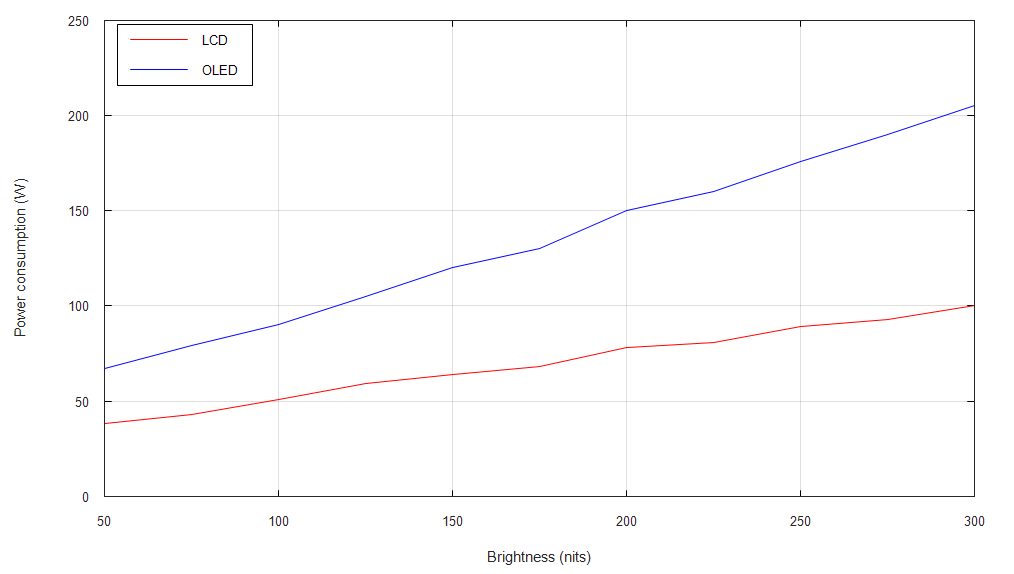
It depend with size too, OLED TV use more power than LED TV.

From rtngs
lcd-oled-power-brightness.png
 
  • Like
Reactions: Nothingness

Asterox

Golden Member
May 15, 2012
1,062
1,876
136

DavidC1

Platinum Member
Dec 29, 2023
2,187
3,340
106
That is simply not true except on the brightest of backgrounds. LED monitors use a backlight, and regardless of brightness, always have that backlight at a fixed setting. OLED pixels are self emitting.
Self emitting or not it does nothing for reducing power. Many average people expected power reduction based on not requiring backlight.

Reality, OLED screens on laptops are generally blamed for poor battery life, because that's how much more power it uses. What looks like on the high level and what it actually is can be very different.
 
  • Like
Reactions: ikjadoon

FlameTail

Diamond Member
Dec 15, 2021
4,384
2,762
106
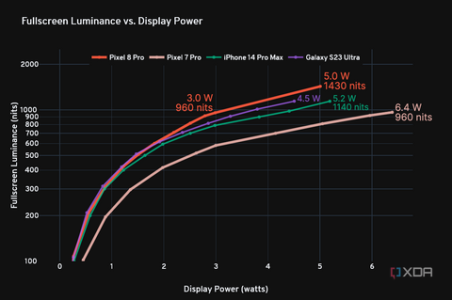
It is possible for OLED laptops to improve battery life greatly from where they are now.

OLED tech is improving at a rapid pace, much faster than LCDs perhaps. Samsung Display for instance, releases a new OLED material set almost every year. The Galaxy S24 series just debuted their latest M13 AMOLED technology. Each new technology brings much improved power efficiency. Unlike smartphones, it seems laptops are much slower in adopting these new technologies.
google_pixel8pro_luminance_vs_power_labelled.png

Aside from OLED materials sets, another thing that can help improve power efficiency in OLEDs is the use of LTPO/oxide TFT + VRR. This has already been implemented in smartphones with great success. LTPO/oxide TFTs are inherently more power efficient than LTPS in normal OLEDs, and it also enables dynamic VRR. This means the display refresh rate can go dynamically adjust to suit the content on the screen, going as low as 1 Hz when displaying static content.

Aside from hardware, software features can also help improve power efficiency. Look at Asus' Lumina OLED. They have implemented some special software techniques, which reduces OLED power consumption.
 

ikjadoon

Senior member
Sep 4, 2006
241
519
146
That is simply not true except on the brightest of backgrounds. LED monitors use a backlight, and regardless of brightness, always have that backlight at a fixed setting. OLED pixels are self emitting. Unless you are using white/bright colors all day, OLED will use less power. To put another way, show a dark grey or black blank image full screen on your monitor. Unless brightness or refresh rate don't match, OLED will consume less power.

For movies? OLED wins in both power consumption and image quality.

Don't believe me? look it up with a reputable source.

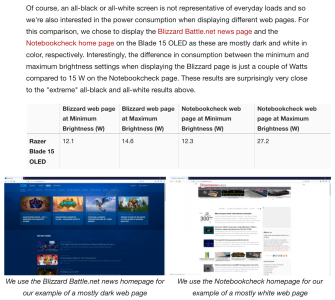
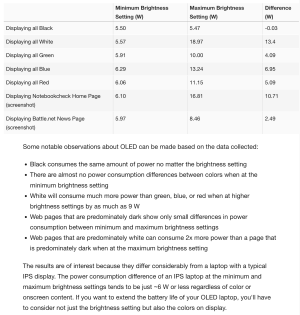
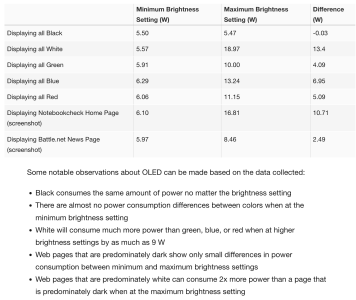
Unfortunately for laptop OLEDs, much of the web uses a light background (i.e., high APL). In fact, even Notebookcheck's own light website consumed virtually the same power as a 100% white background.

Because of this, OLED is more likely to carry a battery life penalty for browsing based battery life tests. Notebookcheck ran the numbers in a 2019-era OLED:

1707143867746.png
1707143382913.png

They have a somewhat-comparable comparison (4K60 OLED vs 1080p240 IPS): the OLED lost the battery life comparison by ~10%.

//

In another comparison, at minimum brightnesses Notebookcheck's own site (via screenshot) consumed more power than an all white background on a 2019-era OLED and only slightly less at maximum brightness.

1707145763987.png

The bane of any OLED laptop owner is a white website with higher brightnesses. :(

//

More to the topic, this review summary claimed "great battery life", but it's hardly one hour longer than the average. This is the HP Spectre x360 14 2024.

//

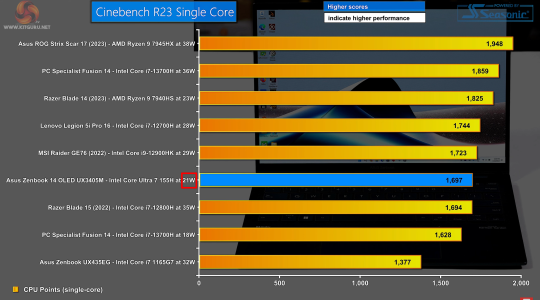
This is the Zenbook 14 OLED w/ the U7 155H.

1707144843358.png

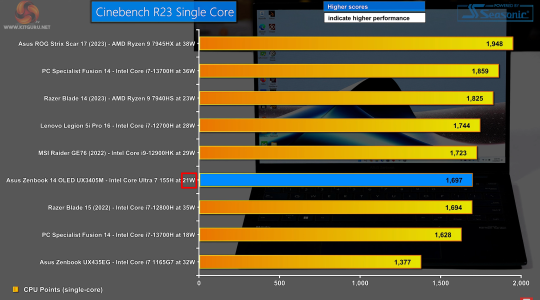
Some more 1T power numbers (I assume CPU package power). I thought the i7-13700H at 18W was very competitive.

//

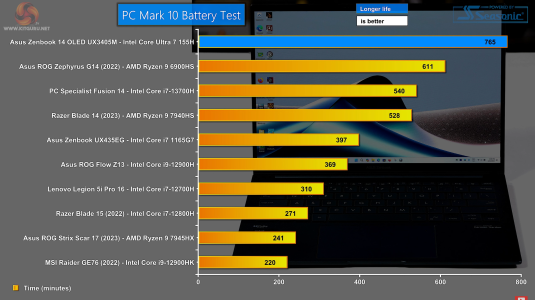
Battery life here is much improved with the PCMark10 test. This is great to see, though some is due to the test including offline media playback and MTL just runs laps around RPL there.

1707145080456.png

Unfortunately, the AI benchmarking was a mess and I don't blame KitGuru: turned out ASUS used the wrong API framework (good luck to consumers catching that) until a Windows update somehow reverted it, Windows tried to downgrade the GPU drivers, and the UL test seems tough to connect to real usage.
 

Attachments

  • 1707144055931.png
    1707144055931.png
    278.6 KB · Views: 11
  • 1707144843544.png
    1707144843544.png
    2.7 MB · Views: 10

dullard

Elite Member
May 21, 2001
26,196
4,869
126
Looks like MTL battery life has had an phenomenal improvement! What has changed in the last 2 months? New bios patches/pcode updates/windows drivers/os patches/etc? Or is it something else entirely like a new stepping or larger battery, etc?
ikjadoon specifically stated that it was because of offline media playback being included in the test. I assume that means that the laptop doesn't have to actively download the media while playing it. Just a guess here, but does that mean that only the LPE cores and media engine is running and the rest of the CPU cores can shut down in this case?