
-
We’re currently investigating an issue related to the forum theme and styling that is impacting page layout and visual formatting. The problem has been identified, and we are actively working on a resolution. There is no impact to user data or functionality, this is strictly a front-end display issue. We’ll post an update once the fix has been deployed. Thanks for your patience while we get this sorted.
You are using an out of date browser. It may not display this or other websites correctly.
You should upgrade or use an alternative browser.
You should upgrade or use an alternative browser.
[GameGPU] Just Cause 3
Page 3 - Seeking answers? Join the AnandTech community: where nearly half-a-million members share solutions and discuss the latest tech.
3DVagabond
Lifer
Its cpu limited/AMD cpu overhead.Thats why Furyx have almost same performance as 390x in 1080P.
Google translator
They should be able to optimize for that.
3DVagabond
Lifer
http://images.nvidia.com/geforce-co...interactive-comparison-001-on-vs-off-rev.html
If you got an NV card, force HQ 16x AF in drivers. By default, the game seems to be really awful at it.
Not this again? Is nVidia defaulting to a lower AF setting?
What's with the whining about SLI? It always seems based on large assumptions about the feasability or ease of implementation.
News Flash! DirectX and OpenGL don't support multi GPU(at least not in a way that works well with games). Do you really think nvidia will convince any developer to write their engine a certain way(or modify, assuming this is feasible or even possible), including not using optimizations that are incompatible with AFR, just so a few % of users will be happy?
The reality is that occasionally or even often, some games, even big games, won't support SLI. Whichever new API becomes popular might solve the issue, but who knows. I'm not convinced every development house will bother.
News Flash! DirectX and OpenGL don't support multi GPU(at least not in a way that works well with games). Do you really think nvidia will convince any developer to write their engine a certain way(or modify, assuming this is feasible or even possible), including not using optimizations that are incompatible with AFR, just so a few % of users will be happy?
The reality is that occasionally or even often, some games, even big games, won't support SLI. Whichever new API becomes popular might solve the issue, but who knows. I'm not convinced every development house will bother.
Last edited:

crisium
Platinum Member

What's with the whining about SLI? It always seems based on large assumptions about the feasability or ease of implementation.
News Flash! DirectX and OpenGL don't support multi GPU(at least not in a way that works well with games). Do you really think nvidia will convince any developer to write their engine a certain way(or modify, assuming this is feasible or even possible), including not using optimizations that are incompatible with AFR, just so a few % of users will be happy?
The reality is that occasionally or even often, some games, even big games, won't support SLI. Whichever new API becomes popular might solve the issue, but who knows. I'm not convinced every development house will bother.
I'm not sure if you're kidding or serious. Many Gameworks features can only be run with a 980Ti sometimes, which is a VERY few % of users, yet Nvidia STILL invests in getting those features into games...
Again, not sure if srs..... SLI not working in games, especially when Nvidia has a hand in those games, is VERY VERY annoying.
I'm not sure if you're kidding or serious. Many Gameworks features can only be run with a 980Ti sometimes, which is a VERY few % of users, yet Nvidia STILL invests in getting those features into games...
Again, not sure if srs..... SLI not working in games, especially when Nvidia has a hand in those games, is VERY VERY annoying.
Not sure why you think implementing gameworks is comparable to SLI...
It sounds like you're still making the assumption that SLI support is always possible, feasible, or even beneficial, no matter how an engine works. If you look at engines like Unreal 4, id Tech 5, and others, maybe you will realize this is not the case.
If you want the opinions of people with more credibility, then I suggest you read what these well known developers have said about it.
https://forum.beyond3d.com/threads/...nd-analysis-thread.57188/page-47#post-1877829
http://www.gamedev.net/topic/666419-what-are-your-opinions-on-dx12vulkanmantle/#entry5215019
http://www.neogaf.com/forum/showpost.php?p=167749982&postcount=3
Multi GPU (SLI/CrossfireX) is f*****g complicated. You cannot begin to conceive of the number of failure cases that are involved until you see them in person. I suspect that more than half of the total software effort within the IHVs is dedicated strictly to making multi-GPU setups work with existing games. If you've ever tried to independently build an app that uses multi GPU - especially if, god help you, you tried to do it in OpenGL - you may have discovered this insane rabbit hole.
Last edited:

does anyone know a work-around, like an inspector profile that works? I game at 1440p/120hz with 980ti's, and 70 FPS is not good enough and i dont want to turn down settings.
Apparently a profile is being worked on.
As for now, maybe this will help. Not sure if there's another profile that will work.
https://forums.geforce.com/default/topic/900670/how-to-solve-sli-rendering-issue-with-just-cause-3-/
Last edited:

AdamK47
Lifer
Apparently a profile is being worked on.
As for now, maybe this will help. Not sure if there's another profile that will work.
https://forums.geforce.com/default/topic/900670/how-to-solve-sli-rendering-issue-with-just-cause-3-/
I doubt it's that easy. Adding SLI bits through Inspector, maybe.

RussianSensation
Elite Member
What's with the whining about SLI? It always seems based on large assumptions about the feasability or ease of implementation.
News Flash! DirectX and OpenGL don't support multi GPU(at least not in a way that works well with games). Do you really think nvidia will convince any developer to write their engine a certain way(or modify, assuming this is feasible or even possible), including not using optimizations that are incompatible with AFR, just so a few % of users will be happy?
The reality is that occasionally or even often, some games, even big games, won't support SLI. Whichever new API becomes popular might solve the issue, but who knows. I'm not convinced every development house will bother.
Most developers who care about PC gamers work with AMD/NV to get multi-GPU support to work unless the game engine itself is 100% incompatible (UE4 or Company of Heroes 2). In this case, I have not seen any evidence that proves that the Avalance Engine 3.0 is incompatible since it works in Mad Max. This tells me it is 100% the developer's responsibility to work with NV/AMD to get multi-gpu working. I guess the developer just decided not to bother wasting any $ getting multi-GPU support for one reason or another.
Side-by-side video footage proves without a shadow of a doubt that Just Cause 3 is a console port with trivial improvements in shadows and heat haze effect.
https://www.youtube.com/watch?v=WH1dYcPNB0E
My guess is the decision to not spend any $ on multi-GPU support or the PC version in terms of technical graphics is because this studio doesn't have the resources for that. Sales of Mad Max weren't that stellar.
Based on the amount of user review feedback, JC3 is looking like it's not doing that well in sales.
http://www.metacritic.com/game/xbox-one/just-cause-3
http://www.metacritic.com/game/playstation-4/just-cause-3
Cannot expect much from a game that was clearly made primarily for consoles and just ported to PC for extra sales as an after-thought.
Most developers who care about PC gamers work with AMD/NV to get multi-GPU support to work unless the game engine itself is 100% incompatible (UE4 or Company of Heroes 2). In this case, I have not seen any evidence that proves that the Avalance Engine 3.0 is incompatible since it works in Mad Max. This tells me it is 100% the developer's responsibility to work with NV/AMD to get multi-gpu working. I guess the developer just decided not to bother wasting any $ getting multi-GPU support for one reason or another.
Side-by-side video footage proves without a shadow of a doubt that Just Cause 3 is a console port with trivial improvements in shadows and heat haze effect.
My guess is the decision to not spend any $ on multi-GPU support or the PC version in terms of technical graphics is because this studio doesn't have the resources for that. Sales of [URL=" Max weren't that stellar[/URL].
Based on the amount of user review feedback, JC3 is looking like it's not doing that well in sales.
Cannot expect much from a game that was clearly made primarily for consoles and just ported to PC for extra sales as an after-thought.
I'm not really sure why you're saying it's a port. All versions of the game were developed simultaneously.
Anyway, SLI may be possible(and is apparently coming), but my point was that people shouldn't just expect it to be in every game. It's not a trivial addition, everything I've heard about it from developers suggests that it's the complete opposite in many cases.
Last edited:
96Firebird
Diamond Member
Time to learn fellas:
[/QUOTE] Yeah, the actual papers t...the cluster system iirc), new LOD system etc.
Last edited:
https://www.youtube.com/watch?v=pBBw5nssai0
very interesting, AMD GPUs seem to have performance problems under heavy load that may not be apparent on most benchmarks
very interesting, AMD GPUs seem to have performance problems under heavy load that may not be apparent on most benchmarks
RussianSensation
Elite Member
I'm not really sure why you're saying it's a port. All versions of the game were developed simultaneously.
Anyway, SLI may be possible(and is apparently coming), but my point was that people shouldn't just expect it to be in every game. It's not a trivial addition, everything I've heard about it from developers suggests that it's the complete opposite in many cases.
Well you may be right that it's not a direct port but based on the comparative videos and the graphics of the game on PS4 and PC, this game is 99% identical between both versions minus the heat haze and minor shadow improvements. This game is straight up made for consoles first and foremost. The graphics are crap, sorry, and I own Just Cause 2 so not trying to hate. From a technical perspective, this game is not impressive. Even for 2012 graphics standards, this game is still not impressive.
https://www.youtube.com/watch?v=pBBw5nssai0
very interesting, AMD GPUs seem to have performance problems under heavy load that may not be apparent on most benchmarks
Aren't you generalizing there? The only AMD GPU that was tested was R9 380, not 280X/380X/290/290X/R9 295X2/390/390X/Fury/Nano/Fury X but your post implies some global issue. Let's take a look from that video:
In the beginning, 960 gets pummeled into the ground more or less the entire time during the first 1:10 min of that video but he doesn't emphasize that at all despite R9 380 being that much closer to the 60 fps mark.
At 22 second mark, GTX960 is at 48 fps, R9 380 is at 60 fps.
At 29 second mark, GTX960 is at 45 fps, R9 380 is at 57 fps.
At 51-52 second mark, GTX960 is at 48 fps, R9 380 is at 70 fps.
At 1:06 min, GTX960 is at 48 fps, R9 380 is at 60 fps.
None of this is important to him? OK, I guess sub-60 fps is suddenly not worth talking about.
Then once he gets to 1:15 min mark, he starts talking about large latency spikes while ignoring how 960 was bombing the entire time up to 1 min 15?
Then at the 1:49 mark he talks about how firing the mini-gun depresses the performance of the 380 but 960 is at 40-41 fps vs. 380 at 38-39 fps. Then he proceeds to show how both of these cards cannot even come close to 50 fps during those scenes. In other words, both are too slow during gun fights/explosions for smooth 60 fps PC gaming standard.
The way he presented the data right there is not very objective because he seems to suggest that R9 380 is having some 'major' issues while ignoring that in other parts of the game the 960 is the one that's struggling and has major deficits against the 380. His analysis actually shows that neither the 960 nor the 380 is good enough to get 60 fps @ 1080P maxed out in JC3 and a faster graphics card is required. While in some scenes 960 has the edge, in others 380 has the edge but neither is great. That's what I got out of that video.
As far as FX8350 is concerned, it's not at all surprising that i5 4690K would smoke it. Unless he overclocked FX8350 to 4.7-4.8Ghz, it's a foregone conclusion that it won't be as fast as an i5 4690K. So basically moral of the story is to get an R9 290/390/970 because the sub-$200 GPU desktop landscape right now just presents bad value.
Was watching a Russian youtube channel tonight and the main editor said the same thing -- every GPU under R9 390/970 is crap and isn't worth buying for a good modern AAA experience. Better to spend a little more upfront and enjoy great gaming experience over the next 2 years. I agree.
Yeah, the actual papers they put out a while ago go into more detail and are pretty interesting. Clustered deferred shading, a new shadow management system(it sort of works in tandem with the cluster system iirc), new LOD system etc.
Too bad all of that technical speak means little in this case when the end result doesn't translate to a next gen PC game. The graphics are so outdated, it's ridiculous that cards like GTX960/380 cannot max this game out at 1080P @ 60 fps.
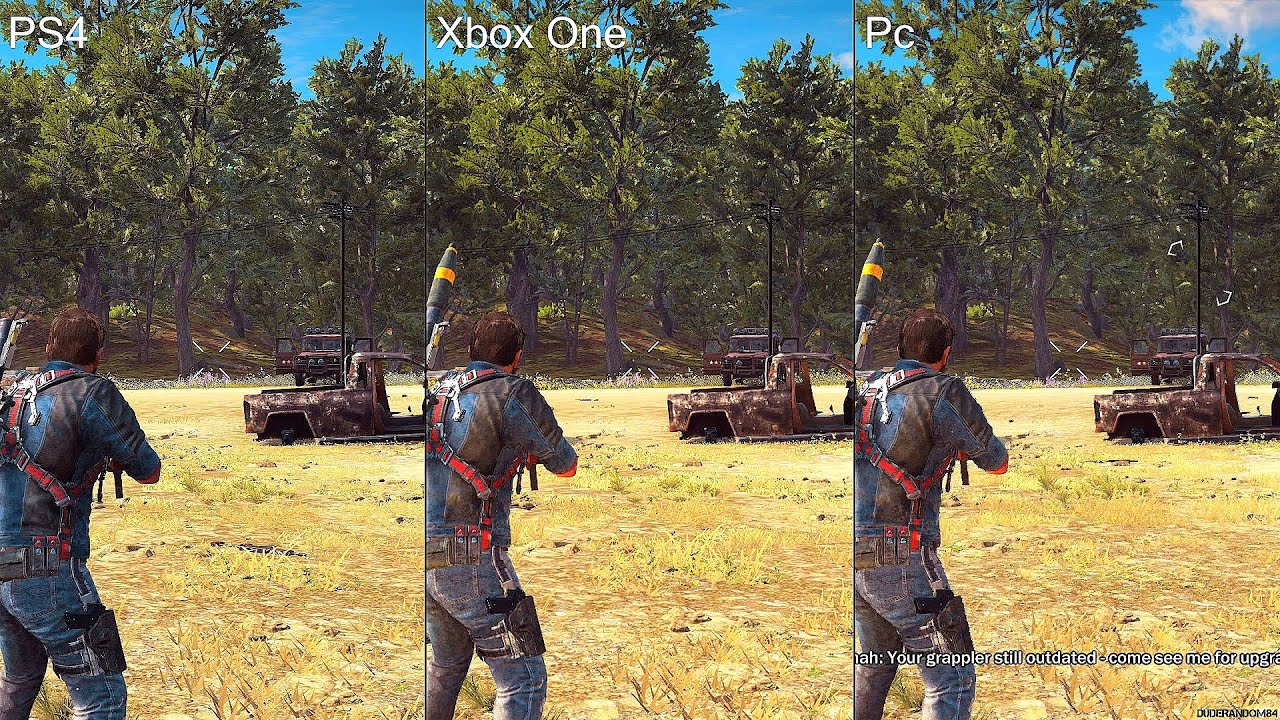


Fire/explosions and the way things fall apart with Havok physics are the best technical aspects of this game. I almost feed back for being so harsh on Assassin's Creed Unity last year. At least with enough horsepower, Unity actually looks good. JC3 should have come out in 2012-2013, not end of 2015.
If someone showed me some of the 2015 PC games during 2008 when Crysis Warhead came out, I would say no, I don't believe you that PC gaming graphics would stagnate for 7 years and actually regress.
Also, The Witcher 3, GTA V raised the bar. Compared to those titles, JC3 looks like a 2012-2013 game max. Let's not even discussing SW:BF that looks like a next gen game compared to JC3.
Last edited:
My personal opinion - this game is very poorly optimized on the GPU side for its level of mediocre graphics. Requiring an overclocked 780 or a 290/Titan to hit 60 fps @ 1080P for console level graphics. My opinion = Mad Max, made on the same Avalanche Engine 3.0 looks and runs better.
Yeah okay.

Mad Max looks amazing in comparison to JC3.
Honestly, what you been smoking lately, RS? 😉


Blitzvogel
Platinum Member
Just Cause 3 is a HUGE game. BF3's maps don't hold a candle in terms of size. Battlefront's maps are even smaller than most BF3 and BF4 maps.
GTAV would be a better comparison, but I would agree that GTAV is a better looking game.
GTAV would be a better comparison, but I would agree that GTAV is a better looking game.

AtenRa
Lifer
Just Cause 3 is a HUGE game. BF3's maps don't hold a candle in terms of size. Battlefront's maps are even smaller than most BF3 and BF4 maps.
GTAV would be a better comparison, but I would agree that GTAV is a better looking game.
Yea ok granted BF maps are smaller, I have only used them for the comparison in graphics. And as you said, GTAV graphics are way better than Just Cause 3.
Aren't you generalizing there? The only AMD GPU that was tested was R9 380, not 280X/380X/290/290X/R9 295X2/390/390X/Fury/Nano/Fury X but your post implies some global issue. Let's take a look from that video:
In the beginning, 960 gets pummeled into the ground more or less the entire time during the first 1:10 min of that video but he doesn't emphasize that at all despite R9 380 being that much closer to the 60 fps mark.
At 22 second mark, GTX960 is at 48 fps, R9 380 is at 60 fps.
At 29 second mark, GTX960 is at 45 fps, R9 380 is at 57 fps.
At 51-52 second mark, GTX960 is at 48 fps, R9 380 is at 70 fps.
At 1:06 min, GTX960 is at 48 fps, R9 380 is at 60 fps.
None of this is important to him? OK, I guess sub-60 fps is suddenly not worth talking about.
Then once he gets to 1:15 min mark, he starts talking about large latency spikes while ignoring how 960 was bombing the entire time up to 1 min 15?
Then at the 1:49 mark he talks about how firing the mini-gun depresses the performance of the 380 but 960 is at 40-41 fps vs. 380 at 38-39 fps. Then he proceeds to show how both of these cards cannot even come close to 50 fps during those scenes. In other words, both are too slow during gun fights/explosions for smooth 60 fps PC gaming standard.
The way he presented the data right there is not very objective because he seems to suggest that R9 380 is having some 'major' issues while ignoring that in other parts of the game the 960 is the one that's struggling and has major deficits against the 380. His analysis actually shows that neither the 960 nor the 380 is good enough to get 60 fps @ 1080P maxed out in JC3 and a faster graphics card is required. While in some scenes 960 has the edge, in others 380 has the edge but neither is great. That's what I got out of that video.
As far as FX8350 is concerned, it's not at all surprising that i5 4690K would smoke it. Unless he overclocked FX8350 to 4.7-4.8Ghz, it's a foregone conclusion that it won't be as fast as an i5 4690K. So basically moral of the story is to get an R9 290/390/970 because the sub-$200 GPU desktop landscape right now just presents bad value.
Was watching a Russian youtube channel tonight and the main editor said the same thing -- every GPU under R9 390/970 is crap and isn't worth buying for a good modern AAA experience. Better to spend a little more upfront and enjoy great gaming experience over the next 2 years. I agree.
he is not ignoring the fact that the 380 is faster, he is very clear about it even saying it's what he expected and showing the results the entire time, but the focus of the video was to investigate why the 960 had higher minimums and why AMD users were complaining more about performance issues even when on typical benchmarks they would look faster, I'm pretty sure that keeping a consistent framerate under heavy action is more important than having a 70fps, pay attention to the video not just the framerate, during the 70fps the Radeon almost only had the sky on the screen and the 960 was looking down, once the gameplay is closer again the difference is not as significant (while still clear most of the time), but once he is doing pretty much the same under heavy action the Radeon was clearly slower, suffering a much bigger performance drop,
concluding that this is a disadvantage for AMD Radeons and not just the 380 seems pretty logical, specially considering the historic of having worse DX11 overhead, but I'm sure they can do more testing.
this game is fine with lower end cards as long as you accept console level experience with a 30FPS cap for consistency, or high variation like the 380 had.
https://www.youtube.com/watch?v=FKmfWg_rERk
Too bad all of that technical speak means little in this case when the end result doesn't translate to a next gen PC game. The graphics are so outdated, it's ridiculous that cards like GTX960/380 cannot max this game out at 1080P @ 60 fps.
Well, they're not there to make the game look better really, but to maintain performance in stressful scenarios. The problem is that most of the really stressful scenarios involve a ton of CPU limited physics and destruction.
The game might not look as nice as others, but I think they traded that at least partially for having a massive draw distance. So instead of making each tree look way better, they decided to just show way more of them.
Last edited:
concluding that this is a disadvantage for AMD Radeons and not just the 380 seems pretty logical, specially considering the historic of having worse DX11 overhead, but I'm sure they can do more testing.
Concluding it affects all radeons is totally premature from one test on a midrange card. We have no idea what would actually be causing it, your DX11 overhead theory is just one and not a very well supported one since we do not have any more evidence other than this video. It could be the particular CPU/GPU combination that one reviewer has. It could be a lot of things.
It could be driver related, vram memory bandwidth related, ROP related, system RAM related, architecture specific... the point is we do not know and making speculative conclusions based on too little evidence helps no one.
My theory is that you will see no problems like this on a 290 due to the doubled ROPs. My theory is exactly as well supported as your dx11 overhead theory, which is to say, it's pure speculation.
More data needed.
Concluding it affects all radeons is totally premature from one test on a midrange card. We have no idea what would actually be causing it, your DX11 overhead theory is just one and not a very well supported one since we do not have any more evidence other than this video. It could be the particular CPU/GPU combination that one reviewer has. It could be a lot of things.
It could be driver related, vram memory bandwidth related, ROP related, system RAM related, architecture specific... the point is we do not know and making speculative conclusions based on too little evidence helps no one.
My theory is that you will see no problems like this on a 290 due to the doubled ROPs. My theory is exactly as well supported as your dx11 overhead theory, which is to say, it's pure speculation.
More data needed.
yes more data needed, but we have a lot of data showing worse DX11 overhead problems with Radeons, it's nothing new, so it doesn't take much to consider it a possible problem.
and the points you mentioned, memory limited and so on don't make much sense considering the 960 specs,
r9 380 is GCN 1.2, the specs are well balanced, I have a hard time seeing it as something specific to this card, not affecting other Radeons
390 and 970 running the same thing would be very interesting.
AtenRa
Lifer
Well, they're not there to make the game look better really, but to maintain performance in stressful scenarios. The problem is that most of the really stressful scenarios involve a ton of CPU limited physics and destruction.
The game might not look as nice as others, but I think they traded that at least partially for having a massive draw distance. So instead of making each tree look way better, they decided to just show way more of them.
I dont know about you but i would prefer fewer and better trees than this one.

TRENDING THREADS
-
 Discussion Zen 5 Speculation (EPYC Turin and Strix Point/Granite Ridge - Ryzen 9000)
- Started by DisEnchantment
- Replies: 25K
-
Discussion Intel Meteor, Arrow, Lunar & Panther Lakes + WCL Discussion Threads
- Started by Tigerick
- Replies: 24K
-
 Discussion Intel current and future Lakes & Rapids thread
- Started by TheF34RChannel
- Replies: 24K
-

-
