
-
We’re currently investigating an issue related to the forum theme and styling that is impacting page layout and visual formatting. The problem has been identified, and we are actively working on a resolution. There is no impact to user data or functionality, this is strictly a front-end display issue. We’ll post an update once the fix has been deployed. Thanks for your patience while we get this sorted.
You are using an out of date browser. It may not display this or other websites correctly.
You should upgrade or use an alternative browser.
You should upgrade or use an alternative browser.
AMD RYZEN Builders Thread
Page 130 - Seeking answers? Join the AnandTech community: where nearly half-a-million members share solutions and discuss the latest tech.

Well I'm frustrated with the new build. Some of the games I play really jitter with SMT enabled. I believe it's due to the fact the game is running on the SMT cores. Is there anyway to determine right off which cores have SMT enabled?
Try enabling high performance mode (or installing Ryzen balanced power plan) and seeing if you can do a fixed clock OC. I think before I did those two things Windows power management would occasionally give me microstutters due to changing clocks.
Balanced power plan installer:
https://community.amd.com/servlet/JiveServlet/download/1461-70650/Ryzen_Balanced_Power_Plan.zip
All cores have SMT enabled. The quick answer is turn off even cores in affinity for that application (assuming that, that is what is causing the issue). Long answer is SMT on this isn't so much one core is Real and one is SMT. Both are schedulable and the CPU basically decides based on load and other things which to process. You can send a full 100% single core load to either CPU and it won't affect the workload.
Now windows is supposed to be able to tell which CPU are full cores and which are SMT for assignment (again just basically assuming all odds as real and evens as SMT). What you might be running into is Windows parking cores and flopping a really light workload around to keep power usage and clock speed low. If you have power set to balanced than that will happen a lot and was easily the main reason for Performance issues originally.
Now windows is supposed to be able to tell which CPU are full cores and which are SMT for assignment (again just basically assuming all odds as real and evens as SMT). What you might be running into is Windows parking cores and flopping a really light workload around to keep power usage and clock speed low. If you have power set to balanced than that will happen a lot and was easily the main reason for Performance issues originally.

CuriousMike
Diamond Member
Well I'm frustrated with the new build. Some of the games I play really jitter with SMT enabled. I believe it's due to the fact the game is running on the SMT cores. Is there anyway to determine right off which cores have SMT enabled?
Can you tell me which games you notice this in?
I've been playing a lot of Rocket League, Dirt Rally, Overwatch and some light titles ( Gauntlet, Helldivers, Grid Autosport ) and I've been experiencing the (perhaps imagined) "smoother framing" compared to my old i5-4590.

Zstream
Diamond Member
Try enabling high performance mode (or installing Ryzen balanced power plan) and seeing if you can do a fixed clock OC. I think before I did those two things Windows power management would occasionally give me microstutters due to changing clocks.
Balanced power plan installer:
https://community.amd.com/servlet/JiveServlet/download/1461-70650/Ryzen_Balanced_Power_Plan.zip
Yep, enabled high performance plan. I did upgrade to the latest bios yesterday and haven't tested since. The new bios did fix my audio issues, maybe it fixed this.
Zstream
Diamond Member
Can you tell me which games you notice this in?
I've been playing a lot of Rocket League, Dirt Rally, Overwatch and some light titles ( Gauntlet, Helldivers, Grid Autosport ) and I've been experiencing the (perhaps imagined) "smoother framing" compared to my old i5-4590.
Archeage, Crysis 3 - it's much smoother when playing WoT and gods and generals.

CuriousMike
Diamond Member
Rocket league, dirt rally, and overwatch are light titles, too.
That may be the case, but I had north of 150 hours on Dirt Rally on my i5-4590 -- the last 20+ hours on my Ryzen has been smoother. I can't explain it... the framerates are better with Ryzen, but I play exclusively with V-Sync on. (Dirt Rally is weird if not locked.) .
https://forums.anandtech.com/threads/amd-ryzen-builders-thread.2499342/page-74#post-38798693
Guess who just updated to F3 on the Gigabyte K7...
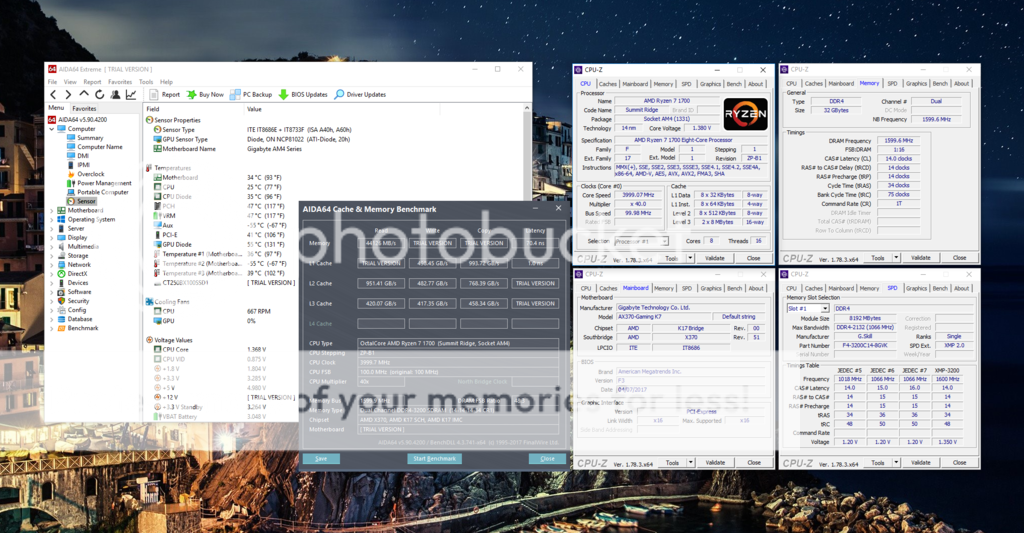
32GB (4x8GB) DDR4-3200 CL14 achieved! I enabled XMP profile 1 and upped the voltage to 1.45V. May be able to go lower, we'll see. I should note I enabled XMP, saved and rebooted. Changed voltage, saved and rebooted.
32GB (4x8GB) DDR4-3200 CL14 achieved! I enabled XMP profile 1 and upped the voltage to 1.45V. May be able to go lower, we'll see. I should note I enabled XMP, saved and rebooted. Changed voltage, saved and rebooted.
CuriousMike
Diamond Member
This is great news - I was nervous that 4x8GB would never support 3200.
32GB (4x8GB) DDR4-3200 CL14 achieved! .

3DVagabond
Lifer
Any performance difference between 2x16 and 4x8? Is it better to populate all of the slots? Or have more or less chips per dimm?

Mockingbird
Senior member
From looking around a bit, the consensus seems to be the Tachi and the Asus Hero are the best boards for overclocking/memory compatibility right now? I've got a 1700 sitting here doing nothing and I'm itching to get the system built now. I've favored gigabyte lately but not heard glowing reports of their aorus boards so far.
I have the Gigabyte GA-AX370 Gaming K7.
I don't have have any problem with it, but it just seems expensive esp. compare to the AsRock X370 Taichi which has better VRM phrases and more features all the while costing less.
That said, the GA-AX370 Gaming K7 does seem to have better memory support than the X370 Taichi.
Would love it if anyone can chime in.
Currently running 1700 on a Asus CH6 OC'd to 3.6. It seemed stable after multiple passes of IBT but getting the following error on all my cores/threads when I boot.
Source: Kernel-Processor-Power (Microsoft-Windows-Kernel-Processor-Power)
Event ID:35
Level: Error
Performance power management features on processor 0 in group 0 are disabled due to a firmware problem. Check with the computer manufacturer for updated firmware.
The Bios is 1002 on the Asus mobo.
Anyone see anything similar? Wondering if this might be a cosmetic issue from disabling power saving features on the bios.
Currently running 1700 on a Asus CH6 OC'd to 3.6. It seemed stable after multiple passes of IBT but getting the following error on all my cores/threads when I boot.
Source: Kernel-Processor-Power (Microsoft-Windows-Kernel-Processor-Power)
Event ID:35
Level: Error
Performance power management features on processor 0 in group 0 are disabled due to a firmware problem. Check with the computer manufacturer for updated firmware.
The Bios is 1002 on the Asus mobo.
Anyone see anything similar? Wondering if this might be a cosmetic issue from disabling power saving features on the bios.
From looking around a bit, the consensus seems to be the Tachi and the Asus Hero are the best boards for overclocking/memory compatibility right now? I've got a 1700 sitting here doing nothing and I'm itching to get the system built now. I've favored gigabyte lately but not heard glowing reports of their aorus boards so far.
Asus has the cheapest X370 board in the Prime, but it feel s very "cut down" in terms of BIOS features. Memory support isn't great due to the lack of a DRAM Boot Voltage among other things. It might have the worst memory support of all X370 boards - Only 2 types of RAM are certified for 3200, and the vast majority of RAM is only certified for 2133 with this board.
So if you can spend the extra $40 for the Taichi, I think it's worth it. The C6H seems a bit overpriced for what it is. It's not like you get more PCI-E lanes or anything like that, since it's still the X370 chipset.
Last edited:

guskline
Diamond Member
Anyone running GTX 1070s in SLI with a 1600(X) or Ryzen 7? Considering doing it rather than waiting for Vega, and the 1070s would be a good upgrade for gaming and video editing from mining-worn R9 390s.
Crono: I'm running RX480s in Crossfire with a 1800x and having a hoot. I just wanted to stay "all AMD" BUT running 2 GTX1070s would be much more powerful GPU wise.
As usual, part of the problem is wheter or not the games will have profiles for SLI/CF. Also what size monitor are you using?
In my case, since I wanted to stay with the most modern AMD gpu I bought a RX480 and then got the "bug" to CF it. With the GTX1070, that is quite a bit more expensive proposition.

EXCellR8
Diamond Member
CF is a total waste... I had two 480's for about a week and found maybe one game that supported it well. I used to be all for CF but it seems like SLI is supported by a lot more games.
i tried many different drivers/profiles with the twin polaris cards and almost every game had issues
i tried many different drivers/profiles with the twin polaris cards and almost every game had issues
Kinda got scared shitless today ,
Boot up PC , hello Bios prompt i never see because normally you boot straight into windows..
5min later , hello Bios prompt still being there
...eum reboot
Hello bios prompt again
5min later , black screen , still responding but very slowly to numlock on/off ok so not stuck
7min later tap delete
10min later ow bios interface , working normally
eeeeeeeeeum save and quit
Rebooting followed by instant windows loading screen ........
WTH.....
Spec:
No OC
AB350-Gaming 3 Gigabyte , default bios settings + SVM(virtualization) turned on , Bios F5
Saphhire nitro RX 470
16GB ADATA XPG
Boot up PC , hello Bios prompt i never see because normally you boot straight into windows..
5min later , hello Bios prompt still being there
...eum reboot
Hello bios prompt again
5min later , black screen , still responding but very slowly to numlock on/off ok so not stuck
7min later tap delete
10min later ow bios interface , working normally
eeeeeeeeeum save and quit
Rebooting followed by instant windows loading screen ........
WTH.....
Spec:
No OC
AB350-Gaming 3 Gigabyte , default bios settings + SVM(virtualization) turned on , Bios F5
Saphhire nitro RX 470
16GB ADATA XPG
The latest for your board should be F6. I found F5 to be unstable at any DDR speed above 2400 personally. Also, the dual BIOS on that board would trigger occasionally with no rhyme or reason to it on the initial F2.
http://www.gigabyte.com/Motherboard/GA-AB350-Gaming-3-rev-10#support-dl
http://www.gigabyte.com/Motherboard/GA-AB350-Gaming-3-rev-10#support-dl
TRENDING THREADS
-
 Discussion Zen 5 Speculation (EPYC Turin and Strix Point/Granite Ridge - Ryzen 9000)
- Started by DisEnchantment
- Replies: 25K
-
Discussion Intel Meteor, Arrow, Lunar & Panther Lakes + WCL Discussion Threads
- Started by Tigerick
- Replies: 25K
-
 Discussion Intel current and future Lakes & Rapids thread
- Started by TheF34RChannel
- Replies: 24K
-

-
