• We’re currently investigating an issue related to the forum theme and styling that is impacting page layout and visual formatting. The problem has been identified, and we are actively working on a resolution. There is no impact to user data or functionality, this is strictly a front-end display issue. We’ll post an update once the fix has been deployed. Thanks for your patience while we get this sorted.

AMD RYZEN Builders Thread

Page 102 - Seeking answers? Join the AnandTech community: where nearly half-a-million members share solutions and discuss the latest tech.
Further attempts to increase RAM speed.

18-17-17-17-36 @ 3200 @ 1.4v posted fine, got into windows, but chrome was repeatedly crashing.

18-17-17-17-36 @ 2933 @ 1.4v posted fine, in windows now, so far so good. It's been running about 20 minutes with no errors. I think this might be my new stable setting.
 
Part one: 1700
Part two: Arctic silver (just in case)

Arrived today. Part three - Corsair 3200 CL16 RAM (It's on the QVL. Hope it works) should arrive tomorrow.

Final part should arrive Monday or Tuesday - Gigabyte Gaming 3. Buying it for the same reason basically everyone else is: the only B350 board with 1220 audio.

I'll post how the RAM works.

It looks like the UEFI BIOS on Gigabyte boards is better than Asus. My Asus Z97 board is hard to tell which option is selected since it is gray or black.
 
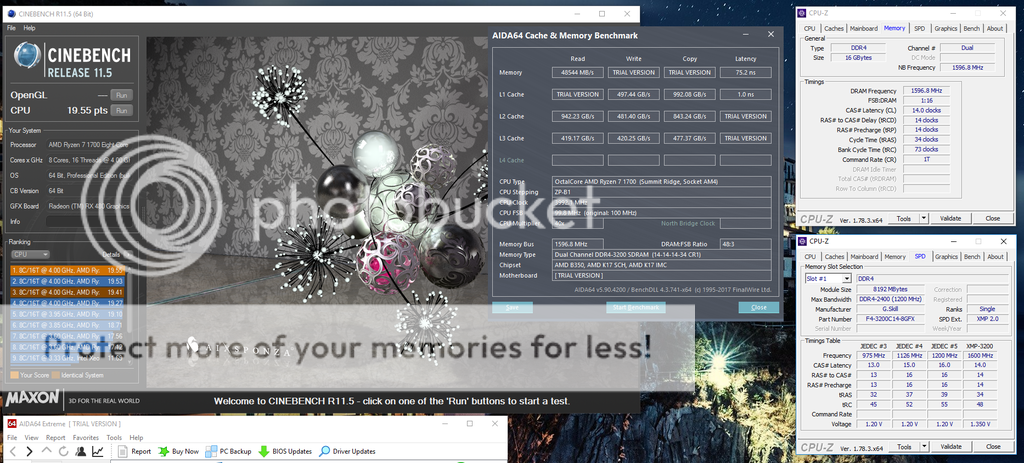
Well that was stupidly easy. In MSI's 2.1 and 2.2 BIOSes for the B350M Gaming Pro all I had to do was enable A-XMP and zero effort DDR4-3200 on reboot.

AIDA64%203200%20A-XMP_zpsoa75il7l.png


Gigabyte could take some pointers from MSI on their memory stability!

Its a little strange that they are releasing so many updates on a 3VRM gaming pro board but ignoring the mortar series which seemingly have better 3 VRM
 
"I was using the latest BIOS for our ASUS Crosshair VI Hero motherboard (1002) and upgraded to some Geil RGB (!!) memory capable of running at 3200 MHz on this board with a single BIOS setting adjustment."

From PCper.com in their review about the Ashes of Singularity update that takes more advantage of Ryzen's 8 cores. He does NOT include information as to WHICH Geil RAM it was.

https://www.pcper.com/reviews/Processors/Ashes-Singularity-Gets-Ryzen-Performance-Update
 
PSU crapping out on current system, forced me into this upgrade a little early, guess i can have some fun with these teething issues with the rest of you guys.

Im ordering:

Asus Prime X370 mobo
Ryzen 1700 w/ D15 heatsink
Corsair 16GB(2x8GB) 3600mhz
Samsung 500GB EVO M2 NVME SSD(OS, apps)
Crucial MX300 2TB(steam/games)
Corsair 650w RMi PSU
Fractal Design Define S case
Win 10 Home retail
Will be keeping my RX 480 8GB for now, may upgrade later this year to something faster.

All parts except ram will be here monday, ram backordered for 2-4 weeks.

So ill be joining the fray in 2-4 weeks.
 
Updated to the 1002 on the Crosshair board. Night and day difference. More stable, only downside is it wrecked manual fan control for me. Changing the offset to 83 and using the silent settings got it close enough.

LLC seems to be working a fair amount better. 4ghz is performing way better. I will be a happy camper until May when the rest of the improvements roll out.
 
just spent 20 minutes trying to get my build to boot up but no dice. pretty lousy deal.

If you run into a boot loop due to failed memory settings, you should turn off power, switch off PSU, and use a jumper on the clear CMOS header for at least 30s. Then go do something else for a few minutes, come back, and turn it back on and load optimized defaults and start from there again.

I've had to do this on all three of my Ryzen motherboards so far when pushing memory clocks with memory that doesn't work out of the box.
 
If you run into a boot loop due to failed memory settings, you should turn off power, switch off PSU, and use a jumper on the clear CMOS header for at least 30s. Then go do something else for a few minutes, come back, and turn it back on and load optimized defaults and start from there again.

I've had to do this on all three of my Ryzen motherboards so far when pushing memory clocks with memory that doesn't work out of the box.

Nah, just moved everything back to the Z170... could be weeks before another BIOS is released. The last one was dated 3/16 and it wasn't posted until nearly a week later. I'll pull the RAM, wait on am update and then try it again... chip ran excellent and cool on the custom water but the board obviously needs more fine-tuning. I cleared CMOS with the jumper and by pulling the battery and removing one DIMM, but nothing really made much of a difference. For another day I suppose.
 
I just bought a Taichi from newegg. Order complete, they haven't cancelled yet !! Pray....

Edit: its in packaging.

Looks like it's still in stock. I was able to place an order and received confirmation. It's been in stock for at least 22 minutes now.
 
if the color scheme wasn't so damn fugly i'd consider grabbing one in the interim... could still have BIOS issues however

It's an odd design, though I guess it fits with the Taichi name. I ruled it out before launch because of that, but another ASRock mobo (the Fatal1ty Pro board) was going to be my backup in case I couldn't get the Crosshair VI Hero.
 
Last edited:
if the color scheme wasn't so damn fugly i'd consider grabbing one in the interim... could still have BIOS issues however
I can't even see the board with this huge noctua air cooler in it. It's kind of a shame too, because this black and white TridentZ memory would probably look really nice paired with this board.
 
Okay. I managed to find a g skill serial number decoding scheme to identify the chiip inside it. It correctly identified my chips to be samsung. Aalso read somewhere that all C14 are samsung. Cannot confirm that, but will explain why some with C16 is having problems.

G.Skill serial numbers always start with the year and week, for example 913 is the 13th week of 2009 while 1240 is the 40th week of 2012. Pretty straightforward.
smile.gif


After that there are four digits which stand for different ICs/manufacturers:

AB40 - Samsung/Hynix (seems to be both, only used for a short time)
000x - Hynix (only on samples?)
0000

x10x - Nanya eTT/uTT
2100
x15x - ??? eTT/uTT
2150
x20x - Powerchip/PSC (sometimes eTT/uTT)
1200
x30x - Micron
3300
x40x - Hynix
1400/2400/3400
x50x - Samsung
1500/2500/250B
x60x - SpecTek (/Micron)
1600
x80x - Elpida
0800/1800
3800 MxH-E Hyper

http://www.xtremesystems.org/forums/showthread.php?283666-Figuring-out-G-Skill-s-SNs

Hopefully it will be helpful to some
 
Cannot confirm that, but will explain why some with C16 is having problems.
Yes there's definitely some disparity with chips on the C16's. Mine are definitely Samsung and working much better than some other C16s with almost identical model numbers.
 
Wow, I just flashed to 1.94a on my X370 Taichi and it's awesome! Well sort of.

I now have UEFI profiles!

I can OC in the UEFI without a reboot loop!

CPU-z can now accurately read vcore!

I just dialed in 4.0 GHz and DDR4-3200 14-14-14-32 and off I go! No more need to use Ryzen Master unless twiddling around on the desktop.
 
Wow, I just flashed to 1.94a on my X370 Taichi and it's awesome! Well sort of.

I now have UEFI profiles!

I can OC in the UEFI without a reboot loop!

I just dialed in 4.0 GHz and DDR4-3200 14-14-14-32 and off I go! No more need to use Ryzen Master unless twiddling around on the desktop.

Welcome to the 4GHz Ryzen club. And the exclusive DDR4-3200 CL14 club 🙂
 
Back
Top