
-
We’re currently investigating an issue related to the forum theme and styling that is impacting page layout and visual formatting. The problem has been identified, and we are actively working on a resolution. There is no impact to user data or functionality, this is strictly a front-end display issue. We’ll post an update once the fix has been deployed. Thanks for your patience while we get this sorted.
You are using an out of date browser. It may not display this or other websites correctly.
You should upgrade or use an alternative browser.
You should upgrade or use an alternative browser.
AMD RYZEN Builders Thread
Page 37 - Seeking answers? Join the AnandTech community: where nearly half-a-million members share solutions and discuss the latest tech.


Elfear
Diamond Member
LOL I was considering grabbing that open boxed crosshair, haha. We probably would have ran into each other. Question is, who would have held the door open for the other guy? First one in the door would have got that crosshair.
Bogg: "Good morning. Whatcha buying this morning?"
Elfear: "Oh nothing really, just a couple flash drives"
SPRINT TO MOTHERBOARD ISLE
Ha! I was running that exact scenario through my head on the way to the door. Hopefully having watched a few football games in my life would give me the needed moves to get that board. 😀
Which store do you live near?
I have the same problem concerning temps. Which cooling solution do you use? I read at Toms that due to changes with the backplate there might be some issues. Seems like my AlphaCool Eisbär could be affected. So atm I'm not too sure if I should set up the system at all.
Edit: I found a spare AM3 backplate laying around, maybe I'll try that one.
PH-TC14PE with the AM4 mounting kit. It uses the stock backplate but comes with its own washers, screws and retention brackets. Toms Hardware reported 78C in Prime95 with custom open loop water cooling, so in that case my temps are excellent considering I'm just using an air cooler and getting 3-4C lower temps with 2-3C higher room temps.
http://www.tomshardware.com/reviews/amd-ryzen-7-1800x-cpu,4951-11.html
I'm not going to trust any temps until there have been a few more updates to BIOS and monitoring software. Like I said, the latest BIOS update caused my idle temps to go from 34C to 56C, which just doesn't make sense since full load temps didn't change. It must be reporting it wrong.
BTW, I tested High Performance and Balanced with a watt meter. Idle power draw was about 78-80W at the socket either way. So it seems you're just killing performance by using Balanced, even though Windows shows the CPU at a constant 3.6+ GHz in High Performance mode.
Last edited:
PH-TC14PE with the AM4 mounting kit. It uses the stock backplate but comes with its own washers, screws and retention brackets. Toms Hardware reported 78C in Prime95 with custom open loop water cooling, so in that case my temps are excellent considering I'm just using an air cooler and getting 3-4C lower temps with 2-3C higher room temps.
http://www.tomshardware.com/reviews/amd-ryzen-7-1800x-cpu,4951-11.html
I'm not going to trust any temps until there have been a few more updates to BIOS and monitoring software. Like I said, the latest BIOS update caused my idle temps to go from 34C to 56C, which just doesn't make sense since full load temps didn't change. It must be reporting it wrong.
BTW, I tested High Performance and Balanced with a watt meter. Idle power draw was about 78-80W at the socket either way. So it seems you're just killing performance by using Balanced, even though Windows shows the CPU at a constant 3.6+ GHz in High Performance mode.
Yeah I noticed that the wrong readings in the BIOS are caused by the beta BIOS, I flashed back the 0702 non-beta one and the readings were correct again. I changed the backplate nonetheless and I really think that needs to be adressed by AlphaCool etc. With the old AM3 backplate the cooler sits tight as it should. Good to hear you are not affected 😉

Markfw
Moderator Emeritus, Elite Member
So which memory (gskill, corsair, etc) is samsung ?i heard that samsung works better than hynix for some reason.
I just realized I have a Deepcool Gammaxx 200T in an old build (an FM2 build... forgot I had a GTX 750 in there, too... neat 🙂) just collecting dust, and apparently because it doesn't use a custom backplate/bracket, it actually fits. Going to proceed with build now, swapping out the Deepcool fan with a 92mm Arctic F9 first.
Last edited:

alexruiz
Platinum Member
I just realized I have a Deepcool Gammaxx 200T in an old build (an FM2 build... forgot I had a GTX 750 in there, too... neat 🙂) just collecting dust, and apparently because it doesn't use a custom backplate/bracket, it actually fits. Going to proceed with build now, swapping out the Deepcool fan with a 92mm Arctic F9 first.
The DeepCool fan is fairly decent to be honest.
The 200 is 92mm fan, the 200T is 120mm fan. The heatsink is the same, so the 92mm fan should fit on the 200T
alexruiz
Platinum Member
Yeaa. My bios on asus prime b350m is over 3 weeks old and cant update it yet.
On a 1700 non x, running stable at 3.8 all cores - 1.3375V. Cant go further as it is. As expected. Pretty nice 25% oc out the box. Standard cooler in hot conditions.
Some cores are stuck at 3.7 for the lower v it seems.
The trick is now to identify those - so efficiency and performance can go hand in hand.
Where is the BIOS did you adjust the multiplier?
I am doing a build with a Ryzen 7 1700 and an Asus prime b350 plus, and for the life of me cannot find where to change the cpu frequency.

moonbogg
Lifer
Ha! I was running that exact scenario through my head on the way to the door. Hopefully having watched a few football games in my life would give me the needed moves to get that board. 😀
Which store do you live near?
Closest one is Tustin.


imported_jjj
Senior member
And I have heard that somewhere around 2666-3000 is the fastest you can get for ram that works, but get tight timings. Any recommendations here ?
.
ComputerBase with 2 modules G.Skill Trident Z DDR4-3600
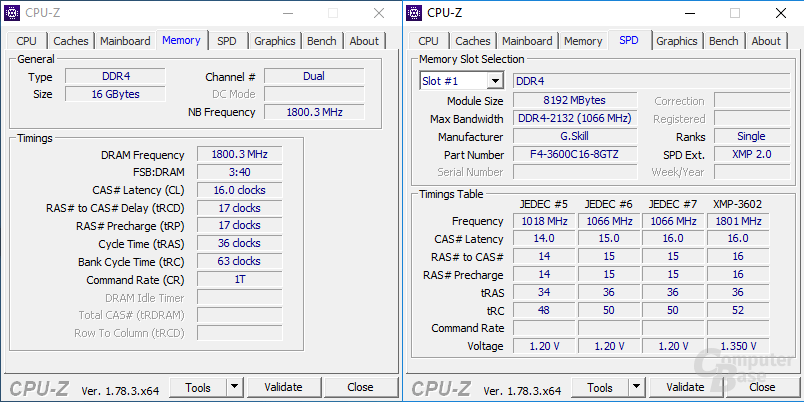
G.SKILL’s with a new 64GB (4x16GB) got to DDR4-3200MHz CL14-14-14-34
https://www.gskill.com/en/press/vie...s-and-fortis-series-ddr4-memory-for-amd-ryzen
When your mobo gets support hard to say but things are moving in the right direction.

Anyone put these under a custom waterloop? Interested in the temperatures and overclocks...
Soon... get my motherboard on Tuesday!

SketchMaster
Diamond Member
OK, I'm going to be that guy that bombs into the thread without reading the 37 pages of info and ask what MB y'all would recommend?
My current rig has an i7 5820K with 4 x 8GB of Patriot Memory VIPER 4. I'm hoping to reuse the RAM and h100i AIO (has the old AM3 HW that works with the AM4 mounts). Wondering what MB you've seen that seems to be performing best and is getting the most love with updates?
My current rig has an i7 5820K with 4 x 8GB of Patriot Memory VIPER 4. I'm hoping to reuse the RAM and h100i AIO (has the old AM3 HW that works with the AM4 mounts). Wondering what MB you've seen that seems to be performing best and is getting the most love with updates?

Doom2pro
Senior member
So which memory (gskill, corsair, etc) is samsung ?
G.Skill mostly uses Samsung, but I think some of their Ripjaw uses Hynix.

DrMrLordX
Lifer
So which memory (gskill, corsair, etc) is samsung ?
Depends on the OEM.
With Corsair, there's a version number (ver) on every DIMM. You can tell which ICs are in the RAM by that number. For example, ver 4.31 means Samsung B-die (the good stuff).
You have to do research on an OEM-by-OEM basis to sort out this stuff.
Most of the higher-clock G.Skill is Samsung B though.
OK, I'm going to be that guy that bombs into the thread without reading the 37 pages of info and ask what MB y'all would recommend?
The ASRock x370 Taichi seem to have the most robust VRMs. Its current supported memory speeds ain't all that.
Lots of people like the stability/functionality of the Gigabyte Aorus Gaming V, but chew over on XS is not impressed by its PWM.
The Asus Crosshair VI Hero seems to be getting the best memory clockspeeds so far.
With updates, I'm gonna go with the c6H as being "the best" but I could be wrong.

sirmo
Golden Member
Even if his RAM blew up, I fail to see how that's related to Ryzen. Ryzen doesn't supply voltage/power to the RAM. Motherboard does.Just a heads up, this guy on Youtube had one of his Trident.Z RGB modules die and another stopped lighting up, they were working fine until he tried to clock them at 3000Mhz @ rated 1.35V, system booted but a minute later one stick was dead and both had no RGB!
SketchMaster
Diamond Member
The ASRock x370 Taichi seem to have the most robust VRMs. Its current supported memory speeds ain't all that.
Lots of people like the stability/functionality of the Gigabyte Aorus Gaming V, but chew over on XS is not impressed by its PWM.
The Asus Crosshair VI Hero seems to be getting the best memory clockspeeds so far.
With updates, I'm gonna go with the c6H as being "the best" but I could be wrong.
Cool beans. I was hearing over in the other thread that the Asus board was likely the best, and I'm an Asus fan so that all works out for me.
...Now to just try and figure out how to get my hands on one... 😕 To rub it in, the local Frys has plenty of Ryzen CPUs in stock, but no MBs.
sirmo
Golden Member
https://www.newegg.com/Product/Product.aspx?Item=N82E16813132963Having a problem finding c6h on newegg. I filtered for am4, and got 21 mottherboards, but even manual looking, I don;t see c6h anywhere.
And on the memory, so it seems that higher clock gskill is the samsung ? like over 2667 ?
Is this it?
Doom2pro
Senior member
Even if his RAM blew up, I fail to see how that's related to Ryzen. Ryzen doesn't supply voltage/power to the RAM. Motherboard does.
I agree, he admits the title was not the best, but I think the VRM did him in, either a high spike or sustained voltage above 1.35.
TRENDING THREADS
-
 Discussion Zen 5 Speculation (EPYC Turin and Strix Point/Granite Ridge - Ryzen 9000)
- Started by DisEnchantment
- Replies: 25K
-
Discussion Intel Meteor, Arrow, Lunar & Panther Lakes + WCL Discussion Threads
- Started by Tigerick
- Replies: 24K
-
 Discussion Intel current and future Lakes & Rapids thread
- Started by TheF34RChannel
- Replies: 24K
-

-
