• We’re currently investigating an issue related to the forum theme and styling that is impacting page layout and visual formatting. The problem has been identified, and we are actively working on a resolution. There is no impact to user data or functionality, this is strictly a front-end display issue. We’ll post an update once the fix has been deployed. Thanks for your patience while we get this sorted.

AMD RYZEN Builders Thread

Page 94 - Seeking answers? Join the AnandTech community: where nearly half-a-million members share solutions and discuss the latest tech.
Part of me wants to TOFTT and get the AMD Ryzen specific Flare X 3200 and see if it works in an approved motherboard (the Gaming 3 from Gigabyte). Both are, unfortunately, out of stock so I can't see if it's an improvement in compatibility and easy to set to 3200.

I have a set of 2x8GB DDR4-3200 Flare X en route. Should be able to verify on Wednesday if it's plug and play on my rigs.
 
my what a great ordeal this system was to get running okay, especially after the effortless breeze that was Skylake!

my 990FX board was finicky, but man this was a whole other level. after 3 fresh installs of Win 10 Pro I am finally able to sit in front of a machine that is 90% functional. graphics drivers finally installed, data migrated, and 16GB of memory (albeit 2667) working so far. this was definitely a rough one and, honestly, if the boards weren't so scarce I'd consider returning everything and waiting on jumping back in. i think i might be alright though, and once the BIOS is sorted out hopefully I can max out my memory and see what I can do for OC. worst case scenario I will buy a different set of DIMMs, but no way am I spending that much on the Flares.
 
Good deal!

I checked it Saturday, in stock.
Went to buy on Sunday, out of stock.

If it works easily, I might put it on my list, though it's a bit pricey.
 
my what a great ordeal this system was to get running okay, especially after the effortless breeze that was Skylake!

my 990FX board was finicky, but man this was a whole other level. after 3 fresh installs of Win 10 Pro I am finally able to sit in front of a machine that is 90% functional. graphics drivers finally installed, data migrated, and 16GB of memory (albeit 2667) working so far. this was definitely a rough one and, honestly, if the boards weren't so scarce I'd consider returning everything and waiting on jumping back in. i think i might be alright though, and once the BIOS is sorted out hopefully I can max out my memory and see what I can do for OC. worst case scenario I will buy a different set of DIMMs, but no way am I spending that much on the Flares.

Weird.. this was the opposite experience I had. I haven't had any issues since way back in the socket 939 and core 2 era.
 
So, until I get the desire to migrate all of my VM's, I'll let my Haswell box handle it. However, I just bought eVGA 3200 ram and I'm stuck on 2600 speeds. Is this ram decent or should I exchange it? http://www.microcenter.com/product/459742/16GB_2_x_8GB_DDR4-3200_PC4-25600_CL16_Desktop_Memory_Kit

Also, I was thinking about this CPU cooler, but it seems like the wraith is doing a decent job? http://noctua.at/en/products/cpu-cooler-retail/nh-c14s

I doubt the CPU cooler (blowing air down) is limiting my ram speeds, but it's annoying.

I have that same kit with a 1700x and a Gigabyte Aorus Gaming 5. Mine is able to run at 2933 16-18-18 1.35v stable all day and can run at 3200 16-18-18 1.35v but with crashes if I run blend test in Prime95 (but can game all day long at 3200). Make sure that you have the right timings and voltage or it definitely won't work. Also, my RAM used to down-clock itself in older BIOSes (I am on F5d from Gigabyte) and I think that future BIOS updates will also impact the RAM stability.
 
I'm considering an upgrade from my 2500K (oc'd to 4.2). Do you think a 1700 would be a decent upgrade? I'll be doing some gaming, including some CPU dependent games like MMOs and Dota 2 and also doing some blender rendering as far as CPU intensive workloads are concerned. Or would a 7700k be a better option?

And have AMD said how many generations they expect the AM4 socket to be in use or if x370 boards will support Zen2 and Zen3 CPUs?
 
Hey everyone,

Just upgraded my FX-8320 to a Ryzen 7 1700. I got the ASRock AB350 Fatal1ty Gaming K4. I was able to reuse my AM3 clip cooler (Zalman quiet).

I bought some G Skill Ripjaws 4 DDR4 3000MHz before Ryzen even came out in anticipation of prices going up. I didn't expect all the memory challenges with Ryzen. I am able to get it at 2400MHz but no higher, although I haven't tried much. I'll just wait until the BIOS bugs get ironed out. To get 2400MHz I had to first set the timings manually to 14-14-14-34, save and restart, and then change the multiplier. If I did both at once it wouldn't work and would reset to 2133MHz. It's running now at 2400MHz, 12-12-12-32.

I tried a small bit of overclocking with Ryzen Master Utility. Very easy to get it to 3.7 by setting voltage to 1.2250. Getting to 3.8 without Cinebench crashing required a huge bump to 1.30625V. I haven't tried any higher and probably won't for a while due to rapidly diminishing returns. I'll probably just keep it stock for now, and bump it up to 3.7 whenever I need a bit more lightly threaded performance.

Find out what the latest BIOS for your board is and google around to see if anyone is having any major issues with it. If no red flags, upgrade your BIOS and see if your Memory speeds improve. Ryzen LOOOOVES fast RAM.

1.3 VCORE is nothing, as long as your temps under load aren't too high you can push 1.35 all day. AMD says you shouldn't go towards 1.4 unless you have water, over 1.42V is when things get really dicy...
 
I have that same kit with a 1700x and a Gigabyte Aorus Gaming 5. Mine is able to run at 2933 16-18-18 1.35v stable all day and can run at 3200 16-18-18 1.35v but with crashes if I run blend test in Prime95 (but can game all day long at 3200). Make sure that you have the right timings and voltage or it definitely won't work. Also, my RAM used to down-clock itself in older BIOSes (I am on F5d from Gigabyte) and I think that future BIOS updates will also impact the RAM stability.

Do you have startup issues?

https://www.reddit.com/r/Amd/comments/61p512/gigabyte_gaming_k7_board_died_overnight_time_to/

https://www.reddit.com/r/Amd/comments/61mv95/aorus_ax370_gaming_5_owners_any_issues_strange/

https://www.reddit.com/r/Amd/comments/61mt8s/has_anyone_managed_to_get_3600_mhz_memory_working/
 
Last edited:
Find out what the latest BIOS for your board is and google around to see if anyone is having any major issues with it. If no red flags, upgrade your BIOS and see if your Memory speeds improve. Ryzen LOOOOVES fast RAM.

1.3 VCORE is nothing, as long as your temps under load aren't too high you can push 1.35 all day. AMD says you shouldn't go towards 1.4 unless you have water, over 1.42V is when things get really dicy...

Thanks. I actually updated right away from 1.30P (I think pre-production BIOS) to the latest beta 1.44. Big difference in functionality, but it's still a work in progress. I had to make a DOS USB boot drive using Rufus because my early BIOS didn't even have an instant flash option.

I have read a lot about Ryzen's preference for high memory speeds, and it was one reason I waited a few weeks before buying anything. I'm hoping it will get resolved soon enough and I won't have to buy new hardware. I'm unable to set command rate in BIOS and it's running at 1T right now. I keep checking ASRock's website every day for new updates.

I know it will be safe to run up to 1.35v and even higher if temps are under control, but it doesn't seem worth it to me right now. To get it stable at 3.8GHz required more than 80mV additional voltage than 3.7GHz, just for an extra 100MHz. 3.7GHz at 1.225V seems like a good compromise of speed, power and heat at this time. I'm sure I could hit 3.9GHz at close to 1.4V, but that's a lot more power and heat to manage for not much gain. Same reason I stayed at 4.3GHz on my FX-8320.
 
Thanks. I actually updated right away from 1.30P (I think pre-production BIOS) to the latest beta 1.44. Big difference in functionality, but it's still a work in progress. I had to make a DOS USB boot drive using Rufus because my early BIOS didn't even have an instant flash option.

I have read a lot about Ryzen's preference for high memory speeds, and it was one reason I waited a few weeks before buying anything. I'm hoping it will get resolved soon enough and I won't have to buy new hardware. I'm unable to set command rate in BIOS and it's running at 1T right now. I keep checking ASRock's website every day for new updates.

I know it will be safe to run up to 1.35v and even higher if temps are under control, but it doesn't seem worth it to me right now. To get it stable at 3.8GHz required more than 80mV additional voltage than 3.7GHz, just for an extra 100MHz. 3.7GHz at 1.225V seems like a good compromise of speed, power and heat at this time. I'm sure I could hit 3.9GHz at close to 1.4V, but that's a lot more power and heat to manage for not much gain. Same reason I stayed at 4.3GHz on my FX-8320.

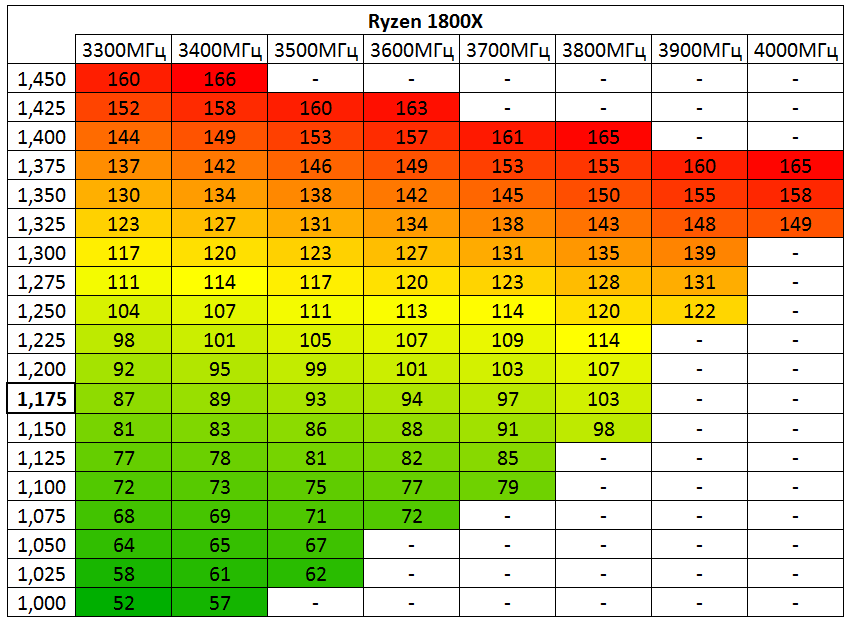
Posted this somewhere else but guess i'll share here too. How W scale with V and clocks.
Ofc your chip might clock a bit differently.
03_big.png

Source (in Russian) https://www.overclockers.ru/lab/832...-7-1800x-njuansy-raboty-i-razgon-pamyati.html
 
That's cool. So in my case, it's almost 30W extra to run at 3.8 vs. 3.7. I feel good about staying at 3.7 right now, or even stock most of the time.

Maybe one day I'll test it out with my watt meter and see if the data lines up.
 
I have a set of 2x8GB DDR4-3200 Flare X en route. Should be able to verify on Wednesday if it's plug and play on my rigs.

Ordered a pair of these this weekend from Newegg with their 10% memory coupon. Now, just need the AsRock Fatality Gaming Pro motherboard to get back in stock and I'll get a 1700 and finally get a chance to build.
 
That's cool. So in my case, it's almost 30W extra to run at 3.8 vs. 3.7. I feel good about staying at 3.7 right now, or even stock most of the time.

Maybe one day I'll test it out with my watt meter and see if the data lines up.

Highest efficiency ends at 3.3-3.5GHz.
This thing shines between 0.7 and 1V and should make Raven Ridge really interesting.
 
I have that same kit with a 1700x and a Gigabyte Aorus Gaming 5. Mine is able to run at 2933 16-18-18 1.35v stable all day and can run at 3200 16-18-18 1.35v but with crashes if I run blend test in Prime95 (but can game all day long at 3200). Make sure that you have the right timings and voltage or it definitely won't work. Also, my RAM used to down-clock itself in older BIOSes (I am on F5d from Gigabyte) and I think that future BIOS updates will also impact the RAM stability.
I second this... ensure to amend the RAM voltage to something like 1.355v worked for me and I was able to set 2666Mhz with CAS 15-15-15-35 Timings, CPU is clocked @ 4.0GHz on water cooling / 1.385v and max temp never going over 60c
 
Last edited:
asus has a new bios out for the b350 plus anyone try it? the notes say increased performance so ill prolly try it anyway but my system is running well now so im kinda hesitant to mess with it.
 
asus has a new bios out for the b350 plus anyone try it? the notes say increased performance so ill prolly try it anyway but my system is running well now so im kinda hesitant to mess with it.
I installed the new Bios last night, it wiped all overclocked settings and would post until I "restored to default" I then went back into BIOS and set the following;
CPU @ 4.00GHz with 1.385v / memory using DOCP profile @ 2666Mhz with 1.355v (+1) - this is fully stable and hoping to push further when I get time
The new Bios has some new features which I haven't messed with yet, one states performance bias? This lets you tell the overclock to perform better for certain benchmarks (I think)
** Note ** Mine is the Asus Prime Pro x370
 
OK, something odd, and I need help. Went to change my overclock, with less vcore, more speed. Applied from Ryzen master, then it locked up. Rebooted, went into bios, and went back and saved (3.9 ghz, 1.35 vcore) But when windows books, its running at 3.2 ghz. If I run Ryzen master. click on the profile, and apply, it says "sucessfully updated", but it did not say "this requires a reboot" which it should, and its still runnig at 3.2 !!!

Uploading new bios 1.44 and will try that, but please if you have any idea, reply.

Do the memory speed/timings on the profile differ from what you set in the BIOS? The Ryzen Master profile only reads the memory timings on the first start up. If you change the speed/timings in the BIOS they will not update to the saved profile(s). You need to manually match them up. Changing the core voltage and clock speed are live changes and should never require a reboot.


So I found I can run my memory @ 3200 if I slacken the timings to 16-16-16-16-36. However, it's definitely not stable. It doesn't crash or anything, but things just aren't as smooth. I was having issues with videos playing too. Went back to 2933 @ CL 14. All normal. Come on BIOS updates!
 
nice overclock! were you able to do better with this bios revision than the last one?
I haven't had chance to push this since Bios update, these are the same overclock settings I had before the BIOS update (had to re-apply them after flash)
Looking to try and push over 4.00GHz tonight and see where I can get to, id say there is headroom as temps are low and im still below 1.45v - which I will gradually push towards whilst pushing up the multiplier
 
got the locking up to stop but Radeon settings likes to crash (host app) and I am having that same video issue as I did with my AM3+ board and the 290X...

on a restart, DP has no video but cold boot works fine. leads me to believe it's a AMD chipset issue because I've used this RX 480 on the skylake and it was absolutely flawless.
 
Back
Top