• We’re currently investigating an issue related to the forum theme and styling that is impacting page layout and visual formatting. The problem has been identified, and we are actively working on a resolution. There is no impact to user data or functionality, this is strictly a front-end display issue. We’ll post an update once the fix has been deployed. Thanks for your patience while we get this sorted.

AMD RYZEN Builders Thread

Page 91 - Seeking answers? Join the AnandTech community: where nearly half-a-million members share solutions and discuss the latest tech.
Doesn't look like it. The manual shows installation for the correct orientation on AMD.

Right, it's the correct orientation for front-to-back airflow in a normal ATX build. But I hate the clip installation method because it always feels like I'm going to snap the socket in half.
 
If you're on a budget and don't mind overclocking, a R7 1700 is definitely a valid option.

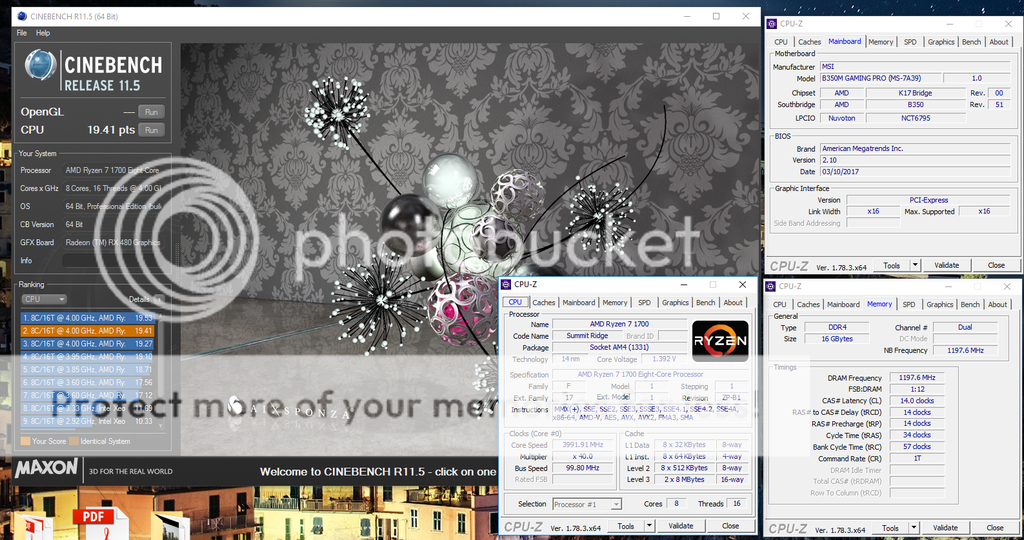
Here's what mine just did at 1.38V (I could probably go lower):
Ryzen%20B350%204000MHz%201700_zpsfftsuwry.png


That's 4GHz on a $79.99 B350 mATX motherboard which won't let me go above 1.40V anyways (probably because VRM components are... underwhelming) 😛

For the life of me I can't seem to get my CPU to run at 3.6ghz 100% of the time. Am I missing a setting?
 
For the life of me I can't seem to get my CPU to run at 3.6ghz 100% of the time. Am I missing a setting?

Which board? Could be a BIOS issue? My Gigabyte board decidedly hates my various DDR4 memories and refuses to run faster than 2400MHz CL15. I ran at CL14 for a while and it locked up every now and then. Haven't had that issue on other boards (Asus C6H and MSI B350M Gaming Pro... though to be fair, the C6H is dead)
 
MSI Tomahawk - I set the CPU frequency to 3700 and nothing. My ram is at 2600 as the other settings won't let the box boot.
 
Do you have auto voltage enabled? On my 1800X auto voltage worked fine OCing up to 40x (literally just change multi to 40x) but on my 1700 I had to manually choose a voltage in order to get it to work. 3800 booted fine on auto but 3900 and above required manually setting voltage.
 
IEC, My Ryzen 7-1800x is OC'd to 4000 (40x100) with ram running at DDR4-2400. Ran 1 hour of Asus Real bench without fail. Temps were great.
 
Do you have auto voltage enabled? On my 1800X auto voltage worked fine OCing up to 40x (literally just change multi to 40x) but on my 1700 I had to manually choose a voltage in order to get it to work. 3800 booted fine on auto but 3900 and above required manually setting voltage.

I do. What's a good voltage for temps at 3.7?
 
After a couple of hours of preliminary Cinebench testing on my 1700 (I also was looking at my Kill-a-Watt meter). Tested with the Stock Wraith Spire Cooler, XFX R9 285 2GB, a Crucial M4 64GB SSD, with Rosewill Arc M550 PSU:

3.6GHz needs 1.15v ~145 watts
3.7GHz needs 1.225v ~170 watts
3.8GHz needs 1.325v ~210 watts
3.9GHz needs 1.3875v ~224 watts (I think, I'll have to double check this, seems lower than I recall)

I can't hit 4GHz without hitting a wall it seems. My CPU probably wants more voltage. I tried 1.415v but I don't think the stock cooler can handle that voltage/heat and the system just crashes instantly.

My Gigabyte AB-350M-Gaming 3 mATX mobo seems limited BIOS wise, especially since Gigabyte hasn't released an update since the first release version (2/20/17). But even then, I'm still impressed by this relatively cheap board. It takes my G. Skill Ripjaws 4 3000 sticks just fine. XMP automatically detected the 2933 speeds and timings. I'm even able to overclock my RAM to 3200 speeds. My sticks are single-rank, and most likely Samsung. I'll have to use a program to double check.

Since I can't adjust Vcore in the BIOS I am forced to use Ryzen Master. I'm actually surprised at how nice that program is with regards to software overclocking. And last thoughts before I enjoy some The Magicians with the gf, I'm really, really impressed with the stock Spire Cooler. That thing is the best stock heatsink/fan combo included with any CPU ever. And it's quiet too, even at full load. Wow.
 
Yes.

If I was running Prime95 all day long, I wouldn't run this at 3.8ghz as the temps got into mid-high 80's.

But for non-stop gaming, photo editing and general use it's managing to keep it below 70.

3.8GHz not 4? The max clocks are showing 3980 so assumed that's where it is, guess that was a previous OC.
 
MSI Tomahawk - I set the CPU frequency to 3700 and nothing. My ram is at 2600 as the other settings won't let the box boot.
Start by setting ram at 2133 with auto setting.
Revert all to default by loading standard setup.
Then oc.
The cpu by default uses above 1.4 in spikes so its perfectly safe to use eg 1.375. Take that as a starter for 3.4 and work up.
Confirm voltage is working.
 
Well I got the 4000mhz tridentz memory, and now I am ready to build.

I am going all in. Working pc or bust. I am going to hook up everything, push the power button, and see what happens. Wish me luck.
 
Back
Top