
-
We’re currently investigating an issue related to the forum theme and styling that is impacting page layout and visual formatting. The problem has been identified, and we are actively working on a resolution. There is no impact to user data or functionality, this is strictly a front-end display issue. We’ll post an update once the fix has been deployed. Thanks for your patience while we get this sorted.
You are using an out of date browser. It may not display this or other websites correctly.
You should upgrade or use an alternative browser.
You should upgrade or use an alternative browser.
120Hz Monitor LIST -- Includes LightBoost, G-SYNC, Overclockable, etc.
Page 9 - Seeking answers? Join the AnandTech community: where nearly half-a-million members share solutions and discuss the latest tech.
Yeah I am eagerly awaiting the ROG 27" 120hz + G-sync monitor but after its announcement there has been like zero info published about it since, I'm wondering if they have run into delays with G-sync as well.
I've been itching to get a new monitor for a 2 setup. Bout to just bite on a the BenQ xl2420z but that's w/o Gsync
bystander36
Diamond Member
When it was first revealed, that monitor was expected to be out in June. We still have over a month at least, probably closer to 2 months.Yeah I am eagerly awaiting the ROG 27" 120hz + G-sync monitor but after its announcement there has been like zero info published about it since, I'm wondering if they have run into delays with G-sync as well.
Yeah I am eagerly awaiting the ROG 27" 120hz + G-sync monitor but after its announcement there has been like zero info published about it since, I'm wondering if they have run into delays with G-sync as well.
Latest is June. 144hz and will do 3d @ 1440p. Also an 8 bit panel.

Mark Rejhon
Senior member
Heads up regarding BENQ XL2411Z, XL2420Z, and XL2720Z:
There are now multiple options to get Version 2 firmware on your Z-series.
Version 2 firmware is of interest to those people who like LightBoost.
1 -- You can get BENQ to give you free firmware upgrade service for your monitor:
Free BENQ Upgrade to Version 2 Firmware (BENQ.com)
2 -- You can also do the upgrade yourself (requires upgrader dongle):
DIY Upgrade to Version 2 Firmware
3 -- Some stores are now finally BENQ monitors with Version 2 firmware already preinstalled, easiest is via the BENQ online store.
The purpose of Version 2 firmware is to be compatible with the Blur Busters Strobe Utility:

This utility allows adjusting BENQ's "LightBoost" equivalent; to get sharper motion than LightBoost 10%, or brighter than LightBoost 100%, and it also supports 60Hz strobing (good for LightBoost with gaming consoles, Playstation4, and XBox360, or HDTV boxes), as well as having much better colors than LightBoost with no color distortion and no gamma bleaching. For LightBoost users (especially 24" users with crimson/purple/blue color tint), the Z-Series is a big "LightBoost" image quality upgrade, as long as your BENQ monitor supports Version 2 firmware.
There are now multiple options to get Version 2 firmware on your Z-series.
Version 2 firmware is of interest to those people who like LightBoost.
1 -- You can get BENQ to give you free firmware upgrade service for your monitor:
Free BENQ Upgrade to Version 2 Firmware (BENQ.com)
2 -- You can also do the upgrade yourself (requires upgrader dongle):
DIY Upgrade to Version 2 Firmware
3 -- Some stores are now finally BENQ monitors with Version 2 firmware already preinstalled, easiest is via the BENQ online store.
The purpose of Version 2 firmware is to be compatible with the Blur Busters Strobe Utility:
This utility allows adjusting BENQ's "LightBoost" equivalent; to get sharper motion than LightBoost 10%, or brighter than LightBoost 100%, and it also supports 60Hz strobing (good for LightBoost with gaming consoles, Playstation4, and XBox360, or HDTV boxes), as well as having much better colors than LightBoost with no color distortion and no gamma bleaching. For LightBoost users (especially 24" users with crimson/purple/blue color tint), the Z-Series is a big "LightBoost" image quality upgrade, as long as your BENQ monitor supports Version 2 firmware.
Last edited:

Unoid
Senior member
Heads up regarding BENQ XL2411Z, XL2420Z, and XL2720Z:
There are now multiple options to get Version 2 firmware on your Z-series.
Version 2 firmware is of interest to those people who like LightBoost.
1 -- You can get BENQ to give you free firmware upgrade service for your monitor:
Free BENQ Upgrade to Version 2 Firmware (BENQ.com)
2 -- You can also do the upgrade yourself (requires upgrader dongle):
DIY Upgrade to Version 2 Firmware
3 -- Some stores are now finally BENQ monitors with Version 2 firmware already preinstalled, easiest is via the BENQ online store.
The purpose of Version 2 firmware is to be compatible with the Blur Busters Strobe Utility:
This utility allows adjusting BENQ's "LightBoost" equivalent; to get sharper motion than LightBoost 10%, or brighter than LightBoost 100%, and it also supports 60Hz strobing (good for LightBoost with gaming consoles, Playstation4, and XBox360, or HDTV boxes), as well as having much better colors than LightBoost with no color distortion and no gamma bleaching. For LightBoost users (especially 24" users with crimson/purple/blue color tint), the Z-Series is a big "LightBoost" image quality upgrade, as long as your BENQ monitor supports Version 2 firmware.
Props to all your great work Mark

monkeydelmagico
Diamond Member
Tom's hardware just did a review on an Overlord Tempest 27" 120hz IPS. $450.-. I'm REALLY tempted.

r3pshow
Member
Tom's hardware just did a review on an Overlord Tempest 27" 120hz IPS. $450.-. I'm REALLY tempted.
Yeah! I sow it this morning, just the response time wasn't so good...other than that it's awesome! :|

exar333
Diamond Member
Yeah! I sow it this morning, just the response time wasn't so good...other than that it's awesome! :|
How so? It was better than a lot of 1080P TN-types. It is generally more than 50% less (or even more) than other IPS panels for absolute input lag.

jackstar7
Lifer
When are these going to hit 30"!? Any news?
I'm guessing never as the next iteration that's taking hold is UHD, and to drive over 60Hz is going to require DP 1.3 on both sides (monitor and GFX cards).
I don't think anyone is going to pursue a 1600p over 60Hz. Though I'd enjoy being proven wrong on that one. I just think there are similar limitations to bandwidth that enter into the equation at that rez that prevent 120Hz. And I doubt anyone is going to produce something that can't hit the marketable 120Hz.
Jamesrender
Junior Member
To fix LightBoost colors, can be easier on some monitors (e.g. VG278H) and harder on others (e.g. VG248QE). Usually, the most common LightBoost color fix is to lower the gamma in nVidia Control Panel downwards to about ~0.85 (and sometimes lower) because that "undoes" the forced LightBoost gamma bump. One disadvantage is that it makes LightBoost even darker.

Whitestar127
Senior member
Honestly, products like the Overlord Tempest mentioned above don't really make sense to me, at least not at this point in time.
I mean, 2560x1440 at 120hz? That's not going to happen unless you sell your house and your family to buy computer power, and probably not even then.
I'm running a 1080p monitor with two 670s in SLI and only the fewest of games (mostly old ones) I can run at 120hz. Remember, you need consistent 120fps+ to do this. While GPUs might be powerful enough many games are CPU limited and that's when you are SOL.
As long as consoles exist what we really need is technology that can achieve butter smooth, blur-free motion at 60hz. Why? Because way too many games are still locked at 60hz. G-SYNC is of course a step in the right direction, but we really need blur reduction technologies that work at 60hz. Not sure if that's possible though. Maybe future OLEDs?
I mean, 2560x1440 at 120hz? That's not going to happen unless you sell your house and your family to buy computer power, and probably not even then.
I'm running a 1080p monitor with two 670s in SLI and only the fewest of games (mostly old ones) I can run at 120hz. Remember, you need consistent 120fps+ to do this. While GPUs might be powerful enough many games are CPU limited and that's when you are SOL.
As long as consoles exist what we really need is technology that can achieve butter smooth, blur-free motion at 60hz. Why? Because way too many games are still locked at 60hz. G-SYNC is of course a step in the right direction, but we really need blur reduction technologies that work at 60hz. Not sure if that's possible though. Maybe future OLEDs?
Last edited:

Rhezuss
Diamond Member
I'm shopping for a new monitor to replace my LG W2353V-PF 23" 1080p. It serve me well and got it new for only 200CAD 6-7 years ago. Now i'd like a bigger screen, 27" would be my sweet spot. I play lots of games and would love to have a bigger screen to enjoy them.
I recently bought a GTX 970 which is damn too powerful for a 1080p resolution. But the good thing is that I can crank everything on ultra and enjoy my games.
Now I have a hard time choosing a new monitor. There's so much stuff out there with so many different options that i'm starting to feel dizzy. G-Sync, 120+ HZ, 1440p, 4K, Flicker free, TN, IPS...blahblahblah...
When I bought my current LG I didn't even bother to check reviews or get infos before spending money. I just bought it and I really enjoyed it. I was coming from a 1280x1024 Viewsonic screen so it wasn't that hard to be amazed.
I'm now in the same mood and I think that is what i'm gonna do. Get in a store, choose a screen and buy it. It certainly can't be worst that my current LG TN panel...
Maybe grab a nice lokoing Samsung or LG 27" and call it a day. I'm not even sure how all those shiny options on $500+ monitors will add to the experience and fun of playing games...
EDIT: This Samsung panel look cool enough LS27D590PS/ZC...
I recently bought a GTX 970 which is damn too powerful for a 1080p resolution. But the good thing is that I can crank everything on ultra and enjoy my games.
Now I have a hard time choosing a new monitor. There's so much stuff out there with so many different options that i'm starting to feel dizzy. G-Sync, 120+ HZ, 1440p, 4K, Flicker free, TN, IPS...blahblahblah...
When I bought my current LG I didn't even bother to check reviews or get infos before spending money. I just bought it and I really enjoyed it. I was coming from a 1280x1024 Viewsonic screen so it wasn't that hard to be amazed.
I'm now in the same mood and I think that is what i'm gonna do. Get in a store, choose a screen and buy it. It certainly can't be worst that my current LG TN panel...
Maybe grab a nice lokoing Samsung or LG 27" and call it a day. I'm not even sure how all those shiny options on $500+ monitors will add to the experience and fun of playing games...
EDIT: This Samsung panel look cool enough LS27D590PS/ZC...
Last edited:
Honestly, products like the Overlord Tempest mentioned above don't really make sense to me, at least not at this point in time.
I mean, 2560x1440 at 120hz? That's not going to happen unless you sell your house and your family to buy computer power, and probably not even then.
I'm running a 1080p monitor with two 670s in SLI and only the fewest of games (mostly old ones) I can run at 120hz. Remember, you need consistent 120fps+ to do this. While GPUs might be powerful enough many games are CPU limited and that's when you are SOL.
As long as consoles exist what we really need is technology that can achieve butter smooth, blur-free motion at 60hz. Why? Because way too many games are still locked at 60hz. G-SYNC is of course a step in the right direction, but we really need blur reduction technologies that work at 60hz. Not sure if that's possible though. Maybe future OLEDs?
I run mine at 96hz 24/7. I have a noticeable improvement in everything, from basic desktop work to gaming. I can see a difference when scrolling, moving windows, and gaming at 96-120hz regardless of FPS, but everyone's eyes are different.
SantaAna12
Member
Out of touch....patience please.
Is the Asus the only option?
I take it that overclocking one of the Korean panels can get me close, for a heck of alot less. That would be IPS too? So maybe that would be the best bet, as I am not sure I want to invest in Nvidia's monitor tech for that much.
I love the graphics in the games I play, and would like to make the leap.
Is the Asus the only option?
I take it that overclocking one of the Korean panels can get me close, for a heck of alot less. That would be IPS too? So maybe that would be the best bet, as I am not sure I want to invest in Nvidia's monitor tech for that much.
I love the graphics in the games I play, and would like to make the leap.

Mark Rejhon
Senior member
Been a while, so I've updated with G-SYNC/FreeSync Monitors:
- ASUS VG248QE GSYNC .............. 24″ 1920×1080 144Hz Ultra Low Motion Blur (ULMB)
- BENQ XL2420G ........................ 24″ 1920×1080 144Hz ULMB
- Philips 272G5DYEB ................... 27″ 1920×1080 144Hz ULMB
- AOC g2460Pg (Europe) ............... 24″ 1920×1080 144Hz ULMB
- Acer XB270H ............................ 27″ 1920×1080 144Hz ULMB
- Acer XB280HK (4K Ultra HD) ....... 28″ 3840×2160 60Hz
- ASUS ROG Swift PG278Q ............ 27″ 2560×1440 144Hz ULMB
There is a huge batch of announced new monitors at CES 2015, so I'll add these to this list later this month. Including several IPS 120Hz+ monitors!
- ASUS VG248QE GSYNC .............. 24″ 1920×1080 144Hz Ultra Low Motion Blur (ULMB)
- BENQ XL2420G ........................ 24″ 1920×1080 144Hz ULMB
- Philips 272G5DYEB ................... 27″ 1920×1080 144Hz ULMB
- AOC g2460Pg (Europe) ............... 24″ 1920×1080 144Hz ULMB
- Acer XB270H ............................ 27″ 1920×1080 144Hz ULMB
- Acer XB280HK (4K Ultra HD) ....... 28″ 3840×2160 60Hz
- ASUS ROG Swift PG278Q ............ 27″ 2560×1440 144Hz ULMB
There is a huge batch of announced new monitors at CES 2015, so I'll add these to this list later this month. Including several IPS 120Hz+ monitors!
jackstar7
Lifer
From Benq.com
http://www.benq.us/news/2014/BenQ-Announces-New-Product-Lineup-for-the-2015-International-CES
Sounds promising.
http://www.benq.us/news/2014/BenQ-Announces-New-Product-Lineup-for-the-2015-International-CES
BenQ.com said:New Wide-Quad High-Definition XL2730Z
BenQ’s 27-inch XL2730Z monitor ensures gamers stay on the leaderboard by providing a WQHD 2560 x 1440 gateway into the fast-action world of gaming. Equipped with Gaming Refresh-rate Optimization Management (GROM), gamers gain the freedom to custom-build their personal gaming experience by tweaking viewing preferences such as refresh rates, display resolutions, and screen sizes. For even greater gaming comfort, the XL2730Z features BenQ’s RevolutionEyes™ technology for exceptional monitor performance by eliminating backlight flickering at all brightness levels so that gamers can engage in longer playing sessions. In addition, the monitor’s low blue light technology manages the exposure of blue spectrum light emitted by computer screens to further contribute to more comfortable viewing. The XL2730Z also comes equipped with 144Hz refresh rate, 1ms GTG response time, adaptive sync function, as well as BenQ’s Black Equalizer, Motion Blur Reduction 2.0, Auto Game, and Game to Go Modes.
Sounds promising.
bystander36
Diamond Member
Kinda lame that the upgrade kit was twice what they said it was going to be, and now its not even sold.
The upgrade kit was $20-$30 more than they said it would be. They predicted the added cost to prebuilt G-sync monitors would be roughly $100, not the DIY kit. They figured that would be $170-$180.
Callsign_Vega
Junior Member
Acer XB270HU, essentially an upgraded ROG Swift with an IPS panel.
Highlights:
-27" 2560x1440 IPS
-144 Hz
-G-Sync
-ULMB Strobing backlight Mode
-4ms GtG
-Blue Light Filter
-Zero PWM
-AU Optronics Semi-gloss Anti-Reflection film

Since the debut of G-SYNC our partners have released many TN models, with resolutions ranging from 1920x1080 to 3840x2160 (4K), and features that further improve your experience. Today, G-SYNC enters a new era with the unveiling of the worlds first 144Hz IPS G-SYNC monitor at The International Consumer Electronics Show in Las Vegas. Engineered by Acer, the 2560x1440 XB270HU is the worlds first 144Hz IPS gaming monitor, the world's first IPS G-SYNC gaming monitor, the first IPS gaming monitor to also support NVIDIA Ultra Low Motion Blur (ULMB) technology, and one of the worlds first IPS monitors with a response time of only 4ms G-to-G.
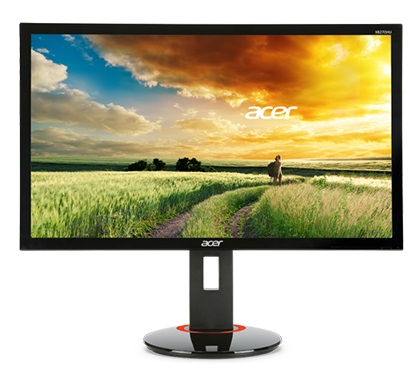
Why the fuss about IPS G-SYNC at 144Hz? For many enthusiasts its the monitor Holy Grail, combining IPSs wide viewing angles, bright displays, and highly accurate colors with G-SYNCs lighting fast, super smooth gaming technology, which fixes IPSs traditionally poor gaming performance. Together, IPS and G-SYNC make your games look and play better than ever before.
In addition to its G-SYNC and IPS technology, the Acer XB270HU is a fully featured monitor, offering just about every extra you could hope for. Starting from the top, the screen can be height adjusted, titled, rotated into Portrait, and VESA wall mounted. On the side theres the required DisplayPort 1.2 output for G-SYNC, plus HDMI and DVI outputs for game consoles and other devices, as well as audio out and two USB 3.0 ports for accessories or storage.
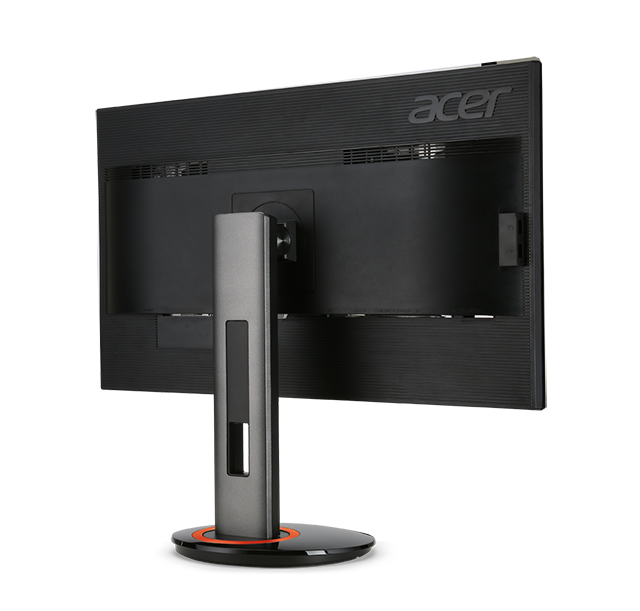
-Acer XB270HU is the worlds first NVIDIA® G-SYNC enabled gaming monitor with an IPS display that offers consistent, clear images from 178-degree wide viewing angles.The screen will feature Acer's EyeProtect technology including Blue Light Filter and Flicker less backlight.
The Acer XB270HU monitor will be available globally and begin shipping in March 2015.
Highlights:
-27" 2560x1440 IPS
-144 Hz
-G-Sync
-ULMB Strobing backlight Mode
-4ms GtG
-Blue Light Filter
-Zero PWM
-AU Optronics Semi-gloss Anti-Reflection film
Since the debut of G-SYNC our partners have released many TN models, with resolutions ranging from 1920x1080 to 3840x2160 (4K), and features that further improve your experience. Today, G-SYNC enters a new era with the unveiling of the worlds first 144Hz IPS G-SYNC monitor at The International Consumer Electronics Show in Las Vegas. Engineered by Acer, the 2560x1440 XB270HU is the worlds first 144Hz IPS gaming monitor, the world's first IPS G-SYNC gaming monitor, the first IPS gaming monitor to also support NVIDIA Ultra Low Motion Blur (ULMB) technology, and one of the worlds first IPS monitors with a response time of only 4ms G-to-G.
Why the fuss about IPS G-SYNC at 144Hz? For many enthusiasts its the monitor Holy Grail, combining IPSs wide viewing angles, bright displays, and highly accurate colors with G-SYNCs lighting fast, super smooth gaming technology, which fixes IPSs traditionally poor gaming performance. Together, IPS and G-SYNC make your games look and play better than ever before.
In addition to its G-SYNC and IPS technology, the Acer XB270HU is a fully featured monitor, offering just about every extra you could hope for. Starting from the top, the screen can be height adjusted, titled, rotated into Portrait, and VESA wall mounted. On the side theres the required DisplayPort 1.2 output for G-SYNC, plus HDMI and DVI outputs for game consoles and other devices, as well as audio out and two USB 3.0 ports for accessories or storage.
-Acer XB270HU is the worlds first NVIDIA® G-SYNC enabled gaming monitor with an IPS display that offers consistent, clear images from 178-degree wide viewing angles.The screen will feature Acer's EyeProtect technology including Blue Light Filter and Flicker less backlight.
The Acer XB270HU monitor will be available globally and begin shipping in March 2015.
TRENDING THREADS
-
 Discussion Zen 5 Speculation (EPYC Turin and Strix Point/Granite Ridge - Ryzen 9000)
- Started by DisEnchantment
- Replies: 25K
-
Discussion Intel Meteor, Arrow, Lunar & Panther Lakes + WCL Discussion Threads
- Started by Tigerick
- Replies: 25K
-
 Discussion Intel current and future Lakes & Rapids thread
- Started by TheF34RChannel
- Replies: 24K
-

-
