
-
We’re currently investigating an issue related to the forum theme and styling that is impacting page layout and visual formatting. The problem has been identified, and we are actively working on a resolution. There is no impact to user data or functionality, this is strictly a front-end display issue. We’ll post an update once the fix has been deployed. Thanks for your patience while we get this sorted.
You are using an out of date browser. It may not display this or other websites correctly.
You should upgrade or use an alternative browser.
You should upgrade or use an alternative browser.
Discussion Zen 5 Builders thread
Page 6 - Seeking answers? Join the AnandTech community: where nearly half-a-million members share solutions and discuss the latest tech.


With PBO on auto on my Asrock board, it easily exceeds that.88W PPT is without PBO enabled.
Depending on what they charge for the 7700 and 7600 that isn't too bad a deal. Talk about desperate though. I wonder how many 9000 chips they got in stock. Only 16Gb of ram for the 9600x isn't so hot.

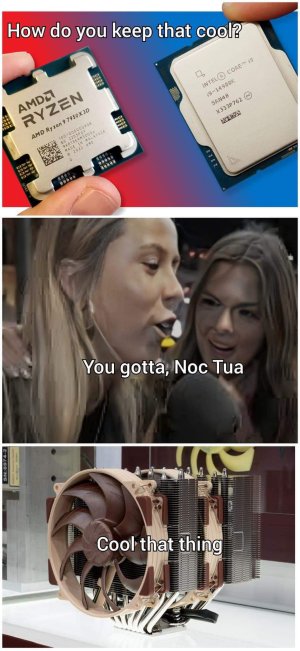

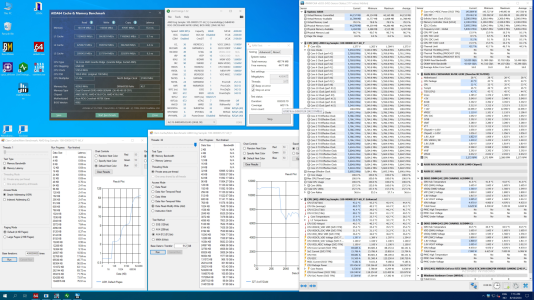
If this was an Apple CPU, we would only need 8GB's of RAM 🤣
Dang Best Buy has me buying Crucial 64GB DDR4 kits for AM4 like it is end times or something, lol.
I am spoiled by 128GB on the 5900X and am waiting for a DDR5 price break hopefully in the next few months, only running 32GB kits on AM5 right now.
Fudge yeah, we in business! The first boot did not like two sticks at the same time, did one stick, booted, turned off, tested the other stick, booted, turned off, put both in, BOOM, dual channel FTW.FFS, such a n00b, put it all together before doing the bare board Q-Flash Plus update, just tore it apart and am now watching the orange bios update light blink in the dark 😒
Set the BIOS settings, turned all security "features" off, running this old school least amount of junk as possible. Just turned off memory context restore, on to OS install.

Hail The Brain Slug
Diamond Member
Q-Flash+ didn't work for you with CPU and RAM installed??FFS, such a n00b, put it all together before doing the bare board Q-Flash Plus update, just tore it apart and am now watching the orange bios update light blink in the dark 😒
I use it constantly in my X670E Gigabyte board. For some reason on my model, the normal Q-Flash doesn't work at all so I use Q-Flash+ for every update.
Just because it does work on a bare board without CPU and RAM doesn't mean it's required to work...
LOL, well it would have if I had ever done it before, did not know I had to rename the file to "GIGABYTE.BIN" after copying to the USB drive root directory 🤣Q-Flash+ didn't work for you with CPU and RAM installed??
I use it constantly in my X670E Gigabyte board. For some reason on my model, the normal Q-Flash doesn't work at all so I use Q-Flash+ for every update.
Just because it does work on a bare board without CPU and RAM doesn't mean it's required to work...
The below settings gave me a 4 hour headache; OS installers will not load if all 3 are disabled.
The screen does not change to the below until going into the page, and only setting MCE to disabled (all settings are on Auto by default), then saving and restarting 😒
Basically, if I touch Gear Down Mode, I cannot install Windows or load a Linux Live ISO.
I took out the dedicated video card and started using the integrated GPU because it would do a weird video card type crash and then say no signal and restart the system, but then it happened on the iGPU also... Ugh
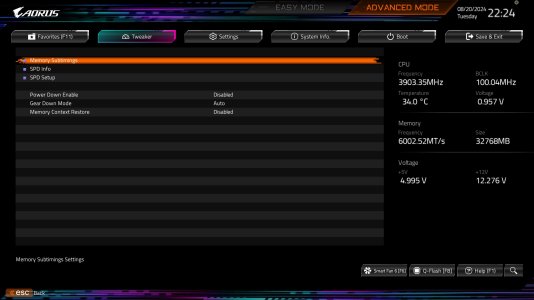
The screen does not change to the below until going into the page, and only setting MCE to disabled (all settings are on Auto by default), then saving and restarting 😒
Basically, if I touch Gear Down Mode, I cannot install Windows or load a Linux Live ISO.
I took out the dedicated video card and started using the integrated GPU because it would do a weird video card type crash and then say no signal and restart the system, but then it happened on the iGPU also... Ugh
igor_kavinski
Lifer
OK, that's messed up. Not getting Gigabyte mobo ever.

StinkyPinky
Diamond Member
I haven't been so disappointed since I last saw myself naked in a mirror. 
igor_kavinski
Lifer
THAT can be fixed.I haven't been so disappointed since I last saw myself naked in a mirror.
Gigabyte? Doubtful.
LOL, I usually pick Gigabyte if on sale or AsRock, this issue was just a quirk of the BIOS and me being stubborn 🤣THAT can be fixed.
Gigabyte? Doubtful.
Hail The Brain Slug
Diamond Member
Kinda weird to immediately blame the motherboard for changing a setting causing issues with no further context. It could be a zen 5/agesa/platform issue that exists on every board running that same config for all we know.OK, that's messed up. Not getting Gigabyte mobo ever.
igor_kavinski
Lifer
I have history with Gigabyte.Kinda weird to immediately blame the motherboard for changing a setting causing issues with no further context.
Always used to buy their mobos coz they would seem to offer a lot plus the "durable" thing would trigger a large portion of my neurons into going "Get it Get it Get it!". Durable, maybe but problem-free, no.
Went with ASROCK for Z790 and pleasantly surprised. Even more surprised that their Epyc mobo has a crazy amount of tweaking options, including memory overclocking.
Hail The Brain Slug
Diamond Member
No reason to let your prejudice against the brand lead you to jump to conclusions. There's plenty to hate on with regards to Gigabyte without unfounded blame also being assigned to them.I have history with Gigabyte.
igor_kavinski
Lifer
There's plenty to hate on with regards to Gigabyte without unfounded blame also being assigned to them.
Seems like "their" BIOS issue, does it not?The screen does not change to the below until going into the page, and only setting MCE to disabled (all settings are on Auto by default), then saving and restarting 😒

Markfw
Moderator Emeritus, Elite Member
My hatred of gigabyte was about 2006. I sent a perect LOOKING motherboard back to them for RMA, and they denied it and sent it back. They sabotaged the motherboard ! Had scratches in all the places that mattered. I had a witness too ! Never bought a thing from them since.No reason to let your prejudice against the brand lead you to jump to conclusions. There's plenty to hate on with regards to Gigabyte without unfounded blame also being assigned to them.
igor_kavinski
Lifer
I think their video cards are OK (I have the AORUS RX 6800. Not much to complain and using since 2022).
They seem to be trying to cash in on the AI craze with a lot of AI products, including an AI SSD with crazy endurance claims. I don't know how true that is or how much that thing costs.
They seem to be trying to cash in on the AI craze with a lot of AI products, including an AI SSD with crazy endurance claims. I don't know how true that is or how much that thing costs.
Hail The Brain Slug
Diamond Member
I guess if you're specifically picking on those options being present in that menu - they are easily accessible in the AMD CBS menu otherwise.Seems like "their" BIOS issue, does it not?
I was referring to disabling gear down mode causing OS installers to fail to boot.
I have had menu options appear, disappear, and move between bios revisions on any brand of board I've ever had. Seems like really splitting hairs to complain about it only for Gigabyte.
igor_kavinski
Lifer
Hmm..lots of bad experiences then 🙂I have had menu options appear, disappear, and move between bios revisions on any brand of board I've ever had.
Thankfully haven't had to deal with disappearing options. Mostly I've had memory stability issues on my previous Gigabyte mobos, even when not overclocking. I haven't gone through a lot of mobos but Gigabyte ones just have not been good for me. I guess everyone's mileage varies.

AdamK47
Lifer
Asus must have hired some of these employees.My hatred of gigabyte was about 2006. I sent a perect LOOKING motherboard back to them for RMA, and they denied it and sent it back. They sabotaged the motherboard ! Had scratches in all the places that mattered. I had a witness too ! Never bought a thing from them since.
User error instead of MB error if gear down mode is the first thing he touches when an OS isn't even loaded. 😏I was referring to disabling gear down mode causing OS installers to fail to boot.
TRENDING THREADS
-
 Discussion Zen 5 Speculation (EPYC Turin and Strix Point/Granite Ridge - Ryzen 9000)
- Started by DisEnchantment
- Replies: 25K
-
Discussion Intel Meteor, Arrow, Lunar & Panther Lakes + WCL Discussion Threads
- Started by Tigerick
- Replies: 25K
-
 Discussion Intel current and future Lakes & Rapids thread
- Started by TheF34RChannel
- Replies: 24K
-

-
