• We’re currently investigating an issue related to the forum theme and styling that is impacting page layout and visual formatting. The problem has been identified, and we are actively working on a resolution. There is no impact to user data or functionality, this is strictly a front-end display issue. We’ll post an update once the fix has been deployed. Thanks for your patience while we get this sorted.

Question Zen 4 builders thread

Page 24 - Seeking answers? Join the AnandTech community: where nearly half-a-million members share solutions and discuss the latest tech.
Huh, ASrock says the sleep issue is an AM5 platform requirement. See thread on reddit here. I suspect they're wrong but...
Can anyone with a non-ASRock board comment if your PC can go to sleep and wake from sleep?

Gigabyte and MSI users chiming in here. https://community.amd.com/t5/processors/sleep-mode-not-available-when-expo-is-enabled/td-p/548658

I suspect they are right that it doesn't work now for any vendor and also suspect that AMD will fix it with an AGESA update eventually.
 
After my troubles, I would say memory.


Nope I started seeing also: "Over current on USB shutting down in 15 seconds to protect MB", MSi support saw a screen shot said bad MB return, sounded like it is a know problem as they did not even blonk just said bad MB. Ok fine, but there are none in stock and so now no MB for weeks 🙁

I did track down the 33 and 31 errors, MB would not boot unless Video card was present and connected to a monitor, never seen the like, it hung unless I connected a DVI or DP cable to a monitor, and the USB-C to DP did not seem to work at all, hence the hang without Video card installed, may have been related to the USB over current, but still what was teh point of having a built in to debug with if it does not work.

So a week to get the MB, 2 days to setup the system cleanly and get it started, 6+ hours of hell fighting with it and right back to MSI for replacement, which could take 20+ days 🙁

One last majorly annoying thing is Windows does not find any NIC during install so have to side load a driver or do so after install, which is petty 90's, in fact I never got so far as booting Windows and getting online with the MB always got USB warnings or cut outs first.

ERIC
 
AMD launches. Still not as bad as B350 at launch but they're trying

Definitely much better than X370 too! I'm happy with my build even just running DDR5-4800 defaults until AMD fixes EXPO mode. I'll start to be annoyed in a month or two if they don't fix it.
 
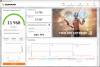
Cinebench R23 ST = 2167 points
Windows 10 x64 - AMD Ryzen 7 7950x | 16/32 @ ~6000mhz | ROG CROSSHAIR X670E HERO | 2x16GB DDR5-6200-28-36-36-28 1T

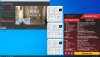
Cinebench R23 MT = 42257 points
Windows 10 x64 - AMD Ryzen 7 7950x | 16/32 @ ~5700/5400mhz | ROG CROSSHAIR X670E HERO | 2x16GB DDR5-6200-28-36-36-28 1T

Large custom watercooling loop. (4 pumps + MO-RA3 420 + NexXxoS Monsta Full Copper 400mm + 10L water among other things)
Cinebench r23 2167 points ST-6.jpg
nevermind the "1.61" vcore, its a readout bug.. Highest voltage used was 1400mv.
 
Last edited:
Hammertime

ST = 6000mhz
MT = CCD0 @ 5700mhz | CCD1 @ 5450mhz

Large custom loop watercooling. (4 pumps + MO-RA3 420 + NexXxoS Monsta Full Copper 400mm + 10L water among other things)

nevermind the "1.61" vcore, its a readout bug.. Highest voltage used was 1400mv.

That score for only 16 cores on ambient temperatures is just absurd lmao.

Amazing stuff! Keep it coming, I can't stop drooling over what I'm seeing so far
 
Just a quick one.

7950X SP:116
Asus ROG STRIX X670E-E FW:0611
Kingston Fury 2x16GB DDR5-6000 CL36-38-38-80 EXPO1 Setting
Win10

Sleep and wake work fine for me.

Tweaking it for the following settings:

PBO Curve Optimizer -20
Temperature Limit 85c
Power Limit 180w

CBR23 initial 10min runs good so far (will test LinX, Prime95 later)
Temps 82c
5.2.5 CCD1, 5.15 CCD2
Power 185w

Cannot really test anything GPU wise yet, as it is just setup on a test bench and will swap out my 5950X at a later date.
 
I'm wondering how noticeable a 7700X/X670E setup would be over my existing 10700K/Z490 for 4K gaming. It looks impressive but the total upgrade cost is quite high (especially the boards/memory) if the improvement will only be marginal. I'm also a bit concerned about my VR headset's compatibility with AMD platforms.
 
I'm wondering how noticeable a 7700X/X670E setup would be over my existing 10700K/Z490 for 4K gaming. It looks impressive but the total upgrade cost is quite high (especially the boards/memory) if the improvement will only be marginal. I'm also a bit concerned about my VR headset's compatibility with AMD platforms.
Maybe wait for 7800X3D?
 
Anyone see Gigabyte extended warranty from 3 years to 5 on some of their 670 motherboards. Seems like a good deal if your motherboard shopping. I am still waiting for stock of B650 boards.

Only problem I have is lots of boards do not have Display port 2.0 yet. Would be nice to see that as well as more usb 4 connections on midrange boards.

Here is a link to the Gigabyte announcement!


I haven't seen much main stream press pick this up yet, but with revenue down I would not be surprised if more motherboard do the same.

R81Z3N1
 
Anyone see Gigabyte extended warranty from 3 years to 5 on some of their 670 motherboards. Seems like a good deal if your motherboard shopping. I am still waiting for stock of B650 boards.

Only problem I have is lots of boards do not have Display port 2.0 yet. Would be nice to see that as well as more usb 4 connections on midrange boards.

Here is a link to the Gigabyte announcement!


I haven't seen much main stream press pick this up yet, but with revenue down I would not be surprised if more motherboard do the same.

R81Z3N1
I registered my X670E Aorus Master and it still lists only 3 years.
 
Last edited:
ASUS has the ITX motherboard in stock. I cancelled my Newegg order and ordered direct. Next Day shipping, so should have it pretty quick.
The Real Question is... Will you be able to access the BIOS and Disable AVX-512 And run a few test for me?? Will you?? Uh?
 
The Real Question is... Will you be able to access the BIOS and Disable AVX-512 And run a few test for me?? Will you?? Uh?
How exactly Intel implements disabling of AVX-512? Is it just setting CPU flags? If it is just flags only, the AVX512 should work on AlderLake if forced to execute AVX512 code regardless of CPU flags. Similar to Zen1 and FMA4. Otherwise I would imagine they have to handle at decoder level to trap AVX-512 instruction and trigger exception. This would require the decoder to support disabling the AVX512 Instructions. I am not sure AMD would implement such a functionality to their decoder since many instructions are direct decode and not micro coded.
 
How exactly Intel implements disabling of AVX-512? Is it just setting CPU flags? If it is just flags only, the AVX512 should work on AlderLake if forced to execute AVX512 code regardless of CPU flags. Similar to Zen1 and FMA4. Otherwise I would imagine they have to handle at decoder level to trap AVX-512 instruction and trigger exception. This would require the decoder to support disabling the AVX512 Instructions. I am not sure AMD would implement such a functionality to their decoder since many instructions are direct decode and not micro coded.
They do it through microcode. I think this is in later bios revisions. It also happens where there are e-cores present.

But this is a Zen 4 builders thread, nothing to do with Intel.
 
They do it through microcode. I think this is in later bios revisions. It also happens where there are e-cores present.

But this is a Zen 4 builders thread, nothing to do with Intel.
Have you checked and see if AVX-512 can be disabled from BIOS?
 
They do it through microcode. I think this is in later bios revisions. It also happens where there are e-cores present.

But this is a Zen 4 builders thread, nothing to do with Intel.
Is micro code in the sense MicroCode ROM? To do that through micro code ROM, all the AVX512 instruction has to be micro coded. But I don't think all the AVX512 instruction are micro coded. Only complex and rarely used instruction are micro coded (I am more familier with AMD architecture than Intel so my understanding here might be incorrect). Most commonly used instructions are directly decoded to 1 or 2 u-ops. Only at decode stage the CPU will know about the instruction being decoded. Having another logic to already complex decode unit just for the purpose of disabling AVX512 seems wasteful. This is same for Intel and AMD.
 
Is micro code in the sense MicroCode ROM? To do that through micro code ROM, all the AVX512 instruction has to be micro coded. But I don't think all the AVX512 instruction are micro coded. Only complex and rarely used instruction are micro coded (I am more familier with AMD architecture than Intel so my understanding here might be incorrect). Most commonly used instructions are directly decoded to 1 or 2 u-ops. Only at decode stage the CPU will know about the instruction being decoded. Having another logic to already complex decode unit just for the purpose of disabling AVX512 seems wasteful. This is same for Intel and AMD.
I do not understand your reply. Someone was asking how Intel disabled avx-512, and I said through micro code, and I think that applied to a bios update. AMD has no such plan to disable avx-512.

And again THIS IS AN AMD BUILDERS THREAD, ENOUGH WITH THE iNTEL CRAP.
 
Back
Top