
im-different
Junior Member
Yeah, if you're not doing any substantial overclocks, it should be fine.


Yeah, if you're not doing any substantial overclocks, it should be fine.

You use something like this.I was wondering how do you find out, how much Wattage is PC pulling out of wall socket!
Hey everyone! So I received my Asus DCIII 390X three days back. Its running well. But the issue that is disturbing me is its high temperatures.
Ambient: 30-33 C
Idle: 40 C
Browsing: 55 C
GTA V (Very High): Upto 85 - 89C
Skyrim (Ultra + mods): 82 C
Are these normal temperatures or should I send it back?


So whats the point of having these High End Cards if I have to play games with a fear of card damage or burst through heat, while keeping one eye on the temperatures.
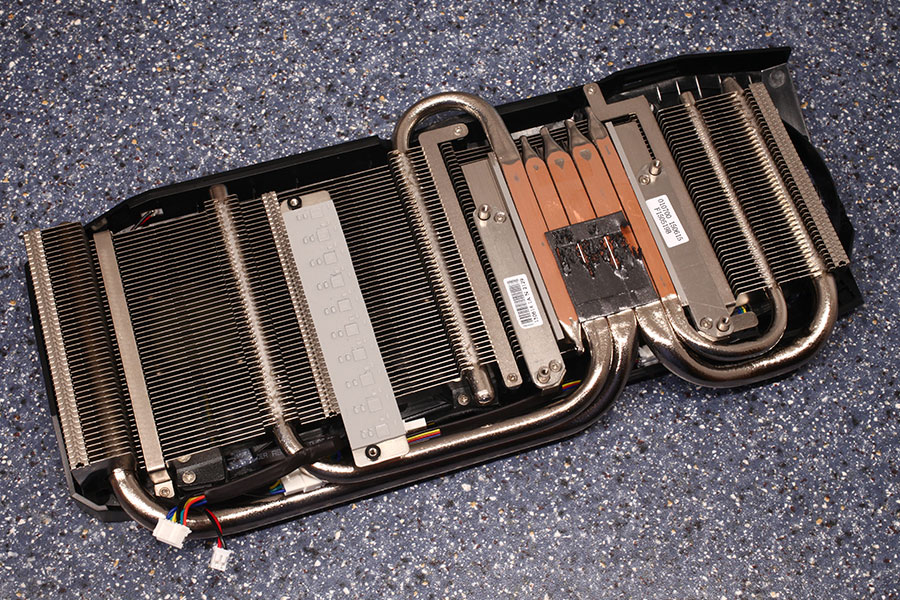
You won't damage the card for 2 reasons:
1) The point at which the GPU will be damaged is higher than 95C on the 390. The card shouldn't even start throttling until it reaches 95C. We can't compare different ASICs and their operating temperatures directly. For example, Intel CPUs can easily operate at 95C and some series don't start throttling until 100C but AMD's FX CPUs cannot.
NV's GTX280 is rated at 105C, GTX680 can handle 98C, GTX580 can do 97C, 780Ti can handle 95C, 980Ti is rated at 92C, etc.
Most people freak out about temperatures because there are a lot of lies/myths spread online about them and these myths persist.
2) Most GPUs today are so advanced that they have thermal throttling sensors that will prevent damage to the GPU itself.
Your operating temperatures are actually normal for the Asus R9 390X Stirx because Asus decided to cut costs and never designed a copper block that allows for universal/proper contact with all of the heatpipes on the die.

So the problem here is 100% Asus's heatsink implementation. Companies that designed the cooler properly do not have these issues on the 390X.

It's not your fault of course but it's incredible how engineers (or bean counters) go forward with production of a $300-400 graphics card and make such mistakes.
Returns are not accepted, they would only provide hand to hand new sealed box of the same card or they would provide me credit of the card after deducting the costs of deprecation, that is about 30 percent of the paid cost.
I want only thing that it should not get fried. Just want to know up to what temperature I am safe with this card?
So what should be the temperature after which I should start worrying. Because playing while keeping an eye on the GPU temperatures is really frustrating after investing so many dollars.

I believe that the vendors should provide at least 10 - 15 C of gap between operating temperatures and throttling temperatures.
Also is it a bad idea to run the fans at 80% while gaming for about 2-3 hours a day?
EDIT: Could it be an issue of the 600W PSU? I have read at many places that the card can consume upto even 510 W on full load and may be my PSU is giving that much power. Should I try a higher wattage PSU?

I think I will deal with it then. Thanks for your replies, guys. Anyways I am using as a stop gap card!!

That's nothing, don't worry about it. Even crappy single ball bearing fans are rated at 30,000 hours. Plus, you have 2-3 year warranty. You can crank the fans to 100% if you want as long the as noise doesn't bother you.
Since you are using this card as a stop-gap before 16nm HBM2 GPUs, just pay attention to dust clean-up and if you want to tinker with it, change the thermal paste material, although Asus might void warranty on that. ​
600W PSU should be about right if it is a good PSU.
I'm weird and like running by CPU cooler vertically to the 200 on top like you have there, but it's probably not worth tearing things apart.
Won't make a big difference I imagine.
Your airflow looks good to me.
I wouldn't bother putting paste on the card at all unless it does jump a lot, which I doubt it would in the near future.
If it works, don't fix it sometimes, even if trying to push things 🙂

I would not mess this thing as I am not Linus :sneaky:
Plus warranty would matter a lot when temperatures are already soaring. Do you think that a side fan with high CFM be of any use? Should I replace current one with a corsair high CFM one?
Why does HWinfo shows GPU thrice and all with different temperature readings? Which one to follow?
Can't replace TIM on a GPU, too afraid!! Ambient is about 30 C (Its summer time :|).I doubt it would make much difference, probably less than swapping TIM. What's your ambient room temperature? 22C?
Right now your HW Monitor shows a maximum GPU temperature of 46*C so you haven't played a game yet when you took that screenshot. 😀


