
-
We’re currently investigating an issue related to the forum theme and styling that is impacting page layout and visual formatting. The problem has been identified, and we are actively working on a resolution. There is no impact to user data or functionality, this is strictly a front-end display issue. We’ll post an update once the fix has been deployed. Thanks for your patience while we get this sorted.
You are using an out of date browser. It may not display this or other websites correctly.
You should upgrade or use an alternative browser.
You should upgrade or use an alternative browser.
What's the most reliable 512GB SSD for ~$300?
Page 2 - Seeking answers? Join the AnandTech community: where nearly half-a-million members share solutions and discuss the latest tech.

exdeath
Lifer
3TB of SSD's? Seriously? Is there really no better way to spend money?
No.
4 x 240GB Patriot Wildfires + LSI 9260-4i and I did it for speed and don't even use 1/4 of the capacity.
We no longer make CPUs out of relays, so hard drives need to go away too.
With modern computers capable of performing trillions of operations per second and moving 50+ GB/sec of memory bandwidth, "Please wait loading..." needs to become a thing of the past.
Last edited:

BFG10K
Lifer
You could have infinite I/O and that still wouldnt happen as there are bottlenecks elsewhere.With modern computers capable of performing trillions of operations per second and moving 50+ GB/sec of memory bandwidth, "Please wait loading..." needs to become a thing of the past.
The fact is, a RAID SSD setup isnt going to be significantly faster than say, a single 1TB VelociRaptor, in the vast majority of game load times.
Here are a couple of RAM disk tests that confirm my own findings:


serpretetsky
Senior member
I think it really depends on the game. I don't have enough data to disagree with you on your comment that the "vast majority" are not significantly faster, although i also don't know what you define as significantly faster.You could have infinite I/O and that still wouldnt happen as there are bottlenecks elsewhere.
The fact is, a RAID SSD setup isnt going to be significantly faster than say, a single 1TB VelociRaptor, in the vast majority of game load times.
Here are a couple of RAM disk tests that confirm my own findings:
http://www.tomshardware.com/reviews/battlefield-rift-ssd,3062-12.html
http://www.anandtech.com/show/2614/14
http://techreport.com/review/23937/ocz-vector-ssd-reviewed/10
also, if any of your games experience stuttering during game content streaming then an ssd may decrease those stutters as well.
http://www.anandtech.com/show/2614/14
http://www.maximumpc.com/article/features/hard_data_proves_ssds_improve_game_performance
http://www.tomshardware.com/reviews/battlefield-rift-ssd,3062-13.html
I do believe there are appreciable differences in ssd vs hdd in gaming.

Zap
Elite Member
With modern computers capable of performing trillions of operations per second and moving 50+ GB/sec of memory bandwidth, "Please wait loading..." needs to become a thing of the past.
I think what will make loading 10x faster is not in increasing the performance of our storage, but in game makers getting rid of splash screens and clickthroughs. Seriously.
Example: Borderlands 2
You start the game in Steam, and it gives you a launcher with a menu. You click on Play, and then you get about six splash screens where you can either wait for the whole thing to go through, or you can madly click your mouse to hurry them along. Then it gets to the screen where it says "click to play" and you have to click, where it FINALLY loads the main game menu. If you don't click, it will start cycling through other splash screens and videos that you have to click to get back to the "click to play" screen.
What. The. Heck.
Really?
Then you start the game, choose the character, and finally... nope, can't play yet, because you have to verify that you made the right choices. Yes, another click.
I see no link or charts
Site probably disallows hotlinking or something. Try opening these in a separate window/tab.
image 1
image 2
BFG10K
Lifer
Lets start with some tests I ran a while ago:I think it really depends on the game. I don't have enough data to disagree with you on your comment that the "vast majority" are not significantly faster, although i also don't know what you define as significantly faster.
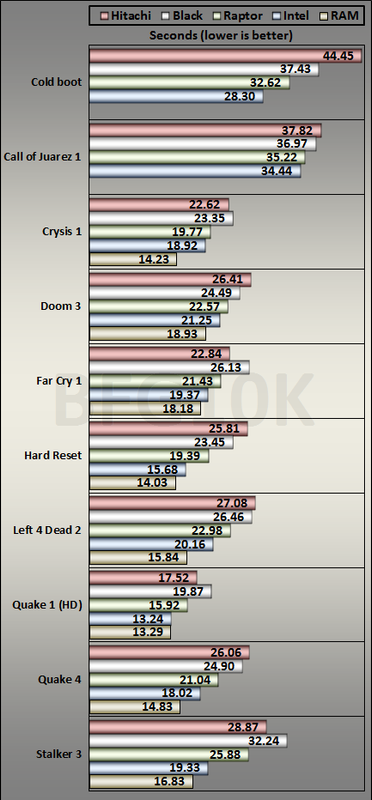
Note that these are in-game level load times (not starting up), so theyre not bottlenecked by cut scenes, Steam, user input, or anything else like that. You can see how close a 1TB VelociRaptor is to the SSD.
Now you might say but what about six SSDs in RAID? Well, see the RAM scores? Thats how fast the games would load if you essentially had infinite I/O performance. That means instant loads on a six-SSD RAID system are a pipe dream unless you were getting near-instant loads on the HDD anyway, in which case it doesnt matter.
The RAM disk tests here back my findings (link fixed): http://www.behardware.com/articles/...up-crucial-m4-ocz-vertex-3-intel-510-320.html
Ive checked your results and my original comment stands: the fact is, a RAID SSD setup isnt going to be significantly faster than say, a single 1TB VelociRaptor, in the vast majority of game load times. I mean some of your tests are using slow 5400rpm green drives.
Except Intels result, which was done on a VelociRaptor, but not on the new 1TB version, which is a lot faster than the old one. Ive tested several games that experience in-game pausing/hitching (e.g. the Stalker series), and they werent significantly reduced on the SSD compared to the 1TB VelociRaptor.
The fact is that game streaming is generally designed so that regular HDDs can manage.
serpretetsky
Senior member
that's some indepth testing, thanks!Lets start with some tests I ran a while ago:
.
Did you do any testing on ssd effect on mininum framerate (load streaming stuttering) by any chance?
Insomniator
Diamond Member
I don't think there are 850 PC games worth playing... or games from any platform for that matter... even for benchmarking. Is this an epeen thing?
gl with the array
gl with the array
Game loading times are especially pertinent for games that stream content (nearly any MMORPG, most open world games, any TES games, etc). There load times matter less than frame rate stability. I wouldn't even imagine trying to play a heavily modded Skyrim setup on anything less than a SSD - the frame rate stability would probably be disastrous even on a Quad SLI setup. Last time I tried Borderlands 2 on a HDD (being too lazy to copy it to an SSD), it was a miserable experience.
For games that are level-based, or that have a single map (strategy games for instance), I think SSDs are a waste of premium space.
Still for the OP I think some written batch scripts (shouldn't take more than 10 minutes) to copy the data from your storage drives to your SSD, and back, would save a considerable amount of money. I don't have thousands in disposable income to spend, so to each their own.
For games that are level-based, or that have a single map (strategy games for instance), I think SSDs are a waste of premium space.
Still for the OP I think some written batch scripts (shouldn't take more than 10 minutes) to copy the data from your storage drives to your SSD, and back, would save a considerable amount of money. I don't have thousands in disposable income to spend, so to each their own.
Last edited:


Very nice !

AdamK47
Lifer
Here's one of the first tests I've performed on the array.

There are supposedly some further tweaking I can do with the controller, but honestly I'd be happy leaving the performance here. It's a bazillion times better than the 4TB Hitachi that's been used for my installs.
Edit: For comparison, this is my 256GB Vertex 4 on the Intel SATA3 controller. This drive is still used as my OS/Boot drive.

There are supposedly some further tweaking I can do with the controller, but honestly I'd be happy leaving the performance here. It's a bazillion times better than the 4TB Hitachi that's been used for my installs.
Edit: For comparison, this is my 256GB Vertex 4 on the Intel SATA3 controller. This drive is still used as my OS/Boot drive.
Last edited:
serpretetsky
Senior member
also, let us know if the raid fails in the near future for whatever reason. I'd be interested to know.
AdamK47
Lifer
Yes, that benchmark was after creating the array.
I'll let you know if the array fails. I bought a 2 year replacement plan at Micro Center when I bought the drives. Only bought the plan for one drive. Micro Center doesn't attach the plan to any specific drive, so if any drive fails I can use it.
I'll let you know if the array fails. I bought a 2 year replacement plan at Micro Center when I bought the drives. Only bought the plan for one drive. Micro Center doesn't attach the plan to any specific drive, so if any drive fails I can use it.
Last edited:

KentState
Diamond Member
While you're at it, might I suggest doing this SSD array as a SAN and converting your LAN to TCP over 10 gigabit Infiniband. 🙂
Not enough bandwidth with 10 gigabit and the latency is much higher.
Yes, that benchmark was after creating the array.
I'll let you know if the array fails. I bought a 2 year replacement plan at Micro Center when I bought the drives. Only bought the plan for one drive. Micro Center doesn't attach the plan to any specific drive, so if any drive fails I can use it.
lol.....
Slick.. 5 for one deal.
TRENDING THREADS
-
 Discussion Zen 5 Speculation (EPYC Turin and Strix Point/Granite Ridge - Ryzen 9000)
- Started by DisEnchantment
- Replies: 25K
-
Discussion Intel Meteor, Arrow, Lunar & Panther Lakes + WCL Discussion Threads
- Started by Tigerick
- Replies: 25K
-
 Discussion Intel current and future Lakes & Rapids thread
- Started by TheF34RChannel
- Replies: 24K
-

-
