
-
We’re currently investigating an issue related to the forum theme and styling that is impacting page layout and visual formatting. The problem has been identified, and we are actively working on a resolution. There is no impact to user data or functionality, this is strictly a front-end display issue. We’ll post an update once the fix has been deployed. Thanks for your patience while we get this sorted.
You are using an out of date browser. It may not display this or other websites correctly.
You should upgrade or use an alternative browser.
You should upgrade or use an alternative browser.
What controls Turbo Core in Xeons?
Page 82 - Seeking answers? Join the AnandTech community: where nearly half-a-million members share solutions and discuss the latest tech.


Dufus
Senior member
If you can’t help me to find message with V4 bclk bootstrap method
Thank you
I've not had a v4 to play with otherwise I would certainly look into it. I have seen a couple of v4 pre-production CPU's reports show that BCLK strap should be supported, I don't know if it is so for production chips. People can check if MSR 0x61E is present which is required but do note that even if it is present it may still not work. For example the v3's report fixed CPU core voltage is supported but I've not seen it work, perhaps some secret Intel register bit needs to be set. From the sound of it, all has been tried with the full turbo on v4 and not working as v3. Can't say you didn't try.
Also I only have a single socket board so no hardware to test for multi-socket support. Good that some of other guys were able to do that. I did have some spare time a few weeks back where I hoped to try and provide a generic BIOS DXE FFS for voltage / turbo and other settings for up to 8 sockets with individual settings for each processor. It would have saved having hundreds of files for different values. Unfortunately I didn't get any response so nothing became of it. 🙁 Not sure there's that many people wanting to do the mod anyway TBH.
http://www.overclock.net/t/1591590/xeon-hacking-and-overclocking-x79-x99-beyond-x58/1500#post_26425768 said:Would someone with dual or more sockets and CPU's run a small program for me under the UEFI shell?
Thanks.
Edit: The free time I had over the weekend to provide up to 8 socket V3 voltage control from the BIOS with an FFS addon has gone now so no need for anyone to reply to this anymore.
Or maybe it's the way I went about it. I know I don't explain things very well but I didn't realize how bad it was until today. So I'm going to leave it to someone else and make this my last post. I've never been in the software or computer industry so pretty sure there's probably hundred's of thousands of people who can do this a lot better than myself. The EDK2 driver example should help explain about providing addon 3rd party BIOS setup support.
Well they do cheat really because the power management is never initialized which means no power readings, DTS temperature readings, idle C-States other than CC1, no AVX and they cannot use later ucodes. Also this type of bclk overclocking is different from v3 and v4 as it is not linked to PCIe clock. Might be able to do something with an i5-8400 but for Haswell and Broadwell it's a no go, only the straps are an option.Non-K Skylake Overclocking
but they do not cheat TDP nor delete ucode.


MOF
Member
Interesting. Looks like the driver is working but something else limits cpu speed under load.
But that does not mean anything. Thats can be microcode or fused code inside the cpu.

kjboughton
Senior member
Interesting. Looks like the driver is working but something else limits cpu speed under load.
But that does not mean anything. Thats can be microcode or fused code inside the cpu.
1) Agree. Multiplier pattern shown suggest driver is working. I doubt core frequencies would be that high otherwise.
2) If you recall, we were shown a SS from HwINFO64 tooltip caption on Broadwell-EP that indicated second set of core turbo speed bins for AVX2. I am 99% certain the functionality to change this is per OC Mailbox Command function 0x1b for each applicable domain. I do have a sense for how the programming syntax would be applied given how other similar Mailbox interfaces have worked in the past. It is possible that the ME state machine applies the limiting multiplier in some other way as to prevent large power excursions. I would like to see if it is possible to program these registers during the time of vulnerability. Seeing as how it's possible with the VIDs (also a Mailbox function), I suspect it here as well.
I do not have the components necessary to test my driver further in order to expand effectivity to include Broadwell-E. And even if I did, there's no guarantee as to success.
kjboughton
Senior member
this is my asus z10 bios for c state :
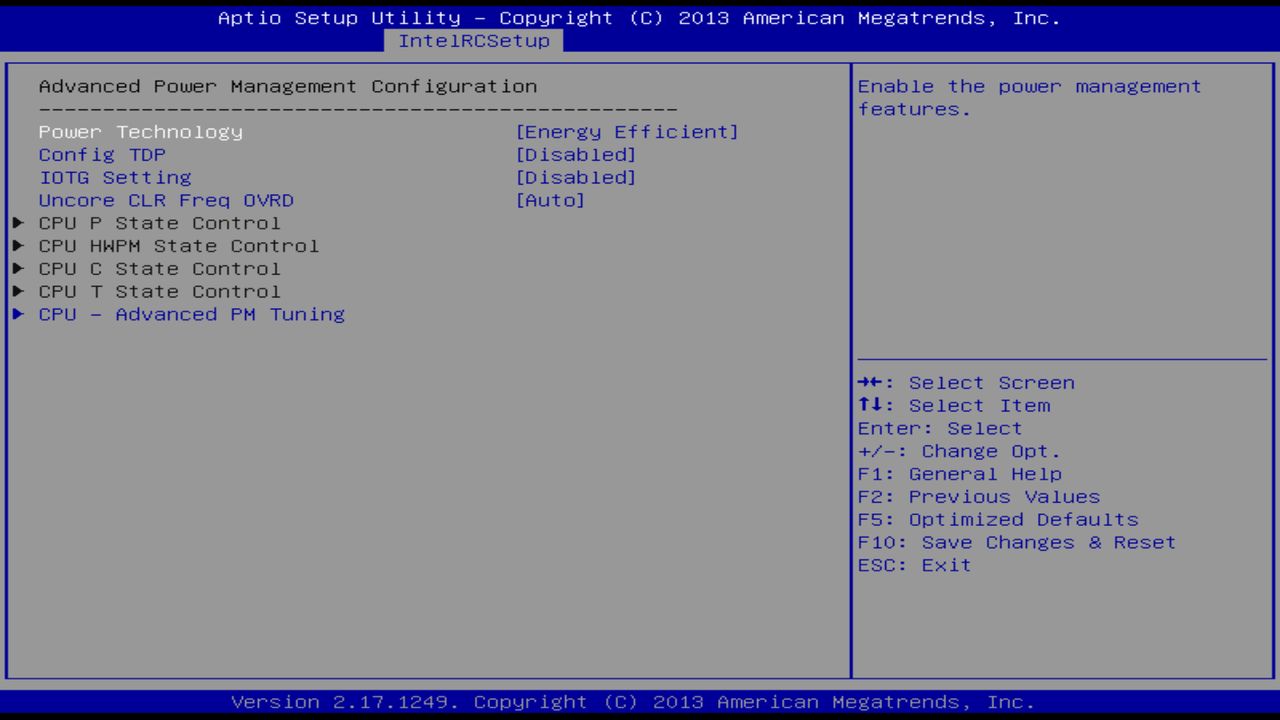
i dont know what option i change..?
So, to go back. This is wrong; Power Technology should be set to Custom.
Under CPU P State Control:
- Package C State limit to C0/C1 state
- CPU C3 Report to Enabled
- CPU C6 Report to Disabled
foureight84
Member
I am using blck right now "overclock" my V4's. It's not worth it on xeons, at least for me. I can push it as high as 103mhz and anything higher will cause system instability. As stated, it changes everything, pcie, memory, etc. It's an issue with these system as ecc memory usually aren't stable at higher than rated speed.bclk changes everything, core ring memory...
if bclk straps works, with TDP cheat and voltage offset, we almost get one multicore unlocking high-end CPU, like 7980xe and 7940x.
wow
It is sure that overclocking bclk without locking pcie speed to 100mhz is meaningless.I am using blck right now "overclock" my V4's. It's not worth it on xeons, at least for me. I can push it as high as 103mhz and anything higher will cause system instability. As stated, it changes everything, pcie, memory, etc. It's an issue with these system as ecc memory usually aren't stable at higher than rated speed.
E5 16XX v3/v4 can use 125 or 150 bclk for better frequency.
I tried ddr3 ecc memory overclock from 1066 to 1600 without any issues.
A lot of ddr4 2133 without ECC an not overclock.
I trend to believe it is the memory particles matters.
So, to go back. This is wrong; Power Technology should be set to Custom.
Under CPU P State Control:
Show us what's available under CPU HWPM State Control...
- Package C State limit to C0/C1 state
- CPU C3 Report to Enabled
- CPU C6 Report to Disabled
Yes..sure kjboughton..
i tested it soon..
i have one 2696 v4 one titan and one crusial micron 16 gb 2400 ecc ram..
and i very very want we work to this .... >>for win this MATCH !!!!
for me for you and for v4 user....and kjboughton yes after this unlocked you 100% buy this Monster and
voilaaaaaaaaaaa !!!!!
we must unlock this monster PLEASE !!!!
i go to test and report this...
But kjboughton can you set uncore ratio big than x27 in efi driver..please i want test this... example uncore ratio x29 only for test please ????!
Arne Pursell
Junior Member
Thanks saved me as mmtool had disappeared from the interwebs. Still to do the deed on EP2C612 with 2x e5-2696 v3. Nervous as hell here! Wondering if it is worth it for 20-25% increase in performance...😱..apart from pure awesomeness of course!Hey, I made a pack with all the tools necessary 😉 UBU, UEFI SHELL, V3 driver, microcodes, etc and instructions =)
-Modded Bios 3402 for Asus X99 deluxe included-
http://www80.zippyshare.com/v/U179LJHE/file.html
Arne Pursell
Junior Member
I've used that method on PC with two CPU: BIOS modificaton + V3.EFI + win + microcode_27
Config: ASRock EP2C612 WS + 2xE5-2686v3.
And have got an interesting result: the first CPU is unlocked and the second one is not.
(That "asymmetrical" system works stable after C3/C6 states were disabled in BIOS.)
As I understand that's happened because V3.EFI has updated MSR registers only on the first CPU - where it was executed.
But how can I run necessary MSR update on both CPU ?
Is this still an issue? Just about to flash same mobo with 2x e5-2696 v3. Will keep ploughing through thread...using same methodology as you.
MOF
Member
Is this still an issue?
The original v3.efi one cpu only, for dual cpu systems you can use C_payne's dual drivers
https://peine-braun.net/public_files/XEON_V3_BIOS_MODS/EFI-Drivers/dual CPU/
Arne Pursell
Junior Member
Great thanks for heads up..was about to use the original v3.efi.The original v3.efi one cpu only, for dual cpu systems you can use C_payne's dual drivers
https://peine-braun.net/public_files/XEON_V3_BIOS_MODS/EFI-Drivers/dual CPU/
Arne Pursell
Junior Member
Uhhm, any idea which one I'm supposed to use? Go from 0 to 120. Starting to become a pretty long there thread here, is the post about it towards the back? Thanks for the help! 🙂Great thanks for heads up..was about to use the original v3.efi.
EDIT: see these are the ffs files, I assume I'm safe still with the v3.efi shell? Sorry not a linux or vmware person, complete and utter newb here!
EDIT 2: I may just delay this operation til I've picked up some extra bios chips, no point in living needlessly dangerously after the windows 10 for workstation catastrophe..exciting living on the edge...maybe a bit too exciting (total reinstall of win on all pc's etc 😵). But any advice appreciated, need the all-cores for premiere etc. These babies still go like the clappers on Vray even at stock speeds..
EDIT 3: assuming I need two drivers?
Last edited:
Arne Pursell
Junior Member
Roger that, would like to know as well before committing...At least it is confirmed for EP2C612 WS, however needs more data regarding the everyday usage - stability, temps and so on.
MOF
Member
Safest method is "load" command in efi shell but i think C_payne drivers has a problem with load command. So, you can use bcfg driver add 0 ..... command.
Always start from "0"
ffs and driver injecting last thing you should do. When everything works perfect you can inject ffs version into your bios image.
You can use or try the original v3.efi but your second cpu will stuck in to non turbo stock speed. V3.efi not recommended for dual systems.
Always start from "0"
ffs and driver injecting last thing you should do. When everything works perfect you can inject ffs version into your bios image.
You can use or try the original v3.efi but your second cpu will stuck in to non turbo stock speed. V3.efi not recommended for dual systems.
Arne Pursell
Junior Member
Safest method is "load" command in efi shell but i think C_payne drivers has a problem with load command. So, you can use bcfg driver add 0 ..... command.
Always start from "0"
ffs and driver injecting last thing you should do. When everything works perfect you can inject ffs version into your bios image.
You can use or try the original v3.efi but your second cpu will stuck in to non turbo stock speed. V3.efi not recommended for dual systems.
See that, saw in the ftp you linked he had the v3x2 efi shell. Question is which of all the .ffs that are listed there I'm trying to 'inject"? . Still working through the whole thread for the nth time, at about page 14. Thanks 'heaps' as the aussies would say for the help! Looks like some more research here before do the deed...in the page 8-9 basic instructions a lot seems to be missing...ditto bcfg driver method. If I don't brick mobo will post a detailed methodology. But some reading first I think!
Arne Pursell
Junior Member
Thanks anyway, struggling though it! Happy modding! Nice avatar btw 😉ffs files are injectable versions of the efi drivers.
I know 82 page too much but all information about modding inside it. I read it all more than 3-4 times.
Arne Pursell
Junior Member
arne I have same board dual chips use v3x2_50_39_vcc still the best but disables all power monitoring so good cooling required I'm watercooled
Have 2x h80i's so should be ok. Stable so far? Gonna wait until back from travels (Feb) and have some backup BIOS chips ordered from Netherlands, can't risk main pc at moment. What method worked best for you? And link to the v3x2_50_39_vcc? About 60% through reading the thread for 4th time, but have to call it a night. Do I need to use some bcfg driver method? or something? Frankly, the pages 8-9 which are still the best, are still missing a lot of info. A russian dude made a really good vid on youtube, but of course, I don't speak russki paruski!
Thanks for replies ! Encouraging! Couldn't be worse than Corsair Link of course! (yes now on siv64 😉 Would be awesome to have the vray performance (or arnold etc), then when doing vids on premiere or nuke or resolve, turn off cores in Bios for some extra speed!
TRENDING THREADS
-
 Discussion Zen 5 Speculation (EPYC Turin and Strix Point/Granite Ridge - Ryzen 9000)
- Started by DisEnchantment
- Replies: 25K
-
Discussion Intel Meteor, Arrow, Lunar & Panther Lakes + WCL Discussion Threads
- Started by Tigerick
- Replies: 25K
-

-

-
