• We’re currently investigating an issue related to the forum theme and styling that is impacting page layout and visual formatting. The problem has been identified, and we are actively working on a resolution. There is no impact to user data or functionality, this is strictly a front-end display issue. We’ll post an update once the fix has been deployed. Thanks for your patience while we get this sorted.

The unofficial *nix screenshot thread!

Jodell88

Diamond Member
I hope we'll see some awesome setups with your preferred window manager, desktop environments, themes, fonts, etc. 😎

I'll start, Gnome 3 with the Zukitwo shell and the Zukitwo-Resonance GTK theme, the icon theme is faience. I'm also using the infinality patch set for my font rendering.

Clean
vYXI1cA


Busy
vYXI1cQ


vYXI1cg


If anyone can tell me how to use thumbnails as a link, please let me know.
 
Last edited:
I hope we'll see some awesome setups with your preferred window manager, desktop environments, themes, fonts, etc. 😎

I'll start, Gnome 3 with the Zukitwo shell and the Zukitwo-Resonance GTK theme, the icon theme is faience. I'm also using the infinality patch set for my font rendering.

Clean
vYXI1cA


Busy
vYXI1cQ


vYXI1cg


If anyone can tell me how to use thumbnails as a link, please let me know.

oneiric with gnome shell 3.2 ? care to explain , how to achieve the top panel transperency ??
 
Screenies rule!!! 😀

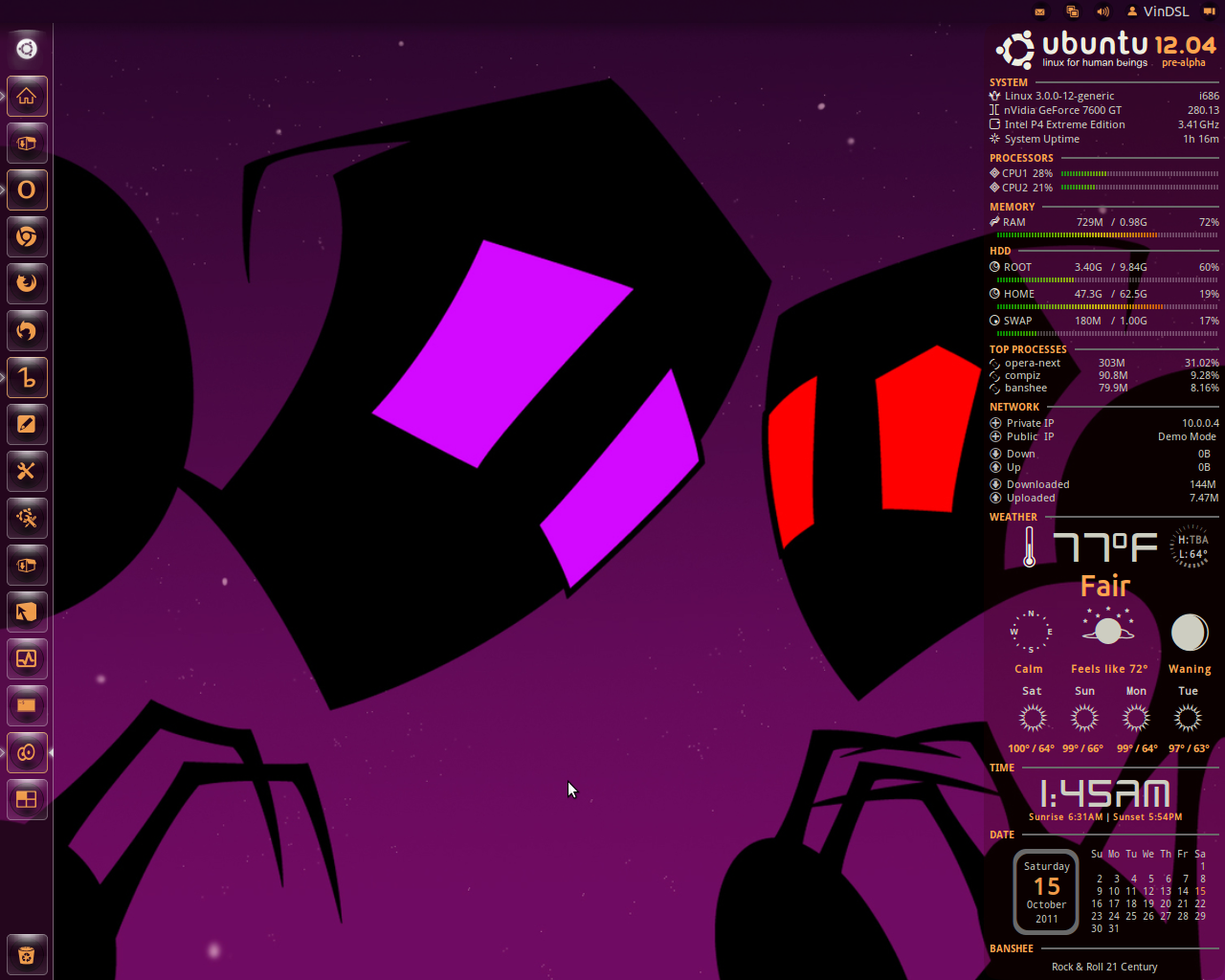
Ubuntu 12.04 dev release- Radiamentary 0.66 - ACYL 0.9.4 - Adwaita GTK+

vindsl-desktop-15-oct-2011-2.png
 
New wallpaper. Everything else is the same.

TOF8c.jpg


Edit:
New pic with brown leaves, and penguins! The color of the leaves has bothered me for awhile, and I finally got around to changing them. I prefer the more muted color.
 
Last edited:
How do you guys get conky to look so nice? I tried following one of Vin's dumps from some other thread, but my conky ended up looking all messed up and spanned half of the screen 🙁
 
How do you guys get conky to look so nice? I tried following one of Vin's dumps from some other thread, but my conky ended up looking all messed up and spanned half of the screen 🙁

Mine's a hacked together mess cobbled from a few sources, including Vin :^D

I did stupid stuff like use spaces instead of proper coding to align things in the panel. I also have a bunch of stuff commented out. Conky takes a lot of time to get what you want, but it can be fairly satisfying. I stopped playing with it for the time being, but I'll likely mess with it again when I see someone with something cool that I like.

Here's mine. Keep in mind, nothing you see here can be considered best practice, and it /may/ not work for you due to my dumb formatting. It'll give you something to play with though. Also, that clock isn't part of Conky. That's a widget from screenlets. I like having an analog clock, and left the space at the top so I could just drop one on there, and I think it look like it belongs :^)

Code:
background no
font Ubuntu:size=11
#xftfont Ubuntu:size=14
use_xft yes
xftalpha 0.9
update_interval 2.0
total_run_times 0
own_window yes
own_window_type normal
own_window_transparent yes
own_window_hints undecorated,below,sticky,skip_taskbar,skip_pager
double_buffer yes
minimum_size 220 5
maximum_width 220
draw_shades yes
draw_outline no
draw_borders no
draw_graph_borders yes
default_color #C7B69C
default_shade_color black
default_outline_color green
alignment bottom_right
gap_x 12
gap_y 35
no_buffers yes
uppercase no
cpu_avg_samples 2
override_utf8_locale no
uppercase no # set to yes if you want all text to be in uppercase

TEXT


#${color #555753}SYSTEM ${hr 1}${color}

${color #C7B69C}Hostname: $alignr$nodename${color}
${color #C7B69C}Kernel: $alignr$kernel${color}
${color #C7B69C}Uptime: $alignr$uptime${color}
#${color #C7B69C}Temp: ${alignr}${acpitemp}C${color}
${color #C7B69C}CPU: ${alignr}${freq} MHz${color}
${color #C7B69C}Processes: ${alignr}$processes ($running_processes running)${color}
${color #C7B69C}Load: ${alignr}$loadavg${color}

${color #C7B69C}CPU1 ${alignr}${cpu cpu1}%${color}
${color #555753}${cpubar 4 cpu1}${color}
${color #C7B69C}Ram ${alignr}$mem / $memmax ($memperc%)${color}
${color #555753}${membar 4}${color}
${color #C7B69C}swap ${alignr}$swap / $swapmax ($swapperc%)${color}
${color #555753}${swapbar 4}${color}
${color #555753}Highest CPU $alignr CPU%  MEM%${color}
${color #C7B69C}${top name 1}$alignr${top cpu 1}     ${top mem 1}${color}
${color #C7B69C}${top name 2}$alignr${top cpu 2}    ${top mem 2}${color}
${color #C7B69C}${top name 3}$alignr${top cpu 3}      ${top mem 3}${color}

${color #555753}Highest MEM $alignr CPU%  MEM%${color}
${color #C7B69C}${top_mem name 1}$alignr${top_mem cpu 1}     ${top_mem mem 1}${color}
${color #C7B69C}${top_mem name 2}$alignr${top_mem cpu 2}       ${top_mem mem 2}${color}
${color #C7B69C}${top_mem name 3}$alignr${top_mem cpu 3}       ${top_mem mem 3}${color}
#${color #555753}Filesystem ${hr 1}${color}

${color #C7B69C}Root: ${alignr}${fs_free /} / ${fs_size /}${color}
${color #555753}${fs_bar 4 /}${color}
${color #C7B69C}Home: ${alignr}${fs_free /home} / ${fs_size /home}${color}
${color #555753}${fs_bar 4 /home}${color}
#${color #C7B69C}Swap: ${alignr}$swapperc% $swap/$swapmax ${color}
#${color #555753}${swapbar 4 /swap}${color}
#HDD0: ${alignr}${fs_free /media/HDD0} / ${fs_size /media/HDD0}
#${fs_bar 4 /media/HDD0}

#${color #555753}NETWORK ${hr 1}${color}
${color #C7B69C}Down     ${downspeed eth0}  ${alignr}Up     ${upspeed eth0} ${color}
${color #555753}${downspeedgraph eth0 25,107} ${alignr}${upspeedgraph eth0 25,107}${color}
${color #C7B69C}Total ${totaldown eth0} ${alignr}Total ${totalup eth0}${color}

#${color #555753}WEATHER ${hr 1}${color}
#${execi 1800 /home/tux2/Scripts/weather.sh SWXX0006}
#${color #555753}Date ${hr 2}${color}
${voffset 4}${font Ubuntu:size=12}${color #C7B69C}${alignc 80}${time %A}${font}
${voffset 6}${if_match ${time %e}<=9}${font DroidSansFallback:bold:size=19} ${color4}${alignc 85}${time %e}${font}${else}${if_match ${time %e}>=10}${font Ubuntu:bold:size=22}${color #555753}${alignc 80}${time %e}${font}${endif}${endif}
${voffset 8}${font Ubuntu:size=12}${color #C7B69C}${alignc 80}${time %B}${font}
${voffset 10}${font Ubuntu:size=12}${color #C7B69C}${alignc 80}${time %Y}${font}
###### Uncomment the following line for Conky 1.8.0 ######
${voffset -95}${font LiberationMono:size=9}${color #C7B69C}${execpi 60 VinDSL_Cal_6=`date +%-d`;cal|sed -e "1d" -e 's/^/${offset 75}/' -e 's/\<'$VinDSL_Cal_6'\>/${color4}&${color #C7B69C}/'}${font}
## Uncomment the following line for Conky 1.8.1 ##
##${voffset -75}${offset 100}${font LiberationMono:size=8}${color3}${execpi 60 VinDSL_Cal_6=`date +%-d`;cal|sed -e "1d" -e 's/\<'$VinDSL_Cal_6'\>/${color4}&${color3}/'}${font}
#${voffset -97}${font CutOutsFor3DFX:size=64}${color8}${alignc 97}2${font}
####DeaDBeeF####
${color #555753}   ~~~~~~~DeaDBeeF~~~~~~~${color}
${font Ubuntu:size=9:bold}${color #C7B69C}${execi 2 deadbeef --nowplaying "%t"}$font
${execi 2 deadbeef --nowplaying "%a"}
${execi 2 deadbeef --nowplaying "%b"}
${font Ubuntu:size=8:bold}${execi 2 deadbeef --nowplaying "%y"}$font                                        ${font Ubuntu:size=8}${execi 2 deadbeef --nowplaying "%e"}${offset 2}/${offset 2}${execi 2 deadbeef --nowplaying "%l"}$font
#${texeci 20 ~/.config/conky/db-cover.sh}${image ~/.config/conky/#conkyCover.png}
 
I'll give your stuff a try, maybe it will work a little better for me. I absolutely love your clock though 🙂

And as far as best practices go... tim toady 😉
 
And a quick one from today, with Compiz "cube" (2 sides) activated.


I've moved away from Conky, and really all widgets. Just a panel at the top.

7d924f1c.png
 
Ubuntu 11.10 with Gnome shell 3.2 and Faenza Dark icons. I LOVE Gnome shell and can't believe I hadn't tried it before especially since I loath Unity.

Ywr1t.jpg


lg7ey.jpg


NNgv1.jpg
 
Last edited:
Ubuntu 11.10 with Gnome shell 3.2 and Faenza Dark icons. I LOVE Gnome shell and can't believe I hadn't tried it before especially since I loath Unity.
I'm a GS fanboui too (but prefer Unity)! 😀

Here's Ubuntu 12.04 with Gnome shell 3.2.1 and ACYL icons.

vindsl-desktop-23-oct-2011.png


vindsl-desktop-23-oct-2011-2.png
 
I went back to the zukitwo shell theme because the faience shell theme has some problems.

vYXllcQ


I also wonder if you can theme gdm. :hmm:
 
Currently lightdm in Archlinux is a no go. It obliterates my $PATH variable, no cursor on boot, and it apparently has some security issues. :colbert:
 
Currently lightdm in Archlinux is a no go. It obliterates my $PATH variable, no cursor on boot, and it apparently has some security issues. :colbert:

Doh! Sorry it didn't go well for you. I know Arch has a wiki on LightDM, but I didn't pay much attention to it. What security issues did you find?
 
Back
Top