• We’re currently investigating an issue related to the forum theme and styling that is impacting page layout and visual formatting. The problem has been identified, and we are actively working on a resolution. There is no impact to user data or functionality, this is strictly a front-end display issue. We’ll post an update once the fix has been deployed. Thanks for your patience while we get this sorted.

Slow write speeds but normal read speeds (SAMSUNG 850 EVO)

jopereira

Junior Member
Hi,

I'm running a 500Gb SAMSUNG 850 EVO on a ASUS P8Z68 V GEN3 motherboard, i7 2600K running at 4.4GHz, 16Gb RAM.

With Crystal DiskMark and ATTO, my read speeds are as expected (normal), with 560MB/s, but my write speeds cap at about 100Mb/s.

I suppose hardware bandwidth should not be the limitation (as I can get fast read speeds) but some configuration (or software) may be limiting the write speed.

On same machine, same SATA port, a 32Gb Sandisk SSD ReadyCache drive does ~490MB/s read and 112Mb/s write speed (a little more than 850 EVO).

On the same machine, two green (read, slow) drives in RAID 0 easily do +210MB/s.

Any ideas where should I start? 🙄

JP
Lisbon, Portugal
 
Go to Device Manager, expand "Disk Drives" and right-click the 850 EVO and select "Properties". Go to "Policies" tab and make sure "Enable write caching on the device" is checked (i.e. enabled).
 
Go to Device Manager, expand "Disk Drives" and right-click the 850 EVO and select "Properties". Go to "Policies" tab and make sure "Enable write caching on the device" is checked (i.e. enabled).

But that's not 'cheating' (using RAM as write buffers), or do you think it might enable internal circuits in SSD?

Thanks.
 
But that's not 'cheating' (using RAM as write buffers), or do you think it might enable internal circuits in SSD?

Thanks.

That enables the DRAM inside the SSD to be used for user data caching, which is essential for efficient operation (write combining and other optimizations).
 
Not to Necro a thread, but I'm experiencing a similar problem only worse (average 30meg write speeds) and write caching on the drive was already enabled. In fact its on for all my drives.

Intel i7 4930k 3.4 ghz CPU
Gigabyte X79 UP4 motherboard
Samsung Evo 840 SSD
Gskill DDr3 666Mhz 32 GB memory
Windows 7 Professional
 
Not to Necro a thread, but I'm experiencing a similar problem only worse (average 30meg write speeds) and write caching on the drive was already enabled. In fact its on for all my drives.

Intel i7 4930k 3.4 ghz CPU
Gigabyte X79 UP4 motherboard
Samsung Evo 840 SSD
Gskill DDr3 666Mhz 32 GB memory
Windows 7 Professional

That is quite slow particularly since it has an SLC-cache which should boost rates for file transfers.

The main thing that I'm thinking of is how much free space you have on your SSD.
If an SSD is starting to get full it can slow down quite severely.
 
Not to Necro a thread, but I'm experiencing a similar problem only worse (average 30meg write speeds) and write caching on the drive was already enabled. In fact its on for all my drives.

Intel i7 4930k 3.4 ghz CPU
Gigabyte X79 UP4 motherboard
Samsung Evo 840 SSD
Gskill DDr3 666Mhz 32 GB memory
Windows 7 Professional

Is AHCI enabled in BIOS? Has it always been like this or did it happen suddenly? Are you running the latest firmware?
 
Thanks for the help guys. 35.3GB free of 232. Its atrociously bad actually. I was copy and pasting from one directory to another on the same drive (an 8GB folder) and it took more than 16 minutes to copy. Started at 80mb/s then dropped steadily down to 15mb/s at one point. After posting here, I did a search and found that the 840s are apparently known to have slowdown issues... haven't installed the latest firmware... do you have to format the HD to do that? I'd need to back up my system before I do that.

No idea what's enabled in the bios. I'll look on my next boot.
 
Last edited:
Thanks for the help guys. 35.3GB free of 232. Its atrociously bad actually. I was copy and pasting from one directory to another on the same drive an 8GB folder and it took more than 16 minutes to copy. Started at 80mb/s then dropped steadily down to 15mb/s at one point. After posting here, I did a search and found that the 840s are apparently known to have slowdown issues... haven't installed the latest firmware... do you have to format the HD to do that? I'd need to back up my system before I do that.

No idea what's enabled in the bios. I'll look on my next boot.

don't need to format, however make a backup incase something goes wrong. Update the firmware, hopefully that will help
 
Thanks for the help guys. 35.3GB free of 232. Its atrociously bad actually. I was copy and pasting from one directory to another on the same drive an 8GB folder and it took more than 16 minutes to copy. Started at 80mb/s then dropped steadily down to 15mb/s at one point. After posting here, I did a search and found that the 840s are apparently known to have slowdown issues... haven't installed the latest firmware... do you have to format the HD to do that? I'd need to back up my system before I do that.

No idea what's enabled in the bios. I'll look on my next boot.

Then it looks like it may be the read speeds that are slow rather than it's write speeds.

Like gpse said there is no need to format the drive, but in the event that something goes wrong during the update you should do a backup of everything that is important.
 
Thanks for the help guys. Oh crap, just realized I forgot to check the AHCI 😛 Time to reboot...

Yes my "Sata Mode" is set to AHCI. Actually its odd, my computer takes an inordinately long time to post - about 30 - 40 seconds from when I push the power button until I hear the first beep of it turning on. After that though, windows boots in about 20 seconds so I know the drive is working faster than a traditional at least in this regard. Its almost as if the problem doesn't start until it gets into Windows.
 
Last edited:
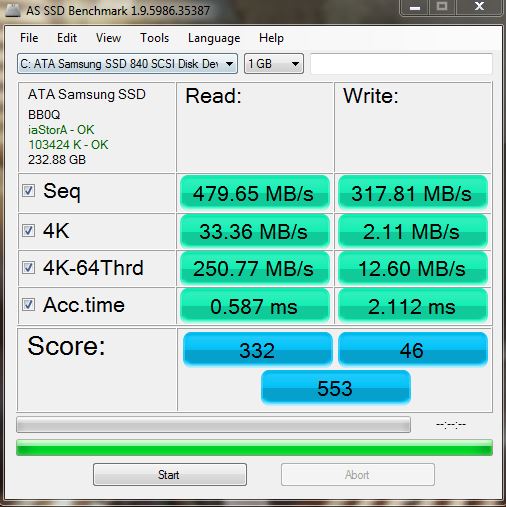
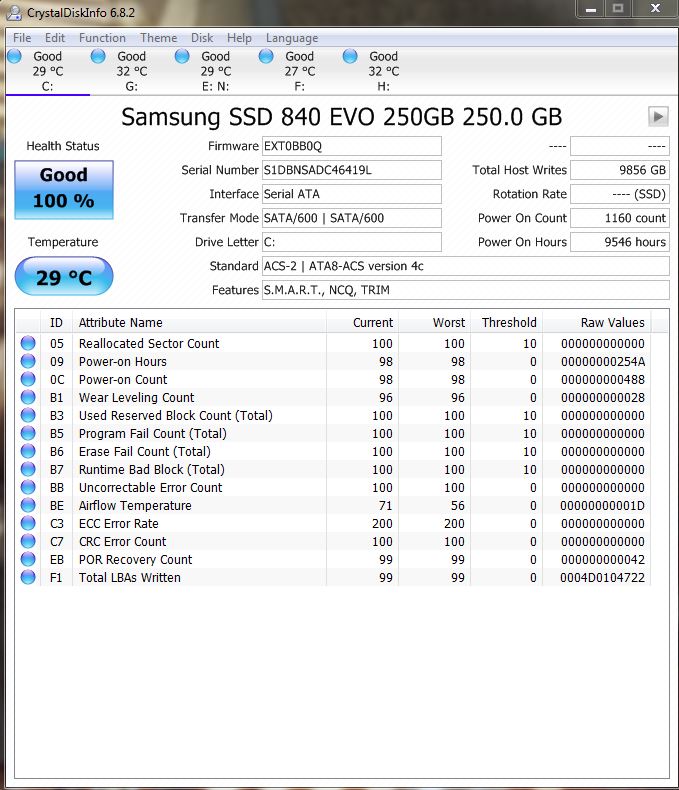
Ok:
alexssd.jpg

CrystalDiskInfo.jpg


And there is no AutoStart tab in task manager.
 
Back
Top