
-
We’re currently investigating an issue related to the forum theme and styling that is impacting page layout and visual formatting. The problem has been identified, and we are actively working on a resolution. There is no impact to user data or functionality, this is strictly a front-end display issue. We’ll post an update once the fix has been deployed. Thanks for your patience while we get this sorted.
You are using an out of date browser. It may not display this or other websites correctly.
You should upgrade or use an alternative browser.
You should upgrade or use an alternative browser.
SETI@Home Wow!-Event 2018
Page 3 - Seeking answers? Join the AnandTech community: where nearly half-a-million members share solutions and discuss the latest tech.

His latest 100 valid tasks have 52 seconds average runtime. Either he dialed down, or more likely, a former lucky streak of unusually quick WUs is now over.
While browsing the setiathome forum, I saw someone stating that the high FP64 performance of Titan V isn't of use in Seti@home, even with customized code.I forgot in which thread I read this... Edit: link
While browsing the setiathome forum, I saw someone stating that the high FP64 performance of Titan V isn't of use in Seti@home, even with customized code.
Last edited:

@lane42, earlier this year I looked at the bus bandwidth usage of 1080Ti at SETI@home:
My peak numbers may be a bit uncertain because of the 1 s reporting interval; but I believe the 90 percentiles to be a good indicator for a performance threshold of the bus after which it doesn't affect the application performance much anymore.
PCIe v2 1x allows for 500 MB/s rx and tx each. It's 985 MB/s on PCIe v3 x1.
I measured on a triple GPU system, but numbers are per GPU.Here are measurements of SETI@Home's PCIe bus utilization, taken from 3x GTX 1080Ti in PCIe v3 x16/ x16/ x8 slots, obtained with nvidia-smi with 1 second reporting period, running for over an hour on Windows and on Linux, respectively.
The numbers are: average / 90%-quantile / peak.
RX = PCIe reception, TX = PCIe transmission
Windows 7 Pro 64bit, Nvidia driver 387.92, SETI@home v8 8.22 opencl_nvidia_SoG
RX: 920 / 1,400 / 1,800 MB/s
TX: 160 / 220 / 520 MB/s
Linux Mint 64bit, Nvidia driver 384.111, setiathome_v8 8.01 cuda90
RX: 340 / 520 / 1,400 MB/s
TX: 80 / 110 / 2,100 MB/s
My peak numbers may be a bit uncertain because of the 1 s reporting interval; but I believe the 90 percentiles to be a good indicator for a performance threshold of the bus after which it doesn't affect the application performance much anymore.
PCIe v2 1x allows for 500 MB/s rx and tx each. It's 985 MB/s on PCIe v3 x1.
Last edited:

TennesseeTony
Elite Member
@Pokey .....I don't see you yet on the team page. https://www.seti-germany.de/Wow/stats_team.php?lang=en&team=30191
😀
😀

ao_ika_red
Golden Member
Last year's result.
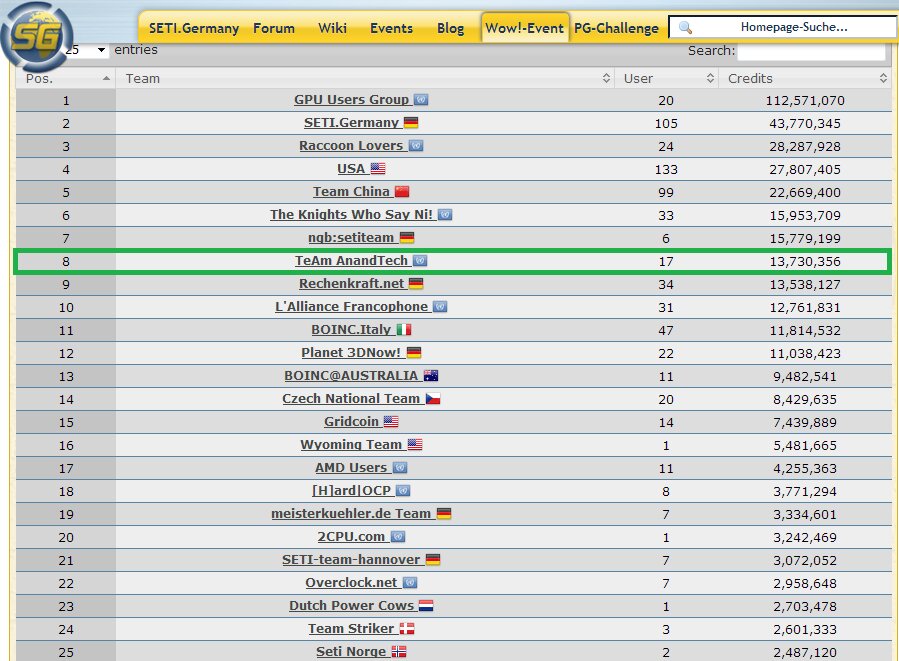
We had some tussles with l'AF, BOINC_Italy, and Planet_3DNow! along the race and then some RKN member(s) dropped their 35 days worth of bunker in last day and suddenly they jumped right behind us.
TeAm's SETI@Home Wow! Event 2017 thread archive.
We had some tussles with l'AF, BOINC_Italy, and Planet_3DNow! along the race and then some RKN member(s) dropped their 35 days worth of bunker in last day and suddenly they jumped right behind us.
TeAm's SETI@Home Wow! Event 2017 thread archive.


Orange Kid
Elite Member
It is both. Glad to have you along for the ride if you so decide.🙂Is this really just an individual event? If TeAm stats are significant here, I should enter right away.
Orange Kid
Elite Member
So I have been able to get multiple Boinc instances going...…,but the extra's aren't finding my GPU. Any clues as to why? Something I need to do?
Using windows and added the cc_config.xml to each, but nothing. Added the info from the coproc_info.xml in the cc_config as that seems to not do it on it's own..nothing either way🙁
Confused🙁
Using windows and added the cc_config.xml to each, but nothing. Added the info from the coproc_info.xml in the cc_config as that seems to not do it on it's own..nothing either way🙁
Confused🙁
I never had to do anything special when I added client instances on my Win 7 or Linux GPU hosts. Specifically, I never put anything GPU related into cc_config.xml.
I decided not to bother. I will either be switching everything off (it will be hot enough next Tuesday at least), or I will be away folding some proteins for the day.I am still undecided myself how I will manage Maintenance Tuesday during the Wow!-Event.
Check if any of your clients has "sched_reply_setiathome.berkeley.edu.xml" in its boinc data directory. You will find <userid>...</userid> near the top.The SETI site is down, is there a way to pull my SETI User ID # out of BOINC somewhere?
Those who registered for last year's Wow! Event (or before), can get the ID from the user URLs in the old user list:
https://www.seti-germany.de/Wow/stats_team.php?year=2017&team=30191
However, I wonder if the registration works at all while the project server is AWOL.
Edit,
last year, late registrations ( = after the start) were possible. I guess this year too.
You may pick any. It could be the one under which the neighbor's dog was born, for example.Edit: Also, does it matter which astrological sign I enter under?
Last edited:
TennesseeTony
Elite Member
Thanks for the info Stefan. 🙂
Wish I was half as smart as some of you guys 🙂
I wish I was half as smart as some of you "wish you were half as smart as" guys are!!! 😀
Lunatics app for "The Search" can be found here: http://lunatics.kwsn.info/ As to how to successfully USE that app.....uhm.....dunno for sure, but I do know it makes a huge difference, a positive difference....
TennesseeTony
Elite Member
Well crap, last update was 18+ months ago.....so we all good, yeah? (from last year?)?
TennesseeTony
Elite Member
Grrrr. No CPU tasks yet, only GPU. All my settings are to run CPU/GPU of all sorts, but nothing (other than GPU) so far..........
ao_ika_red
Golden Member
For windows: target folder is ProgramData > BOINC >projects > setiathome.berkeley.eduAs to how to successfully USE that app.....uhm.....dunno for sure, but I do know it makes a huge difference, a positive difference
AVX customapp is only useful for SandyBridge CPU onwards (Intel) and SteamRoller, Excavator, and RyZen CPUs (AMD).
Lunatic's 0.45 beta 6 installer is quite old but the standalone installer is updated recently but I don't see any significant performance gain so it's not a big problem and if we compare it to stock app, the older custom app is still significantly faster.Well crap, last update was 18+ months ago.....so we all good, yeah? (from last year?)?
It's picking up after usual Tuesday's maintenance day.Grrrr. No CPU tasks yet, only GPU. All my settings are to run CPU/GPU of all sorts, but nothing (other than GPU) so far
source: https://setistats.haveland.com/sah_v8_results.html
ao_ika_red
Golden Member
It's started!
Good luck everyone. May your surroundings cooperate nicely.
Good luck everyone. May your surroundings cooperate nicely.
It's started!
Good luck everyone. May your surroundings cooperate nicely.
Mine didn't
This happened while I tried to bunker:


My UPS understandably unhappy with the situation

Mine didn't either. I saw the start of the race, but my internet went down before I could flush anything.It's started!
Good luck everyone. May your surroundings cooperate nicely.
TennesseeTony
Elite Member
Good Heavens, Kiska! I take it that should be around 240V, instead of 400V?!?!?
TRENDING THREADS
-
 Discussion Zen 5 Speculation (EPYC Turin and Strix Point/Granite Ridge - Ryzen 9000)
- Started by DisEnchantment
- Replies: 25K
-
Discussion Intel Meteor, Arrow, Lunar & Panther Lakes + WCL Discussion Threads
- Started by Tigerick
- Replies: 25K
-

-

-
