• We’re currently investigating an issue related to the forum theme and styling that is impacting page layout and visual formatting. The problem has been identified, and we are actively working on a resolution. There is no impact to user data or functionality, this is strictly a front-end display issue. We’ll post an update once the fix has been deployed. Thanks for your patience while we get this sorted.

Question Server GPU connector

pallab

Member
I am planning to buy a Dell R7525 server.
This server has
2x6 pin GPU power connector (2 of these on board, so total 4x6 pin connectors).

I plan to use a single RTX 8000 which has a 8 pin + 6 pin connector.
So I will put the 6 pin to 6 pin onboard.
But how will I put the 8 pin on GPU to 2x6 pin onboard?

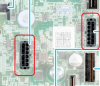
Also the 2x6 pin connectors look like a single 12 pin connector
Look at 5 and 15 in this motherboard:
 
5 12 15 are specialized just for dell, if those are power connectors for gpu.
I tried google, and i can't seem to find what would work.

The pin layout, all being triangle at top, and square at bottom, is pretty unique, and will not work with normal connectors.
 
The R7525 is a highly integrated server. As others mentioned, those 2x6 connectors are not the standard power connectors for the GPU. It's not meant to just install random cards in the system.

If you're missing the cables, then you need to order the R7525 GPU Enablement Kit in the Full Length variant, as you probably don't have the required heatsinks, fans, air shroud, and other pieces for GPU operation.


It comes with the Risers, Power cables, replacement air shrouds, super loud fans, heatsinks, and foam spacers for installing GPUs.
 
The R7525 is a highly integrated server. As others mentioned, those 2x6 connectors are not the standard power connectors for the GPU. It's not meant to just install random cards in the system.

If you're missing the cables, then you need to order the R7525 GPU Enablement Kit in the Full Length variant, as you probably don't have the required heatsinks, fans, air shroud, and other pieces for GPU operation.


It comes with the Risers, Power cables, replacement air shrouds, super loud fans, heatsinks, and foam spacers for installing GPUs.


Now I see it.
 
Last edited:
The R7525 is a highly integrated server. As others mentioned, those 2x6 connectors are not the standard power connectors for the GPU. It's not meant to just install random cards in the system.

If you're missing the cables, then you need to order the R7525 GPU Enablement Kit in the Full Length variant, as you probably don't have the required heatsinks, fans, air shroud, and other pieces for GPU operation.


It comes with the Risers, Power cables, replacement air shrouds, super loud fans, heatsinks, and foam spacers for installing GPUs.


I have verified (from the manual) that the standard air shroud, and 2U heatsink
also allow a 267mm dual socket GPU to be mounted in the server (not just one, atleast 2 of them)
So I wont need a GPU enablement kit to manually install a GPU.
The main reason being that GPU enablement kit comes with 1U Long type heatsink, which cannot handle high TDP processors like the 2U heatsink, moreover
Dell is not selling the kit if I don't buy a GPU from them.

All I need is for a 8-pin to dual 6-pin adapter to work (which comes bundled with my card).
But will that actually work?
Plus we are also worried about the 6-pin being compatible with the 6-pin onboard (whatever layout that is).

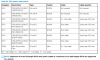
The connectors are documented here

P.S. I dont have the server yet
 
Last edited:
the full length risers, in the gpu enablement kit, are being used to provide adequate cooling for the PASSIVE double slot gpus provided by dell. The retail card I have is actively cooled, so it won't require a direct airflow.
 
As I now understand, Dell is using a 6+2-pin to 12 pin cable to connect the GPUs.
So in theory if I use 3 gpus, I can only provide 8 pin power to all the gpus.
But since I only have 1 gpu
I can use two of these cables with my card. With the second cable being used as a 6 pin to 12 pin adapter.


See this
 
You probably need an external PSU routed inside the case to power your GPU.

Couldn't find any cable that can connect from onboard 12pin connectors to your RTX 8000.

Untitled.png

from P.165 of the service manual

Untitled.png
 
Last edited:
So I got a reply from Dell and they sent me a pic of this cable.
Can any of you guys identify the pins on this cable?
 

Attachments

  • gpu cable.jpg
    gpu cable.jpg
    15.9 KB · Views: 52
That may work.
Good luck sourcing that cable tho.
I bet the only way you will be able to get it is though Dell and getting the GPU expansion kit.
 
Right, reiterating what has been mentioned several times through the thread, that cable is not standard. It is Dell Proprietary, for what is a highly integrated server. You may be able to hack away a solution, but by default, you need the GPU Enablement Kit if not already provided with your Server to get the power connectivity, and airflow needs sorted, and unfortunately, you need to option the GPU Enablement Kit when you order the server. It's not a post sale option.. Remember that the GPUs in these servers for the most part eat the already heated exhaust from the CPU heatsinks. That's why Dell provides shrouding, alternative fans, and heatsinks for the solution. While it may fit physically, there's no guarantee that just shoving it in there will allow it to operate thermally.

"NOTE: All GPU/FPGA cards require L-type heat sink and GPU shroud, irrespective of the length."

At the end of the day, if you can convince Dell to sell you that cable, you can always give it a try. I don't know where you're otherwise sourcing that cable from though, and it still won't guarantee the server will operate properly without the GPU enablement kit. You can also try to power the GPU Externally, but remember again it's a highly integrated server. These things have all sorts of weird behavior when they aren't run by their strict design plan. The fans will run at 100% all the time, but that's not a downside if you're not already using their thermal solution.

At the end of the day, those cables are just a splice of multiple 12V and ground wires going into the system board. At the end of the day, you could wire in, and solder up a spliced cable of your own design if you really want to try to make it work.
 
I managed to get the cable from dell, with VHP fans.
This cable works fine.

Does your cable work fine in the Server R7525 ?

The picture cable is the same as yours?
 

Attachments

  • GPU Power Connector (6+2 to 6 pin)-clear.png
    GPU Power Connector (6+2 to 6 pin)-clear.png
    281.7 KB · Views: 33
I managed to get the cable from dell, with VHP fans.
This cable works fine.
Do you have the part number you ordered from Dell to get this cable? Having the same issue and Dell is not helpful in locating the required cable part number. Thanks!
 
Does your cable work fine in the Server R7525 ?

The picture cable is the same as yours?

Yes it works fine. But I don't know how much power the cable can actually deliver (not more than 150 watts). The connector can deliver 600 watts.

NVDIA is using the same 12 pin connector in their higher end geforce and quadro cards for ampere. Mostly the Geforce 3090 and Quadro 8000.
Maybe dell wanted to ensure support for the upcoming Quadro cards. Hence the 12 pin connectors.
 
Last edited:
Yes it works fine. But I don't know how much power the cable can actually deliver (not more than 150 watts). The connector can deliver 600 watts.

NVDIA is using the same 12 pin connector in their higher end geforce and quadro cards for ampere. Mostly the Geforce 3090 and Quadro 8000.
Maybe dell wanted to ensure support for the upcoming Quadro cards. Hence the 12 pin connectors.

Do you have a part name or part number that I can reference to Dell? I have the same issue.
 
Back
Top