• We’re currently investigating an issue related to the forum theme and styling that is impacting page layout and visual formatting. The problem has been identified, and we are actively working on a resolution. There is no impact to user data or functionality, this is strictly a front-end display issue. We’ll post an update once the fix has been deployed. Thanks for your patience while we get this sorted.

Discussion Seasonic PSU won't turn on unless given "rest"!

x_marX

Member
Hi guys!

I have a weird problem which has been happening from some time.

I have the Seasonic G550 RM PSU which is 5.5 years old with Intel i5 4440 and the Gigabyte B85 D3H. Rams are Hyperx 1866mhz DDR3 8GBX2.
I have two 1TB hdd and a Chinese fan controller with a heavy duty fan from delta.

Now, the problem is that after shutting down the pc, it wouldn't turn back on unless I give it time like 10hrs. Only after that much time, it would turn on when pressing the on button.

I contacted my local pc repair shop and they first said my PSU is faulty. Then they gave me another psu to try it out. So, after turning off my pc, I tried turn on and it wouldn't . So, I swapped the psu and it also failed to turn on.
So, they said it's a problem with the motherboard and replaced some chip but after some days, the problem came back.

Then I thought maybe its the ram. So, changed my old G.Skill ram to the above mentioned brand new rams but the problem remained.

Then, after a while it disappeared. It was all normal. But yeah, it sometimes wouldn't turn on and I have to press the on button repeatedly to turn it on.

Now, it's back. It just wouldn't turn on unless I give it a lot of time.
I tried disconnecting the psu cables and shorted the green and back cables but the psu wouldn't turn on.

Would the on button of my cabinet short sone part of the psu or something ?
Or is it the fan of the psu give bad ?

It's really weird!

Any help would be greatly appreciated!
 
Your description of the problems sounds like a PSU issue. However, you said you have tried multiple power supplies, so maybe they are putting in used units or something.

I'm not sure why the repair shop would have repaired something on the motherboard. You might want to contact them again and find out exactly what they did. You might want to take it to another PC repair shop and get a 2nd opinion on what is wrong with it, because with everything you have stated, it's going to be nearly impossible for someone to diagnose your issues over the internet.
 
I thought the psu is bad too. But it turns back on after like 10 hrs of rest. Should I check it for any bad caps, shorts or replace it's fan ?

Also, my motherboard supports usb power even when off. May be I should turn it off ? It's not like I use it any way.


Btw, one interesting thing I noticed is that if I put the pc on standby, it turns back on.
 
Last edited:
I thought the psu is bad too. But it turns back on after like 10 hrs of rest. Should I check it for any bad caps, shirts or replace it's fan ?

Also, my motherboard supports usb power even when off. May be I should turn it off ? It's not like I use it any way.


Btw, one interesting thing I noticed is that if I put the pc on standby, it turns back on.
Unless you know exactly what you are doing, I'd advise against trying to repair a power supply. You could easily have a really, really bad day making a mistake as they can hold a charge for quite a while that can kill you.

If you peak inside and see things like leaking capacitors, just buy a new one.
 
Tell me about this "Chinese Fan Controller"... what happens if you take it out of the loop, disconnect it, and (temporarily) the fan(s) connected to it.

What may be happening is a self-protection PSU shutdown, due to detecting a short on one of the voltage lines. The Chinese fan controller could be the culprit. (Or the mobo, or GPU, or whatever.)
 
It would have been great if I can get new psu but prices for gold and platinum rated PSUs are really high here.

It's interesting to note the 10hr wait. Is there any clue as to which is at fault?
 
It's interesting to note the 10hr wait. Is there any clue as to which is at fault?
Like I said in my first post, that is a symptom of a failing PSU. However, you said it was replaced twice already, so that's why I say it's going to be just impossible for someone to diagnose your issues over the internet. It will need to be thoroughly tested at a PC repair shop.
 
Like I said in my first post, that is a symptom of a failing PSU. However, you said it was replaced twice already, so that's why I say it's going to be just impossible for someone to diagnose your issues over the internet. It will need to be thoroughly tested at a PC repair shop.
It was not replaced. They just gave me a psu for testing purposes. It was a xfx 750w psu which unfortunately didn't work as well.
I still run my Seasonic G550. I have no issues apart from this one even when running overclocked GTX 1060 gpu.
 
Btw, if I do replace my psu, which one to go for ?
Seasonic is overpriced and rare. We also don't have EVGA.
Corsair and Coolermaster is very common along with Antec. IIRC, Antec is the cheapest.

If I do get a Ryzen 3600+B550 combo along with a 2070 super, a 550w psu still ok, right?
 
It was not replaced. They just gave me a psu for testing purposes. It was a xfx 750w psu which unfortunately didn't work as well.
I still run my Seasonic G550. I have no issues apart from this one even when running overclocked GTX 1060 gpu.
But you also said they replaced a component on the motherboard, which is not common thing for local PC repair shops to do in the U.S. So I have no idea what they replaced and why. Then throw in you've "tested" two additional power supplies, it's hard to say what is wrong with your PC. Unless you have spare known-working components laying around your house in order to swap out parts, your best option is to take it to a PC repair shop.
 
Btw, if I do replace my psu, which one to go for ?
Seasonic is overpriced and rare. We also don't have EVGA.
Corsair and Coolermaster is very common along with Antec. IIRC, Antec is the cheapest.

If I do get a Ryzen 3600+B550 combo along with a 2070 super, a 550w psu still ok, right?
It's tough to recommend a specific power supply without knowing what ones are an option in your market. Most PSU manufacturers have a mixture of units for sale where some specific models are good, and some not so good. For example, Antec has some made by Seasonic that are good, and some of their other models are made by other manufacturers and aren't so great.

I'd also go with a 650W or higher for the proposed Ryzen 3600 build. A good 550w should be enough, but 650w gives you a little more room for future upgrades. A high quality PSU could last you for 10 years (or longer).
 
It's tough to recommend a specific power supply without knowing what ones are an option in your market. Most PSU manufacturers have a mixture of units for sale where some specific models are good, and some not so good. For example, Antec has some made by Seasonic that are good, and some of their other models are made by other manufacturers and aren't so great.

I'd also go with a 650W or higher for the proposed Ryzen 3600 build. A good 550w should be enough, but 650w gives you a little more room for future upgrades. A high quality PSU could last you for 10 years (or longer).
Well, I have found the right psu then - the Antec EA650G Pro!

 
But you also said they replaced a component on the motherboard, which is not common thing for local PC repair shops to do in the U.S. So I have no idea what they replaced and why. Then throw in you've "tested" two additional power supplies, it's hard to say what is wrong with your PC. Unless you have spare known-working components laying around your house in order to swap out parts, your best option is to take it to a PC repair shop.
They said they replaced the CMOS bios chip.
I thought the same; how can they do something like that for cheap?

It's hard to let them have my pc as I need it everyday. This 10 hrs waiting thing doesn't affect me much.

Btw, I do have a friend who's into troubleshooting. According to him, it's an issue with the "on/off" button.

Let me rewire the on button with restart.
 
They said they replaced the CMOS bios chip.
I thought the same; how can they do something like that for cheap?

It's hard to let them have my pc as I need it everyday. This 10 hrs waiting thing doesn't affect me much.

Btw, I do have a friend who's into troubleshooting. According to him, it's an issue with the "on/off" button.

Let me rewire the on button with restart.
You can figure out if it's power switch by unplugging it from the motherboard, and then shorting the two pins with something metal (like a screw driver).

However, if it was the switch going bad, it doesn't make any sense why it takes 10 hours to begin working again. A switch is a pretty simple device, and if it it was broken, it really wouldn't work at all.
 
The whole thing doesn't make any sense lol😀

The only clue is the 10 hour period of the psu to turn itself on.

May be there is a short in the psu or the motherboard or something which trips the psu only when warm?
Or there is some fault in the psu which resets after having the psu caps drains itself ?

I don't know lol😛
 
Instead of "waiting 10 hours", try flipping the PSU hard-off switch in the back of the PSU (if yours has one), and then turn it back on 10 seconds later, then try to push the ATX soft-on/off power button on the front of the case.
 
Tell me about this "Chinese Fan Controller"... what happens if you take it out of the loop, disconnect it, and (temporarily) the fan(s) connected to it.

What may be happening is a self-protection PSU shutdown, due to detecting a short on one of the voltage lines. The Chinese fan controller could be the culprit. (Or the mobo, or GPU, or whatever.)
Well, it's a fan controller by STW which I got it from Aliexpress to which I have fitted a 30W delta 120mm and a CM 120MM fan.

I have removed it and tried it but it still repeats. Let me try again and see what happens .

Now that you mention shorts, I modded by swapping the centrifugal blower fan of my Asus Turbo GTX1060 with a 80mm Delta high pressure fan. May be there is something wrong with that ?
It's a very high performance fan with big current draw.
Should I turn the fan curve down ?
 
I thought the psu is bad too. But it turns back on after like 10 hrs of rest. Should I check it for any bad caps, shorts or replace it's fan ?

Back in the era of the capacitor plague, a customer's PC would only start once it had been disconnected from the mains for several hours (overnight IIRC). The motherboard had a few visibly bad caps.

Another PC from that era had some weird issues that I couldn't narrow down any further than an 'issue with the motherboard'. For reasons I don't remember, I kept the board in s. Some time later, some of the caps were visibly bad.

It could be caps 🙂


Instead of "waiting 10 hours", try flipping the PSU hard-off switch in the back of the PSU (if yours has one), and then turn it back on 10 seconds later, then try to push the ATX soft-on/off power button on the front of the case.

I would have thought you'd suggest switching off the PSU like you said, then press the PC's usual power switch as if you wanted to switch it on, then switch the PSU back on and try switching on the PC again.
 
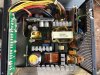
So, just now, I removed the psu from the pc case, disassembled and cleaned the dust and cobwebs. Inspected the caps which to my untrained eyes looked normal.

Connected it to the mains and shorted the green and black cables; nothing happened! The SMPS fan didn't turn on.

I'm f***** now coz I now have to wait 10 hrs to get it start again lol 🤪

My quest to kill the "Runt" (Kingdome Come: Deliverence) have to wait 🙁
 

Attachments

  • IMG20200502164231.jpg
    IMG20200502164231.jpg
    1,002.3 KB · Views: 21
So, I disassembled everything, cleaned and put it back. Didn't tried turning it on at once. Waitedfor like 10 hours before turning it on and then it starts.

Btw, I removed the fan controller and connected the high CFM delta fan to the motherboard instead.

Let me see how it goes!
 
Unless you know exactly what you are doing, I'd advise against trying to repair a power supply. You could easily have a really, really bad day making a mistake as they can hold a charge for quite a while that can kill you.

If you peak inside and see things like leaking capacitors, just buy a new one.
I wouldn't want to risk someone's life over "odds", but it is very rare for any major brand (general PC targeted use rather than proprietary industrial design) PSU to hold a significant charge more than single-digit seconds once disconnected from AC. Bleeder resistor(s) across the HV side cap(s) have been standard for a long time, and even if not present, the 5VSB would've been draining them.

Regardless if someone wants to be super paranoid, they would wear insulating gloves, use insulated screwdriver, on a non-conductive surface, and measure with a multimeter. Or just look at good internal pics of the PSU in question to identify the bleeder resistor(s).
 
Regardless if someone wants to be super paranoid, they would wear insulating gloves, use insulated screwdriver, on a non-conductive surface, and measure with a multimeter. Or just look at good internal pics of the PSU in question to identify the bleeder resistor(s).
“Think of how stupid the average person is, and realize half of them are stupider than that.” - George Carlin

I've met some really stupid people in my life, and I imagine that many of them are the reasons we have warning labels on everything, such as not eating things rat poison or Drano. 😉
 
Well, I do know the basic things like checking stuff using multi-meter, soldering, etc. But yeah, I can have bad days too.

So, I was busy with other things and didn't turn on the pc for some time. Then when I tried on yesterday, I was greeted by the short continuos beeps indicating RAM issue. So, I changed the slots and it's ok now.
Been running it non stop to download GTA V from EPIC.
 
I wouldn't want to risk someone's life over "odds", but it is very rare for any major brand (general PC targeted use rather than proprietary industrial design) PSU to hold a significant charge more than single-digit seconds once disconnected from AC. Bleeder resistor(s) across the HV side cap(s) have been standard for a long time, and even if not present, the 5VSB would've been draining them.

Regardless if someone wants to be super paranoid, they would wear insulating gloves, use insulated screwdriver, on a non-conductive surface, and measure with a multimeter. Or just look at good internal pics of the PSU in question to identify the bleeder resistor(s).

I don't know, man. @mikeymikec trusts only Seasonic power supplies. So it must be a problem with something else.
 
Back
Top