• We’re currently investigating an issue related to the forum theme and styling that is impacting page layout and visual formatting. The problem has been identified, and we are actively working on a resolution. There is no impact to user data or functionality, this is strictly a front-end display issue. We’ll post an update once the fix has been deployed. Thanks for your patience while we get this sorted.

SAMSUNG SM950 PRO NVMe SSD

Page 17 - Seeking answers? Join the AnandTech community: where nearly half-a-million members share solutions and discuss the latest tech.
Mines the same, the M2 device does not show up but, the UEFI detects the Windows Boot Manager in the EFI system partition.

One thing to watch out for when installing windows 10 is to make sure that it was booted UEFI mode or you will get a legacy install. Best to disable CSM before installing to guarantee a UEFI install.

I didn't disable CSM on the new install, how would I know if I got the UEFI install?
 
Last edited:
check disk manager for a EFI System partition of 100MB

30376d1382892536-bios-mode-see-if-windows-boot-uefi-legacy-mode-uefi_disk_management.jpg


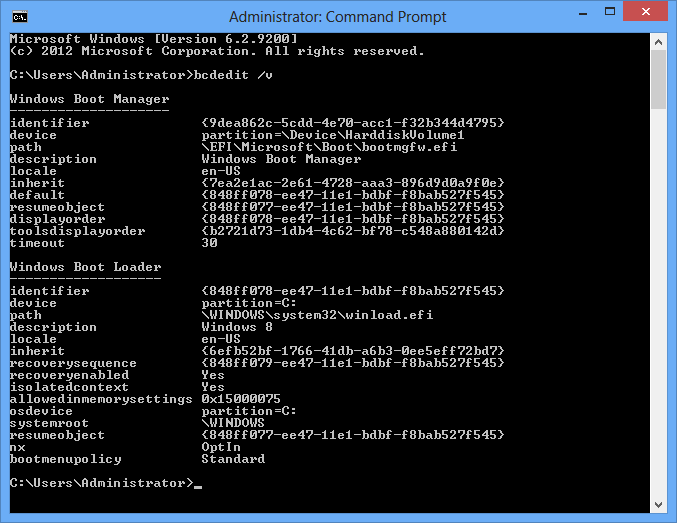
or check the BCD configuration
if its EFI you will have:
Windows Boot Manager will be "bootmgfw.efi"
Windows Boot Loader will be "winload.efi"

bcdedit.png
 
Last edited:
Why would it do that when I used Gpt on rufus to make w10 Bootable on my thumb drive? Sorry on a stupid tablet. ....
.
 
Here you go....my 950 shows has the first boot device in my bios both in EZ mode and in advanced.


Looks like W10 installed as MBR on that disk.

If you want to get to UEFI you will have to migrate it or do a re-install, I didn't want to reinstall so I migrated my Win 7 MBR Partition Scheme to GPT and UEFI booting prior to upgrading it to W10 via the free upgrade.

I would also re create you USB install media and make sure that it is FAT32 and also has the /EFI/Microsoft/Boot files.

When you boot make sure you select the UEFI option for the USB stick, (my system reports both the legacy option and the UEFI option for the USB stick, but i created my stick to handle both cases).

When you have booted correctly from the USB stick in UEFI mode, the installer wont let you continue unless the disk is a GPT Partition so you will have to delete it.
 
Looks like W10 installed as MBR on that disk.

If you want to get to UEFI you will have to migrate it or do a re-install, I didn't want to reinstall so I migrated my Win 7 MBR Partition Scheme to GPT and UEFI booting prior to upgrading it to W10 via the free upgrade.

I would also re create you USB install media and make sure that it is FAT32 and also has the /EFI/Microsoft/Boot files.

When you boot make sure you select the UEFI option for the USB stick, (my system reports both the legacy option and the UEFI option for the USB stick, but i created my stick to handle both cases).

When you have booted correctly from the USB stick in UEFI mode, the installer wont let you continue unless the disk is a GPT Partition so you will have to delete it.

Everything is running good so I don't think I want to mess with it, can you look in event viewer and see what your boot times are?
 
Yes it is I used Rufus to put W10 on my thumbdrive and used GPT...really when i went to reboot after turning off CSM my bios gave me the warning that it wouldn't boot...you know the 950 doesn't show has a NVMe device in my bios there nothing listed when I select NVMe devices?

I also can't boot with csm disabled running win7 ultimate uefi/gpt. uefi boot only options with csm enabled. Have a NVidia 750ti card. Button press Boot time of 01:01.
Bitlocker enabled and win password makes it a few seconds quicker than a 840 pro.
 
Last edited:
fwiw, i tried dis-abling CSM as well (running win 7 x64 Ultimate) w/950 PRO - it wouldn't boot , or rather during boot it would re-enable csm automatically
 
I'm wondering how that translates to NVMe drives.

Also, what settings do people have for the hyperX card in the UEFI? It says leave disabled for M.2 but does that mean the slot on the board or on the card?
 
I'm wondering how that translates to NVMe drives.

Also, what settings do people have for the hyperX card in the UEFI? It says leave disabled for M.2 but does that mean the slot on the board or on the card?

I didn't try those settings, I tried disabling CSM and it wouldn't let me....
 
i just tried those settings, leaving CSM enabled - the sequence of screenshots in that PCDIY link is a little confusing on CSM - it shows "enabled" being selected, then in next screen shows it "disabled", and then wraps up with a shot of it enabled

anyway, wow, my boot time dropped from 18-19 seconds to about 10-11 seconds = happy camper
 
Last edited:
i just tried those settings, leaving CSM enabled - the sequence of screenshots in that PCDIY link is a little confusing on CSM - it shows "enabled" being selected, then in next screen shows it "disabled", and then wraps up with a shot of it enabled

anyway, wow, my boot time dropped from 18-19 seconds to about 10-11 seconds = happy camper

Cool can you take a screen shot of your bios with those settings?
 
fv - there are 26 screenshots already on or in PCDIY's - just follow those

the only selection my board did not have as pictured, was on or in the 26th screen, showing "PCI Express X4_3 Slot (Black) Bandwidth" shown highlighted

the only other exception, as i stated above, i left CSM enabled
 
fv - there are 26 screenshots already on or in PCDIY's - just follow those

the only selection my board did not have as pictured, was on or in the 26th screen, showing "PCI Express X4_3 Slot (Black) Bandwidth" shown highlighted

the only other exception, as i stated above, i left CSM enabled

Cool I got it...glad it worked for you...
 
is samsung 950 pro 512gb version alot faster than samsung 850 evo 500gb?
i play games and browse the internet and open apps? will the difference be on paper the difference seems like hdd to Ssd (samsung 850evo)
and samsung evo 850 to samsung950 pro.
 
after i installed the 950 PRO, someone on another forum posted about or how samsung magician's Rapid Mode actually blocks off some of your system's ram to use as Ramdisk, and posted a screenshot showing some outrageous numbers. So i tried it - nearly flipped me out - don't remember why i had never enabled Rapid Mode before, but below are the results with a 2 years old 840 EVO

Capture3_zps0hdrearo.jpg


i got curious so i cloned the 950 PRO to the 840 and removed the 950 from the system - i swear the 840 was definitely "snappier" in response time, ie opening / loading programs etc. Rendering video files didn't seem to make a difference, but i'd already established my bottleneck is now at the cpu.


for comparison, here's the 950 PRO's benchmarks - for whatever reason, Rapid Mode will not enable on the 950

Capture%201_zpswamrprsj.jpg


kinda makes me wonder if i shouldn't have saved my coin and not bought the 950


fwiw
 
for comparison, here's the 950 PRO's benchmarks - for whatever reason, Rapid Mode will not enable on the 950


fwiw

Rapid mode is not supported on the 950.

I would rather save my RAM for applications than a fast disk cache.

I also installed a 950 Pro 256 into a new Lenovo Y700, it leaves about 700MB read on the table, i suspect it may be throttling due to the confined space. When i get a chance ill check temps while benching to see if that is the case.
 
after i installed the 950 PRO, someone on another forum posted about or how samsung magician's Rapid Mode actually blocks off some of your system's ram to use as Ramdisk, and posted a screenshot showing some outrageous numbers. So i tried it - nearly flipped me out - don't remember why i had never enabled Rapid Mode before, but below are the results with a 2 years old 840 EVO

Capture3_zps0hdrearo.jpg


i got curious so i cloned the 950 PRO to the 840 and removed the 950 from the system - i swear the 840 was definitely "snappier" in response time, ie opening / loading programs etc. Rendering video files didn't seem to make a difference, but i'd already established my bottleneck is now at the cpu.


for comparison, here's the 950 PRO's benchmarks - for whatever reason, Rapid Mode will not enable on the 950

Capture%201_zpswamrprsj.jpg


kinda makes me wonder if i shouldn't have saved my coin and not bought the 950


fwiw

You cannot be serious. RAPID mode is a cache on your RAM, when you run the benchmark, you are benching the cache on the RAM, not the SSD.

You drive is not running at 6000+ MB/s. Also RAPID only helps with programs that have high Queue Depth Usage. Regular usage, Rapid mode doesn't do anything.

The 950 Pro results, that is actually how fast the SSD is running, so it is better than the 840 EVO.

Also Redstorm, check to see if your Lenovo's M.2 slot is x2 lanes or x4, cuz you needs x4 to get the full performance of the drive.
 
Back
Top