Only 2 24'' 120hz gaming monitors on the market?

Page 2 - Seeking answers? Join the AnandTech community: where nearly half-a-million members share solutions and discuss the latest tech.

aigomorla

CPU, Cases&Cooling Mod PC Gaming Mod Elite Member
Super Moderator
Sep 28, 2005
21,131
3,666
126
theres an ACER also no?

personally OP... for that price.. id wait a bit more for the 1440p to hit the market... and force everything to drop.
Like how the 1080p got mainstream and flushed all the lower resolution monitors down.

and smooth for gaming and stuff is really dependant on the game and the videocard.

If your playing a game where u cant even get more then 60fps.. a 60hz monitor wont be your brick wall.

If your playing a game where u get more then 60fps, then you run into a biological issue.
Your eyes are natively only able to register 60fps.. + or - 10 fps... the best eyes are said to only pick up 80-90fps....

So you tell me if u really need a 120hz monitor outside 3d.... :p

now if u include 3d... everything changes....

This isn't the case for very fast motion -- e.g. first person shooters gaming -- and when your GPU's are powerful enough for frame rates matching hertz (120fps@120Hz). Most gamers are able to tell, once presented with this -- e.g. every single person who has come to my 120Hz monitors have noticed the difference immediately without side-by-side. The differences are biggest when framerate matches Hz. Also, USE PROPER TESTING CONDITIONS. Running at 80fps@120Hz can feel less smooth than running 60fps@60Hz. So you MUST run 120fps@120Hz to really massively outperform 60fps@60Hz. fps=Hz is important for motion fluidity.

That said, if you're running at less than 100fps, or if you have LOTS of microstutters, the difference is much, much, much smaller, or invisible.

Not saying there are people who can't tell, but pulling out random numbers (99.999), makes no sense.

+1 to this guys complete statement.
This is the exact situations i and some others have run into.

And i can tell you i gave up because getting acceptable fps min on demanding games... is VERY difficult in many occasions.
 
Last edited:

bystander36

Diamond Member
Apr 1, 2013
5,154
132
106
This isn't the case for very fast motion -- e.g. first person shooters gaming -- and when your GPU's are powerful enough for frame rates matching hertz (120fps@120Hz). Most gamers are able to tell, once presented with this -- e.g. every single person who has come to my 120Hz monitors have noticed the difference immediately without side-by-side. The differences are biggest when framerate matches Hz. Also, USE PROPER TESTING CONDITIONS. Running at 80fps@120Hz can feel less smooth than running 60fps@60Hz. So you MUST run 120fps@120Hz to really massively outperform 60fps@60Hz. fps=Hz is important for motion fluidity.

That said, if you're running at less than 100fps, or if you have LOTS of microstutters, the difference is much, much, much smaller, or invisible.

Not saying there are people who can't tell, but pulling out random numbers (99.999), makes no sense.

If you are not using v-sync, I don't see how 80FPS @ 120hz is worse the 60FPS @ 60hz. The 80 FPS at 120hz will have less noticeable tearing and no issues with stuttering and the 60 FPS @ 60hz will have a very noticeable tear that moves up and down slowly.
 
Last edited:

Mark Rejhon

Senior member
Dec 13, 2012
273
1
71
One thing you said is correct, and the other thing you said is semi-incorrect.
It's dependant on VSYNC setting.

60 FPS @ 60hz will have a very noticeable tear that moves up and down slowly.
Correct on this for VSYNC OFF
However, this does NOT happen for VSYNC ON or Adaptive VSYNC.

If you are not using v-sync, I don't see how 80FPS @ 120hz is worse the 60FPS @ 60hz. The 80 FPS at 120hz will have less noticeable tearing and no issues with stuttering
Correct for VSYNC OFF
Incorrect for VSYNC ON (perfect fps=Hz, no tearing)
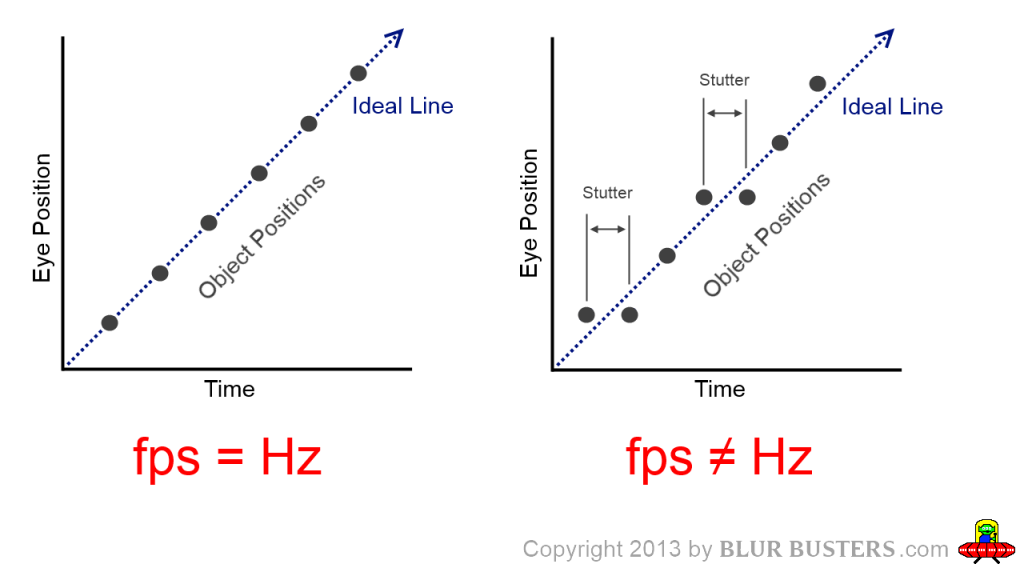
As your eyes smoothly track on-screen motion, the on-screen objects needs to stay in sync. Dis-synchronization show up as stutter/judder. High-frequency stutters creates motion blur (adding momentary sample-and-hold effects)

fps-vs-hz-1024x576.png


This is why many people prefer to play VSYNC ON or Adaptive VSYNC for solo gaming (when the competitive advantage of VSYNC OFF is not needed; since VSYNC OFF has a fluidity/tearing disadvantage). If there's never any slowdowns, the motion looks perfect on CRT's and LightBoost (no tearing, no stutters, no motion blur). You can get the "arcade zero motion blur CRT effect" on LightBoost with VSYNC ON, so it's a pretty cool effect.

Also, when running VSYNC OFF, I prefer framerates massively exceeding Hz, e.g. 300 frames per second. This is because it reduces tearing. Many tiny small-offset tearlines are always less noticeable than fewer big-offset tearlines.

Best framerates for smooth motion:
Smooth motion at VSYNC ON -- should run framerate exactly matching Hz
Smooth motion at VSYNC OFF -- should run framerate massively exceeding Hz

Reasons:
VSYNC OFF framerate below monitor refresh -- stutters start becoming visible.
VSYNC OFF framerate within 1 Hz of monitor refresh -- slow moving tearlines
VSYNC OFF framerate within few Hz of monitor refresh -- harmonic stutter effects (e.g. 125fps @ 120Hz = 5 stutters per second; the beat frequency)

Therefore, best framerate for VSYNC OFF, is framerate massively exceeding Hz to eliminate visible harmonic stutters. But yes, it requires a powerful GPU, or playing older games (e.g. Team Fortress 2)
___

Full circle back; bottom line.
80fps@120Hz does not always show enough of the fluidity benefits of 120Hz monitors for everyone -- sometimes people get dissapointed in 120Hz monitors because they didn't have the GPU horsepower to run fps=Hz (VSYNC ON) or fps>Hz (VSYNC OFF) necessary to max out the motion fluidity potential of the display (to human vision limits / display limits). Whichever way you do it, you still need to push frames to make the 120Hz monitors sing.
 
Last edited:

bystander36

Diamond Member
Apr 1, 2013
5,154
132
106
Correct for VSYNC OFF.
However, this does not happen for VSYNC ON or Adaptive VSYNC.

Incorrect when comparing perfect tearing-free VSYNC ON 60fps@60Hz

As your eyes track motion, the on-screen motion needs to stay in sync. High-frequency stutters creates motion blur (adding momentary sample-and-hold effects)

fps-vs-hz-1024x576.png
That picture shows the behavior of not having the same FPS as your refresh while v-sync is on. I was referring to not having v-sync on. Without v-sync it is far more complicated than that, as updates happen evenly, but not on the whole screen. You feel the response, but don't get as clean of a picture (not blurry, but split).

Motion blur is not affected by tearing. It is affected by response time. Response time does not change even with tearing on the screen.

Whether or not v-sync at 60 hz is better than 80+ FPS without v-sync is likely a bit more subjective as this article shows, though not comparing the exact parameters, as 120hz was not tested, but 30 with v-sync vs 45ish without v-sync was tested, and most people preferred 45 without with 45ish and v-sync was found to be stuttery.
http://www.pcper.com/reviews/Graphics-Cards/Frame-Rating-Visual-Effects-Vsync-Gaming-Animation

Even 60 FPS with adaptive v-sync (half refresh) will reduce motion blur, by the pictures in that article.

And adaptive v-sync and no v-sync would behave the same until you reach 120 FPS, so I don't know what you are talking about there.

The bottom line is for myself, there is no question that 80 FPS without v-sync on a 120hz monitor is superior to 60 FPS at 60 hz. I get nauseated when 60FPS and v-sync between 30-60 mins in first person games. I do not get nauseated at 80+ FPS without v-sync.
 
Last edited:

Stuka87

Diamond Member
Dec 10, 2010
6,240
2,559
136
Out of curiosity, what is the affect of running 60fps (locked) on a 120Hz display? Will it still appear to have less motion blur than 60fps on a 60Hz display (with vsync).
 

tweakboy

Diamond Member
Jan 3, 2010
9,517
2
81
www.hammiestudios.com
And their both 5ms to 12ms. You will get shadowing and ghosting and not a smooth mouse with vsyncon ...

Im @ 1ms 70hz , feels like a FW900 CRT ,,,,,,,,, thx gl
 

bystander36

Diamond Member
Apr 1, 2013
5,154
132
106
Out of curiosity, what is the affect of running 60fps (locked) on a 120Hz display? Will it still appear to have less motion blur than 60fps on a 60Hz display (with vsync).

If the pictures are correct, it should have no motion blur at 60 FPS or any FPS. The lightboost pulses at 120hz regardless of FPS and response time is independent of FPS. Though it is possible that it may look jerkier in comparison to having some blur.
 

Mark Rejhon

Senior member
Dec 13, 2012
273
1
71
That picture shows the behavior of not having the same FPS as your refresh while v-sync is on.
You are correct. So?
But I was proving a different point.
My point stands: 80fps@120Hz is not as smooth as 60fps@60Hz VSYNC ON

Again, yes, VSYNC OFF is better for competitive gaming, but I just wanted to point out that a higher framerate isn't necessarily as smooth as a lower framerate. That's the point I was simply wanting to prove.

I was referring to not having v-sync on. Without v-sync it is far more complicated than that, as updates happen evenly, but not on the whole screen. You feel the response, but don't get as clean of a picture (not blurry, but split).
Yes, I'm familiar with tearing. That's why you really need a framerate massively exceeding Hz to reduce visible tearing (I can even still see tearing even at 180fps).

VSYNC OFF framerate below monitor refresh -- stutters start becoming visible.
VSYNC OFF framerate within 1 Hz of monitor refresh -- slow moving tearlines
VSYNC OFF framerate within few Hz of monitor refresh -- harmonic stutter effects (e.g. 125fps @ 120Hz = 5 stutters per second; the beat frequency)

So, for best framerate for VSYNC OFF, is framerate massively exceeding Hz to eliminate visible harmonic stutters. But yes, it requires a powerful GPU, or playing older games (e.g. Team Fortress 2)
 

Mark Rejhon

Senior member
Dec 13, 2012
273
1
71
Motion blur is not affected by tearing. It is affected by response time. Response time does not change even with tearing on the screen.
Actually, the LCD panel pixel response time isn't the cause of motion blur anymore. See high speed video proof.

Ever since LCD pixels finished pixel transitions in less than one frame (e.g. 2ms LCD), that's barely more than 10% of the time of a 60Hz frame (16.7ms). LCD pixel response time is no longer the major factor of motion blur.

Most motion blur on a modern LCD is caused by the sample-and-hold effect. Even instant pixel response has lots of motion blur (see Why Do Some OLED's Have Motion Blur?). You will notice PS Vita and Samsung Galaxy S3 has lots of motion blur during scrolling! Their pixel response is virtually instant. The motion blur is caused by sample-and-hold, not by the pixel transition time.

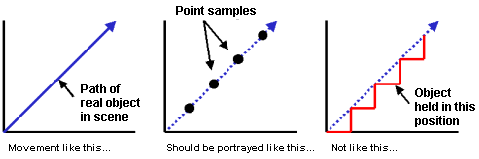
Motion blur is actually more dictated by the length of time a frame is displayed on-screen. Your eyes are always tracking. Your eyes are not in the same position at the beginning of a refresh as at the end of a refresh. As your eyes track across static frames on a display, the frames are blurred across your eyes (by your eye tracking motion). The only way to reduce motion blur is to shorten the static frames -- either by adding more Hz (extra frames, e.g. 120Hz), or by black periods between Hz (black frame insertion, CRT flicker, LightBoost flicker, scanning backlight, etc).

sampleandhold1.gif

(Source: Microsoft Research)
Vertical axis represents position of motion. Horizontal axis represent time.
Middle image represents flicker displays, including CRT and LightBoost.
Right image represents sample-and-hold displays, including most LCD and OLED.

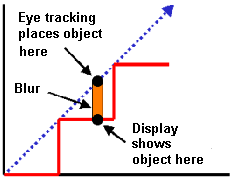
sampleandhold2.gif

(Source: Microsoft Research)


It is now possible to bypass LCD pixel transitions with various strobe backlights (e.g. LightBoost) and scanning backlights (found in high end Panasonic, Sony, Samsung HDTV's). The backlight is turned off while waiting for pixel transitions (unseen by human eyes), and the backlight is strobed only on fully-refreshed LCD frames (seen by human eyes). The strobes can be shorter than pixel transitions, breaking the pixel transition speed barrier! In addition, it eliminates the sample-and-hold effect.

So again, LCD panel pixel response time is no longer the chief determinator of motion blur on modern displays.
 
Last edited:

bystander36

Diamond Member
Apr 1, 2013
5,154
132
106
You are correct. So?
But I was proving a different point.
My point stands: 80fps@120Hz is not as smooth as 60fps@60Hz VSYNC ON

This, again, may be subjective. You say it is, my stomach says it is not. I get nausea at 60 FPS with v-sync on. I do not get nausea at 80+FPS and v-sync off.

I'm not entirely sure what is the cause. I'm just telling you how it feels. The guys at Pcper also seem to think so. I just think there is some subjectiveness to the v-sync on vs. off with higher FPS.
 

Mark Rejhon

Senior member
Dec 13, 2012
273
1
71
This, again, may be subjective. You say it is, my stomach says it is not. I get nausea at 60 FPS with v-sync on. I do not get nausea at 80+FPS and v-sync off.
Don't forget that people can get nausea due to input lag, extra motion blur of 60Hz, or too-smooth motion. The 60fps@60Hz is very 'smooth' and if it has lag, it can create nausea. I've heard of people who get sick due to motion blur, or sick due to too smooth motion, etc.

Nausea doesn't dictate whether 60fps@60Hz has fewer/more stutters than 80fps@120Hz. But yes, it's good to prefer 80fps@120Hz, because it has less lag & feels more responsive.

I have no disagreement about preferring 80fps@120Hz. Less lag, and probably 'feels' better. But from a motion science perspective, it doesn't have less stutters than 60fps@60Hz. LCD 80fps@120Hz may have less motion blur than LCD 60fps@60Hz, but it doesn't have fewer stutters, and thus is not smoother.

(Smoothness/stutters is a different variable than motion blur -- you can have a lot of stutters but little motion blur -- and you can have few stutters but lots of motion blur. Extreme examples: LCD 60fps@60Hz is very smooth but lots of motion blur. CRT 75fps@85Hz is not as smooth but has less motion blur.)

So again, I have no disagreement about preferring 80fps@120Hz.
 
Last edited:

bystander36

Diamond Member
Apr 1, 2013
5,154
132
106
Actually, the LCD panel pixel response time isn't the cause of motion blur anymore. See high speed video proof.

Ever since LCD pixels finished pixel transitions in less than one frame (e.g. 2ms LCD), that's barely more than 10% of the time of a 60Hz frame (16.7ms). LCD pixel response time is no longer the major factor of motion blur.

Most motion blur on a modern LCD is caused by the sample-and-hold effect. Even instant pixel response has lots of motion blur (see Why Do Some OLED's Have Motion Blur?). You will notice PS Vita and Samsung Galaxy S3 has lots of motion blur during scrolling! Their pixel response is virtually instant. The motion blur is caused by sample-and-hold.

Motion blur is actually more dictated by the length of time a frame is displayed on-screen. Your eyes are always tracking. Your eyes are not in the same position at the beginning of a refresh as at the end of a refresh. As your eyes track across static frames on a display, the frames are blurred across your eyes (by your eye tracking motion). The only way to reduce motion blur is to shorten the static frames -- either by adding more Hz (extra frames, e.g. 120Hz), or by black periods between Hz (black frame insertion, CRT flicker, LightBoost flicker, scanning backlight, etc).

sampleandhold1.gif

(Source: Microsoft Research)
Vertical axis represents position of motion. Horizontal axis represent time.
Middle image represents flicker displays, including CRT and LightBoost.
Right image represents sample-and-hold displays, including most LCD and OLED.

sampleandhold2.gif

(Source: Microsoft Research)


It is now possible to bypass LCD pixel transitions with various strobe backlights (e.g. LightBoost) and scanning backlights (found in high end Panasonic, Sony, Samsung HDTV's). The backlight is turned off while waiting for pixel transitions (unseen by human eyes), and the backlight is strobed only on fully-refreshed LCD frames (seen by human eyes). The strobes can be shorter than pixel transitions, breaking the pixel transition speed barrier! In addition, it eliminates the sample-and-hold effect.

So again, LCD panel pixel response time is no longer the chief determinator of motion blur on modern displays.

I think you are misunderstanding what I wrote.

Without lightboost or similar strobing, response time is what causes motion blur. Lightboost works along with your refresh rate to creating the illusion of improved response time.

It still happens on every refresh, so motion blur should be reduced regardless of FPS, as long as the strobing is happening.
 

bystander36

Diamond Member
Apr 1, 2013
5,154
132
106
Don't forget that people can get nausea due to input lag, extra motion blur of 60Hz, or too-smooth motion. The 60fps@60Hz is very 'smooth' and if it has lag, it can create nausea. I've heard of people who get sick due to motion blur, or sick due to too smooth motion, etc.

Nausea doesn't dictate whether 60fps@60Hz has fewer/more stutters than 80fps@120Hz. But yes, it's good to prefer 80fps@120Hz, because it has less lag & feels more responsive.

I have no disagreement about preferring 80fps@120Hz. Less lag, and probably 'feels' better. But from a motion science perspective, it doesn't have less stutters than 60fps@60Hz. LCD 80fps@120Hz may have less motion blur than LCD 60fps@60Hz, but it doesn't have fewer stutters, and thus is not smoother. (Doesn't mean it's better)

I think the term smooth has slightly different meaning to you. To me, smoothness includes responsiveness. You are looking at it entirely from the video output, and not including the input into it all.

EDIT: In the Pcper article, it was strickly a video out test, so it is interesting that people found 45ish FPS without v-sync smoother than 30 FPS with v-sync. There seems to be more too it than your charts suggest. Perhaps what you mean is consistent. Or perhaps they don't mean smooth, but what is more pleasing.
 
Last edited:

Mark Rejhon

Senior member
Dec 13, 2012
273
1
71
Without lightboost or similar strobing, response time is what causes motion blur.
There are two different kind of measuring response times, perhaps that is our confusion.

(1) Response time as "Motion Picture Response Time" (MPRT) -- takes into account of sample and hold effect -- this is the true motion blur mesurement. (google)

(2) Response time as "pixel transition time" -- does NOT take into account of strobing -- this is the misleading standard that most monitor manufacturers use. It is NOT an accurate measure of motion blur.

Nearly all 60Hz LCD computer monitors have an MPRT of 16.7 milliseconds (1/60sec). So the 1ms and 2ms ratings (the time it takes for pixels to transition) is not the true rating of motion blur, while MPRT (Motion Picture Response Time) is actually the true measurement of motion blur. Nearly all 120Hz LCD computer monitors have an MPRT of 8.3 milliseconds (1/120sec) during 120Hz non-strobed mode.

It's also important to be familiar with the sample-and-hold effect:

“Temporal Rate Conversion” (Microsoft Research)
Information about frame rate conversion, that also explains how eye tracking produces perceived motion blur on a sample-and-hold display, including explanatory diagrams.

“Correlation between perceived motion blur and MPRT measurement”
by J. Someya (SID’05 Digest, pp. 1018–1021, 2005.)
Covers the relationship between human perceived motion blur versus Motion Picture Response Time (MPRT) of the display. This also accounts for motion blur caused by eye tracking on a sample-and-hold display, a separate factor than pixel persistence.

“What is needed in LCD panels to achieve CRT-like motion portrayal?”
by A. A. S. Sluyterman (Journal of the SID 14/8, pp. 681-686, 2006.)
This is an older 2006 paper that explains how scanning backlight can help bypass much of an LCD panel’s pixel persistence.

“Frame Rate conversion in the HD Era”
by Oliver Erdler (Stuttgart Technology Center, EuTEC, Sony Germany, 2008)
Page 4 has very useful motion blur diagrams, comparing sample-and-hold versus impulse-driven displays.

“Perceptually-motivated Real-time Temporal Upsampling of 3D Content for High-refresh-rate Displays”
by Piotr Didyk, Elmar Eisemann, Tobias Ritschel, Karol Myszkowski, Hans-Peter Seidel
(EUROGRAPHICS 2010 by guest editors T. Akenine-Möller and M. Zwicker)
Section “3. Perception of Displays” (and Figure 1) explains how LCD pixel response blur can be separate from hold-type (eye-tracking) motion blur.

“Display-induced motion artifacts”
by Johan Bergquist (Display and Optics Research, Nokia-Japan, 2007)
Many excellent graphics and diagrams of motion blur, including impulse-driven and sample-and-hold examples.

Again, MPRT is the only true measurement that applies in an apples-to-apples manner on all display technologies (CRT, LCD, plasma, OLED, strobed, non-strobed, etc). That's a true measurement of motion blur. And they even sell motion blur measurement cameras to TV manufacturers (e.g. MotionMaster and other MPRT Measurement Cameras). These cameras return 16.7 milliseconds for the majority of 60Hz LCD's (brightness=100%), and 8.3 milliseconds for the majority of 120Hz LCD's (brightness=100%). Even if the LCD makers claim 1ms or 2ms.

Unfortunately, MPRT is not currently the response-time measurement standard that LCD manufacturers use. LCD makers measure pixel transition time (GtG -- from a grey to a different grey), and therefore, is not an accurate measurement of motion blur seen by the human eye.

CRT phospohor decay time in a Sony FW900 CRT is about 1 millisecond.
The ASUS VG248QE LCD display quotes a pixel transition time of 1 millisecond.
Why does the CRT have less motion blur than the LCD?
That's because the phosphor decay is the on-to-off cycle time. (90% cutoff point)
While the common LCD manufacturer method is from one-color-to-next. (90% complete point).

The only way to unify measurements is to use MPRT (the only true response time measurement technique) -- that makes comparing motion blur CRT's and LCD's more of an apples-to-apples comparision. Unfortunately, LCD manufacturers won't go for this, because they all would have to erase their ratings and display sad-looking numbers like "response time of 16.7ms"

Again, the point still stands -- the response time numbers that the LCD manufacturers are quoting (aka pixel transition times) are not accurate representations of motion blur.
 
Last edited:

flexy

Diamond Member
Sep 28, 2001
8,464
155
106
Can you name ONE modern game which runs at a steady 120 FPS, even on good hardware like a GTX 670, 770, 780?

You will NOT be able to run any of the more modern games like Crysis 3, FC 3, TR or whatever at 120HZ unless you have a uber-rig (say two Titan etc.) to even remotely being able to sustain "true" 120hz. Just saying.
 

Mark Rejhon

Senior member
Dec 13, 2012
273
1
71
Can you name ONE modern game which runs at a steady 120 FPS, even on good hardware like a GTX 670, 770, 780?

You will NOT be able to run any of the more modern games like Crysis 3, FC 3, TR or whatever at 120HZ unless you have a uber-rig (say two Titan etc.) to even remotely being able to sustain "true" 120hz. Just saying.
Correct.
That's why some of us often play with SLI.

To max out the maximum potential of 120Hz monitors (and 3 of them in surround too!), CallSignVega uses quad Titans, l88tbastard uses a Titan, and I know others use two Titans, etc. You need powerful GPU's to consistently run high framerates in modern games without too many frame drops.

Others, play older games like Team Fortress 2, Counter Strike, Quake Live, and other games, because they prefer the ultrahigh framerates without spending too much money. For that, you only need a good 600-series (e.g GTX 660).

That said, you can still get the majority of of the benefits of a 120Hz monitor with a single 780 or Titan (e.g. running 120fps more than 50% of the time even if not 100% of the time). You may not "max out" the benefits of a 120Hz monitor, but you will get the majority of the benefits rather than just get a few "ho hum" benefits.

Also some play a mix of games -- older and newer -- and temper expectations with newer games until upgrading GPU. Most people usually upgrade computers/GPU's more often than upgrading monitors (there are exceptions, of course).
 
Last edited:

Obsoleet

Platinum Member
Oct 2, 2007
2,181
1
0
I just bought a new LCD and honestly didn't care to get 120hz. Got an Asus 27" and I'm happy with it. I didn't prefer 120hz on my old CRTs, I usually set them to 75hz. On LCDs, I find their native 60hz to be as pleasant as 75hz was on CRTs.

To me 100hz+ looks more full or thick.. hard to describe but I never cared for it. Was always a 75hz guy and used that across the resolution spectrum on CRTs to maintain consistency (some higher res's were limited to 60 or 75hz).
 

bystander36

Diamond Member
Apr 1, 2013
5,154
132
106
Your desire for 75hz back in the CRT days was likely as a result of the flicker that CRT's had and not about smoothness. Now days, monitors don't flicker, though the lightboost strobe is not that different.

With LCD's, you now have motion blur issues to deal with, which is where the 120hz monitors with lightboost helps bring back that CRT advantage.
 

Obsoleet

Platinum Member
Oct 2, 2007
2,181
1
0
When I did my research for the last few LCDs I puchased, I landed on 60hz Asus monitors. I've had two so far be my main display. I found they have little to no input lag. TN panels don't bother me, I find the color accuracy good enough. The 2ms response time with zero input lag was pretty attractive.
http://www.displaylag.com/display-database/ Asus does a great job there pretty much across the board. I considered a 120hz screen from them, but decided against it. I also never liked cross-eyed vision. At least every time I've seen it.
 

Black Octagon

Golden Member
Dec 10, 2012
1,410
2
81
Correct.
That's why some of us often play with SLI...
...Others, play older games like Team Fortress 2, Counter Strike, Quake Live, and other games, because they prefer the ultrahigh framerates without spending too much money.

Others still play all games, old and new, and adjust the graphics quality settings accordingly until they are running at a healthy 120fps for most or all of their in-game experience...

I've been doing this ever since I realised that people's obsession with 'Maxx'-ing out games is an endeavor of diminishing returns. Now, I take smoothness/responsiveness as my primary goal and am a LOT happier for it!
 

bystander36

Diamond Member
Apr 1, 2013
5,154
132
106
"Micro stuttering" is something most people experience. It just doesn't bother many people enough to try and fix it. Blind testing with side by systems show people will always choose the system with less micro stutter over the other, but if playing alone, most people don't complain about it.
 

bystander36

Diamond Member
Apr 1, 2013
5,154
132
106
When I did my research for the last few LCDs I puchased, I landed on 60hz Asus monitors. I've had two so far be my main display. I found they have little to no input lag. TN panels don't bother me, I find the color accuracy good enough. The 2ms response time with zero input lag was pretty attractive.
http://www.displaylag.com/display-database/ Asus does a great job there pretty much across the board. I considered a 120hz screen from them, but decided against it. I also never liked cross-eyed vision. At least every time I've seen it.

That is a settings issue. Convergence to be exact. If properly setup, your eyes converge just like they do in real life. The only thing it lacks is blurriness on objects at a different depth than you are looking at.