Discussion Nvidia Blackwell in Q1-2025

Page 182 - Seeking answers? Join the AnandTech community: where nearly half-a-million members share solutions and discuss the latest tech.

Mopetar

Diamond Member
Jan 31, 2011
8,516
7,777
136
Spending that much on Open Box would make me nervous a bit.

I'd agree with that. You should run a stability test on it for 24 hours just to make sure there aren't any problems. That should detect anything that might be concerning. There's always a possibility someone with money bought it and later replaced it with something that could OC better and that the card doesn't have much wear on it.

If it can handle 24 hours under load within specifications it's unlikely to have any problems crop up a few months from now.
 

CP5670

Diamond Member
Jun 24, 2004
5,683
783
126
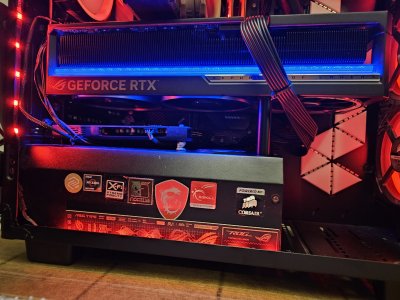
I tried out Cyberpunk, Starfield and Control, just casual gameplay for a hour or so. I can now run Cyberpunk at 4K RT with medium RT lighting and DLAA scaling at 100+fps. It's at least 50% faster than the 4090 here. Path tracing is still too intensive and drops to 60fps, but does very little visually either. Control also runs at 120fps at native 4K with RT, the 4090 needed 2560 upscaled. The 600W usage only occurs in these games, otherwise it uses 300-400W at the same games and settings the 4090 got 120fps on.

The Astral model measures the power draw on the 12V 2x6 pins and prevents overcurrent, which is a big plus. However, the card is quite loud on the P bios and the fans go up to 2400rpm with 70-73C temps and 59db measured near the fans. It's way louder at 600W than the whisper quiet 4090 AIO or really anything I've used in the last 10 years. The fans have a very audible hum, not just an whoosing sound. But in 350W games it's silent. I'll need to try the Q bios, it has the updated version of that already. It boosts to 2780mhz without any oc. I will also try undervolting it. It actually causes the UPS to sound an alarm when total power goes above 1000W, but this can be disabled.

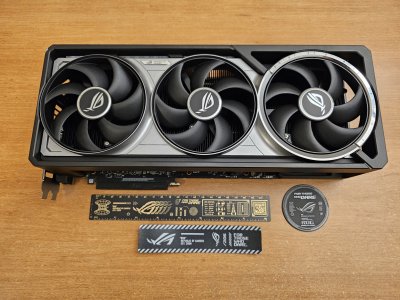
It comes with a cool metal badge and ruler, but is missing the support stand. Maybe that is why it was discounted so much, I have one already and don't mind. It may be that someone bought it and returned it after finding a cheaper model or a better OC model as you said. Or replacing Asus with MSI/Gigbyte to match their board's style, have seen many people do this. There were a couple of open box Astrals at other stores too but at $2600 or more. Generally the $3000+ cards are easy to find but the $2000 ones are sold out everywhere. I would say the upgrade was worth it for $350 but with a few caveats, mainly the noise.

 

Attachments

  • IMG_20251112_130319.jpg
    IMG_20251112_130319.jpg
    1.3 MB · Views: 43
  • IMG_20251112_130302.jpg
    IMG_20251112_130302.jpg
    1.2 MB · Views: 41
Last edited:

CP5670

Diamond Member
Jun 24, 2004
5,683
783
126
I saw this article and in hwinfo two of my pins have 9.54A spikes and slightly exceed Asus's safe threshold of 9.2A and the 12VHPWR spec of 9.5A. While I can't imagine this small a difference would cause a fire, I will get a new cable anyway to be safe. I'm using Corsair's official cable but a right angled and sleeved one would look nicer.

The Q bios is significantly quieter at the cost of 5-6C, so I will use that long term and try to undervolt. It seems unplugging the fourth fan reduces noise too with no effect on temps. Apparently the Astral is one of the loudest models but people still prefer it for the power pin sensing. I would find the P bios noise unacceptable if I spent full price on it, but even with the Q bios it runs cooler than some other cards.
 
Last edited:

bba-tcg

Golden Member
Apr 8, 2010
1,029
635
136
thecomputerguylbb.com
I saw this article and in hwinfo two of my pins have 9.54A spikes and slightly exceed Asus's safe threshold of 9.2A and the 12VHPWR spec of 9.5A. While I can't imagine this small a difference would cause a fire, I will get a new cable anyway to be safe. I'm using Corsair's official cable but a right angled and sleeved one would look nicer.

The Q bios is significantly quieter at the cost of 5-6C, so I will use that long term and try to undervolt. It seems unplugging the fourth fan reduces noise too with no effect on temps. Apparently the Astral is one of the loudest models but people still prefer it for the power pin sensing. Honestly I would find the P bios noise unacceptable if I spent full price on it.
Corsair sells right angled cables, you may have to sleeve it yourself. Maybe not, I haven't checked on the sleeved ones.
 

CP5670

Diamond Member
Jun 24, 2004
5,683
783
126
This one looked nice and is cheap. This particular card actually has the connector upside down so the clip is on top.

Frame generation is good for games like Starfield that are CPU bottlenecked at any settings, going from 90-100fps to a flat 120fps. VR is fantastic and gets flat 90fps across all games at the Reverb G2's native resolution. It's the first card that really achieves this without downsampling and a major improvement over the 4090. I'll need to do another playthrough of SW Squadrons now.

A few games like Jedi Survivor and Overload don't like forced 16x AF in the driver (which I've used for decades) and cause a red tint. It seems to be a 5000 series issue and I made nvInspector profiles to turn it off for these games only.
 
Last edited:

bba-tcg

Golden Member
Apr 8, 2010
1,029
635
136
thecomputerguylbb.com
This one looked nice and is cheap. This particular card actually has the connector upside down so the clip is on top.

Frame generation is good for games like Starfield that are CPU bottlenecked at any settings, going from 90-100fps to a flat 120fps. VR is fantastic and gets flat 90fps across all games at the Reverb G2's native resolution. It's the first card that really achieves this without downsampling and a major improvement over the 4090. I'll need to do another playthrough of SW Squadrons now.

A few games like Jedi Survivor and Overload don't like forced 16x AF in the driver (which I've used for decades) and cause a red tint. It seems to be a 5000 series issue and I made nvInspector profiles to turn it off for these games only.
When I click that link, I get a message that says the site can't be reached. But for an expensive graphics card, I don't think I'd pick cheap as part of my criteria.
 

CP5670

Diamond Member
Jun 24, 2004
5,683
783
126
Fixed the link, it actually looks better quality than Corsair's stock cables though (which is what I have now) and has individually sleeved cables. I don't see any official right angle ones from Corsair on Amazon.
 

bba-tcg

Golden Member
Apr 8, 2010
1,029
635
136
thecomputerguylbb.com
Fixed the link, it actually looks better quality than Corsair's stock cables though (which is what I have now) and has individually sleeved cables. I don't see any official right angle ones from Corsair on Amazon.
Buying directly from Corsair usually comes out to be the same as buying from Amazon. The last right angle one I bought from Corsair was $19.99 plus $10 shipping plus tax. From Amazon, it was 29.99 plus tax, no shipping.

Buy whichever you want (of course), but this is the one I bought (and trust): https://www.corsair.com/us/en/p/pc-...ype-4-psu-90-12v-2x6-style-a-cable-cp-8920347. I bought the style b.
 

Attachments

  • 20251116_091848.jpg
    20251116_091848.jpg
    635.8 KB · Views: 22

CP5670

Diamond Member
Jun 24, 2004
5,683
783
126
$10 shipping kind of kills it though, I have prime with 5% off on amazon with free 2 day shipping.

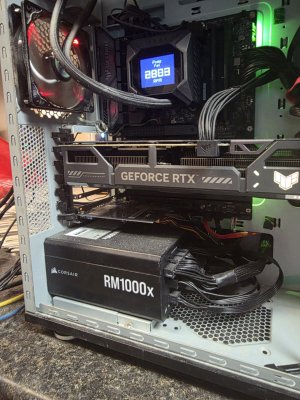
I got that one I linked earlier, it's much nicer than the stock corsair cable, more flexible with individually sleeved wires and adjustable cable holders. It lacks the two sense wires, which is part of the spec update. It took some work to unscrew the PSU cover without moving the card but I was able to replace it. Now all six pins are under 9.2A at 600W and below Asus's warning threshold, and it looks much cleaner too. With the stock cable one pin was at 7A and three others went up to 9.5-9.7A, slightly exceeding the 9.5A spec. This is actually a very useful feature of this Astral card, it's the only 5090 model with this pin sensing and may just save you from a burned connector.

On another note, I was reading that the prices of these cards are likely to go up further next year because of memory prices. So it's better to buy one this year if you want one.
 

Attachments

  • IMG_20251118_141957.jpg
    IMG_20251118_141957.jpg
    981.3 KB · Views: 14
Last edited:

Saylick

Diamond Member
Sep 10, 2012
4,099
9,578
136

Rumors that nVidia will stop bundling memory with the GPU chip, meaning that board makers would have to source the memory themselves.
Can’t say I’ll be surprised if this rumor turns out to be true. Nvidia are historically a cutthroat business partner who will milk you when they can but then throw you to the wolves the moment it’s in their advantage to do so.
 

regen1

Senior member
Aug 28, 2025
255
322
96

Ranulf

Platinum Member
Jul 18, 2001
2,896
2,558
136
I thought the issue was hardware as well as software? Interested to see the performance differences.

Oh the irony on the delay with Arkham Aslyum. That game was a mess that I got for free with a 970 and it was taken off Steam for 6months or so. When they brought it back fixed they gave owners free batman games. Still makes more sense to keep an old card installed for phys-x than hope they cobble together some fix.
 

Tup3x

Golden Member
Dec 31, 2016
1,287
1,418
136
Now if they would fix driver forced anisotropic filtering for Blackwell and everything would be perfect again. At least negative lod tweak can somewhat help but it's truly annoying how many game with broken/lacking/limited AF are out there.
 
  • Like
Reactions: Tlh97 and CP5670

Tup3x

Golden Member
Dec 31, 2016
1,287
1,418
136
does that manifest as weird white artifacts/lines? how to fix on driver settings?
It depends. Sometimes red corruption/lines/pixelation, sometimes green tint all over the place. Doesn't plague every game (engine) though.

It's a known issue and apparently NVIDIA is looking to fix it.