• We’re currently investigating an issue related to the forum theme and styling that is impacting page layout and visual formatting. The problem has been identified, and we are actively working on a resolution. There is no impact to user data or functionality, this is strictly a front-end display issue. We’ll post an update once the fix has been deployed. Thanks for your patience while we get this sorted.

Question Networking for Dummies

Page 2 - Seeking answers? Join the AnandTech community: where nearly half-a-million members share solutions and discuss the latest tech.

BoomerD

No Lifer
For some reason, the ethernet connection in my wife's Dell PC has stopped working. Running Windows 10. It's a Realtek adapter, (I can get the complete info if needed) I've downloaded the latest drivers from Dell. (from 2015...it's an OLD PC)

I changed my wifi router yesterday to a better/faster model. This seems to have happened as a result of that change. It took me a while to get her wifi back up and running...but for now, THAT seems to be working. <cross fingers>

I changed the ethernet cable to a known-working cable. (CAT6) so I DON'T THINK that's the cause of the problem.
The port her PC is connected to on the router shows it's connected, but it just doesn't work.

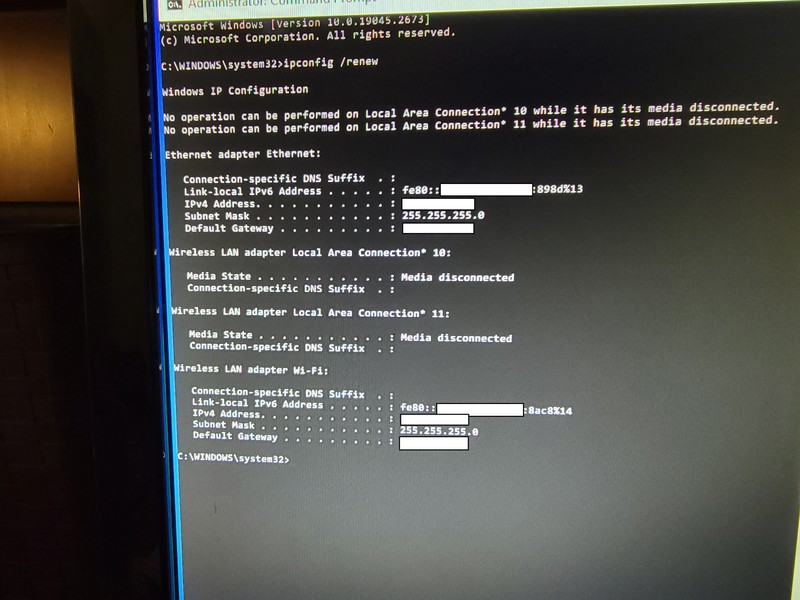
When I run ipconfig, the info basically matches the ipconfig for my pc.(IPv4 and 6 are different...since they're different computers, but subnet mask and default gateway match.

What am I doing wrong? I suppose it's possible network adapter in her 2014 Dell has died...but I think it's something else.
 
Last edited:
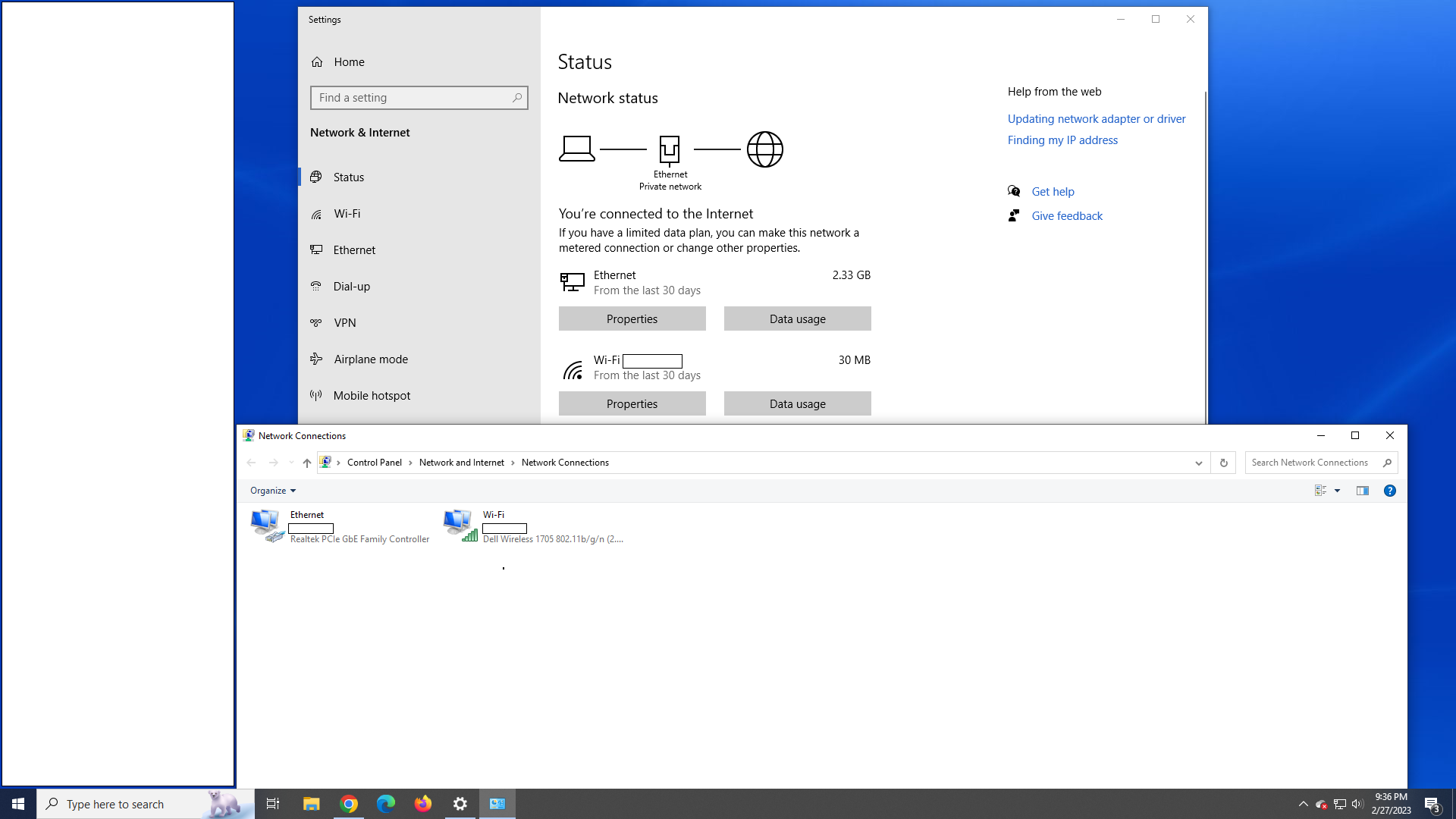
Can you post a screen shot of this.
Start -> type "View Network Connections"

The box that comes up should look something like this:dasf.JPG
 
NCSI "No Internet" false alert issue is quite annoying. I believe most people encountered the false alert more than once during his lifetime using Windows.


I've seen this before but never looked into it.

Try the second solution here perhaps?

Some other suggestions.

Windows Report - Error-free Tech Life https://windowsreport.com/wireless-network-not-connected-internet-works/

Hot Damn...that did the trick! (second suggestion above)
Thank you, thank you, THANK YOU! and THANKS to everyone who offered suggestions on how to fix this.
 
well the thing that is confusing the hell out of me, or got me wondering is the fact windows says he has 11 network adapters.

Im wondering what the 11 adapters he has are.
 
Can you post a screen shot of this.
Start -> type "View Network Connections"

The box that comes up should look something like this:View attachment 77303

acr.png


well the thing that is confusing the hell out of me, or got me wondering is the fact windows says he has 11 network adapters.

Im wondering what the 11 adapters he has are.

Count em...that's 11...right? 1 and 1 is 11!

I scratched my head over that crap as well...
 
I've seen this before but never looked into it.

Try the second solution here perhaps?

Some other suggestions.

Windows Report - Error-free Tech Life https://windowsreport.com/wireless-network-not-connected-internet-works/
Which 2nd suggestion? The 2nd is an article with multiple suggestions.

You mean wsreset.exe?

see above.
 
I always chuckle when people redact local network information like this. These addresses are either private (IP4) or local (IP6) and can only be reached within a local network.

:\ Well normally i wouldn't ask for a ipconfig, but it was trying to debug his physical card and not ip address, as i was thinking something phyiscal might be an issue more then driver / setting.

In this case, better safe than sorry isn't a bad motto.

yep, like how it posts he has 11 other network devices.
 
see above.
Do you mean all this?

1. Press Windows + R keys.

2. Type regedit, click OK.

3. Go to HKEY_LOCAL_MACHINE\SYSTEM\CurrentControlSet\Services\NlaSvc\Parameters\Internet.

4. Make sure following values exist in right pane of Internet:


"ActiveDnsProbeContent"="8.8.4.4"

"ActiveDnsProbeContentV6"="2001:4860:4860::8844"

"ActiveDnsProbeHost"="dns.google"

"ActiveDnsProbeHostV6"="dns.google"

"ActiveWebProbeHostV6"="www.msftconnecttest.com"

"EnableActiveProbing"="1"

Ok if anything required a regedit, it means 4 things.

A System command was drawn to allow registry edits, which is usually something very important to windows,
It was created on Software install and rarely gets edited manually.
Malware / Virus
Bad or Dying hardware which caused a bad read or write.

It could of been the result of you installing all those drivers, that registry was edited.
But you said it wasn't working before, so im thinking you might have a malware.
I would scan my PC for malware.
 
Do you mean all this?


Ok if anything required a regedit, it means 4 things.

A System command was drawn to allow registry edits, which is usually something very important to windows,
It was created on Software install and rarely gets edited manually.
Malware / Virus
Bad or Dying hardware which caused a bad read or write.

It could of been the result of you installing all those drivers, that registry was edited.
But you said it wasn't working before, so im thinking you might have a malware.
I would scan my PC for malware.
I run malwarebytes weekly.
 
Back
Top