• We’re currently investigating an issue related to the forum theme and styling that is impacting page layout and visual formatting. The problem has been identified, and we are actively working on a resolution. There is no impact to user data or functionality, this is strictly a front-end display issue. We’ll post an update once the fix has been deployed. Thanks for your patience while we get this sorted.

My project to cool a 3770k is now complete. (big trouble resolved)

Ferzerp

Diamond Member
I'll stop spilling this info in to other threads. At work now, so I can't collect more data at the moment, and it was late last night when I finished.

This info is with NT-H1 between the die and IHS, IHS shortened to make it more snug against the die, IHS lapped, H100 lapped (though both were lazy lapping jobs), and IX between the IHS and H100. IX installation on my H100 went *nothing* like the instructions. My method was more, Oh crap, it hit 105 and stayed there, now it has blue screened, let me tighten the H100 on down and hope that the stuff melted (it had). On the H100, I have an extra set of the stock washers for the bracket (so 2 thick instead of one). I didn't like that it put a hard limit on how tight it could go because of how loose it originally was.

Here's 1.4V just for grins (LLC wasn't high enough to maintain the voltage under load and I got droop)


ibt1v47ghz.png


Here's what I usually leave it at. IBT didn't get hotter than 65C at this. Interesingly, the P95 and IBT gap appears to have closed (though this is after 45 minutes of P95 too).

p951hr.png


grkM3's request:

44request.png
 
Last edited:
Good job! Do you dropped about 10c?


Easily (at the 4.4Ghz settings). Sadly, I only can give (and collect) after numbers. My before numbers are, well, they're in my head and that's suspect to potential forgetfulness.

I run around 12C cooler at my day to day settings than another 3770k in the house that is set to 4.4Ghz with around .015V less, but also with an H100.

Before, this chip would hit Tjmax with much over 1.3V (again, from memory info)
 
Last edited:
jesus my computer only gets 20GFlops... Even if I had 8 cores it would still only get 80 GFlops...
 
Can you run intel burn test with 8 threads and 4gb ram when you get a chance

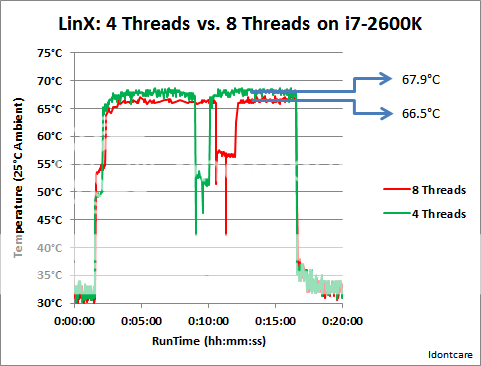
At my day to day settings? Sure. Though, as others have noted, 8 threads seems to cause contention and you end up with lower GFLOPs (and lower temps from what I've seen)
 
At my day to day settings? Sure. Though, as others have noted, 8 threads seems to cause contention and you end up with lower GFLOPs (and lower temps from what I've seen)

trust me your temps will not be lower and it will most def need a vcore bump to be stable.
 
I remoted in to my home system. After 3 runs, the peak is 63C. I'll post the results after the 10 runs. I can't hover over it though so it won't be immediately after it finishes, but the peaks will still be recorded. Only 101GFLOPS (again, due to contention, IDC had a post about it before)

edit: slight delay, restarted it without the "extreme stress" mode because raising the priority made RDP go a little nuts while it was running. I usually like to use that mode when testing to make sure I have enough voltage that the GFLOPs value doesn't vary. If you don't do that, other processes can cause a bit of variation in the reading as they try to use cycles.
 
Last edited:
trust me your temps will not be lower and it will most def need a vcore bump to be stable.


I added your request to the original post grkM3.

Still 65C peak.

edit: when aero is off, the screenshots were RDP and not console taken, just an fyi.
 
Last edited:
IDC, do you have any theory on why my IBT and P95 max temps are now so close to one another? In every other step of this process, I've always had large difference. Now it has reduced to 1C.
 
4.7 is really the reasonable max on this one. I can't really get 4.8 stable, even with up to 1.44V (btw, IBT hit 85C with that voltage). IBT was fine, as was P95, but cinebench crashed.

does increasing PLL ever help, or is it always decreasing it that helps?
 
Why did you stop at 4.7? IB can do 1.5v and be within spec.

What spec? Are you quoting max voltage from an intel data sheet or something else?

If it is the data sheet I seem to recall SB being quoted at 1.72v or similar although you would be mad to actually attempt to run at anthing near that.
 
With all do respect idk your data is wrong.testing with 1gb if ram and 4 threads will not load the core at all compared to 8 threads and 8gb ram.

I see an easy 5c higher temps going to 8 threads andmax mem

Posting 4 threads and min memory for stability is a joke

I can do that at 5500 mhz but no way is the system stable
 
Last edited:
4.7 is really the reasonable max on this one. I can't really get 4.8 stable, even with up to 1.44V (btw, IBT hit 85C with that voltage). IBT was fine, as was P95, but cinebench crashed.

does increasing PLL ever help, or is it always decreasing it that helps?

Your chip has a hunger for voltage it looks like. Nothing wrong with topping out at 4.7ghz if need be.

What voltages have you played around with other than vcore?

My 2550k needs a slight VTT(VCCIO) bump at 4.5ghz plus to stabalize it. From what I can tell it likes 1.077v's for some reason. I figure it's no big deal as stock pumps 1.058v's anyways. I'm just toying around with the PLL currently.

PLL voltage may or may not help your chip. You'd have to try it and see if it will stabalize your chip or not. Bumping it a little higher may help or lowering it down somewhat may help. YMMV compared to other chips.

Your chip looks to be at the point were your gonna have to work for it to get more out of it. To me it kinda makes sense that once a chip gets to a certain point it will require some more advanced voltage manipulation/tweaking.

What kinda BSOD's you get when pushing the chip for more? 0x101? 0x124?

Maybe the following threads can help you or others. They are geared towards SB's but IB's are similar I'm sure. They are at least interesting to view/read and supply some decent tips for dealing with instability 🙂

http://www.overclock.net/t/1120291/solving-fixing-bsod-124-on-sandybridge-read-op-first

If you wanna play around with the VTT/PLL then this link might help you figure out what to look for as far as your chips sweet spot if it has one. Read from post 45 on and it'll give you an idea of how to test it out.

http://www.overclock.net/t/1125843/2500k-overclocking-help/40

I used the following when playing around with VTT/PLL voltages for quick testing.

While looking around/reading posts over there I saw testing a certain way with prime more than once. Seems like it's a quick stability test that does seem to nuke a semi-unstable overclock pretty quickly! Might be worth playing around with also. I just shoot for 30 minutes plus but I'm also playing around online at the same time as stress testing is boring and I figure it gives it a better chance of failing at the same time if votages are marginal 🙂

Once you have P95 open, use these settings:

Custom, 1344 FFT - 1344FT, Available ram use all your ram but leave 1.5GB (1GB for windows and 500mb spare), and set cycles to 1 minutes. So it should look like this:

p95.png


So I have 4Gb ram total, im using 2.5 for this test If you have 8GB, use 6.5GB etc.

If you can pass 15-20 mins of this test, restart the torture test and use 1792 - 1792 for the FFT size. Again do this for 15-20 mins.

If you can do both these tests, you have a good indication of the cpu being stable, and you can either go ahead and do an overnight p95 blend test if you want full stability, or increase the CPU multiplier.

Link to thread with above post as it has some tips also.

http://www.overclock.net/t/1100100/info-intel-2500k-2600k-overclocking-tips

Not sure how or why but it works pretty good. It's not to be used as a decleration of stability after 20 minutes or so. Figure it's easier to do some quick testing this way than getting a bsod at 3hrs and 2min into a prime torture test. I did read that this testing method isn't fool proof but it does seem to work for my rig. If I can pass it it'll pass it multiple times. I guess some have issues with it passing one try then failing the next.

I updated my bios a day or two ago. Lost my profiles so my adventure somewhat begins again. Currently toying around at 4.6ghz but after some tweaking I only need 1.31v's it looks like. I always skip the odd numbers for some reason or another. Gonna bump up to 4.8ghz once I do some more testing on the current profile. This go around I'm just disabling the C3 and C6 states which seems to allow me to run a lower full load vcore. The single core load for some reason gives issues in offset voltage mode with my chip at 4.6ghz or higher. Nuking the C3,C6 only eliminated the too low single and dual core load vcore. Would have to bump the vcore up and xtra 0.020-0.030v's depending on the clock with them enabled.

Sorry this post turned out so long 🙂
 
What spec? Are you quoting max voltage from an intel data sheet or something else?

If it is the data sheet I seem to recall SB being quoted at 1.72v or similar although you would be mad to actually attempt to run at anthing near that.

Sandy bridge had the same 1.52v spec as ivy bridge
 
With all do respect idk your data is wrong.testing with 1gb if ram and 4 threads will not load the core at all compared to 8 threads and 8gb ram.

I see an easy 5c higher temps going to 8 threads andmax mem

Posting 4 threads and min memory for stability is a joke

I can do that at 5500 mhz but no way is the system stable

I have no idea what you are talking about it, but I think by now many of us are used to that being the case.

My tests are all with max-ram tested (~14.5GB), not min ram or 1gb or whatever you seem to be thinking. 8 threads versus 4 threads with max-mem, hands down 4 threads is hotter and faster.

You post no data, I post data. Stating "your data is wrong" is...amusing.
 
Max mem could be giving him higher temps because his cooling system is experiencing heatsoak.

My H100 reaches equilibrium disturbingly quickly in IBT I've noticed. In P95 it takes longer, but in IBT, I've always hit my peak within 5 minutes (usually within 2) with an H100.

That makes sense because there really isn't that much liquid to heat up so you'll stop using it as a cooling reservior pretty quickly and then be cooling based on the long term cooling capability. A bit copper block can hold more heat and so would take longer to peak. At least in my thought experiments it would.


Not sure where he's come up with the 4T/8T thing. HT doesn't really double your cores, and with perfectly optimized code, it will actually slow you down. I'm not saying linpack is perfectly optimized, but it is enough that HT is a detriment, not a benefit. Your proc spends more time idle if you do 8T vs 4T on a 4C/8T intel proc.
 
Last edited:
Trouble in modded cpu land! After 2 weeks or so, one of my cores is getting extremely hot under load.... (think mid 80's compared to mid 60's for the others).

Something has gone very, very wrong.
 
Heatspreader shifted?

I don't know. The lower two cores have stayed the same or dropped a few degrees. The topmost core has gone up 19C and the one below it has gone up 1-2C.

I am concerned that something flowed that shouldn't. Sadly, taking it apart means re-applying the IX though. I'll likely do it later this week.

The temps aren't dangerous, just.... well... I don't want them that high!
 
Back
Top