
VirtualLarry
No Lifer
Or the BIOS disables the device, because... reasons. (To help upsell the H370.)Unless the card does not actually have BT, or is defective.

Or the BIOS disables the device, because... reasons. (To help upsell the H370.)Unless the card does not actually have BT, or is defective.
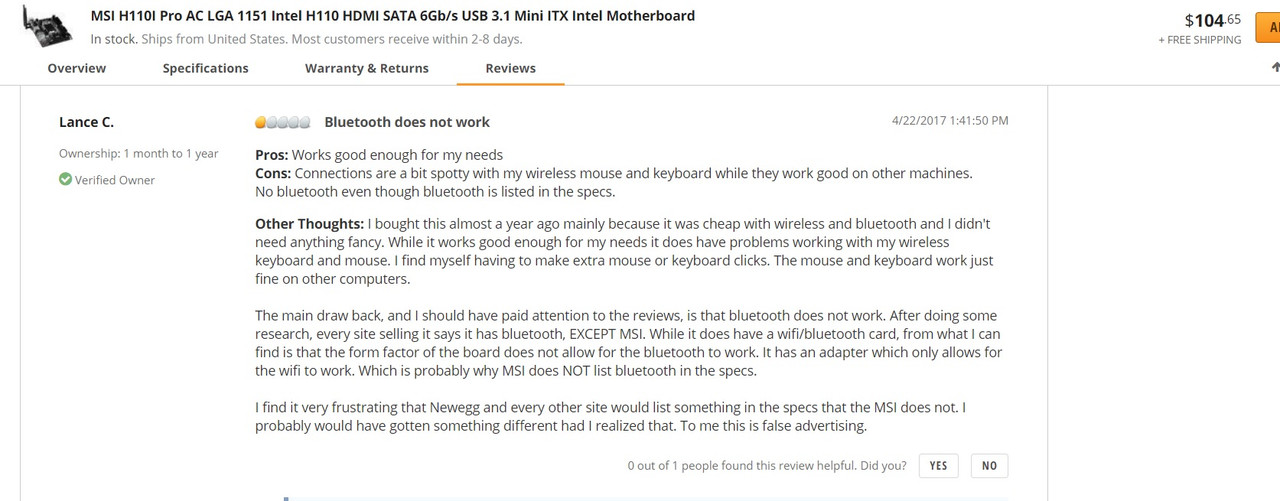
I bought this from Canadian Retailer. So naturally I fill follow Canadian website.I found thread after thread of people saying that that board does not have Bluetooth. Even if the Canada site says it does, the U.S. one says it doesn't. I've installed several Intel wifi/bluetooth internal cards into my PCs, and Windows 10 automatically installs the drivers, and they work without me doing anything.
So factor in the fact that the U.S. site just says it has wifi, all the threads where people are saying no Bluetooth, and that nothing in your device manager shows Bluetooth, I am fairly confident in saying that board does not have it (or it's a defective design). If you want to know without a doubt, remove the black plate that covers the card (where the antenna hooks to the back).
https://www.newegg.com/Product/Product.aspx?Item=N82E16813130929
https://www.google.com/search?rlz=1...64.psy-ab..0.6.1060...0i22i30k1.0.4eNHuzAKc2M
or it could be optional at extra cost.
MSI should really make it clear whether BT is on that board or not. The fact that MSi offers a BT driver for this board makes people wonder what is going on.
MSi Tech Support saying it suppose to have it. They think some people may have issue; but product line does not have the issue.It wouldn't be the first time a manufacturer used an altered/limited chip.
I bet if they pulled the card, it would be missing the Bluetooth portion (my last two Intel wifi/Bluetooth cards had two different cards in it, with a USB 2.0 cable that plugged into a motherboard USB internal header for Bluetooth to work).


I bought this from Canadian Retailer. So naturally I fill follow Canadian website.
MSi Tech Support saying it suppose to have it. They think some people may have issue; but product line does not have the issue.
First they thought it was my OS so I re install the OS. Then they thought it was motherboard they have replaced it.
3rd time they replace the WiFi card.
Now they are thinking I may not have it installed right. They wanted to see pics of the card. I email them.

I know of one way to make sure:
find someone with the z version where the BT works and try that card in the 110I. If it doesn't work then there is definitely something up with the board.
I agree, but I would want my board to function as advertised. 🙂A board that was already replaced, and the module replaced 3 times. Internet full of people who are upset and saying there is no Bluetooth on that motherboard.
At some point I'd just buy a $10 Bluetooth USB drive, and call it a day. But who knows, maybe the 4th time they replace the module will be the magic number. 😉
I agree, but I would want my board to function as advertised. 🙂
I agree swapping out the parts to gets old real quick and feels sotrta going no ware. Specially if one the party knows for sure there is nothing wrong with it. However I don't take substandard specially when the vendor company 100 % believe it suppose to work.That's where the confusion lays with this board. If you look at the detailed specs, it only says wifi.
It's just one image on the Canadian site says BT. It looks like they initially were going to offer BT on this board, but cancelled the plans at the last second, to force user to buy the H170 version. Does it suck they did that, and places like Newegg say it has BT? Yup, but at some point you realize you have to move on.
I mean changing out the board once, and changing out the module 3 times would get very old. I could understand if everyone else's board had working BT, and this was an isolated issue, but the fact is nobody's BT works on this board. Add in the fact that MSI's low-level tech support doesn't seem to have a clue either doesn't help. So spending all that time emailing them, mailing back parts, putting new parts in, is all of that worth $10? (the price of a USB BT thumb drive).


Yea 🙁if Mir96TA is correct in his analysis then that would mean that board could never have supported BT natively.


