
-
We’re currently investigating an issue related to the forum theme and styling that is impacting page layout and visual formatting. The problem has been identified, and we are actively working on a resolution. There is no impact to user data or functionality, this is strictly a front-end display issue. We’ll post an update once the fix has been deployed. Thanks for your patience while we get this sorted.
You are using an out of date browser. It may not display this or other websites correctly.
You should upgrade or use an alternative browser.
You should upgrade or use an alternative browser.
'Max' GPU for a 5 yo PC? i7-920 etc
Page 5 - Seeking answers? Join the AnandTech community: where nearly half-a-million members share solutions and discuss the latest tech.
soccerballtux
Lifer
You are missing the 2nd part of the equation - terrible Kepler performance in games released in the last 6+ months. 970/980 are Maxwell architecture and perform well in modern games. Not true at all for 760/770/780/780Ti/Titan.
http://forums.anandtech.com/showthread.php?t=2411327
or
post #12 here
http://forums.anandtech.com/showthread.php?t=2411570
NV has nothing worth buying below $330:
http://www.techspot.com/guides/912-best-graphics-cards-2014/
well anyways, thanks for making me feel better.
If amd would polish off their software interfaces and stop releasing buggy drivers and overdrives and catalysts I would have a much better experience. Nvidia used to be rough territory 10 years ago but these days everything feels rock solid...good product...they know what they're doing...I'll probably buy one next time...

RussianSensation
Elite Member
What do you mean by overdrives? Also, what bugs specifically did you have with your 7850 over the last 3 years? You made it sound like your AMD card doesn't even work in games, so please list the titles and bugs. You also made it sound as if NV cards are rock solid but you have been using an AMD card; so how would you know that NV cards have no bugs and glitches? They also do. In general, NV and AMD have the most issues in the latest games because frankly most AAA developers now rush broken games out to market and then spend 1-1.5 years patching them (FC4, Watch Dogs, Unity, BF4, etc.). The bugs in those games are not NV's or AMD's fault.
soccerballtux
Lifer
Their AMD Overdrive application is a piece of garbage.
It doesn't ever use P-state Pb0. I get around this by writing Pb0's voltage and multiplier to P-state Pb1.
It doesn't stick after suspend. So guess what, I use a non-AMD piece of software instead of AMD Overdrive to do the boost setting and everything.
7850-- the driver, it's just...less polished, you can tell. Things like having to reboot after installing, logging off/on isn't sufficient (there's no limitation in Windows 7 requiring you to reboot, and Nvidia doesn't), the Catalyst Control Center glitches when you're trying to configure things, I mean it gets everything done there's just no finesse or quality to it, it does not inspire confidence.
There's an OverDrive implementation in the Catalyst Control Center. I thought it might be better than the stock standalone Overdrive download. It's not. It does some ambiguous, undocumented stress test until your PC locks up and reboots (thanks for telling me that that's how far you were pushing it). It then tells you testing is finished and you can slide a little bar over, in my case from 3500 to 3900mhz. No indication of voltage or multiplier. No indication of Turbo behavior. So I left it off, but it was too late, for some reason Windows Aero effects desktop composition wouldn't run anymore; rebooting and they would pop up for a minute and then it would fall back to Windows Basic theme; and I had to uninstall the Radeon drivers and reinstall them before desktop composition would run again.
The standalone Turbo suite won't actually control the number of boost cores and core number of boosting, in spite of there being configuration for it. The checkmark box to configure it is greyed out and you can't deselect it. This is frustrating because there's no consistency to which core gets turbo'd when it gets turbo'd, it's just "well, I feel like turbo'ing this core right now"; so you can't script thread affinity for the important single threaded programs you want boosted (Firefox, Defrag software running a sort algorithm on 500k files). Or let's not even bother discussing an ideal world where you should be able to push all threads or threads of a certain load onto the boosted core(s). Well, at least they have application profiles you can use to set thread affinity for? That's great, but since you can't control the cores that are boosting setting the thread affinity doesn't matter at all. Set it to 0-3 and it'll waste time boosting 4-7 and running 0-3 at stock. About 30% of the time. Other times it will boost them no problem; this is independent of workload.
Back to the GPU, as for working in games, I wouldn't know I haven't played any since I sold my GTX670 for this lol. I'm speaking more of the frontend experience, there are a lot of just messy bugs that have less tolerance for now than I used to simply because I require perfection from my life and the devices I use and I'm not willing to compromise on it like I used to. NVidia's config software is a joy to use, it's pretty hard to screw up, I just can't stand their business practices. Whereas I feel like if I sneeze my AMD config is going to fall over. Which reminds me, before I reformatted I ran into an issue where uninstalling and reinstalling the video driver wasn't sufficient for getting Catalyst config to run (it wouldn't), which mattered because it decided 10% underscan was a good default setting for my HDMI monitor (why would you ever think it was????), and I couldn't change it. I needed to reformat anyways so I didn't care, but when that happened it was pretty full of "wtf, really AMD?".
It doesn't ever use P-state Pb0. I get around this by writing Pb0's voltage and multiplier to P-state Pb1.
It doesn't stick after suspend. So guess what, I use a non-AMD piece of software instead of AMD Overdrive to do the boost setting and everything.
7850-- the driver, it's just...less polished, you can tell. Things like having to reboot after installing, logging off/on isn't sufficient (there's no limitation in Windows 7 requiring you to reboot, and Nvidia doesn't), the Catalyst Control Center glitches when you're trying to configure things, I mean it gets everything done there's just no finesse or quality to it, it does not inspire confidence.
There's an OverDrive implementation in the Catalyst Control Center. I thought it might be better than the stock standalone Overdrive download. It's not. It does some ambiguous, undocumented stress test until your PC locks up and reboots (thanks for telling me that that's how far you were pushing it). It then tells you testing is finished and you can slide a little bar over, in my case from 3500 to 3900mhz. No indication of voltage or multiplier. No indication of Turbo behavior. So I left it off, but it was too late, for some reason Windows Aero effects desktop composition wouldn't run anymore; rebooting and they would pop up for a minute and then it would fall back to Windows Basic theme; and I had to uninstall the Radeon drivers and reinstall them before desktop composition would run again.
The standalone Turbo suite won't actually control the number of boost cores and core number of boosting, in spite of there being configuration for it. The checkmark box to configure it is greyed out and you can't deselect it. This is frustrating because there's no consistency to which core gets turbo'd when it gets turbo'd, it's just "well, I feel like turbo'ing this core right now"; so you can't script thread affinity for the important single threaded programs you want boosted (Firefox, Defrag software running a sort algorithm on 500k files). Or let's not even bother discussing an ideal world where you should be able to push all threads or threads of a certain load onto the boosted core(s). Well, at least they have application profiles you can use to set thread affinity for? That's great, but since you can't control the cores that are boosting setting the thread affinity doesn't matter at all. Set it to 0-3 and it'll waste time boosting 4-7 and running 0-3 at stock. About 30% of the time. Other times it will boost them no problem; this is independent of workload.
Back to the GPU, as for working in games, I wouldn't know I haven't played any since I sold my GTX670 for this lol. I'm speaking more of the frontend experience, there are a lot of just messy bugs that have less tolerance for now than I used to simply because I require perfection from my life and the devices I use and I'm not willing to compromise on it like I used to. NVidia's config software is a joy to use, it's pretty hard to screw up, I just can't stand their business practices. Whereas I feel like if I sneeze my AMD config is going to fall over. Which reminds me, before I reformatted I ran into an issue where uninstalling and reinstalling the video driver wasn't sufficient for getting Catalyst config to run (it wouldn't), which mattered because it decided 10% underscan was a good default setting for my HDMI monitor (why would you ever think it was????), and I couldn't change it. I needed to reformat anyways so I didn't care, but when that happened it was pretty full of "wtf, really AMD?".
Last edited:

Denithor
Diamond Member
Just to toss in a few comments on my experience. I went from a GTX 560 Ti in my HTPC to an XFX 7850 Black edition. On the 560 I had perfect audio/visual over HDMI output to my Onkyo receiver, never any issues at all.
With the 7850, nothing but problems from the very beginning. Sometimes upon boot-up there would be no audio and the audio device wouldn't even show up in device manager.
Other times it would work perfectly, until the TV was turned off. Then the sound would "blink" once and continue fine. Until the TV was turned back on, at which time it would blink out and not come back until the PC was rebooted. At which point it might or might not work. Video was sometimes a problem too, it would randomly switch off my TV even in the middle of active mousing, like it was going into standby or power saver mode or something. Wouldn't come back until I reset PC using the front panel button (no way to see Windows to reboot correctly).
After about a month of that, sold the 7850 and went to a GTX 650 Ti Boost and couldn't be happier. Everything just worked again.
With the 7850, nothing but problems from the very beginning. Sometimes upon boot-up there would be no audio and the audio device wouldn't even show up in device manager.
Other times it would work perfectly, until the TV was turned off. Then the sound would "blink" once and continue fine. Until the TV was turned back on, at which time it would blink out and not come back until the PC was rebooted. At which point it might or might not work. Video was sometimes a problem too, it would randomly switch off my TV even in the middle of active mousing, like it was going into standby or power saver mode or something. Wouldn't come back until I reset PC using the front panel button (no way to see Windows to reboot correctly).
After about a month of that, sold the 7850 and went to a GTX 650 Ti Boost and couldn't be happier. Everything just worked again.
I'm inclined to stick with Nvidia these days for similar reasons. Nvidia drivers do have a few bugs and issues, but I'm familiar with them and know how to work around them, having built up a knowledge base on them over the years. I have an AMD 6550 in my laptop that runs on the standard AMD mobility drivers. It has glitches with lots of old games (and is too slow for modern ones), way more than my desktop Nvidia cards, and I often switch to the laptop's Intel IGP which runs them fine. If this is any indication of AMD's desktop drivers, it's not a good sign. On the other hand, the last time I used a desktop AMD/ATI card was way back with the X1900, which had great drivers and better than the Nvidia ones at the time. It sounds like they have regressed since then.
Old games are usually a much bigger problem than new releases. If a new AAA title comes out with driver bugs, both companies will go out of their way to fix them quickly. However, an obscure old game never gets fixed.
Old games are usually a much bigger problem than new releases. If a new AAA title comes out with driver bugs, both companies will go out of their way to fix them quickly. However, an obscure old game never gets fixed.
soccerballtux
Lifer
Just to toss in a few comments on my experience. I went from a GTX 560 Ti in my HTPC to an XFX 7850 Black edition. On the 560 I had perfect audio/visual over HDMI output to my Onkyo receiver, never any issues at all.
With the 7850, nothing but problems from the very beginning. Sometimes upon boot-up there would be no audio and the audio device wouldn't even show up in device manager.
Other times it would work perfectly, until the TV was turned off. Then the sound would "blink" once and continue fine. Until the TV was turned back on, at which time it would blink out and not come back until the PC was rebooted. At which point it might or might not work. Video was sometimes a problem too, it would randomly switch off my TV even in the middle of active mousing, like it was going into standby or power saver mode or something. Wouldn't come back until I reset PC using the front panel button (no way to see Windows to reboot correctly).
After about a month of that, sold the 7850 and went to a GTX 650 Ti Boost and couldn't be happier. Everything just worked again.
yeah, that's the sort of stuff I'm talking about, things kinda work here and there, but break really easily
update for the thread/OP......
So i got the x5670 in earlier this week.
I already updated my bios, Gigabyte actually had a Bios updater that for windows. I am pretty sure it didnt exist when the board came out. Anyhow, not sure if i needed to but i did it anyway.
EX58-UD3R http://www.gigabyte.com/products/product-page.aspx?pid=3103#ov
Dropped in the x5670 yesterday.
I left all the volts at stock and started overclocking it. I sent the clk up to give me 4 ghz and left everything like it was....and..............
no post.
It was my QPI, I just set the multipliers to keep everything close to stock other than the CPU. It wasnt really that high and might have needed a bump in voltage but i can sort all that out later.
But after that, posted and booted fine. I was at 4ghz. 167x 24 with ease. The vcore was something like 1.24 (the setting in the bios was normal). But it was locked at 4ghz and i would rather it clock down when not being used. I guess the gigabyte board will disable all that power saving stuff if you leave it on "auto" settings.
I went back in the bios and turned all the power saving features in the CPU sections on (EIST, C1E, etc). rebooted and ran some stress test. But noticed the CPU was boosting to 25x multiplier ~4.2ghz. Started stressing and after awhile it gave me a strange error running intelburn. I had ran it several times already so i know i was pretty stable. Anyhow, i went ahead and bumped up the vcore to like 1.28.
I have been running hard all day with all the power saving features on. It downclocks from multi x12 (2000mhz) and rams up to 25x (~4200mhz(single thread stuff)) with no issues whatsoever. Temps are good with the LQ320, recording from HWmonitor as i play around gaming and stress testing.
CPU 28-40c (low to high)
cores 27-58c (low to high)
oh, and this is with the motherboard auto fan controls on. Fan speeds recorded low 1380RPM to high 1762 RPM.
So the PC is running very cool and quiet.
Anyway, i just wanted to give an update for the OP and anyone who might have a first generation i7 on the x58 platform.

if you guys can see these:
idle
http://valid.canardpc.com/aec5tm
and SuperPI
http://valid.canardpc.com/r1rape
I got the pics if you cant. I am a noob to flashing my junk on the forums, lol.....
But, lets be real-
I am sure there is plenty more i can get out of the chip but i wanted to find a very mild daily setting with all the power savings enabled. Once i did, i thought i might give this thread an update, it is very relevant to my upgrade.
I will take the chip further of course but I love finding the sweet spot and running my chips there. I think the sweet spot on this chip will actually be higher than 4ghz but to give you guys an idea of what you can expect by upgrading to a westmereEP this review has the 990x vs the 3770k at stock and 4ghz
http://www.tweaktown.com/reviews/4673/intel_core_i7_3770k_lga_1155_ivy_bridge_cpu_review/index9.html
My cinebech 11.5 score was almost exactly the same as the 4ghz 990x. It was 10.22. This puts it in line with a stock 3930k (which runs mostly @ its turbo 3.8ghz)
There arent many benchmarks out there to compare a 990x OC/westmereEP OC to current Haswell chips. But you can see where it stands against ivy. The benchmarks clearly favor the OC 990x over the 3770k. Heck, even the power consumption on the 4ghz 990x, it is really really close to the ivy six core i7 3930/3960x. It is pretty amassing considering.
From there you can approximate that a 4ghz x56XX would hold up pretty well against 4c(/8t) haswell chips, especially in gaming and general things.
I mean, this is a great route for anyone with an x58 board. Just about any x56XX chip should make it to 4ghz and this makes for a really potent setup......even by today's standards.
But look at this
I left all my power savings on and am not even pushing this chip. not at all. Its running 4 to 4.2ghz turbo with ease, it is truly a walk in the park.
This should be a breeze for most westmereEP chips. Many will go a lot further.
Just thought i would update this thread and if anyone would like i can again once i start really pushing for higher clocks. I still got a lot to do and a lot to figure out. Like how much QPI boost performance and such. It is absolutely a pleasure so far though.......
So i got the x5670 in earlier this week.
I already updated my bios, Gigabyte actually had a Bios updater that for windows. I am pretty sure it didnt exist when the board came out. Anyhow, not sure if i needed to but i did it anyway.
EX58-UD3R http://www.gigabyte.com/products/product-page.aspx?pid=3103#ov
Dropped in the x5670 yesterday.
I left all the volts at stock and started overclocking it. I sent the clk up to give me 4 ghz and left everything like it was....and..............
no post.
It was my QPI, I just set the multipliers to keep everything close to stock other than the CPU. It wasnt really that high and might have needed a bump in voltage but i can sort all that out later.
But after that, posted and booted fine. I was at 4ghz. 167x 24 with ease. The vcore was something like 1.24 (the setting in the bios was normal). But it was locked at 4ghz and i would rather it clock down when not being used. I guess the gigabyte board will disable all that power saving stuff if you leave it on "auto" settings.
I went back in the bios and turned all the power saving features in the CPU sections on (EIST, C1E, etc). rebooted and ran some stress test. But noticed the CPU was boosting to 25x multiplier ~4.2ghz. Started stressing and after awhile it gave me a strange error running intelburn. I had ran it several times already so i know i was pretty stable. Anyhow, i went ahead and bumped up the vcore to like 1.28.
I have been running hard all day with all the power saving features on. It downclocks from multi x12 (2000mhz) and rams up to 25x (~4200mhz(single thread stuff)) with no issues whatsoever. Temps are good with the LQ320, recording from HWmonitor as i play around gaming and stress testing.
CPU 28-40c (low to high)
cores 27-58c (low to high)
oh, and this is with the motherboard auto fan controls on. Fan speeds recorded low 1380RPM to high 1762 RPM.
So the PC is running very cool and quiet.
Anyway, i just wanted to give an update for the OP and anyone who might have a first generation i7 on the x58 platform.
if you guys can see these:
idle
http://valid.canardpc.com/aec5tm
and SuperPI
http://valid.canardpc.com/r1rape
I got the pics if you cant. I am a noob to flashing my junk on the forums, lol.....
But, lets be real-
I am sure there is plenty more i can get out of the chip but i wanted to find a very mild daily setting with all the power savings enabled. Once i did, i thought i might give this thread an update, it is very relevant to my upgrade.
I will take the chip further of course but I love finding the sweet spot and running my chips there. I think the sweet spot on this chip will actually be higher than 4ghz but to give you guys an idea of what you can expect by upgrading to a westmereEP this review has the 990x vs the 3770k at stock and 4ghz
http://www.tweaktown.com/reviews/4673/intel_core_i7_3770k_lga_1155_ivy_bridge_cpu_review/index9.html
My cinebech 11.5 score was almost exactly the same as the 4ghz 990x. It was 10.22. This puts it in line with a stock 3930k (which runs mostly @ its turbo 3.8ghz)
There arent many benchmarks out there to compare a 990x OC/westmereEP OC to current Haswell chips. But you can see where it stands against ivy. The benchmarks clearly favor the OC 990x over the 3770k. Heck, even the power consumption on the 4ghz 990x, it is really really close to the ivy six core i7 3930/3960x. It is pretty amassing considering.
From there you can approximate that a 4ghz x56XX would hold up pretty well against 4c(/8t) haswell chips, especially in gaming and general things.
I mean, this is a great route for anyone with an x58 board. Just about any x56XX chip should make it to 4ghz and this makes for a really potent setup......even by today's standards.
But look at this
I left all my power savings on and am not even pushing this chip. not at all. Its running 4 to 4.2ghz turbo with ease, it is truly a walk in the park.
This should be a breeze for most westmereEP chips. Many will go a lot further.
Just thought i would update this thread and if anyone would like i can again once i start really pushing for higher clocks. I still got a lot to do and a lot to figure out. Like how much QPI boost performance and such. It is absolutely a pleasure so far though.......
Last edited:
RussianSensation
Elite Member
Ocre, congrats on the Xeon upgrade! It's an amazing stop gap solution for X58.
@ soccerballtux,
I never had problems moving the slider for Underscan 10% to correct the HDMI scaling. Had to do it once and restart and the system recognizes the new setting forever. I only use after-market solutions to overclock my GPU (MSI Afterburner) and Mobo bios for CPU overclocking. All Intel, AMD, NV built-in overclocking utilities have been crap. Why bother using them in the first place when there are dedicated tools? Also, to stress test your CPU and GPU, there are plenty of great programs such as Prime95, OCCT, LinX, Unigine Valley/Heaven, etc.
In some cases when I upgrade to an NV card, I have to adjust colours but I don't start calling NV drivers inferior because they have a different preference for colour palette. Just takes 10 min and ready to go for 2-3 years of use.
Also, in recent times an unstable overclock for AMD now causes a driver reboot/error. In the past you'd get artifacts. I bet a lot of people who overclocked their AMD cards to unstable levels get AMD deiver crashes and reboots but don't know why.
@ soccerballtux,
I never had problems moving the slider for Underscan 10% to correct the HDMI scaling. Had to do it once and restart and the system recognizes the new setting forever. I only use after-market solutions to overclock my GPU (MSI Afterburner) and Mobo bios for CPU overclocking. All Intel, AMD, NV built-in overclocking utilities have been crap. Why bother using them in the first place when there are dedicated tools? Also, to stress test your CPU and GPU, there are plenty of great programs such as Prime95, OCCT, LinX, Unigine Valley/Heaven, etc.
In some cases when I upgrade to an NV card, I have to adjust colours but I don't start calling NV drivers inferior because they have a different preference for colour palette. Just takes 10 min and ready to go for 2-3 years of use.
Also, in recent times an unstable overclock for AMD now causes a driver reboot/error. In the past you'd get artifacts. I bet a lot of people who overclocked their AMD cards to unstable levels get AMD deiver crashes and reboots but don't know why.
soccerballtux
Lifer
"why bother using them..." it's more about the sentiment that they just can't produce software worth downloading
RussianSensation
Elite Member
"why bother using them..." it's more about the sentiment that they just can't produce software worth downloading
In that case neither can NV. You can't overclock and stability test their cards in their Driver Control panel either.
okay, here is updated CPUz. I did bump up the QPI/VTT up a tad to 1.25v (still pretty low by overclocking standards), its really necessary when pushing the blck up. I didnt want to push my luck, getting blck at 167 without touching the QPI/VTT volts was good enough for me.
So bumped the QPI/VTT to 1.25 and then the blck (cpu core/base speed) to 175
Other than that, all other voltages remain the same.
Idle:
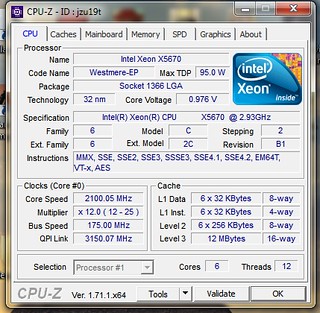
under single thread load:

http://valid.canardpc.com/wb4f59
Cinebench all cores/thread load:

http://valid.canardpc.com/e1s4by
So for the OP and anyone with an older x58 motherboard, you can get a substantial upgrade a westmereEP. Most everyone will clock very very well. This is just some random chip i ordered off Ebay for $110.
As you can see, +4ghz is not a task. You can reach these speeds with all over the power saving features on. My chip idles at less than 1 volt and ramps up to 4.4ghz turbo with 1.28 volts....
I guess, what i am wanting to get across is that you dont have to push the westmereEPs hard at all. Picking one of these up can take your system to ivy/haswell levels and with very little sacrifice. For people with the first generation i7 and an x58 platform, this is an amassing route. Unless you have a specific need for AVX2, this is the way to go.
Overclocking does vary between chips but a lot of these xeons are grade a silicon. The x5670, 6 cores that turbo up to 3.33mhz with tdp of merely 95watts. Look at he specs and see the x5670 is a chip from the top binnings. But i am willing to bet that 99.9% of all x5660s and up will reach 4ghz and above with all the power savings features turned on.
This thread had a lot to do with my decision to upgrade to a westmereEP, just for comparisons at this mild overclock,
SuperPI 1M = 9.454
Cinebench 11.5 = 10.71
Cinebench 10 = 33325 / 6321 (single)

So bumped the QPI/VTT to 1.25 and then the blck (cpu core/base speed) to 175
Other than that, all other voltages remain the same.
Idle:
under single thread load:
http://valid.canardpc.com/wb4f59
Cinebench all cores/thread load:
http://valid.canardpc.com/e1s4by
So for the OP and anyone with an older x58 motherboard, you can get a substantial upgrade a westmereEP. Most everyone will clock very very well. This is just some random chip i ordered off Ebay for $110.
As you can see, +4ghz is not a task. You can reach these speeds with all over the power saving features on. My chip idles at less than 1 volt and ramps up to 4.4ghz turbo with 1.28 volts....
I guess, what i am wanting to get across is that you dont have to push the westmereEPs hard at all. Picking one of these up can take your system to ivy/haswell levels and with very little sacrifice. For people with the first generation i7 and an x58 platform, this is an amassing route. Unless you have a specific need for AVX2, this is the way to go.
Overclocking does vary between chips but a lot of these xeons are grade a silicon. The x5670, 6 cores that turbo up to 3.33mhz with tdp of merely 95watts. Look at he specs and see the x5670 is a chip from the top binnings. But i am willing to bet that 99.9% of all x5660s and up will reach 4ghz and above with all the power savings features turned on.
This thread had a lot to do with my decision to upgrade to a westmereEP, just for comparisons at this mild overclock,
SuperPI 1M = 9.454
Cinebench 11.5 = 10.71
Cinebench 10 = 33325 / 6321 (single)
Last edited:
CropDuster
Senior member
I know my 5650 will run 4.2Ghz, which for $70 on ebay probably can't be beat in bang for buck ratio.
RussianSensation
Elite Member
^ It's an incredible value especially if he sells the i7 920 for $50-60, making it a dirt cheap beastly upgrade. That CPU used to be $1400 US in 2010:
http://www.cpu-world.com/CPUs/Xeon/Intel-Xeon X5670 - AT80614005130AA (BX80614X5670).html
http://www.cpu-world.com/CPUs/Xeon/Intel-Xeon X5670 - AT80614005130AA (BX80614X5670).html
I know my 5650 will run 4.2Ghz, which for $70 on ebay probably can't be beat in bang for buck ratio.
whats the volts and temps like. Are you having to push it? Isnt the multiplier real low, like 20x? those chips are a lot cheaper now even but i recomend at least a 5860 for the higher multiplier so you sont have to push the ucore/memory so hard
All i am saying is:
the OP should absolutely pick one up!!!!!!
i am gonna try 4.5 turbo with power savings on sometime tonight. I think its got it in her
CropDuster
Senior member
Can't remember my 4.2 specs, but at my 24/7 of 3.8Ghz it's 1.208 volts at load and .986 at idle. Multi goes to 22x on the 5650. I like it at 3.8 just for peace of mind and it does what I want it to do without being a space heater.😀whats the volts and temps like. Are you having to push it? Isnt the multiplier real low, like 20x? those chips are a lot cheaper now even but i recomend at least a 5860 for the higher multiplier so you sont have to push the ucore/memory so hard
All i am saying is:
the OP should absolutely pick one up!!!!!!
i am gonna try 4.5 turbo with power savings on sometime tonight. I think its got it in her
update for the thread/OP......
So i got the x5670 in earlier this week.
I already updated my bios, Gigabyte actually had a Bios updater that for windows. I am pretty sure it didnt exist when the board came out. Anyhow, not sure if i needed to but i did it anyway.
EX58-UD3R http://www.gigabyte.com/products/product-page.aspx?pid=3103#ov
Dropped in the x5670 yesterday.
I left all the volts at stock and started overclocking it. I sent the clk up to give me 4 ghz and left everything like it was....and..............
no post.
It was my QPI, I just set the multipliers to keep everything close to stock other than the CPU. It wasnt really that high and might have needed a bump in voltage but i can sort all that out later.
But after that, posted and booted fine. I was at 4ghz. 167x 24 with ease. The vcore was something like 1.24 (the setting in the bios was normal). But it was locked at 4ghz and i would rather it clock down when not being used. I guess the gigabyte board will disable all that power saving stuff if you leave it on "auto" settings.
I went back in the bios and turned all the power saving features in the CPU sections on (EIST, C1E, etc). rebooted and ran some stress test. But noticed the CPU was boosting to 25x multiplier ~4.2ghz. Started stressing and after awhile it gave me a strange error running intelburn. I had ran it several times already so i know i was pretty stable. Anyhow, i went ahead and bumped up the vcore to like 1.28.
I have been running hard all day with all the power saving features on. It downclocks from multi x12 (2000mhz) and rams up to 25x (~4200mhz(single thread stuff)) with no issues whatsoever. Temps are good with the LQ320, recording from HWmonitor as i play around gaming and stress testing.
CPU 28-40c (low to high)
cores 27-58c (low to high)
oh, and this is with the motherboard auto fan controls on. Fan speeds recorded low 1380RPM to high 1762 RPM.
So the PC is running very cool and quiet.
Anyway, i just wanted to give an update for the OP and anyone who might have a first generation i7 on the x58 platform.
if you guys can see these:
idle
http://valid.canardpc.com/aec5tm
and SuperPI
http://valid.canardpc.com/r1rape
I got the pics if you cant. I am a noob to flashing my junk on the forums, lol.....
But, lets be real-
I am sure there is plenty more i can get out of the chip but i wanted to find a very mild daily setting with all the power savings enabled. Once i did, i thought i might give this thread an update, it is very relevant to my upgrade.
I will take the chip further of course but I love finding the sweet spot and running my chips there. I think the sweet spot on this chip will actually be higher than 4ghz but to give you guys an idea of what you can expect by upgrading to a westmereEP this review has the 990x vs the 3770k at stock and 4ghz
http://www.tweaktown.com/reviews/4673/intel_core_i7_3770k_lga_1155_ivy_bridge_cpu_review/index9.html
My cinebech 11.5 score was almost exactly the same as the 4ghz 990x. It was 10.22. This puts it in line with a stock 3930k (which runs mostly @ its turbo 3.8ghz)
There arent many benchmarks out there to compare a 990x OC/westmereEP OC to current Haswell chips. But you can see where it stands against ivy. The benchmarks clearly favor the OC 990x over the 3770k. Heck, even the power consumption on the 4ghz 990x, it is really really close to the ivy six core i7 3930/3960x. It is pretty amassing considering.
From there you can approximate that a 4ghz x56XX would hold up pretty well against 4c(/8t) haswell chips, especially in gaming and general things.
I mean, this is a great route for anyone with an x58 board. Just about any x56XX chip should make it to 4ghz and this makes for a really potent setup......even by today's standards.
But look at this
I left all my power savings on and am not even pushing this chip. not at all. Its running 4 to 4.2ghz turbo with ease, it is truly a walk in the park.
This should be a breeze for most westmereEP chips. Many will go a lot further.
Just thought i would update this thread and if anyone would like i can again once i start really pushing for higher clocks. I still got a lot to do and a lot to figure out. Like how much QPI boost performance and such. It is absolutely a pleasure so far though.......
Thank you for the update. I'm looking into xeons again now. Will snatch one as soon as my 920 is sold. My dilemma now is "5650/5660/5670" 😛
Will keep the thread posted.

SlickR12345
Senior member
That CPU is still pretty powerful, on the level of I5 2300 and if you overclock it on the levels of I5 3470.
So you can go as high as 290x or even GTX 980. At 1080p resolutions it won't be a bottleneck at all.
So you can go as high as 290x or even GTX 980. At 1080p resolutions it won't be a bottleneck at all.
TigerMonsoonDragon
Senior member
r9 290x

Thank you for the update. I'm looking into xeons again now. Will snatch one as soon as my 920 is sold. My dilemma now is "5650/5660/5670" 😛
Will keep the thread posted.
My system upgrade ended up being one of the most substantial upgrades i have ever had. Its crazy it is such an old CPU. I recomned anyone with a capable x58 mother board to go this route. Compared to my 920, overclocked vs overclocked, this westmere is +200% as powerful. This is no joke. I have been looking at reviews of the 4770k and 4790k, running the same benches and it simply blows my mind how powerful this system has become. I am not meaning this in a bragging way. Its just, I never seen a 100$ chip upgrade have anything near this kind of potential. Almost all westmeres can overclock 4ghz+. And the performance is really surprising. Its really hard to beat the performance ..... literally
I got a gtx 970 to pair up with it. Now i am running watchdogs on ultra with DSR and its like a new experience. Its really smooth and feels totally different. i also bought Dragon Age inquisition. I am playing it on ultra settings with DSR as well. Its not the 4k DSR but double the resolution downscaled. I only have medium post processing AA though, havent tried MSAA. Actually, I dont know if its DSR or the post AA is that good but i havent noticed any jaggies at all. It looks amassing. Dragon Age DSR on ultra is beautiful. I really didnt expect to be playing games at these settings. And the crazy part is, DA is locked at 60fps during gameplay.
This is one of the largest upgrade experiences i have ever had. Everything i do is faster and i never realized i was being held back so much. I know the GPU and the CPU together make a huge difference. But these 6 cores 12 threads at 4.2-4.4ghz is literally double my overclocked 920.
As for which xeon to get. I recommend the ones with the higher mulitpliers. x5670 is what i got. The reason is that you dont have to push your motherboard very hard to get over 4ghz overclocks. See, you got to remember, these boards are like 6yrs old. They will not last forever and the harder you push them......its only a matter of time.
Most of them will do well over 4ghz. I was stabilizing 4.8ghz when i decided that why bother pushing it so hard. Tight now my PC runs just like it was at stock. This is even with a +40% overclock. I have dynamic voltage on and speedstep. All my power saving states as well as turbo. Anything up to two cores, my CPU is at 4.4ghz (1.3v). If its loaded past 2 cores, like all cores it runs at 4.2ghz (1.28v). It locks in there as long as its loaded. When i am just browsing it down clocks to 2.1ghz (.992v). My CPU fan is on auto and its whisper quiet.
I am loving it
Edit,
I overclocked the gtx970 for dragon age. I just set MSI afterburner to +220 and its boost is locked 1460-1475. Also i put the mem +75. (3540mhz or something like that). I just pushed them up when i enabled DSR. Its crazy cause i thought the core speed was surely too high especially not adding voltage or anything. So far i have played 4 hrs rock solid at that overclock perhaps it will go even further. Thats pretty crazy to me. The GPU only got to 72 degrees but it s a cool 70f in my house now. 1475mhz right off the bat....its kinda impressive. I have the completely stock nvidia reference gtx970 with the titan cooler. I know the cooler is pretty capable but i figured the vendor overclock bios is what was allowing everyone so high clocks on these cards. I actually thought the stock bios would hold it back. I am sure it will go even higher. Its not artifacting, skipping, or throttling at 1475.
Anyway, just thought i would add that in cause the dsr is very demanding in DA inquisition. Tonight it dropped off 59mhz and into the high 40s to low 50s. Guess it depends on the area in the game. Also, the rendered cut scenes are locked at 30fps for some reason too.
Last edited:

Blue_Max
Diamond Member
My dilemma now is "5650/5660/5670" 😛
I'm going to try using ebay again after so many years and making the same decision now. 😀
I can get the x5670 for almost the same price as the x5650 so I have to ask the resident experts:
Is there something about either that makes it a more stable overclocker than the other?
The x5650 is a "Top Rated Seller" with way more feedback (99.3% + 830 ratings)... would you consider that a safer purchase than [100% +, 40 ratings, USA]?
Thanks! 😳
I'm going to try using ebay again after so many years and making the same decision now. 😀
I can get the x5670 for almost the same price as the x5650 so I have to ask the resident experts:
Is there something about either that makes it a more stable overclocker than the other?
From the post just before yours:
As for which xeon to get. I recommend the ones with the higher mulitpliers. x5670 is what i got. The reason is that you dont have to push your motherboard very hard to get over 4ghz overclocks. See, you got to remember, these boards are like 6yrs old. They will not last forever and the harder you push them......its only a matter of time.
I don't anymore buy from sellers with less than 96% and 2000 feedback. I may make an exception but will not go for someone with under 800. Maybe it's just me thought...The x5650 is a "Top Rated Seller" with way more feedback (99.3% + 830 ratings)... would you consider that a safer purchase than [100% +, 40 ratings, USA]?
Thanks! 😳

crashtech
Lifer
From my experience, feedback numbers in the thousands mean the seller may not be able to take time to resolve your problem if you have one, and a feedback percentage of 96% indicates the seller has been having some significant problems, imo. eBay used to be about casual sellers putting some items up for sale now and again, but is has turned into a conglomeration of online stores, which is not a change for the better. Tbh, the best experiences come from a low volume seller with as close to 100% as possible.I don't anymore buy from sellers with less than 96% and 2000 feedback. I may make an exception but will not go for someone with under 800. Maybe it's just me thought...
I have bought stuff from sellers with 0 feedback in the past, although they were very rare items I couldn't easily get otherwise. I would be fine with either of those two sellers. The ebay and Paypal policies are all in favor of the buyer, and you can get your money back if the item is not as described.
TRENDING THREADS
-
 Discussion Zen 5 Speculation (EPYC Turin and Strix Point/Granite Ridge - Ryzen 9000)
- Started by DisEnchantment
- Replies: 25K
-
Discussion Intel Meteor, Arrow, Lunar & Panther Lakes + WCL Discussion Threads
- Started by Tigerick
- Replies: 25K
-

-

-
