• We’re currently investigating an issue related to the forum theme and styling that is impacting page layout and visual formatting. The problem has been identified, and we are actively working on a resolution. There is no impact to user data or functionality, this is strictly a front-end display issue. We’ll post an update once the fix has been deployed. Thanks for your patience while we get this sorted.

Low 4K Read on Samsung 840 Pro 256GB SSD

vindizzy

Junior Member
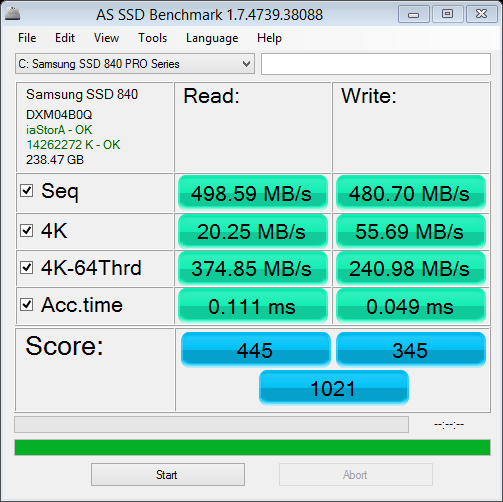
Can't figure out why 4k read is so low (everything else looks OK) - any help from experts is appreciated! Same results on multiple tests.

Read through quite a few forums but couldn't see any direct solution so thought to post here.

AS SSD Benchmark Result:
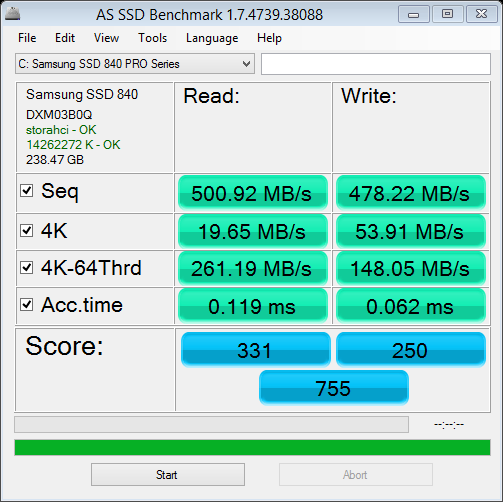
Samsung_SSD_840_Pro.png


Laptop Specs:

Laptop_Spec.jpg


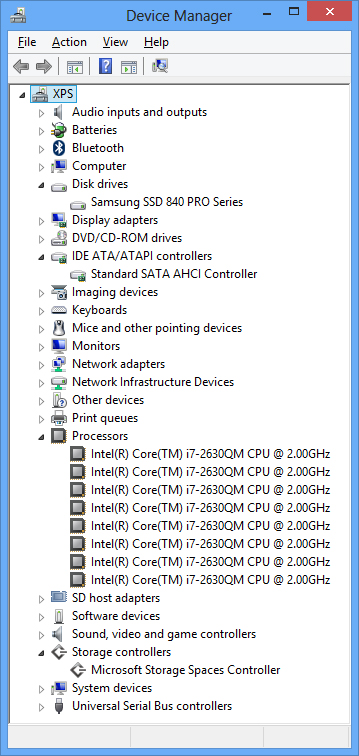
Device Manager Screenshot:

Device_Manager.jpg
 
It isn't low, it is exactly like it should be. 20MB/s of random reads is about the performance you get when only one interleaving channel can be utilised. Only with multiple queued I/Os can the SSD utilise multiple interleaving channels and increase performance accordingly.
 
Here is my run on the same drive...

InitialSSDASBench_zps13ab3e2c.jpg


...you are correct that your reads are slow. Did you optimize with the Samsung Magician utility?
 
double check to see you have intel sata drivers installed. storachi = MS default sata driver; iaStorA = intel's drivers.
 
Can't figure out why 4k read is so low (everything else looks OK) - any help from experts is appreciated! Same results on multiple tests.
Open the "Power Settings" and change them from "Balanced (recommended)" to "High Performance".
This will enhance the 4K reading speed a lot.
 
Fernando 1, this only applies to benchmarking. In real life scenarios, the processor would not be idling when heavy I/O needs to be done. Benchmarks only put load on the storage device, but real applications utilise both storage and CPU (the data read must be processed anyhow). This means that in real life scenario's, you will achieve close to the maximum IOps performance without having to resort to disabling all the power saving techniques.

So setting your power profile to high performance only increases power and increases benchmarks in some cases, it does not actually improve performance in real scenarios.
 
Fernando 1, this only applies to benchmarking.
I know that, but when a user compairs his benchmark results with those of other users with the same SSD and SATA Controller, he should keep in mind, that others may have set the Power Option to "High Performance".
 
Well that may not be enough. If you want proper benchmarking, you should apply CPU load during the benchmark. This can be done with any CPU stress utility. The stressing of the CPU will cause power saving like deep sleep to be inactive and not hurt the performance as much.

In most cases, only laptop and other mobile platforms have aggressive power saving features that hurt 4K random I/O performance. The CPU continues to go to sleep but must 'wake up' which costs time and thus increases latency and lowers the 4K random I/O scores.

But again, this should be very theoretical, since in real world scenarios the application should cause the CPU load instead. Benchmarks are artificial in the sense that they only put stress on the storage device, but virtually no load on the CPU itself. This is not very common.
 
In fact, here is no Problem present. If you see, it is a Samsung 830 256GB. If you compare the AS SSD Benchmarks to some reviews of the SSD, you will see that the 4k read score is mostly around 20 MB/s. And most reviewers always disable every power saving feature.
Only thing I did not get is, why the driver is displayed as "iastorahci". In most cases it is the "iaStorA". But maybe it was just another driver shipped with the Dell device. So maybe you want to check, if there is an update available.
 
Change your ahci driver to the Intel one and re-run your benchmark.

Thanks! Going to try this now. Originally I had Windows 7 and I upgraded to Windows 8 and not sure if I installed all the Dell recommended driver that were there previously.
 
Couple of quick highlights.

1. It's a laptop which will never be as fast as a PC with it's larger architecture.

2. Additional power savings implemented at the bios level that cannot be completely overcome with software settings.

3. Compare to similar hardware to gain better perspectives on what is considered to be "normal".

4. Drivers can and do make a difference along with the bloat/background activity involved during benchmarks. Total available bandwidth can be viewed as a large pie.. and splitting off tiny slivers of it while trying to determine how big it is will be deceiving at best. Even adding MS updates will often slow a system down.

In a nutshell.. those marks are pretty decent for a laptop and you just need to remember that it's intended use is for mobile environments.. not benchmarking.. so compromises have been made to that end. From that perspective.. there's not much you can do about it without making even more compromises to get higher benchmarks. It's always going to be a balancing act.. but disabling speedstep and C states along with the previously mentioned power option settings will raise the levels of performance if you so desire.
 
Last edited:
Updated drivers to Intel SATA AHCI Controller and even though the overall score got bit better, the 4K read is pretty much the same. Not sure if this is the best it can get as others have mentioned here (thanks everyone for you feedback!).

Updated Score:

Samsung_SSD_840_Pro.png


Updated Device Manager Screenshot:

Device_Manager.jpg
 
if you hadn't read the last line in my above post.. it will likely help a bit more as well. Totally reversible and just for the sake of "seeing what's possible" when removing variables, is all.

I'd do it simply because that's how I test all systems with SSD upgrades.. but it look's damned good to me though.
 
if you hadn't read the last line in my above post.. it will likely help a bit more as well. Totally reversible and just for the sake of "seeing what's possible" when removing variables, is all.

I'd do it simply because that's how I test all systems with SSD upgrades.. but it look's damned good to me though.

I read it but didn't go that far! I'm happy with overall performance of this SSD so I guess I'll stop doing any further tests. Thanks for the input!
 
Well for what it's worth, I decided to add some more samples to your test battery and ran the same benchmark on my older Crucial C300 SSD, and here are the results I got as a basis for comparison:

Read Write
Seq: 351.69 106.72
4K: 33.69 69.93 (Hey, mine's faster than yours! Nyah nyah!)
4K-64: 192.8 64.13
Acc. 0.114ms 0.769

Score: 262/145 cumulative 542

I'm swapping this one out for the same Samsung 840 Pro, possibly later this evening.

Heh. I ran the same test on my 3TB USB3 drive:
Read Write
Seq: 157.12 135.07
4K: 0.84 0.86!
I lost patience during the 4K Read test and stopped it. Gak.

On the RAIDed Samsung F3s:

Read Write
Seq: 147.10 155.28
4K: 0.55! 2.15
Again, I ran out of patience during the 4K Read.

Couple things: first, it looks like that 'benchmark' does not weight the 4K tests very highly; second, as you can see from the numbers I'm providing, 'slow' is a very relative thing.
 
Last edited:
Mwahahaha... time to gloat... (not seriously, just having a bit of fun)

So I cloned my Crucial C300 using Samsung's efficient little disk cloning utility, popped in the Samsung 256GB 840 Pro, buttoned the box back up and ran AS SSD Benchmark again, and here's what I got (all values MB/s):

Read Write
Seq: 523.612 490.85
4K: 36.46 117.27
4K-64: 381.32 296.00
Acc. 0.063ms 0.027!!

Score: 470/462 cumulative 1184!

Man, look at the difference in write speeds. Insane. Great Gawd Almighty this thing is fast. It's basically twice as fast and twice the capacity for half the price I paid for the last one. Is there a better illustration of Moore's Law?

Man, I love progress.
 
Last edited:
dude you can't use conventional simple carp benchmarks on these new drives.

1. the 840 pro had old firmware that didn't have GC proper

2. these new drives are using a trick from the big boy san's called Queue Depth QOS/Throttle.

Since they know their QD=1 sucks, they throttle it, so it forces your machine to use more overlapped i/o. Which is like coalescing. Giving up some latency but doing more at once.

If you think about it, you have 2 lanes, everyones in the fast lane, jam. If you choke the fast lane down more people use both lanes.
 
Back
Top