
-
We’re currently investigating an issue related to the forum theme and styling that is impacting page layout and visual formatting. The problem has been identified, and we are actively working on a resolution. There is no impact to user data or functionality, this is strictly a front-end display issue. We’ll post an update once the fix has been deployed. Thanks for your patience while we get this sorted.
You are using an out of date browser. It may not display this or other websites correctly.
You should upgrade or use an alternative browser.
You should upgrade or use an alternative browser.
Let's see your keyboards
Page 2 - Seeking answers? Join the AnandTech community: where nearly half-a-million members share solutions and discuss the latest tech.


lxskllr
No Lifer
Solid feel, key *always* registers. There's no mushiness, or button rock. I could beat my boss to death with a model M, then compose a confession framing the draftsman with the same keyboard :^DWhat's the appeal of those type m keyboards? Noise?

repoman0
Diamond Member
I've been using a WASD Code 104-key with MX Clear switches for the past couple years. Recently replaced it with a WASD V2 87-key again with Clears (basically the same thing minus backlighting and minus the number pad). I bought the barebones one with no keycaps and supplied my own PBT plastic caps, which surprisingly makes it feel significantly nicer and more solid ... less "clacky" despite the switches being identical. They also supposedly will not get shiny like ABS plastic caps do. Also using a separate number pad made by Leopold because I wasn't sure I wanted to give it up completely.
I've been toying with buying a Leopold 87-key with MX brown switches and stealing the keycaps from it so it matches my number pad 🙄
WASD Code (will be moving to my desk at work):

WASD V2:

Numpad:

I've been toying with buying a Leopold 87-key with MX brown switches and stealing the keycaps from it so it matches my number pad 🙄
WASD Code (will be moving to my desk at work):
WASD V2:
Numpad:


ctbaars
Golden Member
Home
https://www.google.com/imgres?imgurl=https://www.daskeyboard.com/images/das-keyboard-4-professional/xdaskeyboard-4-professional-front-view.jpg.pagespeed.ic.O3MH-bee3e.jpg&imgrefurl=https://www.daskeyboard.com/daskeyboard-4-professional/&docid=Mk1zD4VsbyWqCM&tbnid=lyoTxnxFKfbQXM:&vet=10ahUKEwjU-Nng5KDaAhUsT98KHZbjAYgQMwhYKAIwAg..i&w=1500&h=937&bih=1107&biw=1920&q=das keyboard brown&ved=0ahUKEwjU-Nng5KDaAhUsT98KHZbjAYgQMwhYKAIwAg&iact=mrc&uact=8
Work
https://www.google.com/imgres?imgurl=https://images-na.ssl-images-amazon.com/images/I/81oSyxu-v7L._SL1500_.jpg&imgrefurl=https://www.amazon.com/Logitech-920-002719-USB-Keyboard-K200/dp/B003VAM36K&docid=cgotEsiyUsnEYM&tbnid=48qR0Jh9Eqf5wM:&vet=10ahUKEwjl182k5aDaAhUln-AKHWt3ACUQMwiZASgAMAA..i&w=1500&h=678&bih=1107&biw=1920&q=k200 keyboard&ved=0ahUKEwjl182k5aDaAhUln-AKHWt3ACUQMwiZASgAMAA&iact=mrc&uact=8
Edit: Well, this post didn't post as I wanted it to post ...
https://www.google.com/imgres?imgurl=https://www.daskeyboard.com/images/das-keyboard-4-professional/xdaskeyboard-4-professional-front-view.jpg.pagespeed.ic.O3MH-bee3e.jpg&imgrefurl=https://www.daskeyboard.com/daskeyboard-4-professional/&docid=Mk1zD4VsbyWqCM&tbnid=lyoTxnxFKfbQXM:&vet=10ahUKEwjU-Nng5KDaAhUsT98KHZbjAYgQMwhYKAIwAg..i&w=1500&h=937&bih=1107&biw=1920&q=das keyboard brown&ved=0ahUKEwjU-Nng5KDaAhUsT98KHZbjAYgQMwhYKAIwAg&iact=mrc&uact=8
Work
https://www.google.com/imgres?imgurl=https://images-na.ssl-images-amazon.com/images/I/81oSyxu-v7L._SL1500_.jpg&imgrefurl=https://www.amazon.com/Logitech-920-002719-USB-Keyboard-K200/dp/B003VAM36K&docid=cgotEsiyUsnEYM&tbnid=48qR0Jh9Eqf5wM:&vet=10ahUKEwjl182k5aDaAhUln-AKHWt3ACUQMwiZASgAMAA..i&w=1500&h=678&bih=1107&biw=1920&q=k200 keyboard&ved=0ahUKEwjl182k5aDaAhUln-AKHWt3ACUQMwiZASgAMAA&iact=mrc&uact=8
Edit: Well, this post didn't post as I wanted it to post ...

Anubis
No Lifer
Work - Ducky One - MX Blacks

Work Travel - Flico Majestouch 2 = MX Blacks

Home - Corsair K70 - MX Reds w/ Corsairs replacement PBT DBL shot keycaps
https://smile.amazon.com/gp/product/B075QLZVB6/ref=oh_aui_search_detailpage?ie=UTF8&psc=1

Rosewill MX Blacks
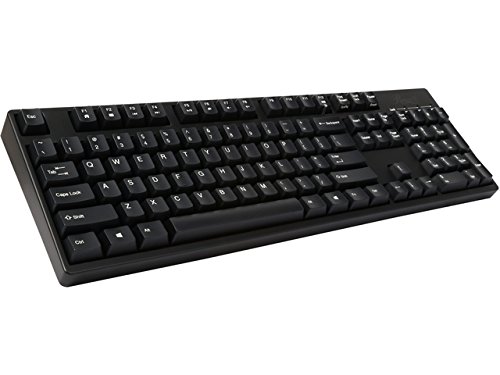
Red Dragon KUMARA - MX Blues

Work Travel - Flico Majestouch 2 = MX Blacks
Home - Corsair K70 - MX Reds w/ Corsairs replacement PBT DBL shot keycaps
https://smile.amazon.com/gp/product/B075QLZVB6/ref=oh_aui_search_detailpage?ie=UTF8&psc=1
Rosewill MX Blacks
Red Dragon KUMARA - MX Blues

AdamK47
Lifer
What's the appeal of those type m keyboards? Noise?
Geek cred.
Anubis
No Lifer
What's the appeal of those type m keyboards? Noise?
they work better, and for people who type a lot, they feel a lot better
Anubis
No Lifer
Geek cred.
pfft buying a stand alone mech or M isn't geek cred
you gotta build your ownkeyboard and spend 1000$ on custom keycaps for that to happen
https://www.reddit.com/r/MechanicalKeyboards/


clamum
Lifer
Wow man, I think yours takes the cake. That's really nice looking. A lot of people don't like the "split" keyboards but I like them (probably helps I touch type "correctly" like I was taught, heh).
 2017-04-03 21.58.26
Man once I went wireless for my mouse and keyboard (mouse a couple years ago I think, keyboard not quite a year), I'll never go back. I love wireless, no frickin cables to annoy and get in the way. Also I've not noticed any drawbacks for games or anything, other than the occasional battery replacement (I just pop in another of the bunch of rechargeables I have). The day when power/data can be all transmitted over the air and there's no longer a tangle of cables behind your PC/home theater/etc will be the day I cry in absolute happiness and track down the inventor of said tech so I can fellate him until he passes out.Here's mine, it's kinda old and worn. Should look at replacing it some time. Hard to find a good quality wired keyboard now days though, everything is wireless.


MrSquished
Lifer
Add me to the Corsair K70 RGB list but with the MX Speed switches. And have no problems typing with them either. They are amazing for gaming


snoopy7548
Diamond Member
Add me to the Corsair K70 RGB list but with the MX Speed switches. And have no problems typing with them either. They are amazing for gaming
That thing does look sweet. It'll probably be my next keyboard. Do you go crazy with custom LED sequences for each game?
MrSquished
Lifer
That thing does look sweet. It'll probably be my next keyboard. Do you go crazy with custom LED sequences for each game?
I don't. I keep a primarily static 4-color custom lighting scheme for everything with a setting that every key I press while in Windows changes color briefly. Anything with too much motion just gets annoying to me.
I set a matching color scheme on my Steelseries Rival 600 mouse and Prism mouse pad. I'm a 42 year old kid that loves blue lighting, but doesn't need the bling.


Platypus
Lifer
Wow man, I think yours takes the cake. That's really nice looking. A lot of people don't like the "split" keyboards but I like them (probably helps I touch type "correctly" like I was taught, heh).
Thanks, I've found it to really help with shoulder/wrist pain since I basically live on my keyboard for my job. That photo doesn't really show the layout I usually use but it's easier to get into one frame. I separate the halves to be even with where my shoulders are. It took a long time to put that stupid thing together because of the hilarious and wild world of buying custom keycaps, but it's sped up my workflow a lot. The firmware is just C, so I programmed a lot of custom multi-button macros to all the various unmarked buttons and that shit is amazing for repetitive tasks.
This thing made me realize that I had two very annoying bad typing habits and it punishes you hard for that. It didn't take long to correct those issues and now I find I'm a lot better on other keyboards as well. I've used ergo keyboards for the last 15 years or so and I really like the ergodox design.


Stopsignhank
Platinum Member
I like using the keyboard on my laptop. I had to do it on a business trip and realized that I like it better than a regular keyboard. I think because I am lazy and I don't have to push the keys down as far.

BudAshes
Lifer
aah yes, ePeen, my kind of thread.
ePeen negative one thousand for using a Mac. Your ePeen is now officially an innie.

purbeast0
No Lifer
I've owned HP laptops, Dell laptops, and now a MacBook Pro (2014 model I got in 2015) and there is no comparison. The MacBook Pro is leaps and bounds better in every way possible than any other laptop I've ever owned.ePeen negative one thousand for using a Mac. Your ePeen is now officially an innie.
Oh and I use it for iOS development, so there is that too...


William Gaatjes
Lifer

^ way mo better keyboard than the M type

^ way mo better keyboard than the M type
The M type just happened to be the last decent keyboard before twenty years of keyboard suckage.
Ah yes, the type of keyboard that let's your neighbours know that you are typing... 😀
TRENDING THREADS
-
 Discussion Zen 5 Speculation (EPYC Turin and Strix Point/Granite Ridge - Ryzen 9000)
- Started by DisEnchantment
- Replies: 25K
-
Discussion Intel Meteor, Arrow, Lunar & Panther Lakes + WCL Discussion Threads
- Started by Tigerick
- Replies: 25K
-
 Discussion Intel current and future Lakes & Rapids thread
- Started by TheF34RChannel
- Replies: 24K
-

-
