Question JPG handling

IBMJunkman

Senior member
May 7, 2015
964
430
136
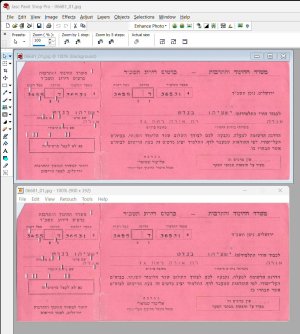
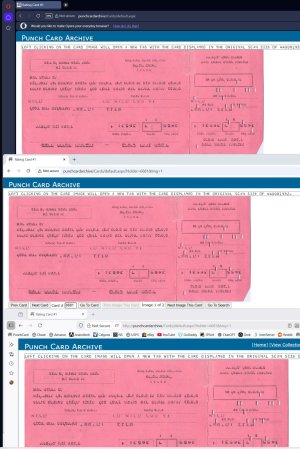
Windows Photos, Firehand Ember and Paintshop Pro all display the image right side up. In Firefox and Chrome on my PC the image is upside down.

What gives?
 

IBMJunkman

Senior member
May 7, 2015
964
430
136
OK. in the double image the top card is in Paint Shop Pro and the bottom is in Firehand Ember.
In the triple image the top is Opera, the middle is Chrome and the bottom is Firefox.
All programs and browsers are looking at the same JPG on my C drive. In Windows Photos the orientation is correct.

Please check https://www.punchcardarchive.com/Cards/default.aspx?Holder=6681&Img=1 with multiple browsers. On the web Opera shows it correctly. On my PC Opera shows it upside down.


pic1.jpgpic2.jpg
 

Ken g6

Programming Moderator, Elite Member
Moderator
Dec 11, 1999
16,828
4,812
75
No issue by default here. Do you have some odd CSS user style in use? It's quite possible to use transform: rotate(180deg) to flip the image.
 

mikeymikec

Lifer
May 19, 2011
21,602
16,869
136
Interesting. What if you go straight to that image file, so there is no html involved? Here is the direct link I got from inspecting the page in dev tools:
https://www.punchcardarchive.com/Cards/Cards/06681/06681_01.jpg

I check on Brave & Safari on MacOS, and Brave and Firefox on Linux Mint, but all were right-side up.
Clicking on that link in Firefox and Chromium in Linux shows the dog-ear (what I presume is a dog-ear anyway) in the top-left corner.


Top-left again.
 

IBMJunkman

Senior member
May 7, 2015
964
430
136
Clicking on that link in Firefox and Chromium in Linux shows the dog-ear (what I presume is a dog-ear anyway) in the top-left corner.


Top-left again.
Not a dog-ear. On a computer punch card it is called a corner cut.

I have decided the problem is caching on my PC. I see cards displaying with the wrong size on my PC. I had already resized them. I FTP the images to my host and they display fine.
 

IBMJunkman

Senior member
May 7, 2015
964
430
136
Well, update. I did nothing to local website or the pictures after I fixed them and uploaded them to host. Still displayed wrong on PC. Started PC this morning and local site images look OK. Yesterday I had all the browsers delete their image cache. No help.

Ah, Windows. What can you do.