Discussion Intel Meteor, Arrow, Lunar & Panther Lakes + WCL Discussion Threads

Page 966 - Seeking answers? Join the AnandTech community: where nearly half-a-million members share solutions and discuss the latest tech.

Tigerick

Senior member
Apr 1, 2022
941
857
106
Wildcat Lake (WCL) Specs

Intel Wildcat Lake (WCL) is upcoming mobile SoC replacing Raptor Lake-U. WCL consists of 2 tiles: compute tile and PCD tile. It is true single die consists of CPU, GPU and NPU that is fabbed by 18-A process. Last time I checked, PCD tile is fabbed by TSMC N6 process. They are connected through UCIe, not D2D; a first from Intel. Expecting launching in Q1 2026.
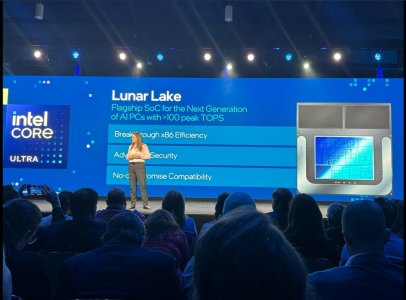
Intel Raptor Lake UIntel Wildcat Lake 15W?Intel Lunar LakeIntel Panther Lake 4+0+4
Launch DateQ1-2024Q2-2026Q3-2024Q1-2026
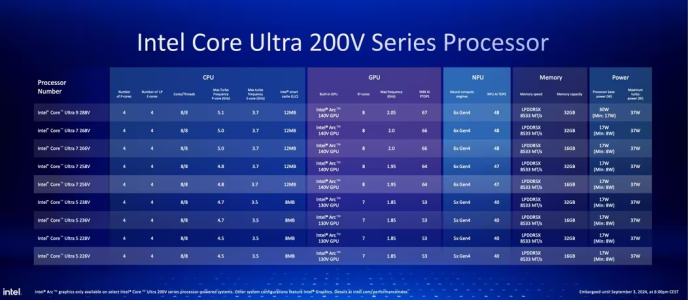
ModelIntel 150UIntel Core 7Core Ultra 7 268VCore Ultra 7 365
Dies2223
NodeIntel 7 + ?Intel 18-A + TSMC N6TSMC N3B + N6Intel 18-A + Intel 3 + TSMC N6
CPU2 P-core + 8 E-cores2 P-core + 4 LP E-cores4 P-core + 4 LP E-cores4 P-core + 4 LP E-cores
Threads12688
Max Clock5.4 GHz?5 GHz4.8 GHz
L3 Cache12 MB12 MB12 MB
TDP15 - 55 W15 W ?17 - 37 W25 - 55 W
Memory128-bit LPDDR5-520064-bit LPDDR5128-bit LPDDR5x-8533128-bit LPDDR5x-7467
Size96 GB32 GB128 GB
Bandwidth136 GB/s
GPUIntel GraphicsIntel GraphicsArc 140VIntel Graphics
RTNoNoYESYES
EU / Xe96 EU2 Xe8 Xe4 Xe
Max Clock1.3 GHz?2 GHz2.5 GHz
NPUGNA 3.018 TOPS48 TOPS49 TOPS


PPT1.jpg
PPT2.jpg
PPT3.jpg


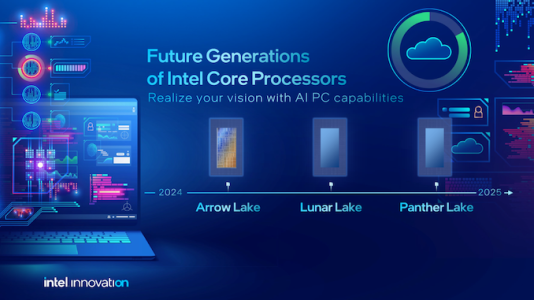
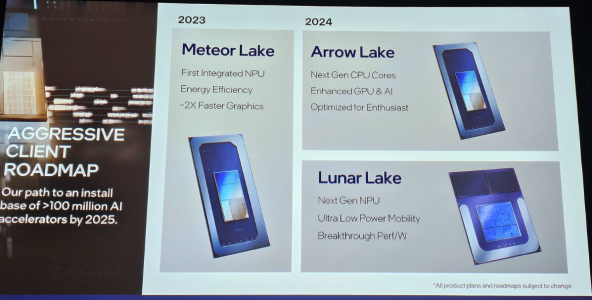
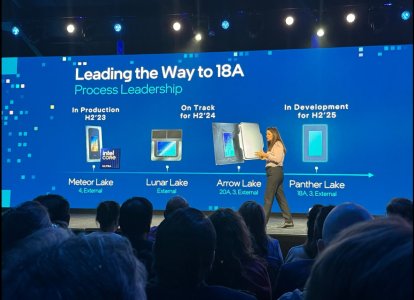
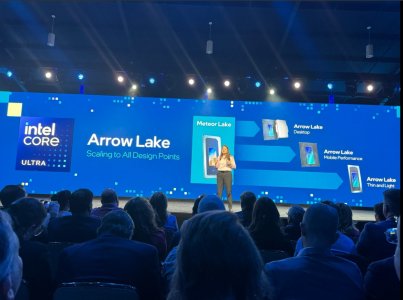
As Hot Chips 34 starting this week, Intel will unveil technical information of upcoming Meteor Lake (MTL) and Arrow Lake (ARL), new generation platform after Raptor Lake. Both MTL and ARL represent new direction which Intel will move to multiple chiplets and combine as one SoC platform.

MTL also represents new compute tile that based on Intel 4 process which is based on EUV lithography, a first from Intel. Intel expects to ship MTL mobile SoC in 2023.

ARL will come after MTL so Intel should be shipping it in 2024, that is what Intel roadmap is telling us. ARL compute tile will be manufactured by Intel 20A process, a first from Intel to use GAA transistors called RibbonFET.


LNL-MX.png
 

Attachments

  • PantherLake.png
    PantherLake.png
    283.5 KB · Views: 24,043
  • LNL.png
    LNL.png
    881.8 KB · Views: 25,531
  • INTEL-CORE-100-ULTRA-METEOR-LAKE-OFFCIAL-SLIDE-2.jpg
    INTEL-CORE-100-ULTRA-METEOR-LAKE-OFFCIAL-SLIDE-2.jpg
    181.4 KB · Views: 72,439
  • Clockspeed.png
    Clockspeed.png
    611.8 KB · Views: 72,326
Last edited:

DrMrLordX

Lifer
Apr 27, 2000
23,204
13,291
136
Halo is indeed a non-competitor unless AMD does something that drastically changes availability.

Strix Halo is widely available, just not in laptops. But that's already been explained before . . .

Why are we arguing price of platform like Panther Lake that haven't even launched for 1 Month? New Platforms are expensive we have seen that with desktop/laptop what was the price of CPU when Zen 4 came out or ARL launched they were expensive

Because it doesn't do enough to justify the price increase.

Is Cougar cove not area efficient compared to Apple M5?

No. The -monts are for area efficiency. The Coves were supposed to be for absolute performance. Real shame about that . . .

Even better combo, same price, 5070ti (12GB) + 7945HX:
Not sure why anyone would prefer the 7945HX at the same price, unless it's for the mdGPU.
 

DavidC1

Platinum Member
Dec 29, 2023
2,166
3,318
106
Intel spends 1.5x more cache, capacity wise, counting from L0 to L3 than Apple does counting from L1 to SL2 in a 4x P-core cluster.
Apple has it better, and L1 is more of a better uarch design and Intel's "L1" isn't really L1 but a renamed tiny L2, side effect of technimarketing, that's even corrupting conferences like Hot Chips and ISSCC. The superlarge L1 in Apple chips cover a lot more and reduce effective latency quite a lot for the all important scalar integer performance while saving power at the same time. L1 is the lowest latency(and I mean the real definition of L1 not the Lion Cove fake one), highest bandwidth. Reminder the L1+L2tiny combo of Pantherlake is less than L1 cache of Apple. For 9 cycles of latency it should be something like 512-768KB in size.

At some point, increasing the higher cache levels are like doubling RAM, you just don't get more pure performance.
I think it's buns for area ngl
How? It's the most dense per transistor. The difference is 5x or more oftentimes.

The old technical articles where it was actually worth the price of the conference they would reveal area/power distribution for server chips and the caches in the 10MB+ range would use something like 20% of the power and the logic would take up the rest. Most modern transistor count is inflated by cache sizes.
We have had this since Nov 2025 and no burn in so far. Seems like its safe for a while. I might just get on it and hide the task bar though.... just in case.
Yes but what about in 10-15 years? I have an NEC LCD monitor that's from 2006 and works fine. Appliances used to easily last 20-30 years as well. Now it's all throwaway stuff.

My laptop is one I bought from eBay and a 2017 Kabylake one. And my desktop is a 10th Gen Pentium with GTX 1080 I bought broken(and fixed). I used to be quite picky about having the most responsive system. My friends would buy dGPUs and I had Intel iGPUs but I bought their X25-M SSD for $800 Cad, that's for an 80GB part. Nowadays it's fast enough that I don't feel the need anymore.
 
Last edited:

DavidC1

Platinum Member
Dec 29, 2023
2,166
3,318
106
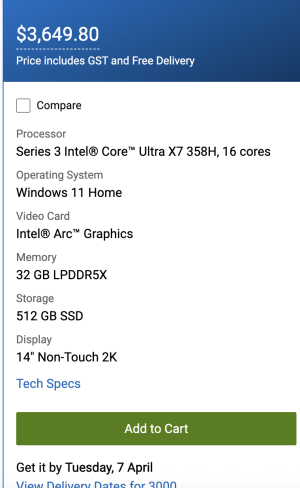
AU prices are up for the Dell XPS 14". lol this thing is DoA. Its $3,649AUD and doesn't ship till April!!
Remember when Dell took away the XPS line? It seems they reintroduced it as a even higher end, at least in terms of pricing.

It's $3099 in Canadian dollars.
 

poke01

Diamond Member
Mar 8, 2022
4,830
6,160
106
Remember when Dell took away the XPS line? It seems they reintroduced it as a even higher end, at least in terms of pricing.

It's $3099 in Canadian dollars.
I checked the Canada store, that’s not bad.

The AU store is way overpriced
 

DavidC1

Platinum Member
Dec 29, 2023
2,166
3,318
106
By the way, Microsoft shares dropped and some speculate it is due to the cloud division not doing better than expected. An article said that people are doubting whether AI will be much more useful beyond what it is. Usually the drop happens when a meteoric rise plateaus.

All the tech sites have reduced focus on AI a lot. And in every forum there are healthy amount of skeptics, even haters towards the trend. Many Tech Youtubers against it, mostly because of the RAM price increases. And of course you have local towns and municipalities going against server builds.
I checked the Canada store, that’s not bad.

The AU store is way overpriced
Ok, you guys are priced 20% higher even accounting for ~5% difference.
 

fastandfurious6

Senior member
Jun 1, 2024
947
1,080
96
An article said that people are doubting whether AI will be much more useful beyond what it is.

This is true because current top models are already too good and the next step above that is models with even better reasoning and will not be public information / public access for a while

Job markets and economies need to adjust but 99% politicians do not understand anything about computers. It takes a very long time
 

eek2121

Diamond Member
Aug 2, 2005
3,474
5,155
136
We have had this since Nov 2025 and no burn in so far. Seems like its safe for a while. I might just get on it and hide the task bar though.... just in case.

My OLED monitor is 3 years old. I play lots of Factorio in my spare time, I have about 3k hours so far in the game.

I have zero burn in on my alienware OLED.

The only thing I did was set the monitor sleep to 1 minute.

OLED desktop/laptop monitors have a ton of protection methods built in, and Tandem OLED is even more burn in resistant.
 

Josh128

Golden Member
Oct 14, 2022
1,530
2,289
106
My OLED monitor is 3 years old. I play lots of Factorio in my spare time, I have about 3k hours so far in the game.

I have zero burn in on my alienware OLED.

The only thing I did was set the monitor sleep to 1 minute.

OLED desktop/laptop monitors have a ton of protection methods built in, and Tandem OLED is even more burn in resistant.
3K hours in a single game is insane! In game HUD items are something that no burn in protection can deal with , and are the primary cause of burn in in plasma and OLED devices. What do you do to mitigate that, or does that game not have any stat/lifebar overlays?
 

OneEng2

Golden Member
Sep 19, 2022
1,002
1,203
106
Right. Mixed up IPC with the gaming perf improvements for Zen5.

Anyway, Zen4->Zen5 was almost 2 years. So 16% in 2 years is about the same or actually less per year, since PTL got 8-10% in one year.
In all fairness, going from N3B to 18A was supposed to get a significant boost (way newer and more advanced process node). So, yes, "one year", but the better way to look at it is the process generation IMO. One could argue that Intel got a double shrink from N3B (and others would argue it was a lateral move).
Yes but what about in 10-15 years?
LOL. I don't consider laptops a long-term buy product (which is why I don't spend crazy money on them). 5-7 years is about where we land it seems.

My desktops? Those stick around forever.... and I generally do a processor-only upgrade on them once before I do a rebuild.
 

DavidC1

Platinum Member
Dec 29, 2023
2,166
3,318
106
Having to worry about a problem coming down the line because it's a fundamental issue(burn-in) is not worth the better screen quality that your body will get used to in everyday usage in no time when it's known that it's more expensive and you sacrifice battery life too.
In all fairness, going from N3B to 18A was supposed to get a significant boost (way newer and more advanced process node). So, yes, "one year", but the better way to look at it is the process generation IMO. One could argue that Intel got a double shrink from N3B (and others would argue it was a lateral move).
We didn't really get big gains on 22nm Ivy Bridge either, even on mobile. Pantherlake CPU was tested to be Arrowlake performance at noticeably lower power levels though. 22nm was a very overrated process.
LOL. I don't consider laptops a long-term buy product (which is why I don't spend crazy money on them). 5-7 years is about where we land it seems.
We buy cheap ones and keep them long too. For general use even a 4-5th gen Intel is fine. If it's a desktop, i5 1st Gen will work.
 
Last edited:

Thunder 57

Diamond Member
Aug 19, 2007
4,267
7,064
136
22nm was a very overrated process.

We buy cheap ones and keep them long too. For general use even a 4-5th gen Intel is fine. If it's a desktop, i5 1st Gen will work.

You;ve said that about 22nm before and I still disagree. Sure, it didn't clock as high but it clocked high enough and at less power.

Also Nehalem might work for a basic office PC but it is dated.. The L3 was serviceable but not great. More importantly there was no AVX or newer, and the iGPU probably couldn't decode anything in use today besides AVC most likely.
 

DavidC1

Platinum Member
Dec 29, 2023
2,166
3,318
106
You;ve said that about 22nm before and I still disagree. Sure, it didn't clock as high but it clocked high enough and at less power.
Then you forgot about the reactions during Ivy Bridge launch. It was very disappointing. It was basically Pantherlake in terms of CPU. It can be more efficient, but at same performance, and you got negligible gains in CPU. It actually overclocked noticeably less than Sandy Bridge. It wasn't until Haswell, and a Refresh at that they fixed those. Pantherlake is also a bit faster in CPU just like Ivy Bridge was.

22nm was when Intel sacrificed their bread and butter to try to beef up their nonexistent line.

In another note, people are talking about how legendary the 1080 was. Actually the GTX 1080 was the lowest gain for a new uarch for some time and was a disappointment, and it came with a price increase, months before crypto mining launch. Compared to now the 1080 looks fantastic. So basically people are grasping at straws.
Also Nehalem might work for a basic office PC but it is dated.. The L3 was serviceable but not great. More importantly there was no AVX or newer, and the iGPU probably couldn't decode anything in use today besides AVC most likely.
We have a 5th gen U laptop, 10th Gen Pentium, 7th Gen Y, 3rd Gen desktop, and Core 2 Quad Desktop. Except the Core 2 Quad, rest are all perfectly usable for web browsing and youtube playback. It's all a matter of conditioning. This is why catering to average joes is absolutely not worth it and you have to convince the enthusiasts and is shown by 10-year steadily declining PC sales volumes.

Having to enable all the power management makes Desktop PC feel 3-4 generations more responsive than a laptop.
 

Thunder 57

Diamond Member
Aug 19, 2007
4,267
7,064
136
Then you forgot about the reactions during Ivy Bridge launch. It was very disappointing. It was basically Pantherlake in terms of CPU. It can be more efficient, but at same performance, and you got negligible gains in CPU. It actually overclocked noticeably less than Sandy Bridge. It wasn't until Haswell, and a Refresh at that they fixed those.

22nm was when Intel sacrificed their bread and butter to try to beef up their nonexistent line.

In another note, people are talking about how legendary the 1080 was. Actually the GTX 1080 was the lowest gain for a new uarch for some time and was a disappointment, and it came with a price increase, months before crypto mining launch. Compared to now the 1080 looks fantastic. So basically people are grasping at straws.

We have a 5th gen U laptop, 10th Gen Pentium, 7th Gen Y, 3rd Gen desktop, and Core 2 Quad Desktop. Except the Core 2 Quad, rest are all perfectly usable for web browsing and youtube playback. It's all a matter of conditioning. This is why catering to average joes is absolutely not worth it and you have to convince the enthusiasts and is shown by 10-year steadily declining PC sales volumes.

Oh I remember the reaction when Ivy Bridge came out. It wasn't until Devil's Canyon (Haswell refresh) they got them clocking to Sandy levels again. Honestly 4.4-4.5GHz was fine though especially considering the competition at the times. I would say the fact that i5 4/4's didn't age well was a far bigger factor.

As for the 1080, I like to counter that with how aweosme the 8800GT was espeically for the price.It was an absolute steal and my favorite Nvidia generation though I did not own a 1080 to compare it to. As for sales the "problem" is that hardware has been good enough for a long time. It certainly isn't the 90's early 2000's anymore and that is a good thing for consumers.
 

Hulk

Diamond Member
Oct 9, 1999
5,369
4,083
136
Oh I remember the reaction when Ivy Bridge came out. It wasn't until Devil's Canyon (Haswell refresh) they got them clocking to Sandy levels again. Honestly 4.4-4.5GHz was fine though especially considering the competition at the times. I would say the fact that i5 4/4's didn't age well was a far bigger factor.

As for the 1080, I like to counter that with how aweosme the 8800GT was espeically for the price.It was an absolute steal and my favorite Nvidia generation though I did not own a 1080 to compare it to. As for sales the "problem" is that hardware has been good enough for a long time. It certainly isn't the 90's early 2000's anymore and that is a good thing for consumers.
Yes. Sandy Bridge was beloved, especially the 2500k for being affordable, performant, and great for over-clocking. Generally whatever follows that type of part is not going to live up to expectation. The fact that Ivy Bridge was a new node and not clocking well sealed the deal for it being a "loser" of sorts for the Sandy Bridge faithful.

Haswell to Broadwell was even worse in this regard with Broadwell for all intents-and-purposes not even having a legit desktop release. Looking back it's quite easy to see the process problems up the road for Intel.

35nm to 32nm was Nahalem to Westmere. "Houston we're showing green across the panel. All go!"
32nm to 22nm was Sandy to Ivy Bridge - "Houston we have a problem. Lost 100MHz but mission is still a go."
22nm to 14nm - Haswell to Broadwell - "Houston we're going to have to abort the mission, we're down 700Mhz. We're going to orbit the moon and return hom. Let's cut our losses and try again another day. In fact, let's stay on this node for the next 7 years and start the "++++++" era."
 

Hulk

Diamond Member
Oct 9, 1999
5,369
4,083
136
Crazy to think that 45nm Nehalem was still very strong in 14nm era
Nahalem was a beast. Here are my notes from the release.

"Macro-op fusion enhancement, one die memory controller, added shared L3 cache among all cores, improved (2nd level) branch prediction and better Loop Stream Detector, increased buffers, registers, and scheduler entries. Hyperthreading is back. All Nehalem parts are 4/8 core, Turbo Boost 1.0 can increase clock 2 multiplier steps. Bloomfield - Performance desktop, Lynnfield - Value desktop much slower memory subsystem, Clarksfield - Mobile, all 4 cores on one die, Start of Core i3/5/i7 designations, 8xx, 9xx"
 

Thunder 57

Diamond Member
Aug 19, 2007
4,267
7,064
136
Nahalem was a beast. Here are my notes from the release.

"Macro-op fusion enhancement, one die memory controller, added shared L3 cache among all cores, improved (2nd level) branch prediction and better Loop Stream Detector, increased buffers, registers, and scheduler entries. Hyperthreading is back. All Nehalem parts are 4/8 core, Turbo Boost 1.0 can increase clock 2 multiplier steps. Bloomfield - Performance desktop, Lynnfield - Value desktop much slower memory subsystem, Clarksfield - Mobile, all 4 cores on one die, Start of Core i3/5/i7 designations, 8xx, 9xx"

You take notes on release? That's dedication. I'd just reference the reviews. Macro op fusion was 32 bit only on Core 2 IIRC and Nehalem extended it to 64 bit, I assume that is what you are talking about? On die memory controller, about time and finally ended Opteron's reign, along with QPI which was quite important in the server world.

I had an Arrandale laptop, the mobile version of Clarkdale and the HT was great to have as I used DVD Shrink a bunch studying abroad as nobody else knew about DVD region coding. I would take freebies like pizza slices or beer to make copies they could use.

As for the L3 cache that was a borrowed idea from AMD, Intel just did it better. It was much improved in Sandy Bridge though. If you looks at a diagram (courtesy of Chipsandcheese) you can see it.

https%3A%2F%2Fsubstack-post-media.s3.amazonaws.com%2Fpublic%2Fimages%2F12247048-8350-4b2c-a486-cca05fc098be_960x687.png


Intel was pretty much always better at cache until Zen. K7-K10 L1 being a clear exception.